
How to Convert PDF to Text?

Summary
Text is the document commonly used in any operating system. If PDF is converted to text, the file can be viewed in any device. In this essay, we will talk about how to quickly convert PDF to text. It is believed that the introduced software is a good choice for most of you.

Convert to Editable Word/Excel/PPT/Text/Image/Html/Epub
Multifunctional Encrypt/decrypt/split/merge/add watermark
OCR Support Extract Text from Scanned PDFs, Images & Embedded Fonts
Quick Convert dozens of PDF files in batch
Compatible Support Windows 11/10/8/8.1/Vista/7/XP/2K
Convert to Editable Word/Excel/PPT/Text/Image/Html/Epub
OCR Support Extract Text from Scanned PDFs, Images & Embedded
Support Windows 11/10/8/8.1/Vista/7/XP/2K
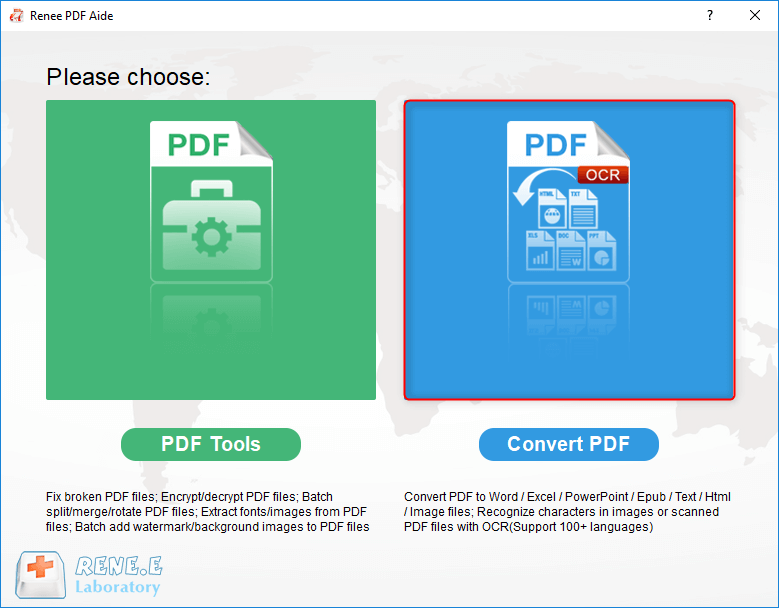
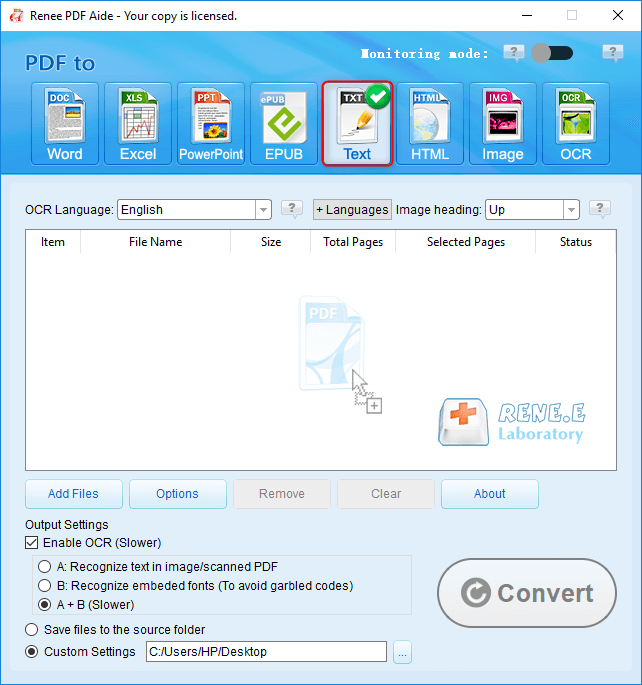
The OCR function can improve text recognition in two ways:
A. Recognize words on image and PDF. You can use this function to improve text recognition when you are going to convert the image-based PDF and the scanned PDF.
B. Recognize the font style to avoid garbled codes when there are different embeded font styles on the PDF file.
Relate Links :

27-01-2021
Jennifer Thatcher : Smartphone is the necessity in our daily. We can complete many things on our phone. In this essay,...
24-12-2020
John Weaver : Have you ever read MSG file? If you usually use Outlook, you will be familiar with this format....


