
Save Time: Convert Multiple PDFs to Word for Business and Academic Work

Summary
Discover the fastest, most reliable methods to convert multiple PDFs into Word documents in just seconds. This comprehensive guide breaks down leading desktop and online tools, helping you protect sensitive data while streamlining your workflow—an ideal starting point for beginners.



| Tool | Update Status | Features | Free Tier / Limitations |
|---|---|---|---|
| Renee PDF Aide | Actively maintained; latest version: 2025.10.27.185 | Convert PDF to Word/Excel/PPT/TXT/HTML/images, OCR, multilingual support, batch conversion, PDF repair/merge/split/encrypt/watermark | Fully free (activation code available at no cost), no watermarks, no task limits |
| Icecream PDF Converter | Latest version: 2.89 (updated February 2024) | PDF ↔ Word/Excel/images/HTML/ePub, OCR, batch conversion, merge/split, password protection | Free version available with near-complete features and no watermarks; Pro version optional |
| PDF24 Creator | Actively updated; latest version: 11.28.2 (released September 2025) | Create/edit/merge/split/compress PDFs, OCR, virtual printer driver, multi-format conversion | Completely free with no restrictions—suitable for both personal and business use |
| AVS Document Converter | Latest version: 4.3.2.273 | PDF ↔ Word/DOCX/ODT/RTF/HTML/ePub/MOBI, batch conversion, merge, watermark, encryption, compression | Free version usable, but some features require an AVS4YOU suite subscription |
| MultiDoc Converter | Infrequent updates but still functional | Converts Word/ODT/RTF/XML/HTML/ePub/TXT → PDF (PDF as output only), batch conversion | Fully free with no restrictions |
| PDFgear | Actively maintained; latest version still supported in 2025 | PDF to Word/Excel/PPT/TXT/images, OCR, batch conversion, PDF editing/merge/split/compression | Fully free, no watermarks, no task limits |

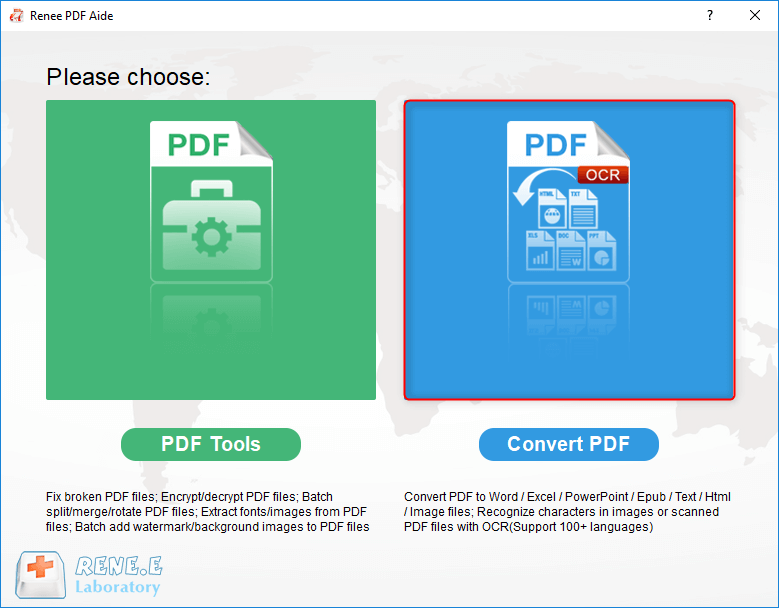
Convert to Editable Word/Excel/PPT/Text/Image/Html/Epub
Multifunctional Encrypt/decrypt/split/merge/add watermark
OCR Support Extract Text from Scanned PDFs, Images & Embedded Fonts
Quick Convert dozens of PDF files in batch
Compatible Support Windows 11/10/8/8.1/Vista/7/XP/2K
Convert to Editable Word/Excel/PPT/Text/Image/Html/Epub
OCR Support Extract Text from Scanned PDFs, Images & Embedded
Support Windows 11/10/8/8.1/Vista/7/XP/2K
Step-by-Step Instructions:
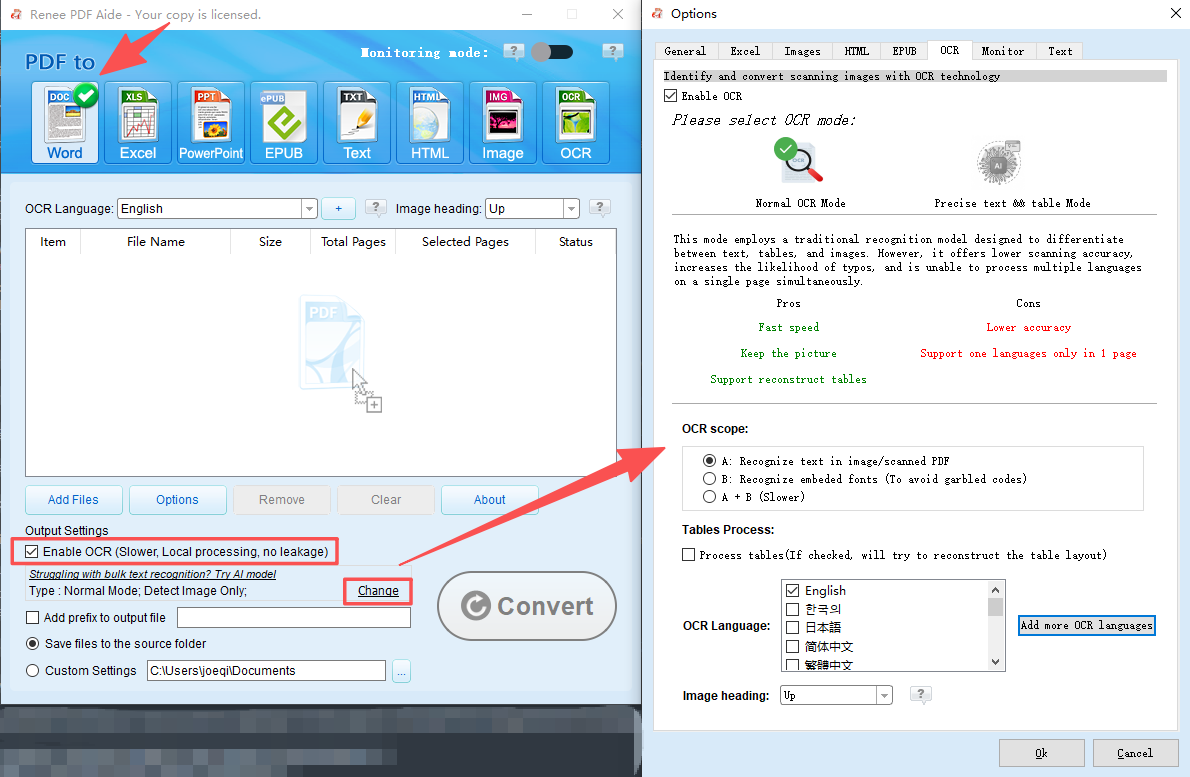
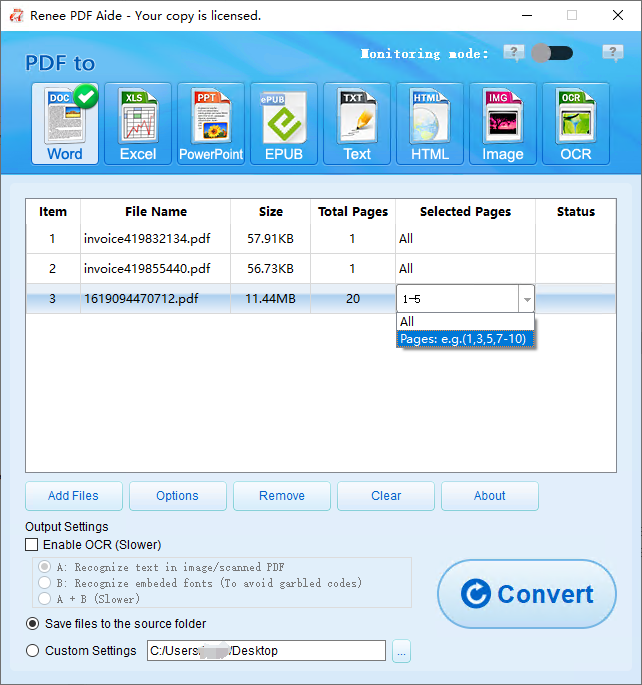
- A: Recognize text in images or scanned PDFs—directly applies OCR to extract text.
- B: Handle embedded fonts (to prevent garbled text)—converts embedded fonts to images first, then applies OCR.
- A+B (slower): Automatically detects whether text is image-based or embedded, then processes accordingly. This mode is more accurate but significantly slower.

- Completely free with no subscription required
- No watermarks on output files
- Simple, user-friendly interface
Cons:
- OCR accuracy lags behind professional tools
- Slower with large files or heavy batch tasks
- Lacks advanced layout and formatting control
How to Use PDFgear


| Platform | Free User Limits | Paid User Limits | Batch Conversion | OCR Availability |
|---|---|---|---|---|
| Smallpdf | • 2 tasks per day • Max 15MB per file • Very limited batch support | • $9/month • Up to 5GB per file • Unlimited tasks | Free: Not supported Paid: Supported | Free: Not available Paid: Full OCR |
| iLovePDF | • Max 3 files per batch • 25MB per file • Daily usage caps | • $6.61/month • 100MB per file • Unlimited batches | Free: Up to 3 files Paid: Unlimited | Free: Basic OCR Paid: Advanced OCR |
| PDF24 Online | • Free tool; smaller file sizes • No strict daily limits | • Premium version handles larger files • Extra features available | Free: Limited batch Paid: Full batch | Free: Limited OCR Paid: Full OCR |
| PDF Techno | • 100MB per file • No daily limits • Unlimited batch | Completely free (no paid tier) | Unlimited batch for all users | OCR fully free with no restrictions |
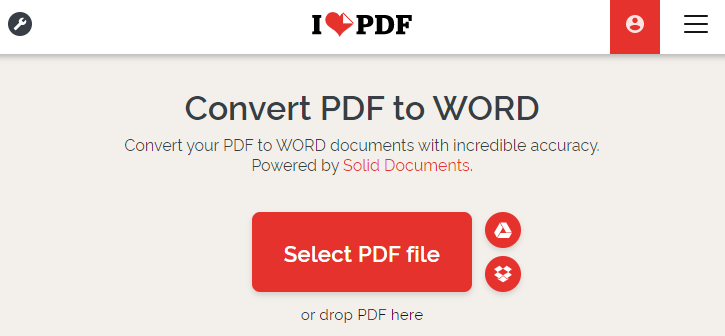
General Steps for Online Conversion
Online vs. Desktop Tools
| Feature | Online Tools (e.g./ PDF24) | Desktop Tools (e.g./ Renee PDF Aide) |
|---|---|---|
| Privacy | Files uploaded to cloud (risk with sensitive data) | 100% local processing (secure & private) |
| Speed | Limited by internet speed | Fast processing (depends on CPU) |
| Batch Limits | Usually restricted (2–5 files per batch) | Unlimited |
| OCR Support | Mostly paid | Built-in with multiple advanced modes |
Convert to Editable Word/Excel/PPT/Text/Image/Html/Epub
Multifunctional Encrypt/decrypt/split/merge/add watermark
OCR Support Extract Text from Scanned PDFs, Images & Embedded Fonts
Quick Convert dozens of PDF files in batch
Compatible Support Windows 11/10/8/8.1/Vista/7/XP/2K
Convert to Editable Word/Excel/PPT/Text/Image/Html/Epub
OCR Support Extract Text from Scanned PDFs, Images & Embedded
Support Windows 11/10/8/8.1/Vista/7/XP/2K
- Updating legacy manuals: Refreshing content across hundreds of archived PDFs.
- Deep Microsoft Office integration: Seamlessly importing data into Excel or PowerPoint via Word.
- Precise layout retention: Ensuring complex tables and headers remain intact during conversion.
- Supports true batch processing for large volumes
- Includes OCR to convert scanned PDFs into editable text
- Enables automated workflows via batch scripts
Disadvantages:
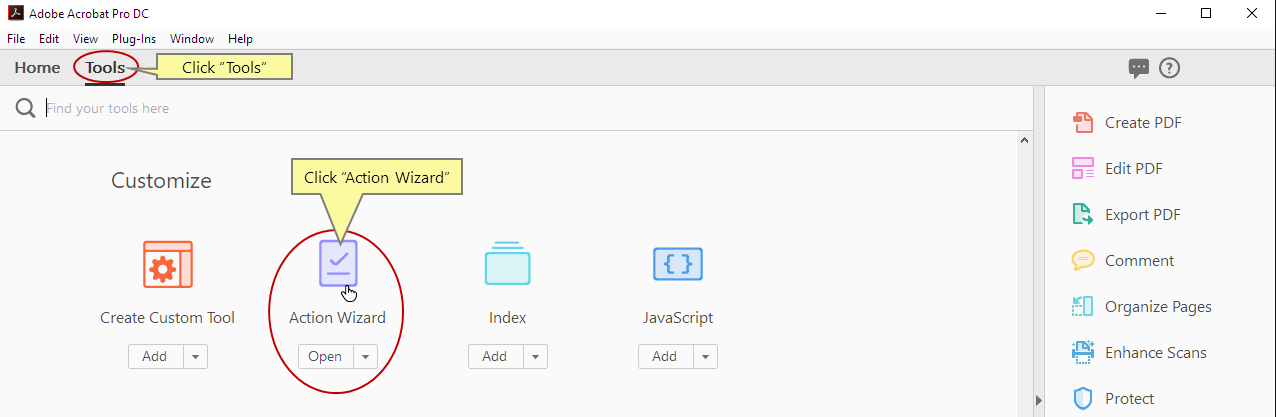
- Requires Adobe Acrobat Pro + AutoBatch plugin (costly—$239+/year subscription)
- Complex setup—not beginner-friendly
- Batch scripting limited to Windows
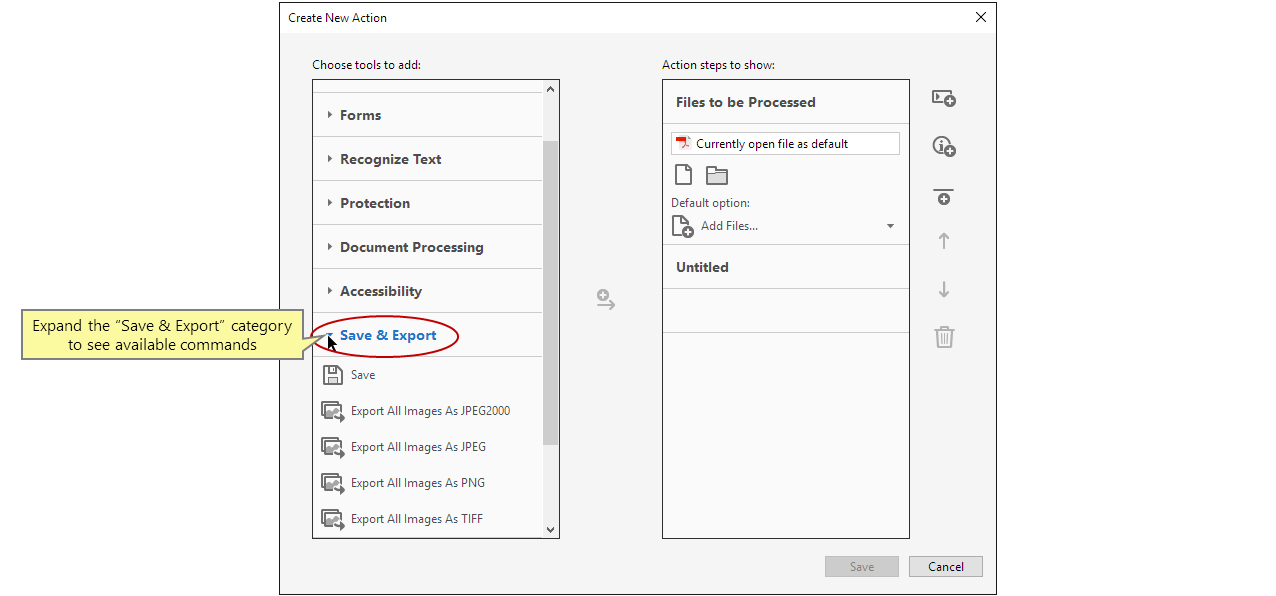
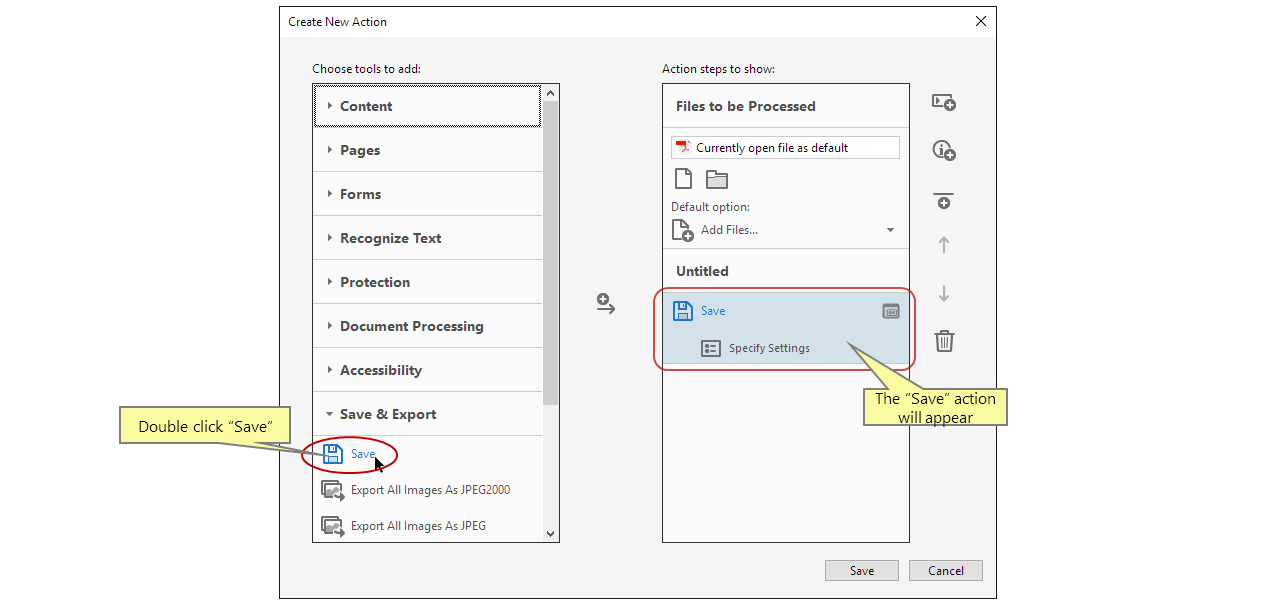
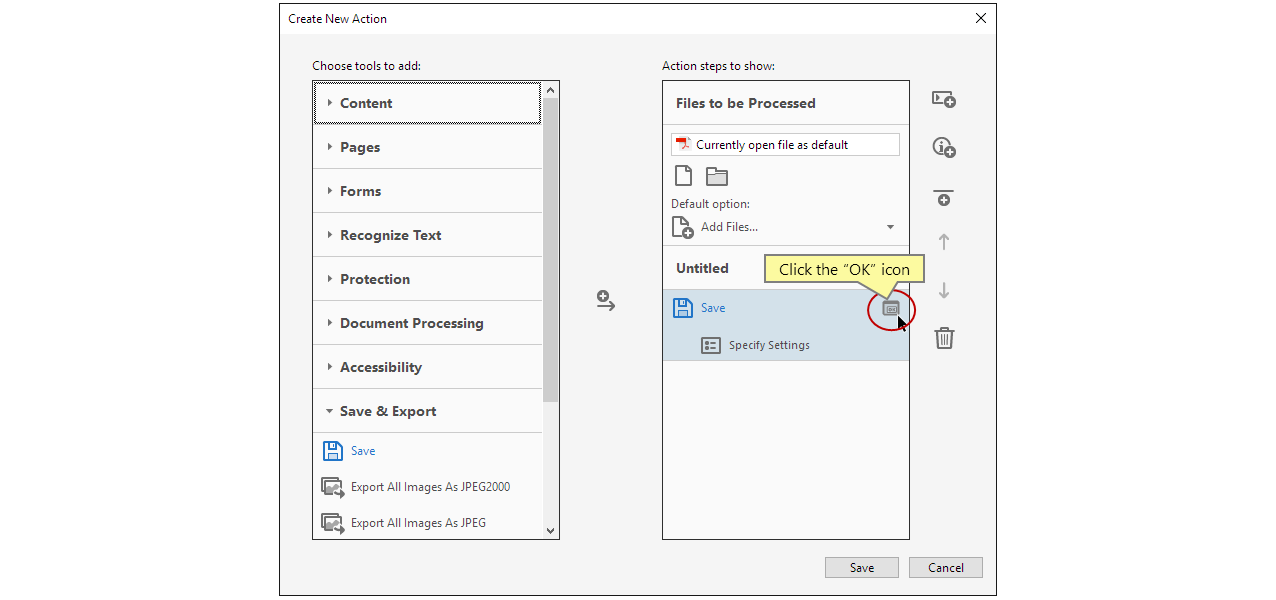
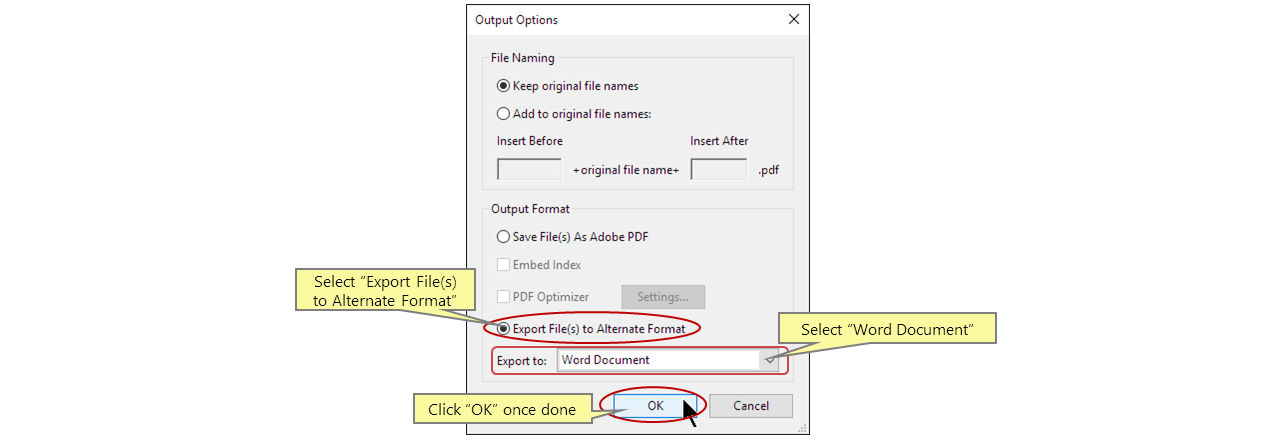
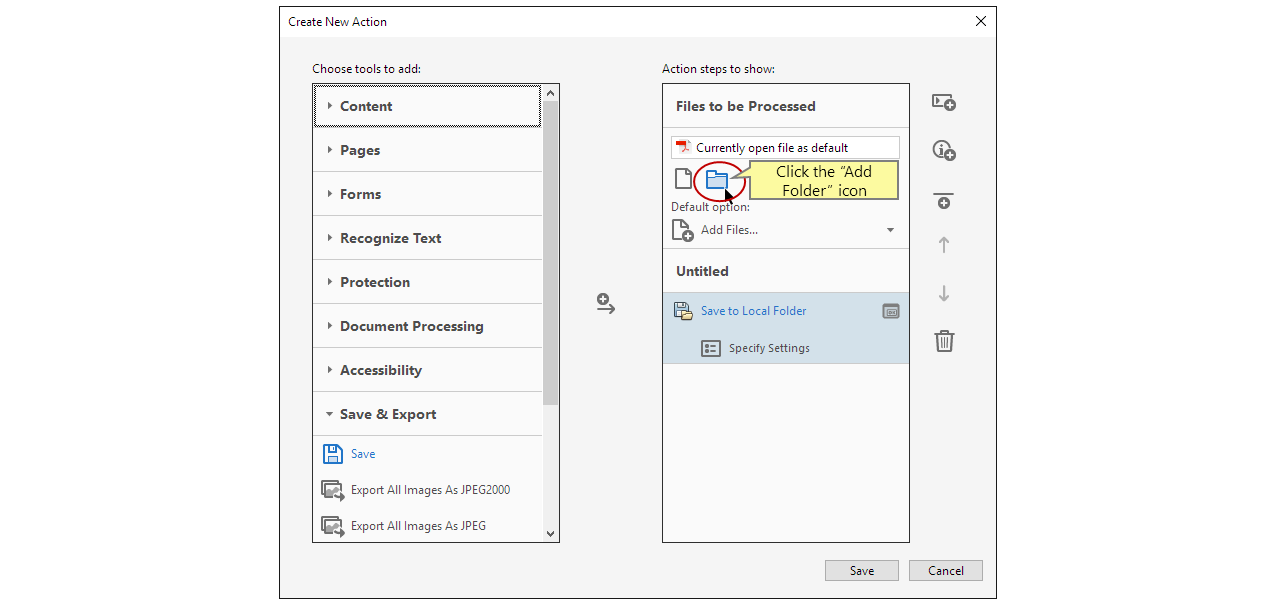
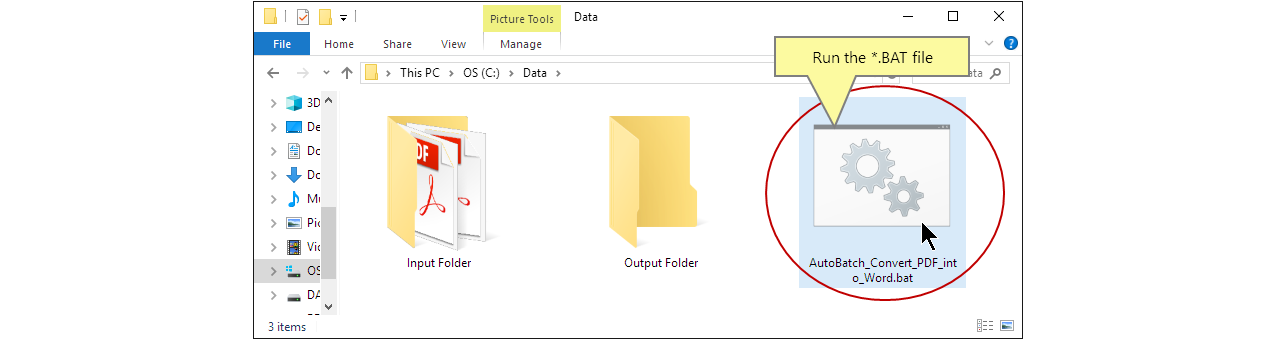
Steps to Batch Convert PDFs in Adobe Acrobat


Q1: Can complex tables retain their formatting during batch conversion?
Q2: Is it safe to convert confidential legal contracts using online tools?
Q3: How long does it take to convert 100 PDF files?
- Text-based PDFs: Desktop tools can process 100 short files (1–2 pages) in 2–3 minutes.
- Scanned/OCR PDFs: Requires image recognition—100 files may take 10–15 minutes.
- Online tools: Significantly slower due to upload/download constraints.
Q4: Can password-protected PDFs be converted?
Q5: Why do some files need OCR while others don’t?
Convert to Editable Word/Excel/PPT/Text/Image/Html/Epub
Multifunctional Encrypt/decrypt/split/merge/add watermark
OCR Support Extract Text from Scanned PDFs, Images & Embedded Fonts
Quick Convert dozens of PDF files in batch
Compatible Support Windows 11/10/8/8.1/Vista/7/XP/2K
Convert to Editable Word/Excel/PPT/Text/Image/Html/Epub
OCR Support Extract Text from Scanned PDFs, Images & Embedded
Support Windows 11/10/8/8.1/Vista/7/XP/2K
Relate Links :
Best Bulk PDF Converter Tools: Quickly & Easily Convert Multiple Files

20-11-2025
Amanda J. Brook : Discover the best bulk PDF converter tools to save time and boost productivity. Compare top free and paid...
Best Ways to Batch Convert PDF to Markdown: Simple, Fast, and Reliable Tools
17-11-2025
Jennifer Thatcher : Discover the best tools and methods for batch converting PDF to Markdown. This definitive guide covers efficient solutions...
Top Ways to Extract Tables from PDF Files : Free & AI Tools Revealed
28-10-2025
Amanda J. Brook : Discover the best ways to extract tables from PDF in 2025 using free tools and advanced AI methods,...
Extracting Text from PDF to Excel: A Comprehensive Guide
23-04-2025
Jennifer Thatcher : The article provides a comprehensive guide on extracting text data from PDFs to Excel, addressing the challenges of...



User Comments
Leave a Comment