author avatar
    Senior Product Manager
Last update by William Davis at 28 October 2025

Summary
Discover the best ways to extract tables from PDF in 2025 using free tools and advanced AI methods, perfect for professionals in the US and India. Get precise, secure conversions of PDF tables to Excel, CSV, Markdown, and more.



Tired of wasting hours manually extracting tables from PDFs? In 2025, with billions of PDF documents circulating in business and research, you’re not alone—many data professionals report PDF table extraction as a major pain point. Whether it’s a 50-page financial report or a scanned invoice, getting clean data into Excel, CSV, or Markdown shouldn’t be a hassle.
The good news? Advanced AI and tools make it effortless. This ultimate guide explores the best methods, from secure Windows desktop apps like Renee PDF Aide for privacy-focused extractions to AI-powered solutions for complex layouts. Let’s unlock your data!
convert table in pdf to xlsx/csv/markdown/docx

Local Tools for Extracting Tables from PDFs

These desktop-based solutions give you the power to extract tables from PDF files right on your computer, ensuring speed, privacy, and precision for everyday needs like analyzing sales data or compiling research stats.

1. Our Top Recommendation: Extract Tables Accurately with Renee PDF Aide

For the best balance of power, privacy, and ease of use, we highly recommend Renee PDF Aide. This isn’t just another PDF converter; it’s a comprehensive desktop solution designed to handle complex data extraction tasks with precision.
It’s particularly powerful for extracting tables from both native and scanned PDFs thanks to its built-in advanced OCR (Optical Character Recognition) technology. A key advantage is its versatility. It can convert your PDF tables directly into:
  • Excel (*.xlsx)
  • CSV (*.csv) (perfect for databases and data analysis)
  • Markdown (ideal for AI training data or documentation)
  • TXT files
  • Editable Word documents
  • …and many other formats.
Because it runs locally on your machine, your sensitive documents never leave your computer, ensuring complete data privacy.
Renee PDF Aide, easy to operate, converts up to 80 pages/min. It supports conversion from PDF to Excel/CSV, Word, PowerPoint, ePub, Text(txt/markdown), HTML, JPG, TIFF, and more.
pdf to word convert result
In addition, this software integrates various functions including optimizing, repairing, and encrypting PDF files. Despite its diverse features, the interface is user-friendly and simple. Renee PDF Aide uses advanced OCR technology to convert scanned PDFs and Images into editable formats and supports one-click batch conversion for efficiency, safety, and a free conversion experience.
Renee PDF Aide offers full support for the XFA format—a specialized PDF standard commonly used by banks and government agencies. In contrast, most conversion tools that lack XFA compatibility generate only an error page, as illustrated below:
Renee PDF Aide – The Ultimate PDF2Excel Conversion Solution! (100 FREE Quota)

Versatile Convert to Word/Excel/PPT/Text/Image/Html/Epub

Secure 100% local conversions ensure zero risk of data leaks

Efficient Batch Process dozens of PDF files in seconds

Comprehensive Seamlessly convert PDFs to Excel, PowerPoint, Text, and more

OCR Support Extract Text from Scanned PDFs, Images & Embedded Fonts

Versatile Effortlessly convert XFA, multi

Secure 100% local conversions ensure zero risk of data leaks

Efficient Batch Process dozens of PDF files in seconds

Free TrialFree TrialNow 1335621 people have obtained the free version!

How to Extract Tables Using Renee PDF Aide
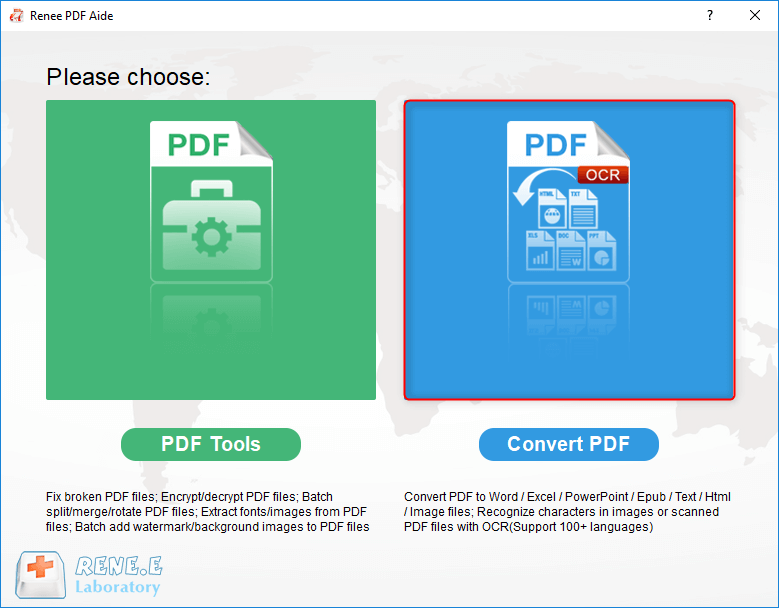
① After installing Renee PDF Aide, open it. Select “Convert PDF”.
select to convert pdf with renee pdf converter 
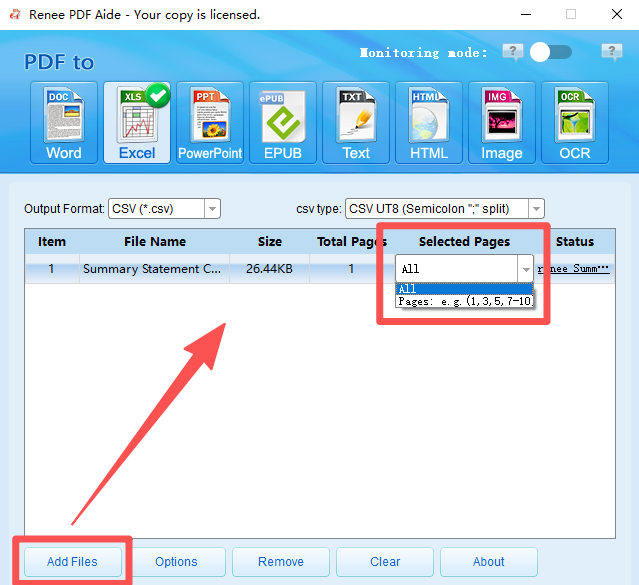
② Add the PDF files to be converted by clicking the “Add Files” button. The software supports batch conversion, allowing you to import multiple files simultaneously. Once added, the file information will appear in the conversion list. Click the “Selected Pages” list to set the pages for conversion.
add files to Renee PDF Aide and select pages
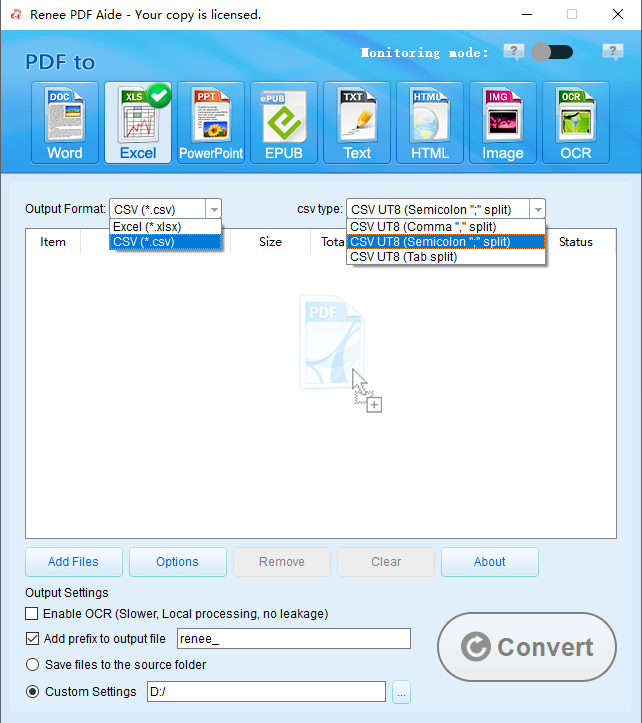
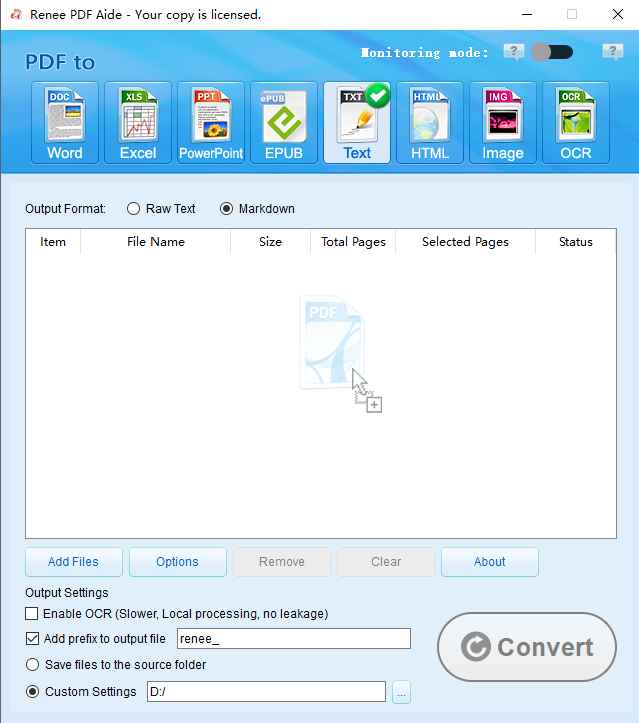
Select Your Output Format. On the top bar, choose your desired format. For tables, you’ll likely pick Excel, CSV in Excel tab; If you choose to convert to TXT, you may choose Markdown or TXT in TXT tab.
convert pdf to excel or csv 
convert pdf to txt or markdown 
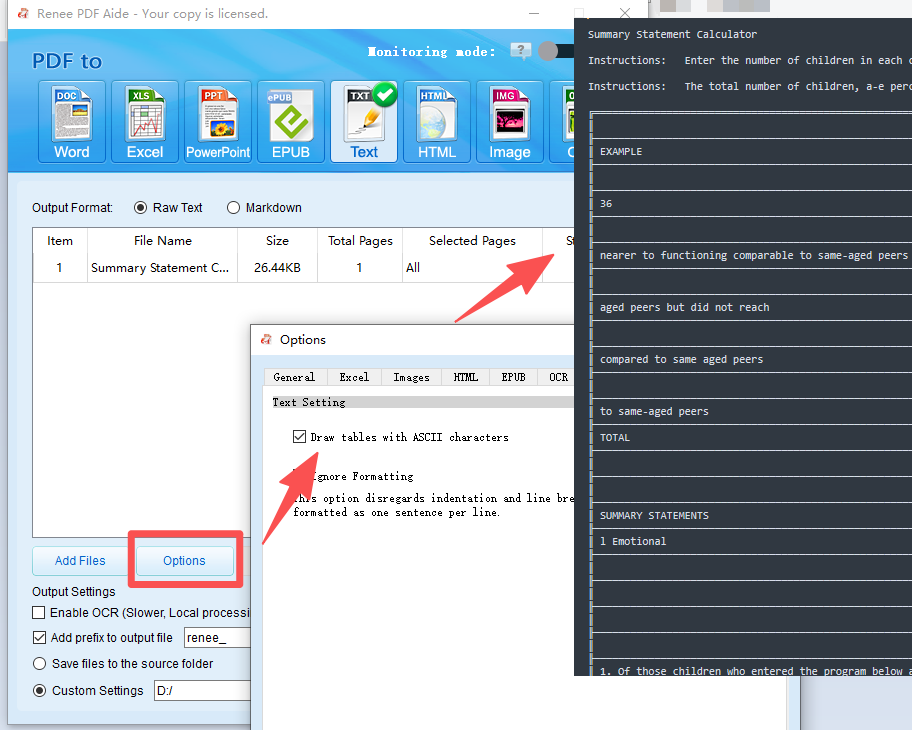
If you need to convert tables from a PDF file into ASCII format, Renee PDF Aide can handle that too.
convert pdf to ascii table 
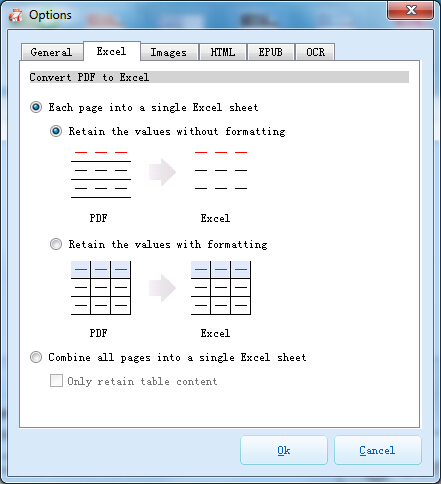
Pro Tip: Click “Options” next to the output format. For Excel, this lets you decide whether to put all pages into one sheet or create separate sheets for each page—incredibly useful for large reports.
set more requirements 
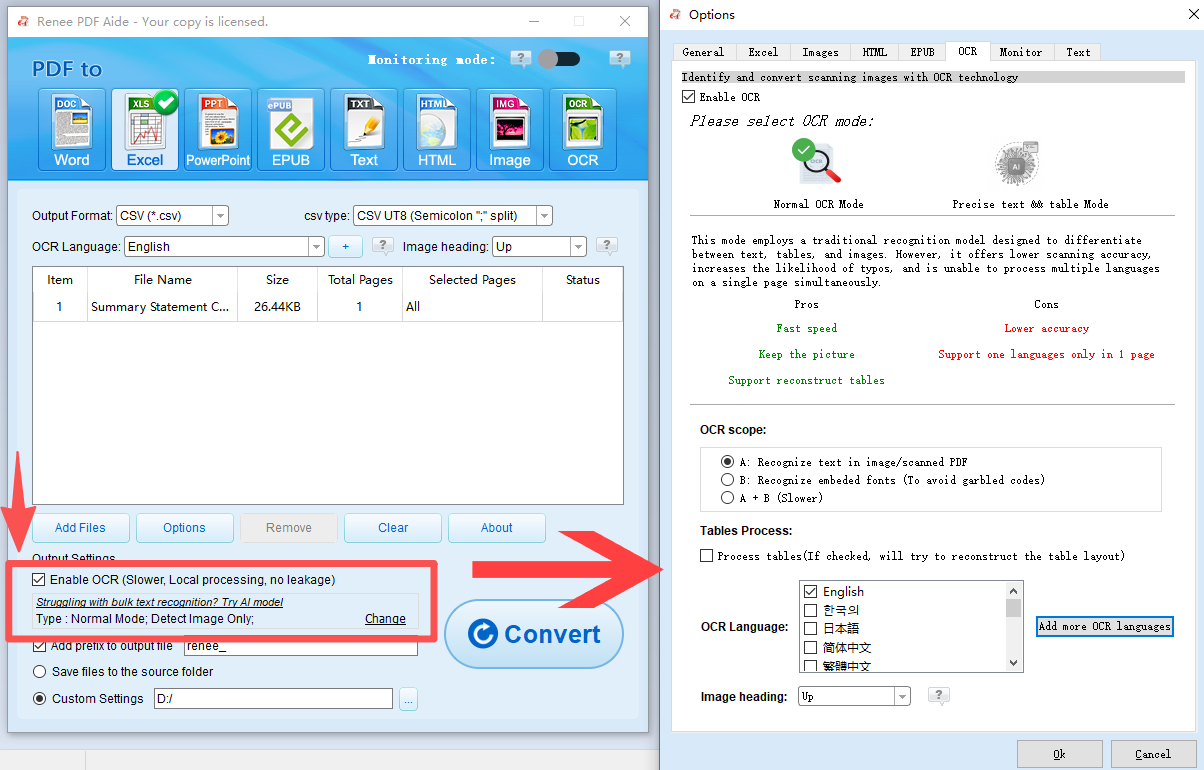
④ If your PDF file is a scanned copy (i.e., an image), please select “Enable OCR”. If your PDF is native (text-based), you can skip this step.
Understanding OCR Modes:
A: Recognize text in pictures or PDF scans: This mode assumes the text on the PDF page is in a picture/scanned image and uses OCR (selecting the corresponding language improves results) to recognize and output the text.
B: Identify built-in fonts (to avoid garbled characters): This mode assumes the text on the PDF page uses embedded fonts. The program converts these fonts into images, then uses OCR (selecting the corresponding language improves results) to recognize and output the text.
A+B (slower): The program automatically determines whether the font in the file is a picture or an embedded PDF font, then converts and outputs it. This mode is time-consuming, resulting in longer conversion times.
PDF Aide using OCR to convert pdf to excel or csv
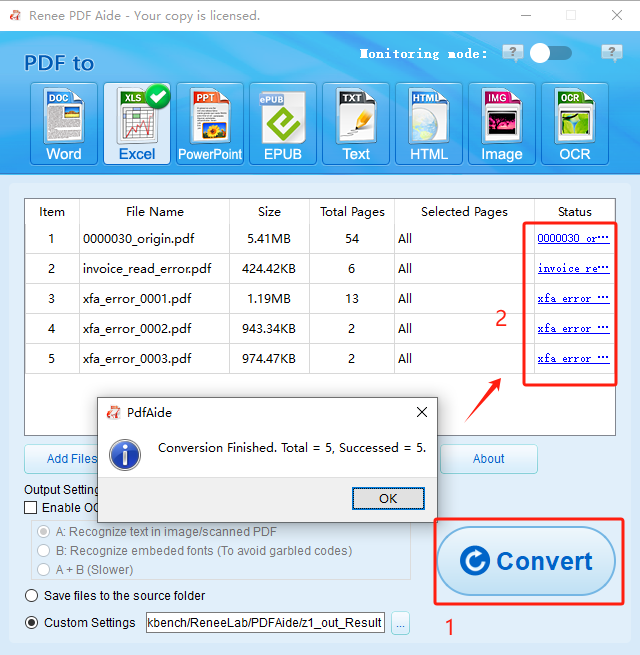
⑤ Click the “Convert” button. After conversion, a prompt will display the total number of files converted, as well as the successful ones. Your PDF table is now in a fully editable format. To access the result files, click the links in the “Status” column.
pdf to excel convert excel 
Renee PDF Aide provides a secure, fast, and highly accurate way to handle nearly any table extraction task you throw at it.

2. Free Desktop Alternative: How to Extract Tables Using Tabula

Note: Tabula, the open-source tool for extracting tables from PDFs, officially stopped receiving updates on June 4, 2018 (final version: 1.2.1). For more advanced or actively maintained features, Camelot may be a better alternative.
If your budget is zero and your tables are relatively straightforward, Tabula is a fantastic open-source tool. It’s a no-frills, free application that runs locally on your computer (Windows, macOS, or Linux), so it shares the same privacy benefits as other desktop software.
Windows & Linux users will need a copy of Java installed. You can download Java yourself. (Java is included in the macOSversion.)
Advantages:
  • Completely free and open-source.
  • Runs locally, ensuring 100% data privacy.
  • Simple interface for visually selecting tables.
  • Exports to CSV, a universally compatible format.

Disadvantages:

  • Does not work on scanned (image-based) PDFs.
  • May struggle with complex tables, merged cells, or unusual layouts.
  • Requires Java to be installed on your system.
  • No longer actively maintained, so bugs may not be fixed.

Steps to Extract Tables with Tabula:

1. Download, install, and run Tabula (it will open in your web browser, but it’s still running locally).
2. Extract the zip file.
3. Go into the folder you just extracted. Run the “Tabula” program inside.
run tabula to convert pdf to excel 
4. web browser will open. If it doesn’t, open your web browser, and go to http://localhost:8080.
5. Click “Browse” to upload your PDF file and then “Import”.
6. Once the PDF loads, click and drag your mouse to draw a box around the table you want to extract.
7. Click “Preview & Export Extracted Data“.
preview exported data from pdf 
8. Review the data. If it looks correct, choose your export format (e.g., CSV) and click “Export“.
Tabula is a great first-try tool for simple, native PDFs. If your document is scanned or the table layout is complex, you’ll likely need a more powerful solution.

3. The Enterprise-Grade Solution: Extracting Tables with Adobe Acrobat Pro

For professionals already invested in the Adobe ecosystem, Adobe Acrobat Pro is the industry-standard heavyweight. Extracting tables is just one small piece of its massive feature set. It can handle almost any PDF you throw at it, including complex layouts and scanned documents (using its high-quality OCR).

The ‘Export PDF’ function allows you to convert PDF tables directly into a formatted Excel (XLSX) workbook or Word document, often preserving the original styling, fonts, and layout with impressive accuracy. This is the go-to choice for corporate environments where precision and integration with other Adobe products are paramount, but it comes at a significant subscription cost.

Advantages:
  • Extremely high accuracy for both native and scanned PDFs.
  • Excellent formatting preservation when exporting to Excel.
  • Part of a complete PDF editing suite (edit text, images, etc.).
  • Trusted and supported by a major company.

Disadvantages:

  • Very expensive (requires a monthly or annual subscription).
  • Overkill if you only need to extract tables.
  • Can be complex and resource-intensive (a large program).

Steps to Extract Tables with Adobe Acrobat Pro:

1. Open your PDF in Adobe Acrobat Pro.
2. In the right-hand tool pane, find and select “Export PDF”.
Adobe Acrobat Pro export PDFs to Microsoft Office formats 
1. Choose “Spreadsheet” as your export format, and then select “Microsoft Excel Workbook”.
2. Acrobat will automatically detect tables. You can click the small settings gear to tweak any OCR settings if it’s a scanned file.
3. Click “Export” .” Choose a location to save your new Excel file.
If you already have Acrobat Pro, it’s a fantastic tool for the job. If not, its high price makes it hard to justify for table extraction alone.

4. Specialized OCR Tools: Using ABBYY FineReader for Scanned PDF Tables

What if your PDF isn’t a document at all, but just a collection of photos of paper? This is a scanned PDF, and standard extractors will fail. This is where a specialized Optical Character Recognition (OCR) tool like ABBYY FineReader shines. While Acrobat and Renee PDF Aide have excellent OCR, FineReader is widely considered a market leader dedicated specifically to document recognition. It uses advanced AI to analyze the page layout, identify text and numbers, and reconstruct complex tables from images with incredible precision. It’s designed for high-volume digitization and archival work, making it perfect for pulling data from old reports or invoices.
Advantages:
  • Best-in-class OCR accuracy, especially for difficult or low-quality scans.
  • Excellent at reconstructing complex table structures.
  • Supports a vast number of languages.
  • Can handle batch processing of thousands of pages.

Disadvantages:

  • High professional price point.
  • Can be complex for a casual user to configure for perfect results.
  • Slower processing time due to the intensive OCR analysis.

ABBYY FineReader for Scanned PDF Tables

Steps to Extract Tables with ABBYY FineReader:

1. Open your scanned PDF in ABBYY FineReader.
2. The software will automatically perform OCR on the document.
3. Navigate to the page with your table.
4. Use the “Table” tool to review (and if necessary, correct) the detected table area.
5. Once the table is correctly identified, use the main “Export” function to send it to Excel or another format.
For the toughest scanned documents where accuracy is non-negotiable, ABBYY is an unmatched professional tool. For simpler, non-sensitive files, consider online converters as discussed next.

How to Extract Tables from PDF with Online Converters

Sometimes you just need the data now, and you don’t want to install any software. This is where online PDF-to-Excel converters like SmallPDF and ILovePDF come in. The process is incredibly simple: visit the website, drag and drop your PDF file, wait for the conversion, and download the resulting Excel file. These tools are fantastic for simple, native PDFs that aren’t confidential. They are fast, accessible from any device, and usually offer a limited number of free conversions per day. However, the biggest trade-off is privacy. You are uploading your document to a third-party server, which is a significant risk for sensitive business or personal data.
Advantages:
  • Extremely easy to use—just drag and drop.
  • No installation required; works on any device with a browser.
  • Very fast for simple conversions.
  • Many services offer a free tier for occasional use.

Disadvantages:

  • Major privacy risk: You must upload your document to a server.
  • Often fails on complex tables or scanned PDFs (unless you pay for OCR).
  • Free versions have limitations (file size, number of pages, daily uses).
  • Requires a stable internet connection.

When Online Tools Aren’t Enough: Try AI-Powered Table Extraction

Online converters are great in a pinch for non-sensitive files. But what if your PDF is a scanned image, or contains complex, multi-column tables that online tools can’t handle well? This is where AI-powered assistants like Copilot, ChatGPT, or Grok come in.
Copilot: https://copilot.microsoft.com/chats/

ChatGPT: https://chatgpt.com/

Grok: https://grok.com/

📊 PDF to Markdown Table Conversion: Tool Comparison

PDF Input SupportScanned Image OCRFree Tier LimitsPaid Tier Benefits
Copilot✅ Screenshots only (no direct PDF upload)✅ OCR via image input⚠️ One image per message; no PDF upload✅ Unlimited image input; faster processing; better formatting fidelity
ChatGPT✅ PDF and image input (GPT-4o only)✅ Strong OCR and layout parsing⚠️ GPT-3.5 only; no image/PDF support✅ GPT-4o access with image/PDF support; enhanced OCR and formatting
Grok✅ Screenshots or pasted content✅ Improved OCR in Grok 3✅ Grok 3 free on x.com/app with quotas✅Grok 3/4 tiers unlock extended memory (128K tokens), voice access, image model (Imagine), and AI companions (Ani & Valentine); replaces Think and DeepSearch features
These tools can analyze scanned documents or screenshots, recognize table structures using OCR (Optical Character Recognition) with Big AI models, and generate clean, editable Markdown tables. This is especially useful when:
  • You’re working with image-based PDFs or screenshots of tables.
  • You need to preserve formatting but don’t want to deal with Excel.
  • You want to embed tables directly into Markdown-based documentation or websites.

How to Use AI Tools for Table Extraction:

1. Take a screenshot or crop the table from your PDF or image.
2. Upload the image to an AI assistant that supports OCR and Markdown generation (e.g., Copilot with image input).
3. Ask the assistant to “Convert this table into Markdown format.”
extract text from scanned pdf files with AI agent
4. Review and copy the generated Markdown table into your document or editor.
These AI tools are especially helpful when traditional converters fail or when you need more control over formatting. Plus, they don’t require uploading your files to third-party servers—many run locally or within secure environments.

The Developer's Method: Extracting PDF Tables with Python

For data scientists, developers, or anyone needing to automate the extraction of tables from hundreds of PDFs, the most powerful method is programming. Using Python libraries like Tabula-py (a wrapper for the Tabula tool) or Camelot, you can write scripts to batch-process entire folders of documents. This approach gives you granular control. You can specify coordinates, handle tables that span multiple pages, and clean the data programmatically before saving it to a CSV, database, or JSON file. This method is not for beginners and requires a comfortable knowledge of Python, but for large-scale data projects, it is the ultimate solution.
Advantages:
  • Infinitely customizable and powerful.
  • Perfect for automating large-batch processing.
  • Can be integrated into larger data analysis pipelines.
  • Many libraries are free and open-source.

Disadvantages:

  • Requires strong technical and programming skills.
  • Time-consuming to set up and debug for specific PDF layouts.
  • A small change in PDF layout can break the script.

Conceptual Steps to Extract Tables with Python:
1. Install Python and the necessary libraries (e.g., pip install tabula-py).
2. Write a Python script to import the library.
3. Use a function like tabula.read_pdf(“your_file.pdf”, pages=”all”) to read the tables into a data structure.
4. Write additional code to process this data and save it to your desired format, like CSV.
5. Run the script from your terminal.
While powerful, coding your own extractor is a major project. Before you go down that path, it’s worth understanding why some PDFs are so much harder than others.

A Quick Note: What Are XFA Forms and Why Can't I Extract Their Data?

Ever opened a PDF that looked like a table, but no tool could read it? You might have an XFA (XML Forms Architecture) form. These aren’t ‘normal’ PDFs. They are dynamic, XML-based forms (often created by Adobe LiveCycle) that allow users to fill in fields. Because the content is generated dynamically, most standard PDF extractors cannot see the data inside. They see an empty form. You typically need specialized software (like Adobe Acrobat or Renee PDF Aide) that can specifically interpret and ‘flatten’ the XFA form before the data can be extracted.
Renee PDF Aide – The Ultimate PDF2Excel Conversion Solution! (100 FREE Quota)

Versatile Convert to Word/Excel/PPT/Text/Image/Html/Epub

Secure 100% local conversions ensure zero risk of data leaks

Efficient Batch Process dozens of PDF files in seconds

Comprehensive Seamlessly convert PDFs to Excel, PowerPoint, Text, and more

OCR Support Extract Text from Scanned PDFs, Images & Embedded Fonts

Versatile Effortlessly convert XFA, multi

Secure 100% local conversions ensure zero risk of data leaks

Efficient Batch Process dozens of PDF files in seconds

Free TrialFree TrialNow 1335621 people have obtained the free version!
PDF tools do not support XFA format 

Final Thoughts

Extracting tables from PDFs ranges from simple to incredibly complex, but the right tool makes all the difference. While online tools offer speed and coding offers customization, a dedicated desktop solution like Renee PDF Aide provides the best all-around combination of security, power, and ease of use. Its ability to handle both native and scanned PDFs, plus its wide range of output formats (Excel, CSV, Markdown, and more), makes it the ideal choice for almost any user.

Frequently Asked Questions About Extracting PDF Tables

Why can't I just copy and paste a table from a PDF?

When you try to copy/paste, you’re grabbing the text, but not the structure. The PDF format doesn’t store data in a grid; it places individual text snippets at specific X/Y coordinates. When you paste it, you lose all the column and row alignment, resulting in a jumbled mess of text.

What is the absolute best way to extract a table from a scanned (image) PDF?

You must use a tool with Optical Character Recognition (OCR). An image-based PDF is just a picture of text; OCR scans that picture, identifies characters, and rebuilds them into digital, editable text. Tools like Renee PDF Aide, Adobe Acrobat, and ABBYY FineReader all have strong OCR engines built for this exact purpose.

Are online PDF table extractors safe to use?

It depends on your data. For non-sensitive information (like a public report), they are generally fine. However, you are uploading your file to a third-party server. We strongly advise against using online tools for any document containing financial data, personal information, or any other confidential material.

Can I extract multiple tables from one PDF file at the same time?

Yes, most high-quality tools support this. Renee PDF Aide allows you to convert the entire document (or specific pages), and it will extract all tables it finds. Advanced tools like Python scripts can even process tables across thousands of documents in one batch operation.

What's the difference between a native PDF and a scanned PDF?

A native PDF is created digitally (e.g., “Save as PDF” from Word). You can click and highlight the text. A scanned PDF (or image PDF) is created from a scanner or by taking a photo. It’s just a single image. You cannot highlight individual words because the file only sees a picture.

My PDF table has merged cells and complex headers. Which tool is best?

This is where free tools like Tabula often fail. You need a more advanced converter with layout-analysis logic. Adobe Acrobat and Renee PDF Aide are both very good at understanding and preserving complex structures like merged cells when converting to Excel, ensuring your data remains accurate.
Renee PDF Aide – The Ultimate PDF2Excel Conversion Solution! (100 FREE Quota)

Versatile Convert to Word/Excel/PPT/Text/Image/Html/Epub

Secure 100% local conversions ensure zero risk of data leaks

Efficient Batch Process dozens of PDF files in seconds

Comprehensive Seamlessly convert PDFs to Excel, PowerPoint, Text, and more

OCR Support Extract Text from Scanned PDFs, Images & Embedded Fonts

Versatile Effortlessly convert XFA, multi

Secure 100% local conversions ensure zero risk of data leaks

Efficient Batch Process dozens of PDF files in seconds

Free TrialFree TrialNow 1335621 people have obtained the free version!

User Comments

Page 1

Leave a Comment


Your comment has been submitted and is awaiting moderation.