
Best Ways to Batch Convert PDF to Markdown: Simple, Fast, and Reliable Tools

Summary
Discover the best tools and methods for batch converting PDF to Markdown. This definitive guide covers efficient solutions for clean, accurate conversions—perfect for users seeking fast document integration and seamless workflow.

Table of contents


📊 PDF to Markdown Conversion Feasibility and Tool Support
| PDF Content Type | Feasibility | Difficulty | Notes | Tool Support |
|---|---|---|---|---|
| Plain text PDF | ✅ High | ⭐ Easy | Direct mapping to Markdown paragraphs and headings. | Renee PDF Aide: Yes · Pandoc: Yes · Marker: Yes · LightPDF: Yes · Mathpix: Yes |
| Formatted text (titles, lists, tables) | ✅ High | ⭐⭐ Medium | Lists and headings convert well; tables may need cleanup. | Renee PDF Aide: Yes · Pandoc: Yes (tables limited) · Marker: Yes · LightPDF: Partial · Mathpix: Yes (OCR for tables) |
| Embedded images | ⚠️ Partial | ⭐⭐ Medium | Images export separately; Markdown references them via ![](). |
Renee PDF Aide: Yes (image export) · Pandoc: Limited · Marker: Limited · LightPDF: Yes · Mathpix: No (focuses on text/Math OCR) |
| Scanned PDFs (image-based) | ✅ With OCR | ⭐⭐⭐ Hard | Requires OCR; accuracy depends on scan quality. | Renee PDF Aide: Yes (OCR) · Pandoc: No · Marker: No · LightPDF: Yes (OCR online) · Mathpix: Yes (OCR specialized) |
| Complex tables (multi-page, merged cells) | ⚠️ Limited | ⭐⭐⭐ Hard | Markdown table syntax is basic; manual cleanup often required. | Renee PDF Aide: Yes (basic tables) · Pandoc: Partial · Marker: Partial · LightPDF: Limited · Mathpix: Yes (better for structured math/data) |
| Math formulas / special symbols | ⚠️ Partial | ⭐⭐⭐ Hard | Needs LaTeX inside Markdown; symbols may break. | Renee PDF Aide: Limited · Pandoc: Yes (LaTeX supported) · Marker: Limited · LightPDF: No · Mathpix: Yes (strong LaTeX OCR) |
| Multi-column layouts / magazine style | ❌ Not recommended | ⭐⭐⭐⭐ Very hard | Markdown doesn’t support multi-column layouts; requires manual restructuring. | Renee PDF Aide: No · Pandoc: No · Marker: No · LightPDF: No · Mathpix: No |
| Hyperlinks | ✅ High | ⭐ Easy | Converts cleanly into [text](url) format. |
Renee PDF Aide: Yes · Pandoc: Yes · Marker: Yes · LightPDF: Yes · Mathpix: No |
| Annotations / comments | ⚠️ Partial | ⭐⭐ Medium | Often not extracted; may need manual handling. | Renee PDF Aide: Limited · Pandoc: No · Marker: No · LightPDF: Limited · Mathpix: No |
Pop Online PDF to Markdown Tools
| Tool | Advantages | Disadvantages | Free Batch Processing? |
|---|---|---|---|
| Morethan.io | Clean interface, no signup required; quick conversion for simple PDFs. | Limited support for complex layouts; weaker OCR for scanned files. | ❌ No |
| MConverter | Supports multiple formats; allows larger files; simple drag‑and‑drop. | Free tier has file size limits; formatting accuracy varies. | ✅ Yes (basic batch conversion free) |
| Zamzar | Well‑known online converter; supports many formats beyond Markdown. | Requires email for some downloads; slower for big files; limited Markdown customization. | ❌ No |
| Vertopal | Multi‑platform support; offers CLI options for developers; decent Markdown output. | Interface less intuitive; advanced features may need paid plan. | ✅ Yes (batch supported, free with limits) |
- No installation needed
- Works on any device with internet
- Free for basic use
- Quick for small files
Disadvantages:
- Requires stable internet
- Potential privacy risks with sensitive docs
- Limited file size and customization
- May struggle with complex layouts
. This method gets you results fast, but for bigger projects, check out the desktop option next—it’s built for scale and security.

Convert to Editable Word/Excel/PPT/Text/Image/Html/Epub
Multifunctional Encrypt/decrypt/split/merge/add watermark
OCR Support Extract Text from Scanned PDFs, Images & Embedded Fonts
Quick Convert dozens of PDF files in batch
Compatible Support Windows 11/10/8/8.1/Vista/7/XP/2K
Convert to Editable Word/Excel/PPT/Text/Image/Html/Epub
OCR Support Extract Text from Scanned PDFs, Images & Embedded
Support Windows 11/10/8/8.1/Vista/7/XP/2K
- Fully offline for max privacy
- Blazing-fast batch conversion
- Excellent layout preservation (tables, code)
- Built-in OCR for scans
- Free trial available
Disadvantages:
- Requires download and install
- Paid for full unlimited use
- Slight learning for advanced OCR modes
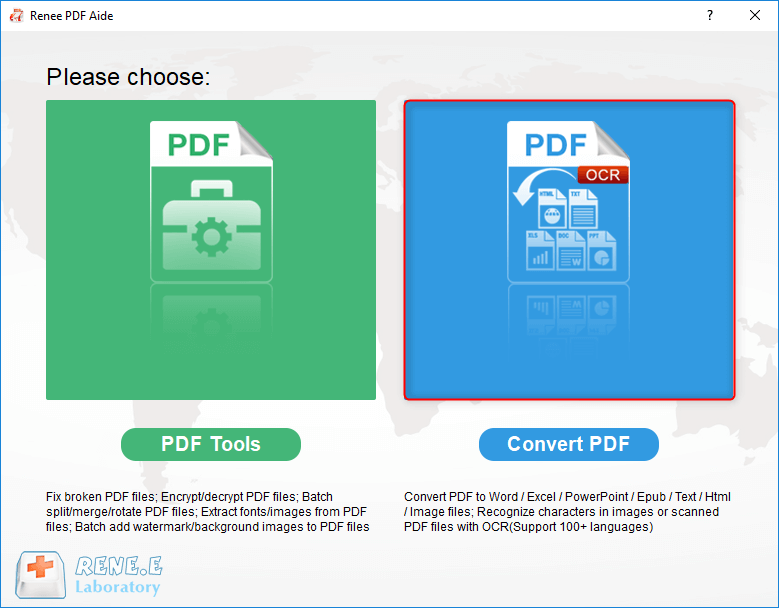
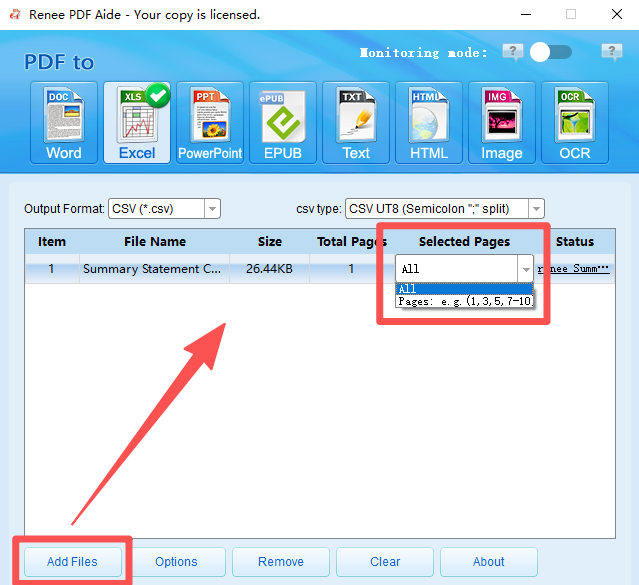
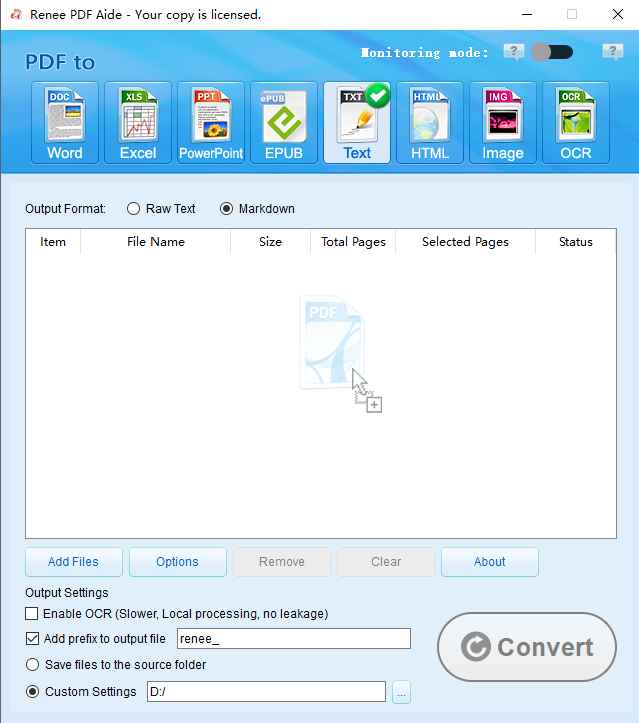
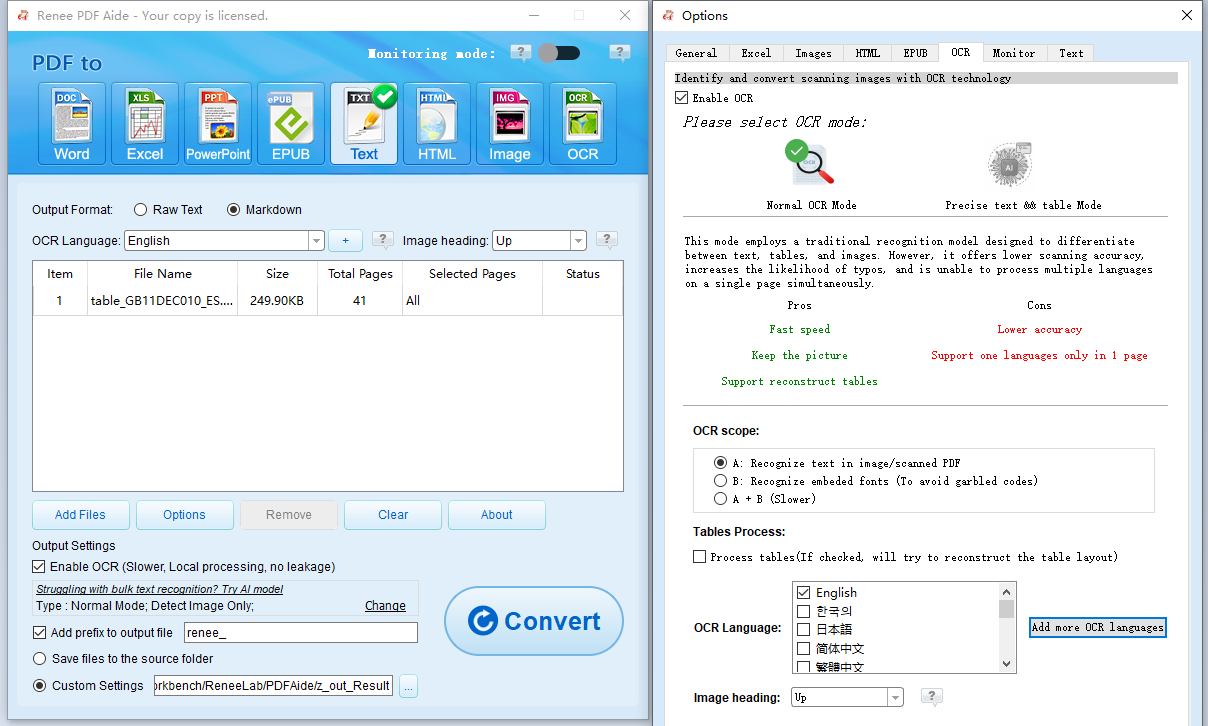
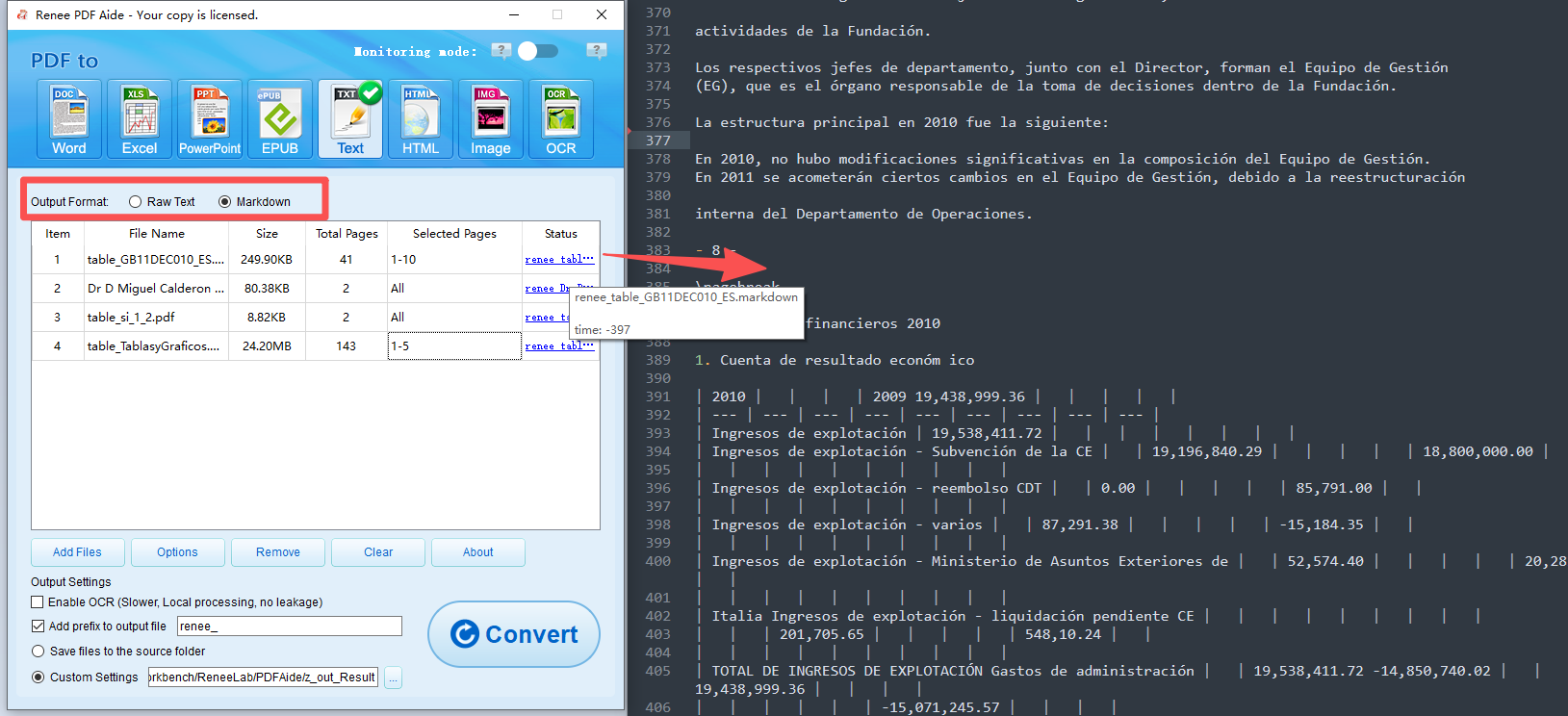
Steps to Convert PDF to Markdown with Renee PDF Aide:
📊 Pandoc vs. Poppler
| Feature / Aspect | Pandoc | Poppler (pdftotext/ pdfimages/ etc.) |
|---|---|---|
| Primary Role | General document converter (multi‑format, direct PDF → Markdown). | PDF utility suite (extracts text/images, not Markdown directly). |
| Ease of Use | Very simple: one command (pandoc input.pdf -o output.md). | Requires chaining commands; more manual setup. |
| Output Quality | Good for text‑heavy PDFs; basic tables and headings preserved. | Precise text and image extraction; Markdown requires extra step. |
| Images | Limited; needs flags like --extract-media. | Strong image extraction via pdfimages. |
| Tables & Layouts | Often messy; needs manual cleanup. | Extracts raw text; layout fidelity depends on follow‑up processing. |
| Scanned PDFs | Poor (no OCR support). | Poor (no OCR support); needs external OCR like Tesseract. |
| Cross‑Platform | ✅ Windows, macOS, Linux. | ✅ Windows, macOS, Linux. |
| Best Use Case | Quick conversion of simple, text‑based PDFs. | Pre‑processing PDFs (text/images) before feeding into Pandoc or other converters. |
Pandoc for PDF to Markdown
pandoc input.pdf -o output.md
pdftk input.pdf cat 5-10 output subset.pdf
pandoc subset.pdf -o output.md
pandoc input.pdf -o output.md –extract-media=./media
- Images are saved in ./media/
- Markdown output will include references like

pandoc input.pdf -o output.md –to=gfm –toc
- –to=gfm → outputs GitHub‑flavored Markdown.
- –toc → generates a table of contents based on headings.
pandoc input.pdf -o output.md –lua-filter=table-clean.lua

- Highly customizable with flags
- Free and open-source
- Good for batch via scripts
- Handles many formats
Disadvantages:
- Command-line only (no GUI)
- Needs dependencies like LaTeX for some features
- Poor with scanned PDFs
Convert to Editable Word/Excel/PPT/Text/Image/Html/Epub
Multifunctional Encrypt/decrypt/split/merge/add watermark
OCR Support Extract Text from Scanned PDFs, Images & Embedded Fonts
Quick Convert dozens of PDF files in batch
Compatible Support Windows 11/10/8/8.1/Vista/7/XP/2K
Convert to Editable Word/Excel/PPT/Text/Image/Html/Epub
OCR Support Extract Text from Scanned PDFs, Images & Embedded
Support Windows 11/10/8/8.1/Vista/7/XP/2K
Pop Tools
| Tool | GPU/CPU Support | Uses LLMs? | Free or Paid | Notes |
|---|---|---|---|---|
| Marker | ✅ CPU/GPU/MPS | Optional (--use_llm) | Free for personal/research; commercial license for larger orgs | Strong layout fidelity, LaTeX math, batch support |
| MinerU (Magic‑PDF) | ✅ GPU recommended; CPU fallback | Yes (multi‑model + LLM) | Open‑source (AGPL); commercial license for enterprise | High accuracy for tables, formulas, multilingual OCR |
| Dolphin (ByteDance) | ✅ CPU/GPU | Yes (vision transformer + OCR) | Free, MIT license | Good for scanned PDFs and complex layouts |
| MarkItDown (Microsoft) | ✅ CPU only | Optional Azure/GPT integration | Free, MIT license | Multi‑format, Markdown output, limited layout fidelity |
| pdf2md (Node.js) | ✅ CPU only | No | Free, MIT license | Lightweight, fast, weaker with complex layouts |
| GPTPDF | ✅ CPU/GPU (via VLLM or GPT‑4o backends) | Yes (vision LLMs) | Paid per use (≈ $0.013 per page) | Excellent for formulas, tables, images; cloud‑based |
| PDF‑Extract‑Kit | ✅ CPU/GPU (configurable) | Yes (LayoutLMv3, YOLOv8, UniMERNet, PaddleOCR) | Free, AGPL‑3.0 | Toolkit for layout/ocr; MinerU builds on it for Markdown |
| Unstructured.io | ✅ CPU/GPU (Docker, Python) | Optional LLM integration | Free core (Apache 2.0); enterprise support paid | General doc parsing (PDF, HTML, email) for RAG pipelines |
What Does “Uses LLMs” Mean?
- Top-notch layout fidelity
- Supports equations and code
- Scriptable for automation
- Open-source and free
Disadvantages:
- Need more Memory and CPU, even GPU
- GitHub install required
- Steeper setup with Python
- Slower for very large files
Convert to Editable Word/Excel/PPT/Text/Image/Html/Epub
Multifunctional Encrypt/decrypt/split/merge/add watermark
OCR Support Extract Text from Scanned PDFs, Images & Embedded Fonts
Quick Convert dozens of PDF files in batch
Compatible Support Windows 11/10/8/8.1/Vista/7/XP/2K
Convert to Editable Word/Excel/PPT/Text/Image/Html/Epub
OCR Support Extract Text from Scanned PDFs, Images & Embedded
Support Windows 11/10/8/8.1/Vista/7/XP/2K
Can I convert scanned PDFs to Markdown accurately?
Is PDF to Markdown conversion free?
How do I handle tables in PDF to Markdown?
What if the conversion messes up images or links?
 and keep hyperlinks. Desktop like Renee extracts them locally. For online, ensure the tool supports media—test small files first.
Are there privacy concerns with online PDF to Markdown tools?
Can I batch convert multiple PDFs to Markdown?
Convert to Editable Word/Excel/PPT/Text/Image/Html/Epub
Multifunctional Encrypt/decrypt/split/merge/add watermark
OCR Support Extract Text from Scanned PDFs, Images & Embedded Fonts
Quick Convert dozens of PDF files in batch
Compatible Support Windows 11/10/8/8.1/Vista/7/XP/2K
Convert to Editable Word/Excel/PPT/Text/Image/Html/Epub
OCR Support Extract Text from Scanned PDFs, Images & Embedded
Support Windows 11/10/8/8.1/Vista/7/XP/2K
Relate Links :
Top Ways to Extract Tables from PDF Files : Free & AI Tools Revealed

28-10-2025
Amanda J. Brook : Discover the best ways to extract tables from PDF in 2025 using free tools and advanced AI methods,...
Effortless Ways to Convert PDF to Excel: The Only Guide You Need
31-10-2025
Amanda J. Brook : This hands-on guide walks you through converting PDFs to Excel using trusted tools that preserve your data. It’s...



User Comments
Leave a Comment