


iPhone / iPad Turns Off but Battery Enough? How to Extend iPhone Battery Life

Summary
Some users report that their iPad or iPhone with the remaining battery turns off by itself when it's cold. Do you also have this kind of problem? Do not worry. In this article, you can find effective solutions.
Content
Part 1: Why does iPad or iPhone Turn Off by Itself When It’s Cold?


Remove Passcode Delete the passcode for iOS devices even locked out.
Fix iOS System Failure Recover frozen iOS devices from DFU mode, recovery mode or other system problems.
Factory Reset One click to restore iOS devices to factory status.
Full Support to iOS Devices Compatible with all models of iPhone, iPad and iPod Touch.
Well Compatibility Fully compatible with the latest version of iOS.
Remove Passcode Delete the passcode for iOS devices even locked out.
Well Compatibility Fully compatible with the latest version of iOS.
Full Support to iOS Devices Compatible with all models of iPhone, iPad and iPod Touch.


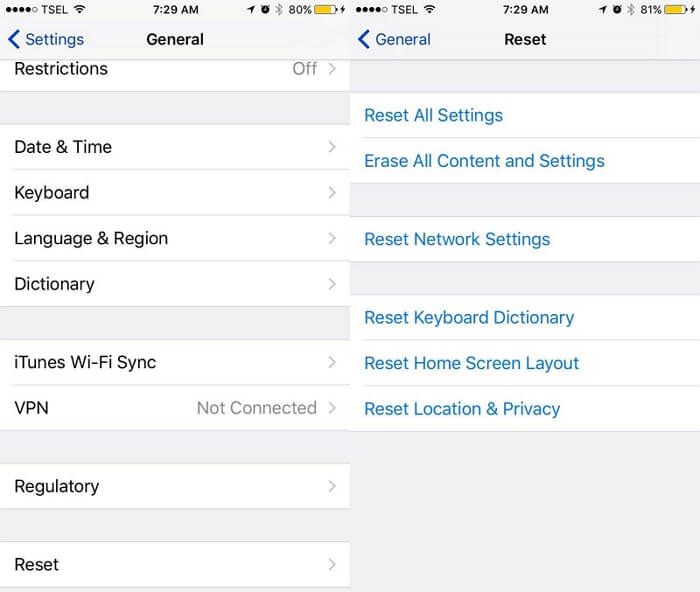
Open [Settings], [General], [Reset] and [Erase All Content and Settings]. And then follow the instructions to check if you want to restore the device. Finally click on [OK] to complete the reset.
Relate Links :
How to Downgrade iOS for iPhone or iPad If Upgrade Accidently
11-01-2021
Amanda J. Brook : When using iPhone or iPad, users often receive notifications about the iOS update. If you mistakenly click the...
Your iPad Won’t Start Suddenly? Find Solution Here!

13-01-2021
Ashley S. Miller : As a product between mobile phone and laptop, iPad allows you to surf news sites, send and receive...


