
Best Multiple PDF to Excel Converters : From Online Platforms to Desktop Apps

Summary
In daily office work, converting dozens or even thousands of table-heavy PDF files into Excel is a common pain point. A powerful multiple PDF to Excel converter lets you batch-process native PDFs and scanned documents with OCR, while perfectly preserving table structure. This guide rounds up the most practical online tools, desktop software, and open-source solutions available today.


| Solution Type | Setup & Offline Use | Batch & OCR Support | Pricing | Ease of Use | Best For |
|---|---|---|---|---|---|
| Online Tools | No install, browser only; ❌ Offline | ❌ Single-file only; OCR partial | Mostly free, paid upgrades | ⭐ Very easy | Casual users, 1–5 files |
| Desktop Software | Requires install; ✅ Full offline | ✅ Unlimited batch; ✅ Full OCR | One-time purchase or subscription | ⭐⭐ Moderate | Professionals & businesses (10–10,000+ files) |
| Open-Source / Code | Install + environment setup; ✅ Full offline | ✅ Fully customizable; OCR depends on library | 100% free | ⭐⭐⭐ Advanced | Developers & tech users (100,000+ files) |
| Tool | Free Usage Limits | Batch & File Size | Conversion Quality | Best Use / Tips | Paid Plans |
|---|---|---|---|---|---|
| SmallPDF | 2 tasks/day, ≤50MB | ❌ No batch (Pro = yes); No strict page limit | ⭐⭐⭐ Great + OCR | Desktop version unlocks batch | Pro $12/mo or $120/yr |
| ILovePDF | 3 tasks/day, ≤200MB | Single only (Premium = batch); No strict page limit | ⭐⭐⭐ Solid | Student discounts available | Premium $7/mo or $48/yr |
| PDF24 | 5 tasks/day, ≤10MB | ❌ No batch (desktop = yes); No strict page limit | ⭐⭐ Decent | Desktop removes limits | Pro $9/mo |
| Google Drive Add-ons | Free, ≤10MB | Some add-ons allow limited batch; No strict page limit | ⭐⭐ Varies | Docs to PDF Pro recommended | ~$5/mo |
| SodaPDF | 2 tasks/day, ≤50MB | ❌ No batch (Pro = yes); No strict page limit | ⭐⭐⭐ Great + OCR & translation | Desktop removes limits | Standard $7/mo; Business $16.5/mo |
| PDF Candy | 1 download/hour, ≤200MB | ❌ No batch (paid = yes); No strict page limit | ⭐⭐⭐ Good | Desktop + Web plans available | Web $6/mo; Desktop+Web $18/mo; Lifetime $99 |
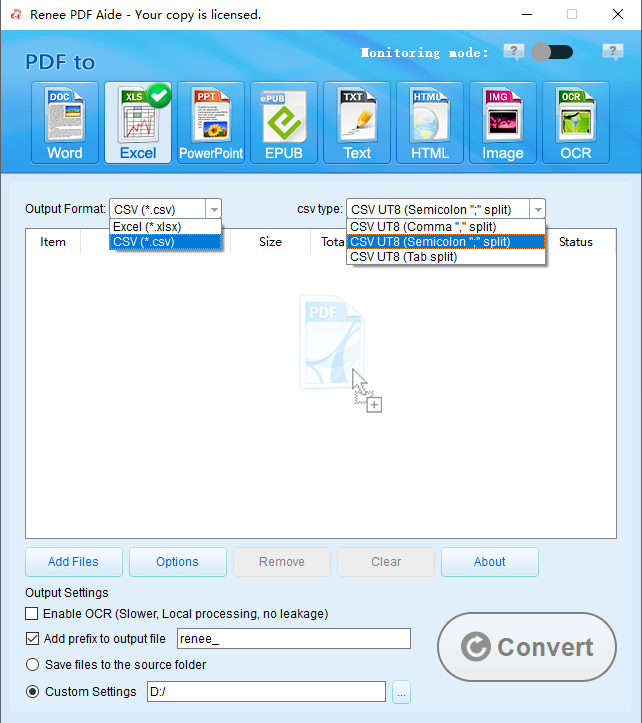
- Direct export to Excel (.xlsx), CSV (perfect for databases & analysis), Markdown, TXT, editable Word, and more.
- 100% local processing — sensitive files never leave your computer.

Versatile Convert to Word/Excel/PPT/Text/Image/Html/Epub
Secure 100% local conversions ensure zero risk of data leaks
Efficient Batch Process dozens of PDF files in seconds
Comprehensive Seamlessly convert PDFs to Excel, PowerPoint, Text, and more
OCR Support Extract Text from Scanned PDFs, Images & Embedded Fonts
Versatile Effortlessly convert XFA, multi
Secure 100% local conversions ensure zero risk of data leaks
Efficient Batch Process dozens of PDF files in seconds

- Works completely offline – maximum data privacy
- Unlimited batch processing at up to 80 pages/min
- Advanced OCR handles scanned docs and XFA forms perfectly
- Multiple output formats (Excel, CSV, Markdown, etc.) fit any workflow
- Built-in PDF repair, encryption, and optimization tools
Disadvantages:
- Requires one-time purchase after trial (very reasonable for pros)
- Slight learning curve for absolute beginners
- Very large batches need decent PC specs
How to Batch Convert Multiple PDFs to Excel with Renee PDF Aide
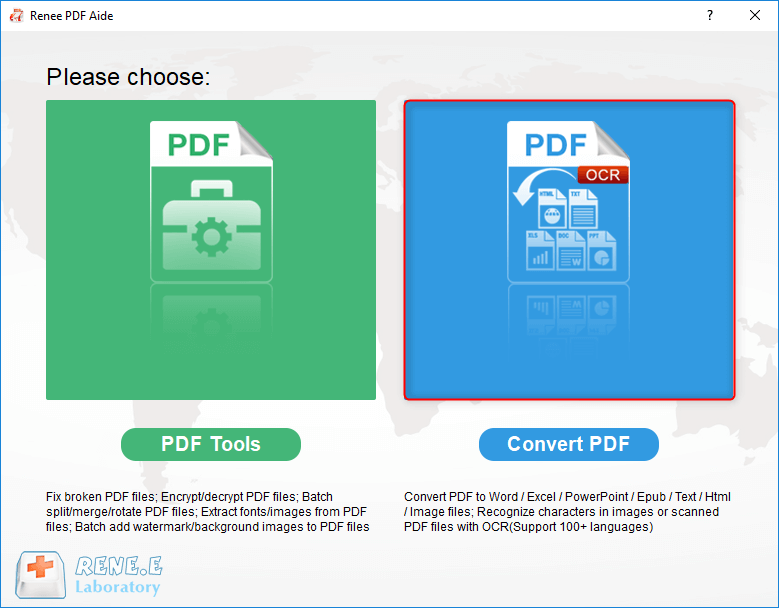
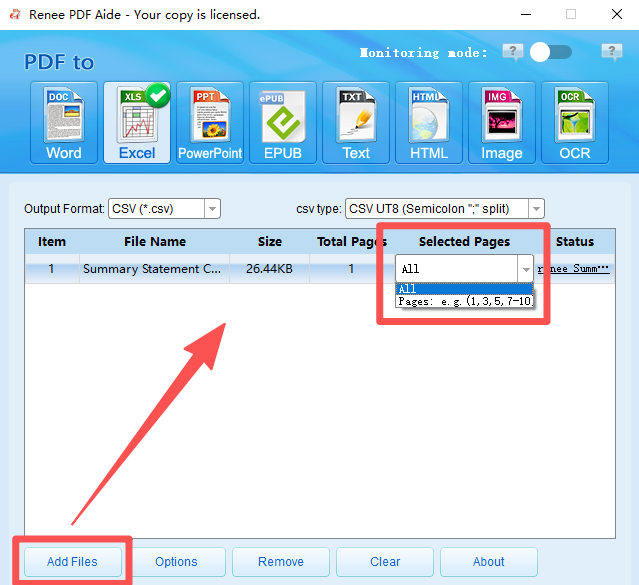
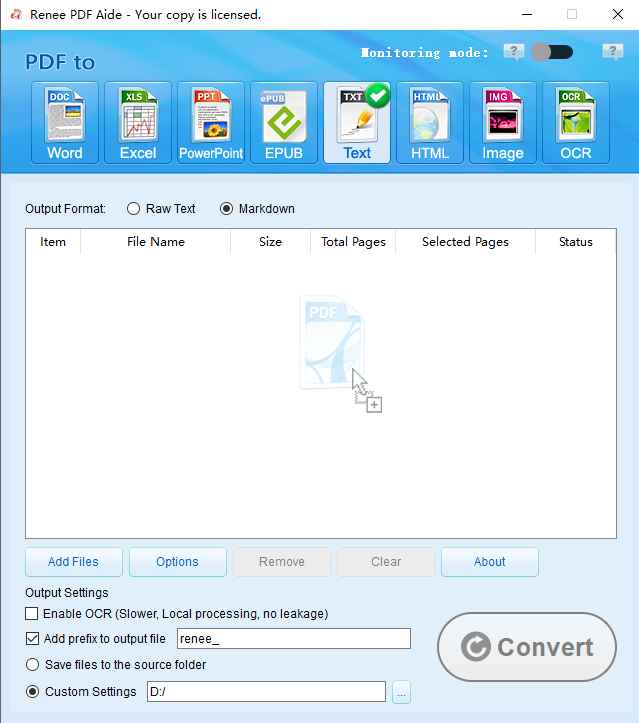
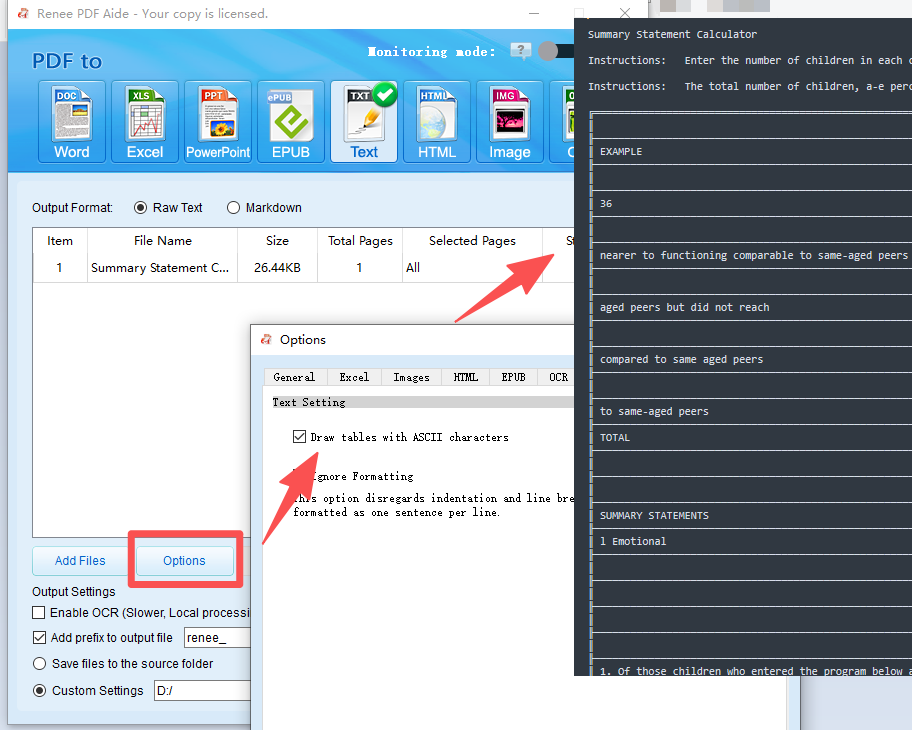
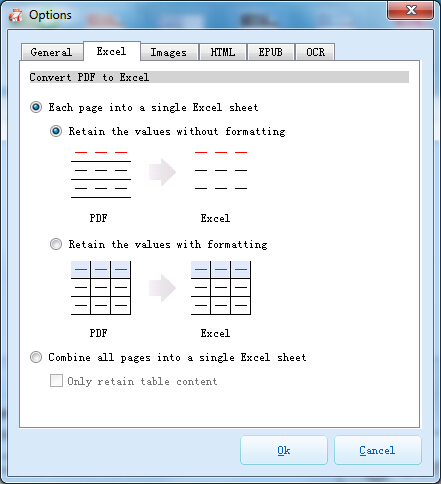
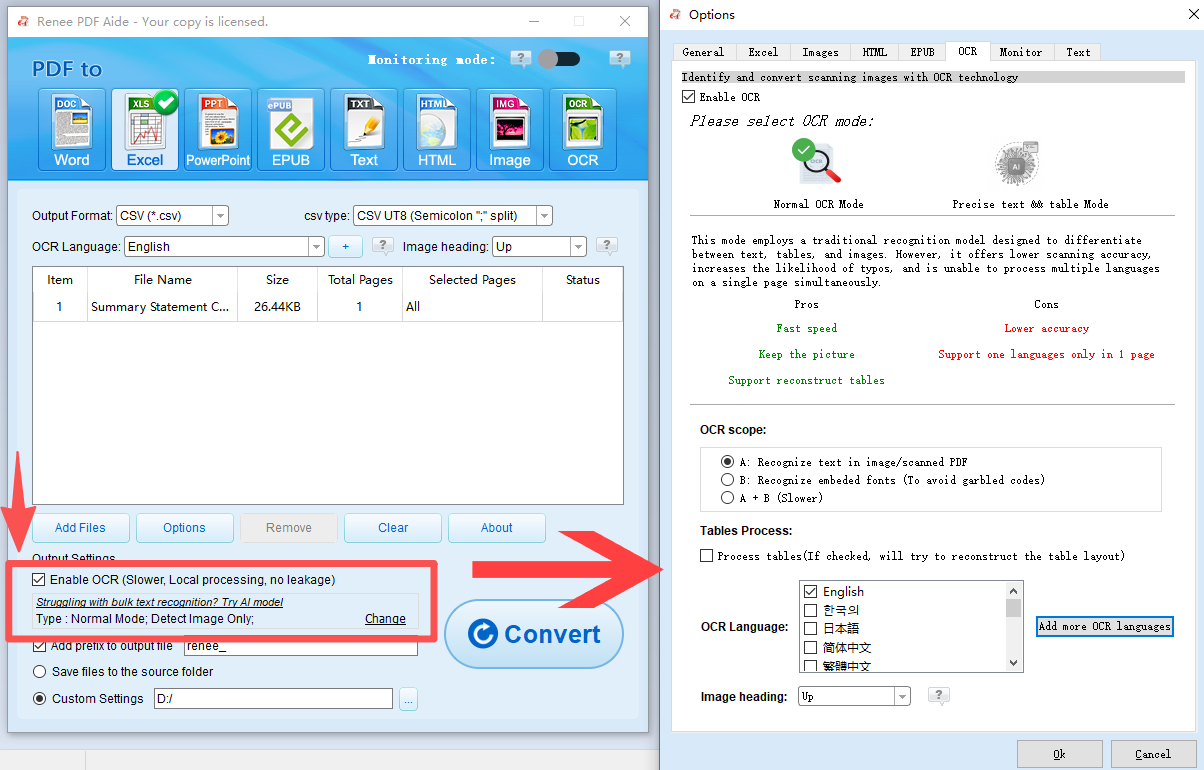
- A: Recognizes text in images/scanned pages (select language for best results).
- B: Handles embedded fonts to avoid garbled text (converts fonts to images first).
- A+B (slower): Auto-detects the best method — longer but most accurate.
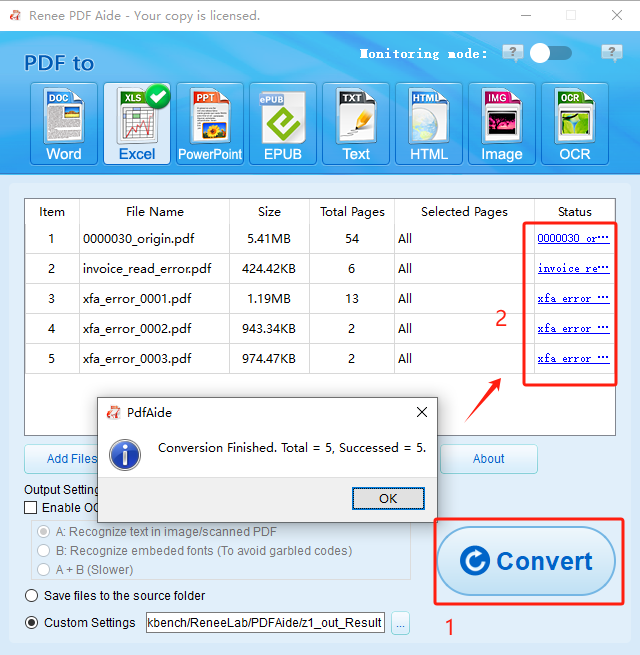
Versatile Convert to Word/Excel/PPT/Text/Image/Html/Epub
Secure 100% local conversions ensure zero risk of data leaks
Efficient Batch Process dozens of PDF files in seconds
Comprehensive Seamlessly convert PDFs to Excel, PowerPoint, Text, and more
OCR Support Extract Text from Scanned PDFs, Images & Embedded Fonts
Versatile Effortlessly convert XFA, multi
Secure 100% local conversions ensure zero risk of data leaks
Efficient Batch Process dozens of PDF files in seconds
Tabula: Open-Source Java Tool Built to Extract Tables from PDFs to Excel/CSV
- Extremely simple for grid tables
- Command-line batch automation
- Clean CSV output ready for Excel
- Lightweight, no bloat
Disadvantages:
- No built-in OCR – can’t handle scanned docs
- Large batches require manual area selection (slow)
- Requires Java setup
- Tables only – ignores other content
Using Tabula via Command Line
java -jar tabula.jar input.pdf output.csv area="x1,y1,x2,y2"
for f in *.pdf; do java -jar tabula.jar $f ${f%.pdf}.csv; done
Using Tabula’s Local Web Interface (Easier for Beginners)

Versatile Convert to Word/Excel/PPT/Text/Image/Html/Epub
Secure 100% local conversions ensure zero risk of data leaks
Efficient Batch Process dozens of PDF files in seconds
Comprehensive Seamlessly convert PDFs to Excel, PowerPoint, Text, and more
OCR Support Extract Text from Scanned PDFs, Images & Embedded Fonts
Versatile Effortlessly convert XFA, multi
Secure 100% local conversions ensure zero risk of data leaks
Efficient Batch Process dozens of PDF files in seconds
Can free online tools really batch-convert scanned PDFs?
Desktop software vs open-source — how do I decide?
Will batch PDF to Excel mess up my table formatting?
Is uploading sensitive PDFs online safe?
Versatile Convert to Word/Excel/PPT/Text/Image/Html/Epub
Secure 100% local conversions ensure zero risk of data leaks
Efficient Batch Process dozens of PDF files in seconds
Comprehensive Seamlessly convert PDFs to Excel, PowerPoint, Text, and more
OCR Support Extract Text from Scanned PDFs, Images & Embedded Fonts
Versatile Effortlessly convert XFA, multi
Secure 100% local conversions ensure zero risk of data leaks
Efficient Batch Process dozens of PDF files in seconds
Relate Links :
Save Time: Convert Multiple PDFs to Word for Business and Academic Work
22-11-2025
Jennifer Thatcher : Discover the fastest, most reliable methods to convert multiple PDFs into Word documents in just seconds. This comprehensive...
Best Bulk PDF Converter Tools: Quickly & Easily Convert Multiple Files

20-11-2025
Amanda J. Brook : Discover the best bulk PDF converter tools to save time and boost productivity. Compare top free and paid...
Best Ways to Batch Convert PDF to Markdown: Simple, Fast, and Reliable Tools
17-11-2025
Jennifer Thatcher : Discover the best tools and methods for batch converting PDF to Markdown. This definitive guide covers efficient solutions...
Top Ways to Extract Tables from PDF Files : Free & AI Tools Revealed
28-10-2025
Amanda J. Brook : Discover the best ways to extract tables from PDF in 2025 using free tools and advanced AI methods,...



User Comments
Leave a Comment