author avatar
    Specialist of Customer Service Dept.
Last update by William Davis at 30 June 2026

Summary
This comprehensive guide outlines multiple technical methods to convert xfa pdf to word, including direct software extraction and manual flattening workarounds. It evaluates the accuracy, privacy, and efficiency of various tools for processing dynamic XML-based forms.


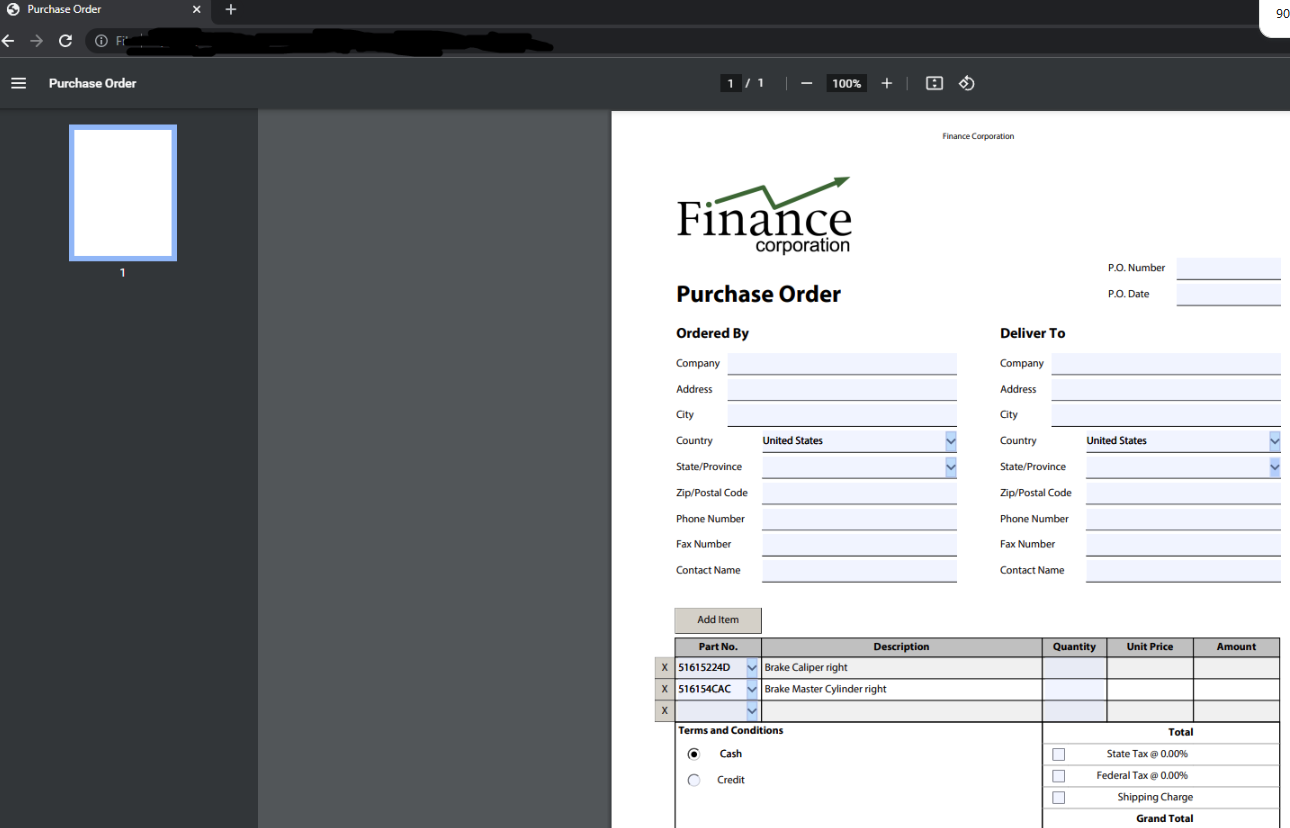
Imagine this: you download a bank statement, tax return, or government application in PDF format. When you try to convert it to Word to fill in fields or extract data, your usual PDF converter throws an error, returns a blank page, or produces unreadable text.
XFA conversion failure
If this scenario sounds familiar, you’re almost certainly dealing with an XFA form—a specialized interactive PDF format widely used by banks, government agencies, and tax departments. Unlike standard PDFs, XFA files are dynamic, and most free tools can’t interpret their content. When you urgently need an editable Word document, you need a solution that truly understands XFA, not one that leaves you stranded.

Understanding XFA PDF Forms and Why Standard Converters Fail

Before diving into solutions, it helps to understand what makes these files so challenging to process. By exploring the structure of XFA documents and how standard software interprets them, the root cause of conversion failures becomes clear.

What is an XFA Form?

XFA stands for XML Forms Architecture. Simply put, it’s a way to create a PDF with no fixed page layout; instead, the form is generated dynamically from XML data. Think of it as a template that assembles labels, fields, and even logic (like calculations or mandatory fields) only when the file is opened. That’s why banks use it for statements that auto-calculate balances, and tax departments use it for returns that adapt to your reported incomes or dependents.
xfa_form_pdf_file_example
FeatureXFA PDFStandard PDF / AcroForm PDF

Underlying Structure

XML‑based template that generates pages dynamically

Fixed page layout stored in PDF objects

Rendering Behavior

Layout is created at runtime when the PDF is opened

Layout is permanent and identical every time

Form Technology

XFA (dynamic forms)

AcroForm (static forms with interactive fields)

Compatibility

Limited support; many viewers (Chrome, Firefox, mobile apps) cannot open XFA

Universally supported across all PDF readers

Interactivity & Logic

Supports calculations, conditional fields, dynamic sections

Basic field validation; no dynamic page generation

Editing & Conversion Difficulty

Very difficult to convert to Word or flatten; often requires specialized tools

Easy to convert, flatten, or edit with standard PDF software

Use Cases

Banking statements, tax forms, government e‑filing, enterprise workflows

Contracts, manuals, invoices, brochures, general documents

Longevity / Future Support

Deprecated by Adobe; not supported in modern PDF standards

Fully supported and recommended for long‑term archiving

A standard static PDF, by contrast, has all text and graphics permanently laid out on the page. AcroForm PDFs (Adobe’s earlier form technology) add interactive fields on top of a static page, so the basic content is always visible. XFA forms, however, lack this static “skeleton”—everything is generated from data.

The Common User Pain Point

When you open a tax form from a government portal or a transaction record from your bank, the document looks normal. But as soon as you try to convert it to Word—using a free online converter or even a paid desktop tool—you get something like this:
XFA conversion failure
Instead of editable text, you see an error message or a blank page. The converter simply can’t interpret the XML data that makes up the form.

Why Standard Converters Break (Quick Comparison)

PDF TypeStructureWhat Standard Converters SeeResult Without XFA Support

Static PDF

Fixed layout, no interactive fields

All text and images on the page

Clean conversion to Word

AcroForm

Interactive fields over a static page

Static background text, fields maybe partially extracted

Partial success, formatting may suffer

XFA Form

XML data stream that dynamically builds the page; no static page content

Only a blank canvas, an error, or garbled XML

Conversion fails with an error or a blank result

Most PDF-to-Word converters work by extracting static page content. They’re not designed to interpret the dynamic XFA data layer, so they give up immediately.

Target Audience Context

Whether you’re a professional reconciling bank records, a student filling out a financial aid form, or an individual dealing with a government e-form, the need for editable text from an XFA PDF is urgent and often time-sensitive. A reliable solution can save you hours of manual retyping and prevent costly mistakes.

The Universal Workaround: Flattening an XFA PDF Before Conversion

Flattening Explained

Flattening transforms a dynamic XFA form into a static, “normal” PDF. When you print or export it, the viewer renders the form’s current data into fixed pages—exactly what a standard PDF converter expects. While you lose any interactive elements, you gain a stable file that can be converted to Word.

Common Flattening Methods (Simplest to Most Advanced)

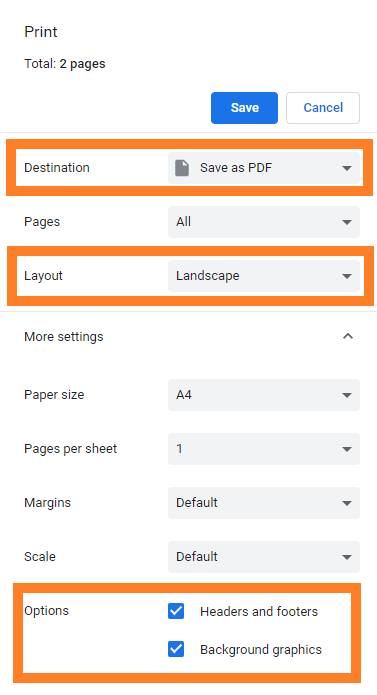
Using a web browser
Open the XFA PDF in a browser that supports dynamic forms, like Firefox. Select File → Print and choose Print to PDF (or click Ctrl + P). This creates a flattened, static copy. It’s free, but you may see formatting shifts, lost tables, or misplaced text.
web browser save as PDF
Using Adobe Acrobat Pro
With Acrobat Pro, use Print to PDF or the more thorough Preflight flattening. This method preserves the layout better than a browser, but requires a paid subscription.

The Two-Step Conversion Sequence

The process is always:
1. Flatten the XFA file into a static PDF.
2. Convert that static PDF to Word using any standard tool.
While effective, this workaround adds extra steps, takes more time, and can degrade formatting or lose data if the flattening engine mishandles complex tables or fields. More importantly, if you use an online flattener, your sensitive information is uploaded to a third-party server.
A more direct, privacy-friendly method is available.

A Direct Path: Convert XFA PDF to Word Without Flattening

Renee PDF Aide is designed to natively support the XFA format, so you can skip the flattening step entirely. It reads the dynamic form directly and extracts the visible content into an editable Word document, preserving the layout and data that most converters miss.

Renee PDF Aide

Key Advantages for XFA Conversion

- Built-in XFA compatibility: The software understands the XML data structure, so you never get an error page or blank output.
- Advanced OCR technology: It handles scanned content and embedded fonts, converting image-based forms into editable text.
- Fully local processing: All operations run on your Windows computer. Sensitive bank statements, tax IDs, or applications never leave your machine, protecting your privacy.
Renee PDF Aide – The Ultimate PDF2Excel Conversion Solution! (100 FREE Quota)

Versatile Convert to Word/Excel/PPT/Text/Image/Html/Epub

Secure 100% local conversions ensure zero risk of data leaks

Efficient Batch Process dozens of PDF files in seconds

Comprehensive Seamlessly convert PDFs to Excel, PowerPoint, Text, and more

OCR Support Extract Text from Scanned PDFs, Images & Embedded Fonts

Versatile Effortlessly convert XFA, multi

Secure 100% local conversions ensure zero risk of data leaks

Efficient Batch Process dozens of PDF files in seconds

Free TrialFree TrialNow 1335621 people have obtained the free version!
Beyond single-file conversion, Renee PDF Aide supports batch processing—import dozens of XFA forms at once and convert them to Word, Excel, or other formats in one go. With speeds up to 80 pages per minute and an intuitive interface, it handles complex document jobs without technical hassle.
See the exact step-by-step workflow below—no flattening required.

Step-by-Step: Converting XFA PDF to Word with Renee PDF Aide

Prerequisites

Download and install Renee PDF Aide from the official website. It’s compatible with Windows 11/10/8.1/8/7 (32-bit and 64-bit). Before you begin, make sure you have administrative rights to install the software. It’s also recommended to close any other PDF viewers or applications that might be using the XFA files you want to convert, to avoid file lock errors during import.

Step 1: Select the Convert PDF Module
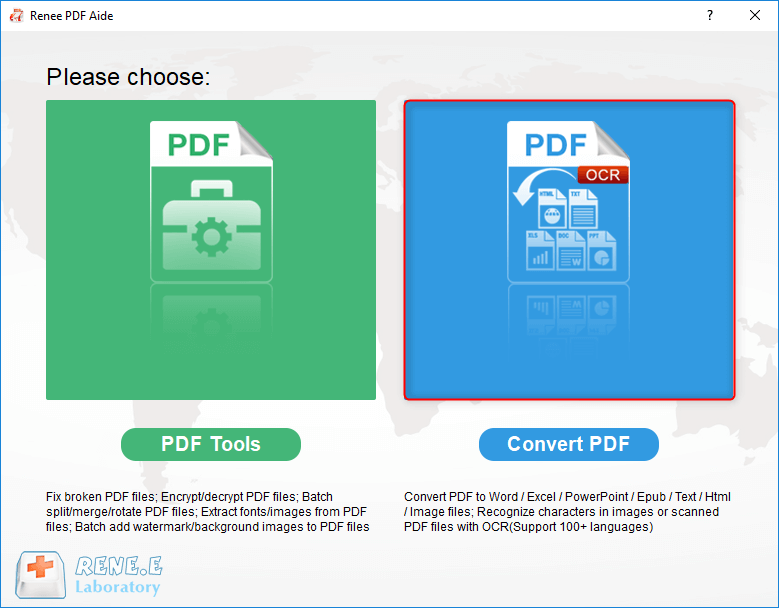
Open the software. On the main interface, click “Convert PDF”.
select to convert pdf with renee pdf converter

Step 2: Add Your XFA PDF File(s)

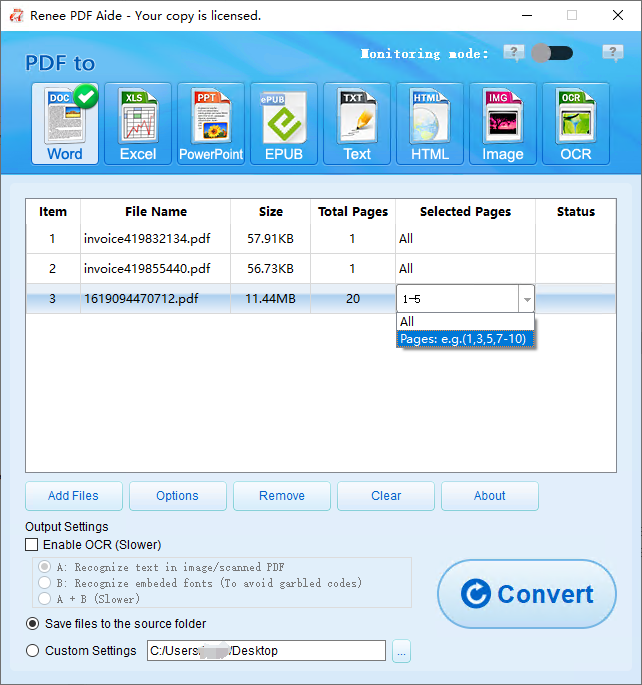
Click the “Add Files” button. The software supports batch conversion, so you can import multiple XFA forms at once.
After adding, the file information appears in the conversion list. Use the “Selected Pages” dropdown to convert only specific pages if needed.
add XFA files and select pages

Step 3: Choose Word as the Output Format

On the top menu bar, select Word.
Click the “Options” button next to the format if you want to control page arrangement in the final document (for example, all pages in one file or split per sheet).

Step 4: Configure OCR (if necessary)

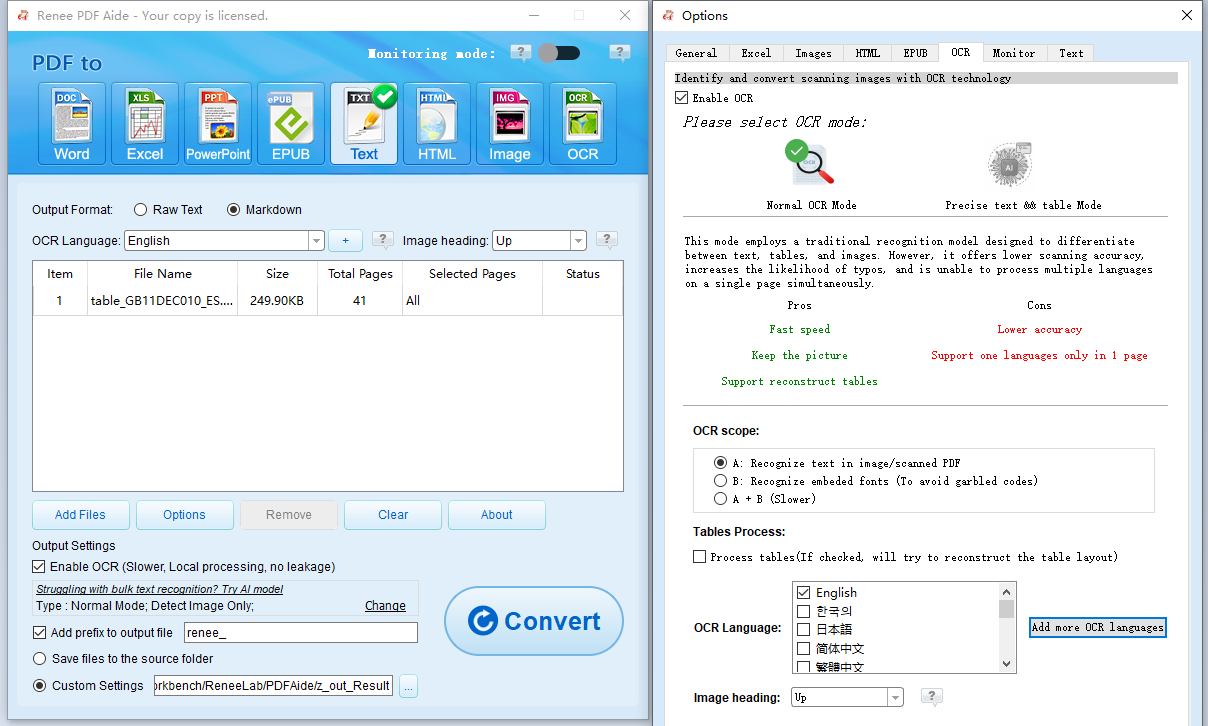
If your XFA PDF is a scanned image or uses custom embedded fonts, check the “Enable OCR” option. If the form is text-based (native), you can skip this.
Three OCR modes are available:
- A: Recognize text in pictures or PDF scans – assumes the page content is an image and applies OCR. For best results, select the correct document language(s).
- B: Identify built-in fonts (to avoid garbled characters) – converts embedded fonts into images before running OCR. This prevents symbol corruption.
- A+B (slower): Lets the program automatically decide whether the content is an image or embedded font. This is thorough but slower.
enable OCR and choose a mode

Step 5: Convert and Retrieve the Document

Click the “Convert” button. Processing runs at up to 80 pages per minute, even with OCR enabled.
When finished, a prompt shows the number of files processed and successful conversions. Click the links in the “Status” column to open your editable Word documents.
conversion finished, open result from Status column
Your XFA form is now a fully editable Word file—no flattening or manual cleanup required.

Alternative Methods: Online Tools, Adobe Acrobat, and Manual Workarounds

Free Online Flattening + Word Conversion

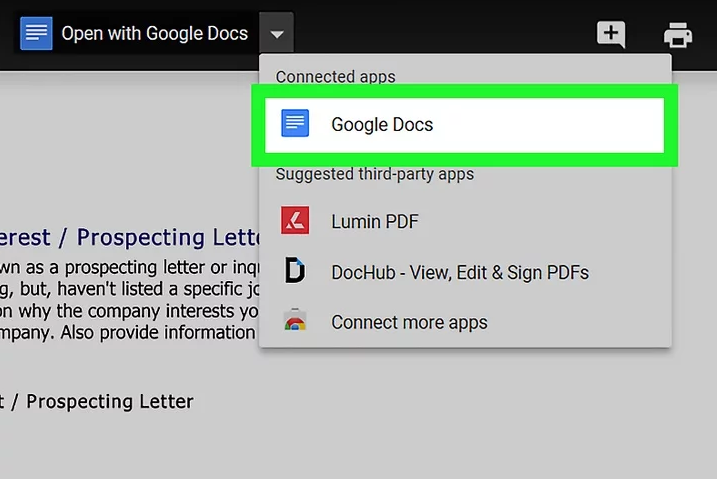
Opening a PDF with Google Docs to edit
Many users start with free online services that flatten an XFA form by converting it to a static PDF, then use another tool to convert that PDF to Word. Typically, this means uploading your sensitive document to a web server, processing it, and downloading a flattened copy. While convenient, this approach comes with significant downsides.
Advantages:
  • No installation required
  • Works from any device with a browser
  • Often free for small files

Disadvantages:

  • High privacy risk – your sensitive data is uploaded to a remote server
  • Formatting is frequently degraded (tables, checkboxes, breaks)
  • File size limits and daily caps
  • Two‑step process is slow and requires a secondary Word converter

Because your government forms or bank statements are uploaded to third-party servers, the risk of data leaks is real. If privacy matters, this method is not recommended.

Adobe Acrobat Pro (Subscription Required)

Adobe Acrobat Pro is recognized as the original PDF powerhouse and can open and flatten complex XFA forms. After flattening, you can use its built-in “Export PDF to Word” feature to complete the conversion. However, this premium solution requires a substantial financial investment.
Advantages:
  • Excellent XFA rendering and flattening accuracy
  • Integrated Word export from the same application
  • No third-party privacy concerns if used offline
  • Supports batch actions

Disadvantages:

  • Expensive monthly or annual subscription
  • Still requires a two-step manual process (flatten → export)
  • Not all Acrobat versions handle every XFA variant perfectly
  • Heavy application that can be slow on older hardware
The results are generally good, but the process is time-consuming and costly. Many users find the subscription hard to justify for occasional conversions.

Manual Copy and Paste (Last Resort)

Microsoft Word start screen with blank document, ready to open a PDF
If the form is very short—such as a single-page certificate—you can open it in a compatible web viewer like Firefox, which often renders XFA forms correctly. Then, manually highlight and copy the visible text, pasting it into a blank Word document for editing.
Advantages:
  • No extra software or cost
  • Immediate, no uploads
  • Full control over what gets transferred

Disadvantages:

  • Only practical for very short forms
  • Destroys all formatting, tables, and images
  • High chance of omitting data from hidden or dynamic sections
  • Extremely time-consuming for multi-page documents

Steps to copy text manually
1. Open the XFA PDF in Firefox or another compatible viewer.
2. Select text with your mouse and copy (Ctrl+C).
3. Paste into a blank Word document.
4. Rebuild tables, realign paragraphs, and retype any missing fields.
For anything beyond a simple declaration, this approach quickly becomes impractical.
While each of these alternatives can technically produce a Word file, they all add steps, risk data privacy, or compromise accuracy. When security and efficiency matter, a dedicated offline tool that understands XFA from the start is the smarter choice.
Renee PDF Aide - Powerful PDF Converting/Editing Tool (100 FREE Quota)

Convert to Editable Convert to Word/Excel/PPT/Text/Image/Html/Epub

Multifunctional Encrypt/decrypt/split/merge/add watermark

OCR Support Extract Text from Scanned PDFs, Images & Embedded Fonts

Quick Convert dozens of PDF files in batch

Compatible Support Windows 11/10/8/8.1/Vista/7/XP/2K

Convert to Editable Word/Excel/PPT/Text/Image/Html/Epub

OCR Support Extract Text from Scanned PDFs, Images & Embedded

Support Windows 11/10/8/8.1/Vista/7/XP/2K

Free TrialFree TrialNow 800 people have obtained the free version!

FAQ

Why do most free online converters and standard tools fail when processing XFA files?

Most free converters and desktop tools only parse the static, printed-page description inside a PDF. XFA forms store their content as XML that the reader must interpret and render before displaying text. Because those tools lack an XFA rendering engine, they see only an empty canvas or raw XML, resulting in errors or blank pages.

Will the process of flattening an XFA PDF degrade the quality of text or images?

Flattening can cause minor shifts in text positioning, drop shadows, broken tables, or missing checkboxes. Image quality usually remains unchanged because the rendering engine scales images to the page dimensions. However, very small fonts or complex graphics may appear slightly softened. Using a professional tool like Adobe Acrobat generally preserves fidelity better than a browser print function.

Can I batch convert multiple XFA PDF files to Word simultaneously using Renee PDF Aide?

Absolutely. The software supports one-click batch conversion. You can add dozens of XFA PDFs to the file list, select Word as the output, and convert them in a single run. The results preserve the original layout and are accessible directly from the conversion summary.
Renee PDF Aide - Powerful PDF Converting/Editing Tool (100 FREE Quota)

Convert to Editable Convert to Word/Excel/PPT/Text/Image/Html/Epub

Multifunctional Encrypt/decrypt/split/merge/add watermark

OCR Support Extract Text from Scanned PDFs, Images & Embedded Fonts

Quick Convert dozens of PDF files in batch

Compatible Support Windows 11/10/8/8.1/Vista/7/XP/2K

Convert to Editable Word/Excel/PPT/Text/Image/Html/Epub

OCR Support Extract Text from Scanned PDFs, Images & Embedded

Support Windows 11/10/8/8.1/Vista/7/XP/2K

Free TrialFree TrialNow 800 people have obtained the free version!

User Comments

Page 1

Leave a Comment


Your comment has been submitted and is awaiting moderation.