author avatar
    Senior Program Developer
Last update by William Davis at 11 May 2026

Summary
The bug check 0x000000ef stop code indicates a critical Windows system process has terminated unexpectedly, triggering a full system halt. This guide covers diagnostic methods, data rescue procedures, and verified repair techniques to address the underlying causes of bug check 0x000000ef errors.


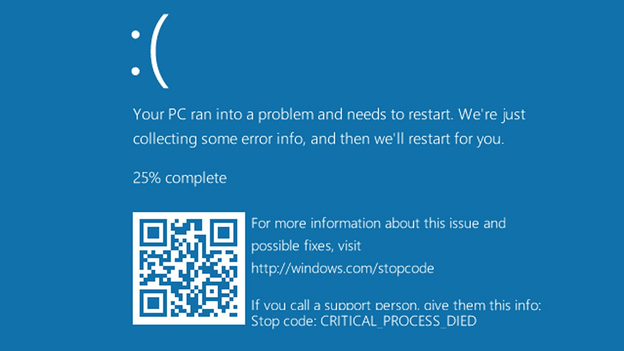
The 0x000000ef stop code is one of those Windows crashes that can leave you staring at a blue screen wondering what just happened. Officially called “Critical Process Died,” this error means a core system process—something Windows literally cannot run without—has unexpectedly stopped. The result: a full system halt.
Critical Process Died ntoskrnl.exe Windows 10
How this error behaves depends a lot on your hardware. On a pre-built Dell or HP desktop, it often shows up after a driver update gone wrong. On a custom gaming rig with an ASUS or MSI motherboard, unstable overclocks or a new SSD might trigger it.
Older laptops? Failing hard drives are usually the culprit. And here’s the tricky part: the safest first move isn’t the same for everyone. If you can still reach Safe Mode, you can try software repairs right away. But if you’re stuck in a boot loop, data rescue comes first—otherwise you risk losing everything while chasing a fix.

How to bug check what Crashes Your System

Before you dive into diagnostics, it helps to understand how this crash actually shows up in the real world. Once a critical process dies, Windows doesn’t just freeze—it leaves behind a trail of symptoms and forensic clues you can use to pinpoint what went wrong. That’s where the next step comes in: recognizing the common warning signs and locating the memory dump files that WinDbg relies on for deeper analysis.

Where You Can Usually Find Memory Dump Files

When Windows crashes, it typically generates one or more dump files that WinDbg can analyze. These files are stored in predictable locations:
C:\Windows\MEMORY.DMP — the full system dump (if enabled)
C:\Windows\Minidump\*.dmp — small crash dumps created by default
C:\Windows\LiveKernelReports\ — kernel‑level dumps for hardware or driver issues
C:\CrashDumps\ — sometimes created by OEM tools or third‑party crash handlers
If your Windows PC fails to boot up to the desktop, you can use either Renee PassNow or a Windows installation media to copy the dump files over to another fully functional computer.

How to Interpret WinDbg Results After Loading a Dump

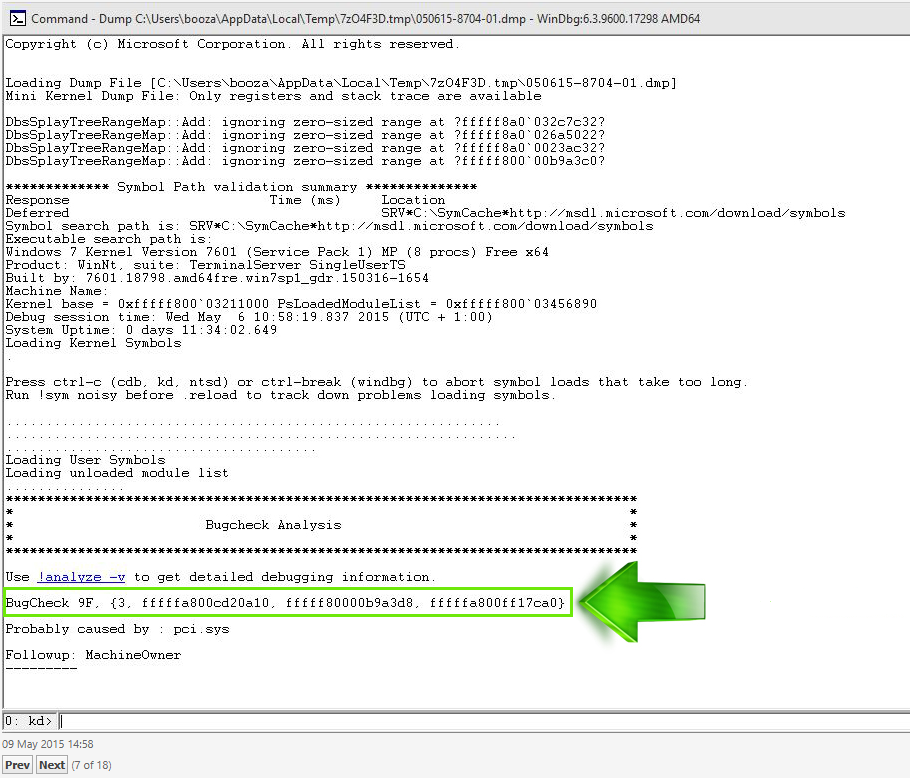
When you open a dump file in WinDbg and run !analyze -v, you’ll typically see several key sections:
windbg load memory dump and analysis
  • BugCheck Analysis — confirms the stop code (0xEF) and basic cause
  • Probably caused by — WinDbg’s best guess at the faulty driver or component
  • process Name — th process that died (important for CRITICAL_PROCESS_DIED)
  • Stack Trace — shows the call sequence leading to the crash
  • Loaded Modules — helps identify outdated or suspicious drivers
  • Failure Bucket ID — useful for searching known issues online
In many 0xEF cases, you’ll see something like:

Probably caused by: ntoskrnl.exe or a storage/graphics driver such as storport.sys, nvlddmkm.sys, etc.

This doesn’t always mean the listed file is the true culprit—it often indicates the component that detected the failure, not the one that caused it. Cross‑checking with Event Viewer and recent driver changes is essential.
MEMORY.DMP files. The dump often points to a specific driver—ntoskrnl.exe is common, but storage or graphics drivers show up frequently too.
Root Cause CategoryTypical TriggerHow to Find Clues

Corrupted System Files

Failed updates or improper shutdown

Event Viewer or SFC logs

Faulty Drivers

Recent graphics/storage driver installs

WinDbg dump or Device Manager

Incompatible Software

Security apps or third-party tools

Clean Boot testing

Failing Hardware

Aging HDD/SSD or bad RAM

S.M.A.R.T. tools or Memory Diagnostic

Aggressive Overclock

XMP profiles or CPU/GPU tweaks

Stability tests after reset

Critical First Step: Rescue Your Files Before Any Repair

Before you run any repair tool—CHKDSK, System Restore, startup repair—stop and think about your data. Those tools can make things worse on an already unstable drive. CHKDSK, in particular, can stress a failing hard drive to the point of total failure.
That’s why file recovery comes first. A bootable recovery tool lets you access your files without loading Windows at all.
Renee Passnow – Professional Windows Password Remover

Remove Windows Login Password 3 steps for whole password remove process.

Recover the files Recover the deleted files without Windows system.

Transfer the data Transfer the important files of the computer with system.

Multifuctional Data transfer, data recovery, bootable problem recovery can be run without system.

Highly compatible Windows 11/10/8.1/8/7/XP/Vista. UEFI boot.

Remove Login Password Support Windows 11/10/8.1/8/7/XP/Vista. UEFI boot.

Recover the files Recover the deleted files without Windows system.

Transfer the data Transfer the important files of the computer with system.

Free TrialFree TrialNow 2000 people have downloaded!
Renee PassNow works well here because it doesn’t install anything on the broken PC, and it boots straight from a USB drive even when Windows won’t start.

Step 1 : Creating the rescue environment

1. On a working computer, download and install Renee PassNow.
download now
2. Insert a USB drive (back up anything on it first—the process will erase it).
Boot the target PC with the created password reset USB/CD/DVD.
3. Open the tool and select “Create a Live USB” to build the bootable media.
Screenshot of Create Live USB option
Boot menu keys for common brands:
BrandBoot Menu Key

Dell

F12

HP

F9 or Esc

Lenovo

F12 or F2

ASUS

Esc or F8

Plug the USB into the crashed computer, restart, and press the boot menu key repeatedly. Select the USB drive to boot from it.

Step 2 : Targeted data rescue scenarios with Renee PassNow
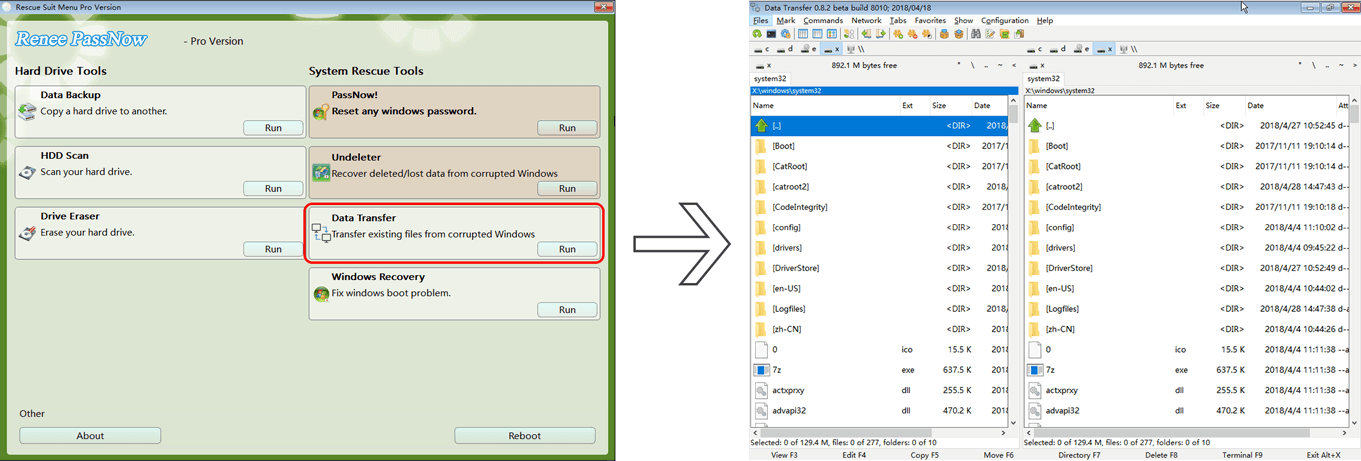
Once booted into the rescue environment, use the Data Transfer function. Navigate to C:\Users\[YourUsername] and copy folders like Documents, Pictures, Desktop, and Downloads to an external drive.
Data transfer function of Renee PassNow
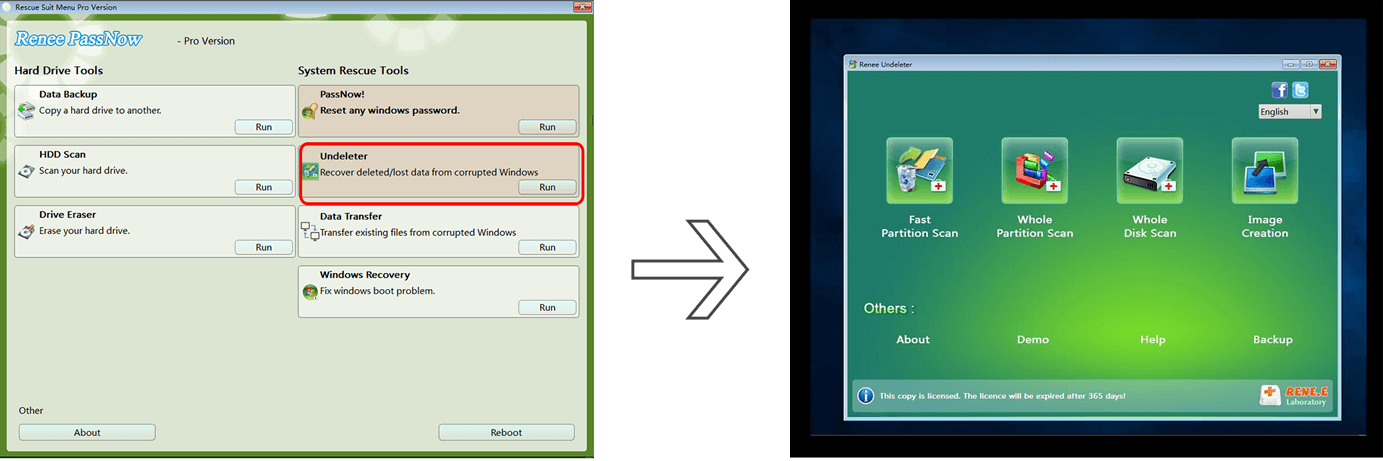
If you accidentally deleted important files before the crash—or if a quick format wiped a secondary drive—switch to the Undeleter function. It scans for recoverable files. Always save recovered data to a different drive than the one you’re scanning.
Data recovery function of Renee PassNow

Bottom line: Rescue your files now. Repair attempts come second.

Renee Passnow – Professional Windows Password Remover

Remove Windows Login Password 3 steps for whole password remove process.

Recover the files Recover the deleted files without Windows system.

Transfer the data Transfer the important files of the computer with system.

Multifuctional Data transfer, data recovery, bootable problem recovery can be run without system.

Highly compatible Windows 11/10/8.1/8/7/XP/Vista. UEFI boot.

Remove Login Password Support Windows 11/10/8.1/8/7/XP/Vista. UEFI boot.

Recover the files Recover the deleted files without Windows system.

Transfer the data Transfer the important files of the computer with system.

Free TrialFree TrialNow 2000 people have downloaded!

Method 1 : Quick Diagnosis-Match the Fault to the Event

Not sure what’s causing the crash? Look at when it happens. That single detail narrows things down fast.
When the Crash HappensMost Likely CauseFirst Action to Take

After Windows Update

Buggy update or corrupted files

Run SFC/DISM in WinRE

After New Hardware (SSD/RAM)

Driver conflict or incompatibility

Roll back drivers or check seating

When Launching Game/App

GPU driver or software conflict

Update or roll back graphics driver

Randomly During Use

Failing storage or RAM

Run hardware diagnostics

On Boot Before Login

Critical service corruption

Data rescue then Startup Repair

One critical question: Can you boot into Safe Mode?
  • Yes → Skip to Section 4 (software repairs).
  • No → Make absolutely sure you’ve completed the data backup in Section 2 before moving to advanced recovery.
Method 2 : Safe Mode & Built-In Software Repairs (Easy to Moderate)

These commands work if you can reach Safe Mode or the Windows Recovery Environment (WinRE).

How to access WinRE:

If you can get to the login screen:
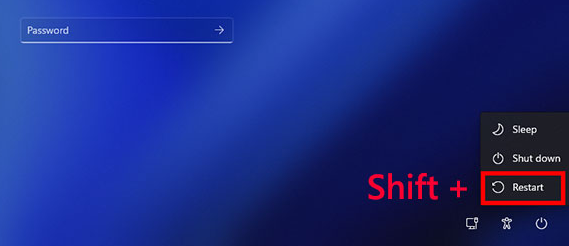
1. Hold Shift and click the Power icon > Restart.
Windows, shift + restart
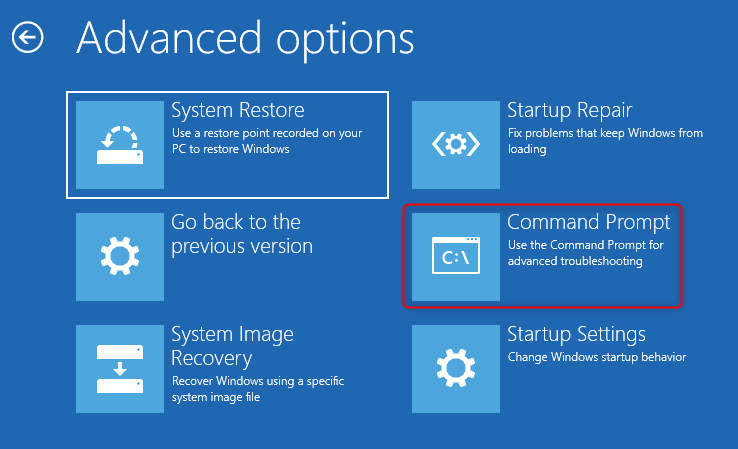
2. When the “Choose an option” screen appears, go to Troubleshoot > Advanced options.
If you can’t boot normally:
1. Boot from a Windows installation USB or recovery drive.
If you don’t already have a Windows installation disc or bootable USB, you’ll need to create one using Microsoft’s Media Creation Tool on another working computer. This tool allows you to download the official Windows installation files and create a bootable USB drive that can be used for system repair or recovery.

You may download this tool from:

Windows 10: https://www.microsoft.com/software-download/windows10

Windows 11: https://www.microsoft.com/software-download/windows11

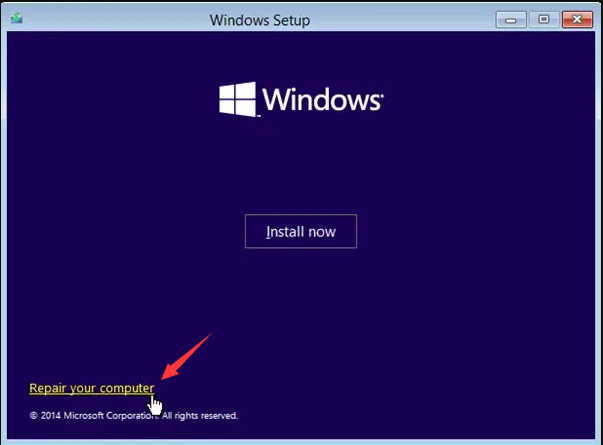
2. On the Windows Setup screen, click Next, then select Repair your computer (bottom-left corner).
windows installation repair your computer
3. You’ll land in the Choose an option menu where WinRE tools live.

SFC and DISM

Open Command Prompt in WinRE or Safe Mode.
command prompt
Start with SFC:

sfc /scannow

Run this first to repair corrupted system files. Success rate is moderate—good for software-only bugs.
If SFC fails, run DISM:

DISM /Online /Cleanup-Image /RestoreHealth

This repairs the system image itself. Better for deep corruption caused by bad updates. Takes longer, but success rate is higher.

Disk integrity check (CHKDSK)

chkdsk C: /f /r

Finds and repairs bad sectors. Risk: medium—CHKDSK can stress a dying drive. Success rate is high for logical file system errors but very low for physical hardware failure. If you hear clicking or grinding from your drive, skip this.

System Restore

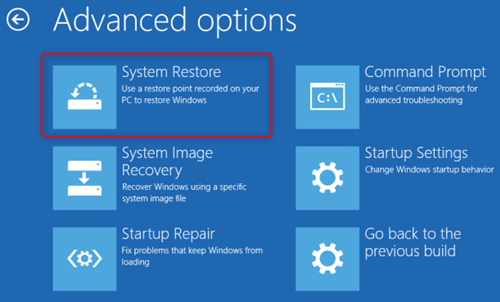
Boot into WinRE or Safe Mode, open System Restore, and pick a restore point from before the 0x000000EF crashes started. Risk is low (only affects system files, though some apps may need reinstallation). Success rate is very high if the crash started after a recent change.
select system restore in windows system to fix windows 10 error
If all four methods fail to resolve the error, move to the next section.

Method 3 : Reversing Recent Changes: Drivers, Updates & Clean Boot

This section is for situations where the 0x000000EF crash started right after a specific change—a driver update, a Windows patch, or a new software installation.

Rolling Back Faulty Drivers

If the blue screen started after updating your graphics, chipset, or storage controller driver:
  1. Boot into Safe Mode.
  2. Input “Device Manager” in search bar and press Enter.
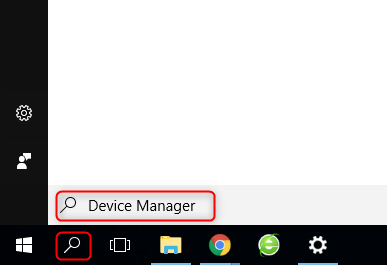
Open device manager
  1. Find the recently updated driver (Display adapters for GPU, IDE ATA/ATAPI controllers or Storage controllers for drives).
  2. Right-click it, select Properties > Driver tab > Roll Back Driver.
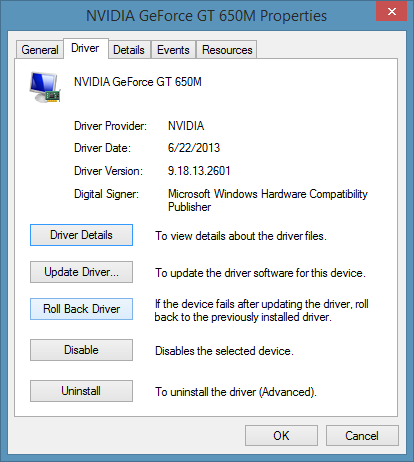
Windows Properties → Driver → Roll Back Driver
Common scenario: The crash started right after a GeForce or AMD driver update.

Uninstalling Problematic Updates

Windows Update can sometimes ship a buggy cumulative update. To remove it:
  1. Boot into Safe Mode or WinRE.
  2. Go to Settings > Update & Security > Windows Update > View update history > Uninstall updates.
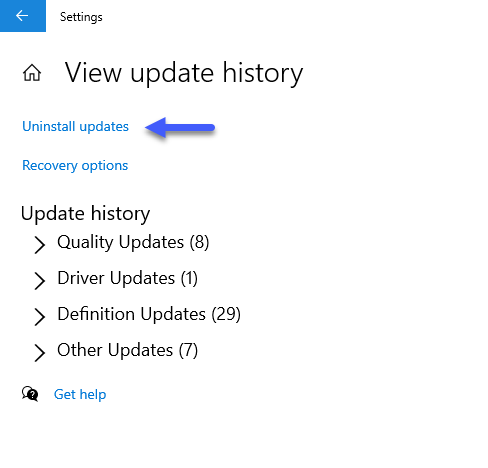
Windows Uninstall updates
3. Select the most recent Quality Update or Feature Update and uninstall it.
Common scenario: The crash happened immediately after Patch Tuesday or a feature update.

Performing a Clean Boot

Third-party software—especially overzealous antivirus tools—can kill critical processes. To find out:
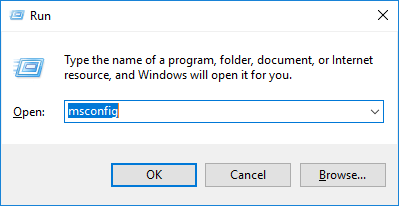
1. Press Win + R, type msconfig, and press Enter.
enter msconfig in run
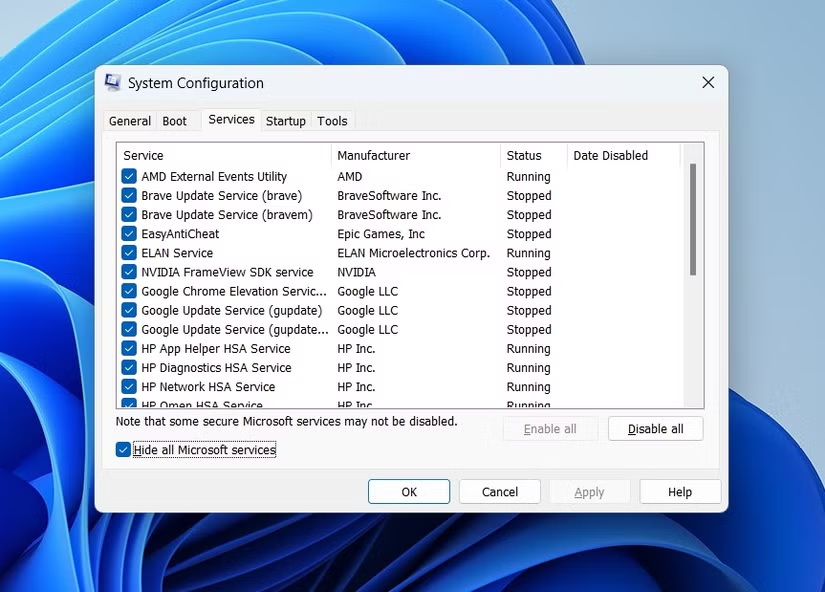
2. Go to the Services tab, check Hide all Microsoft services, then click Disable all.
msconfig service hide all microsoft services
  1. Go to the Startup tab and click Open Task Manager. Disable everything there.
  2. Restart.
If the crash stops, re-enable services one by one until you find the culprit.
Common scenario: The error is intermittent and happens when specific background apps are running.
One last safety check: Before moving to the more destructive options in Section 6, make sure you’ve used Renee PassNow’s Data Transfer feature (Section 2). Seriously. Don’t skip this.

Method 4 : Advanced Hardware Tests & Nuclear Options

Memory & storage diagnostics

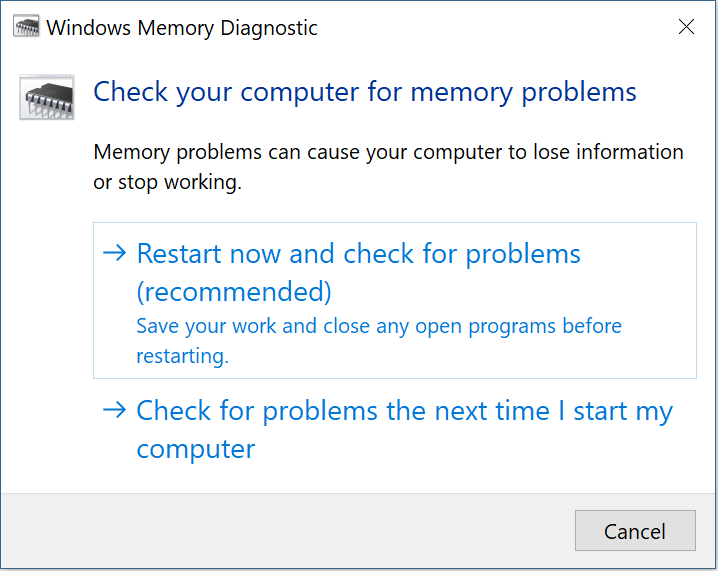
RAM testing: Search for “Windows Memory Diagnostic” or run mdsched.exe. Choose to restart and check for problems. Faulty RAM often causes random 0xEF crashes—especially if you’ve enabled XMP profiles.
Windows memory diagnostic i
Storage health check: Download CrystalDiskInfo (free) or similar tool. Look at the S.M.A.R.T. status of your boot drive. If it says “Caution” or “Bad,” the drive is failing. Replace it immediately. No software repair will fix physical drive failure.

System Reset (Keep My Files)

This is the middle ground. It reinstalls Windows while trying to preserve your personal files in a Windows.old folder. Apps will be removed. Success rate is decent, but it’s not a guarantee on unstable drives.
Go to Settings > Update & Security > Recovery > Reset this PC > Keep my files.

Clean Windows installation

The final fail-safe. This fixes everything—but it also erases everything.
  1. On a working PC, download the Media Creation Tool from Microsoft.
  2. Create a bootable Windows installation USB.
  3. Boot the crashed PC from that USB.
  4. When asked, choose Custom: Install Windows only (advanced).
  5. Delete the existing OS partition (usually the main C: drive partition).
  6. Install Windows onto the unallocated space.

Warning: If you skipped Section 2, all data on the system drive will be permanently lost. No recovery. No undo.

FAQ

How can I tell if bug check 0x000000ef is caused by a bad driver or a dying hard drive?

Look at the timing and behavior. Driver issues usually start right after an update and often let you reach Safe Mode. Hard drive problems tend to cause errors during heavy file access (copying, loading games) and show S.M.A.R.T. warnings. Run both CHKDSK and hardware diagnostics—if the drive’s S.M.A.R.T. status is bad, that’s your answer.

What should I do if Safe Mode also crashes with the same error?

First, rescue your data using a bootable tool like Renee PassNow. Then try Startup Repair from Windows installation media. If that fails, test your RAM and storage—Safe Mode crashing with 0xEF often points to failing hardware.

Will a System Reset really keep all my personal files safe?

“Keep my files” usually preserves your documents, photos, and downloads, but it’s not 100% guaranteed—especially on an unstable or failing drive. Always back up your important data with Renee PassNow before hitting that reset button.

What are the technical requirements for the Renee PassNow rescue USB?

You need a USB drive with at least 8GB of space. The tool supports both x64 and x86 systems and works on Windows 11 down to Windows XP.

Can high RAM usage trigger bug check 0x000000ef?

Yes, but usually not by itself. High RAM usage combined with faulty memory modules or unstable overclocks (like aggressive XMP profiles) can definitely trigger this stop code. Run Windows Memory Diagnostic to check your RAM health. If you’re overclocking, try resetting to default speeds first.
Renee Passnow – Professional Windows Password Remover

Remove Windows Login Password 3 steps for whole password remove process.

Enable/Create Administrator One click for creating new administrator and enable the disabled account.

Widely Use New version supports UEFI boot model, which can be used on more computers, laptops and even surfaces.

Multifuctional Data transfer, data recovery, bootable problem recovery can be run without system.

Highly compatible Windows 11/10/8.1/8/7/XP/Vista.

Remove Login Password Support Windows 11/10/8.1/8/7/XP/Vista.

Enable/Create Administrator One click for creating new administrator and enable the disabled account.

Easy to use No need of any professional knowledge or password reset disk.

Free TrialFree TrialNow 2000 people have downloaded!

User Comments

Page 1

Leave a Comment


Your comment has been submitted and is awaiting moderation.