author avatar
    Specialist of Customer Service Dept.
Last update by James Smith at 4 August 2025

Summary
Accidentally lost files to Avast Antivirus? This easy-to-follow guide shows you how to recover documents, apps, and other essentials that were mistakenly flagged or deleted by Avast on your Windows PC. Whether they’re stuck in quarantine or permanently removed, we’ll walk you through safe recovery methods—step by step.



Avast is a widely trusted antivirus program that safeguards your computer from harmful files sneaking in through downloads or external drives. It typically quarantines or deletes files it deems suspicious. While it’s great at catching threats, sometimes it mistakenly flags safe files—like a crucial work document or a trusted app. If that happens, you’ll want to know how to perform Avast file recovery to get those files back. This guide walks you through the process of recovering files affected by Avast, ensuring you can restore what’s yours without hassle.

How Does Avast Handle Suspicious Files for Avast File Recovery?

When Avast runs a scan, it follows a clear protocol for handling potentially harmful files. It first tries to repair the file. If that fails, it moves the file to a quarantine zone for safekeeping. In some cases, if the file can’t be fixed or quarantined, Avast may delete it permanently to protect your system.
This process applies to both manual scans and real-time virus detection.
Core Shields settings in Avast
When Avast detects potentially unwanted programs, it alerts you and suggests an action, giving you control over what happens next.
Notification settings in Avast
In our version of Avast, the Perform automatic actions during the scan option was disabled by default for all scan types, allowing manual control over file actions.
Disable automatic scan actions

Steps for Avast File Recovery

Avast handles suspicious files in two ways: it either quarantines them or deletes them outright. This section covers both scenarios, guiding you through Avast file recovery from the quarantine zone or recovering permanently deleted files.
Before proceeding, double-check that Avast removed the file by mistake. Restoring a malicious file could harm your system or cause further data loss, so proceed with caution.

Option 1: Avast File Recovery from Quarantine

Avast’s quarantine zone (previously called the Avast Chest) is where flagged files are stored. These files are removed from their original location but remain accessible for Avast file recovery. Restoring them is straightforward, similar to pulling something from the Recycle Bin, but only restore files you’re certain are safe.
Here’s how to do Avast file recovery from quarantine:
1. Launch Avast antivirus.
2. Click the Protection tab on the left sidebar.
3. Select the Quarantine option.
Select the Quarantine option.
4. Locate the files you want to recover in the quarantine list.
Locate the files you want to recover in the quarantine list.
5. Click the three dots next to Delete all, then choose Restore.
Restore files in Avast
6. Avast will return the file to its original location.
To prevent Avast from flagging the file again during future scans, select Restore and add exception instead of just Restore. This ensures Avast trusts the file moving forward.

Option 2: Recovery for Permanently Deleted Files on C Drive Using Renee PassNow

If the file isn’t in quarantine and was located on your system drive (usually the C drive), Avast likely deleted it completely, and it won’t appear in the Recycle Bin. Recovering files from the system drive is trickier because it’s constantly in use—system operations generate lots of write activity that can overwrite deleted data, lowering your chances of getting it back. That’s why, for files lost on the C drive, we recommend using an offline tool like Renee PassNow.
An offline tool for a Windows system typically refers to software that can run without Windows sytem. It loads separately from your main OS to provide access to repair tools when Windows can’t boot properly.
Renee Passnow – Professional Windows Password Remover

Remove Windows Login Password 3 steps for whole password remove process.

Recover the files Recover the deleted files without Windows system.

Transfer the data Transfer the important files of the computer with system.

Multifuctional Data transfer, data recovery, bootable problem recovery can be run without system.

Highly compatible Windows 11/10/8.1/8/7/XP/Vista. UEFI boot.

Remove Login Password Support Windows 11/10/8.1/8/7/XP/Vista. UEFI boot.

Recover the files Recover the deleted files without Windows system.

Transfer the data Transfer the important files of the computer with system.

Free TrialFree TrialNow 2000 people have downloaded!
Renee PassNow lets you recover data without booting into Windows, reducing the risk of overwriting your files. It’s a versatile recovery tool with a built-in feature called Undeleter, perfect for Avast file recovery from the system drive when every second counts.

Why Use Renee PassNow for System Drive Recovery?

  • Offline Recovery: It works from a bootable USB or CD/DVD, bypassing Windows to keep your data safe from further overwriting.
  • Easy to Use: The steps are simple, even if you’re not tech-savvy.
  • Works Everywhere: Compatible with Windows 11, 10, 8.1, 8, 7, Vista, and XP.

How to Use Renee PassNow for Avast File Recovery on the System Drive

1. Install Renee PassNow on a working computer.
Connect a USB drive, launch Renee PassNow, and pick “Create a Live USB” under “Step 1: Choose the creation method”. Back up any USB data first—this process wipes it clean.
2. Choose your system type (x64 or x86), hit Download Now to grab the ISO file, then click Create Live USB. When it’s done, click Eject USB.
use renee passnow to create usb to reset passnword
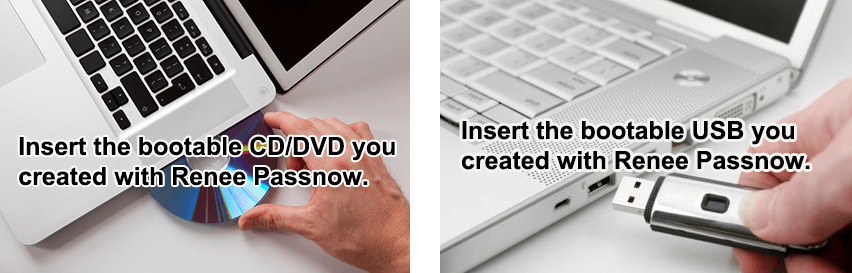
3. Plug the USB into the target computer, turn it on, and quickly press the BIOS key shown on-screen (it flashes for just a second or two).
Boot the target PC with the created password reset USB/CD/DVD.
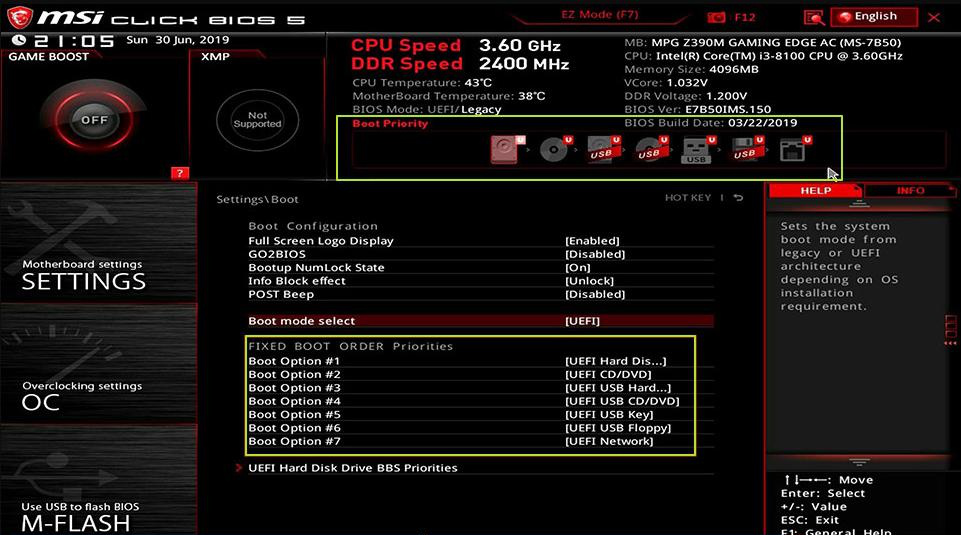
Keep tapping to enter BIOS settings. In the Boot Priority menu, set the USB as the first boot option, save, and restart. Refer to your device manual to identify the correct BIOS key if unsure.
select boot order
Common Server:
Server TypeEnter boot menu method

DELL

Press the F12 key repeatedly before the Dell logo appears on the screen.

HP

Press the F9 key multiple times when the HP logo is displayed.

Common Computers:
BIOS NameEnter boot menu method

ASRock

DEL or F2

ASUS

DEL or F2 for PCs/ DEL or F2 for Motherboards

Acer

DEL or F2

Dell

F12 or F2

ECS

DEL

Gigabyte / Aorus

DEL or F2

Lenovo (Consumer Laptops)

F2 or Fn + F2

Lenovo (Desktops)

F1

Lenovo (ThinkPads)

Enter then F1

MSI

DEL

Microsoft Surface Tablets

Press and hold Power and Volume Up buttons

Origin PC

F2

Samsung

F2

Toshiba

F2

Zotac

DEL

HP

Esc/ F9 for Boot Menu/ Esc/ F10/ Storage tab/ Boot Order/ Legacy Boot Sources

INTEL

F10

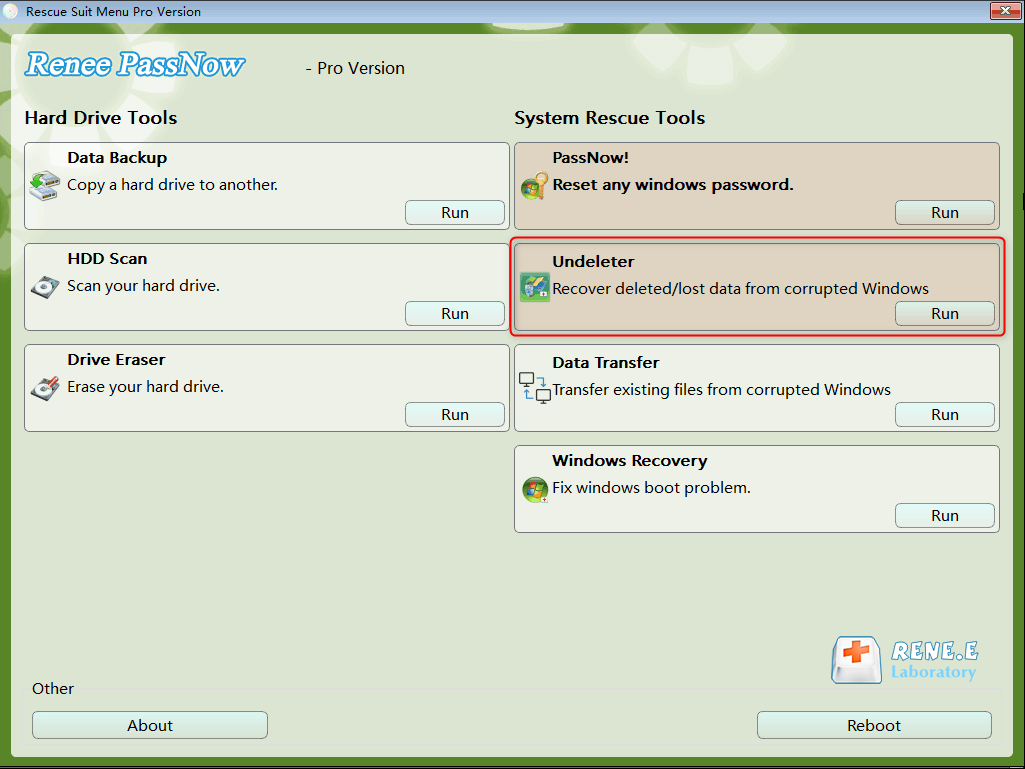
4. Wait for Renee PassNow to load, then pick “Undeleter” from the main screen and click Run.
data recovery function in Renee PassNow
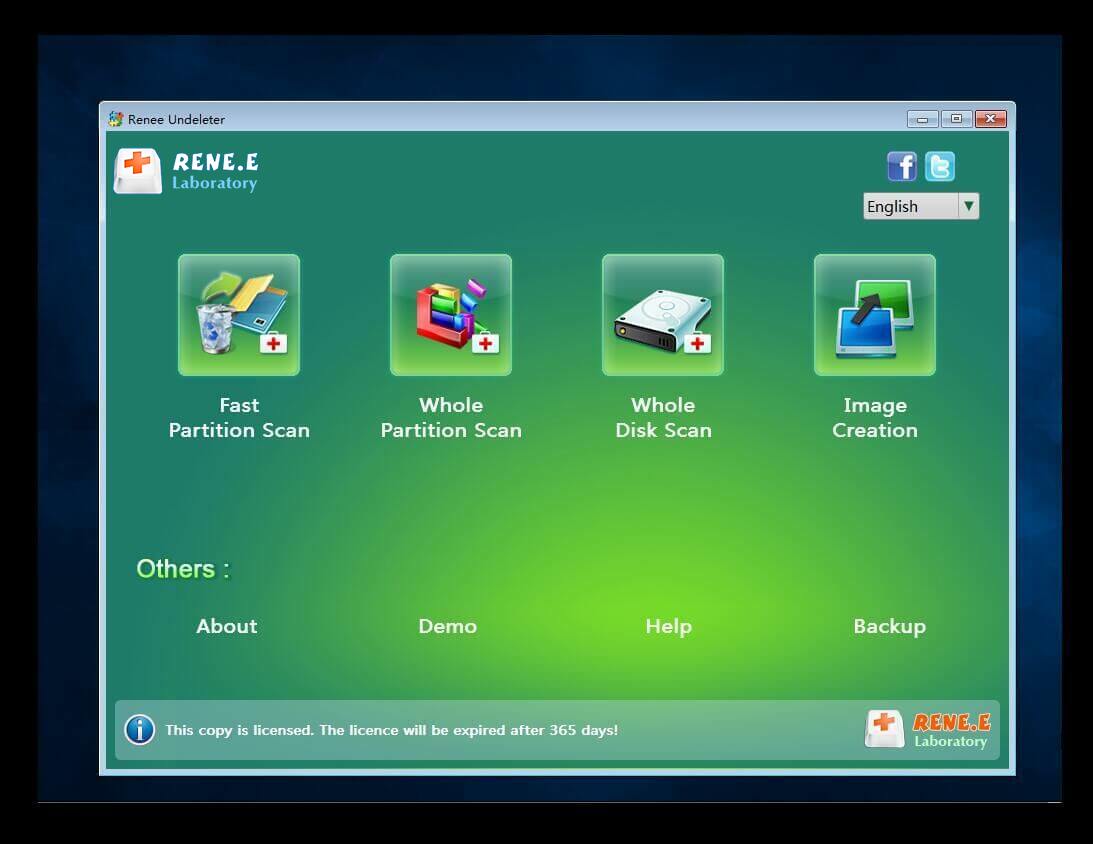
5. Pick a scan option to check the system drive.
scan the whole partition with renee passnow recovery function to reinstall windows 7
6. After scanning, choose the files you want, hit “Recover”, and save them to an external drive.
preview before recovery
Tip: Eject the USB safely after recovery before doing anything else.
Renee Passnow – Professional Windows Password Remover

Remove Windows Login Password 3 steps for whole password remove process.

Recover the files Recover the deleted files without Windows system.

Transfer the data Transfer the important files of the computer with system.

Multifuctional Data transfer, data recovery, bootable problem recovery can be run without system.

Highly compatible Windows 11/10/8.1/8/7/XP/Vista. UEFI boot.

Remove Login Password Support Windows 11/10/8.1/8/7/XP/Vista. UEFI boot.

Recover the files Recover the deleted files without Windows system.

Transfer the data Transfer the important files of the computer with system.

Free TrialFree TrialNow 2000 people have downloaded!
Renee PassNow gives you a fighting chance to recover files from the system drive by keeping things offline and safe.

Option 3: Recovery for Permanently Deleted Files on Non-System Drives Using Third-Party Tools

If the file Avast deleted was on a non-system drive—like a D drive or an external hard disk—your odds of recovery are better. These drives don’t face the same constant write operations as the system drive (C drive), so deleted data is less likely to get overwritten. For this, we recommend a tool like Renee Undeleter. It’s perfect for Avast file recovery when the lost file isn’t on the C drive.
Renee Undeleter - Powerful Data Recovery SoftwareRenee Undeleter data Recovery software

Easy to use Only simple steps to recover data from storage devices.

Multiple scan modes Fast partition scan, whole partition scan and whole disk scan for different recovery needs.

File types Support to recover pictures, videos, audios, documents, mails, etc.

Supported storage devices Recover data from recycle bin, SD card, external disk, etc.

Supported systems Windows 11,10, 8.1, 8, 7, Vista, XP, 2000 and Mac OS X10.6, 10.7, 10.8+.

Easy to use Only simple steps to recover data from storage devices.

Multiple scan modes - 3 scan modes for different recovery needs.

Supported storage devices Recover data from recycle bin, SD card, external disk, etc.

Free TrialFree TrialFree Trial

3000 users have downloaded Renee Undeleter and found data back!

Renee Undeleter is a pro-level tool that can dig up over 400 file types, and its simple design makes it a breeze to use. As long as new data hasn’t overwritten your file, it’s got a solid shot at bringing it back.

How to Use Renee Undeleter for Avast File Recovery on Non-System Drives
Here’s the step-by-step:
1. Download, install, and run Renee Undeleter on your PC.
Heads Up: Don’t install it on the drive you’re recovering from—new data could overwrite what’s left. Same goes for saving anything new there.
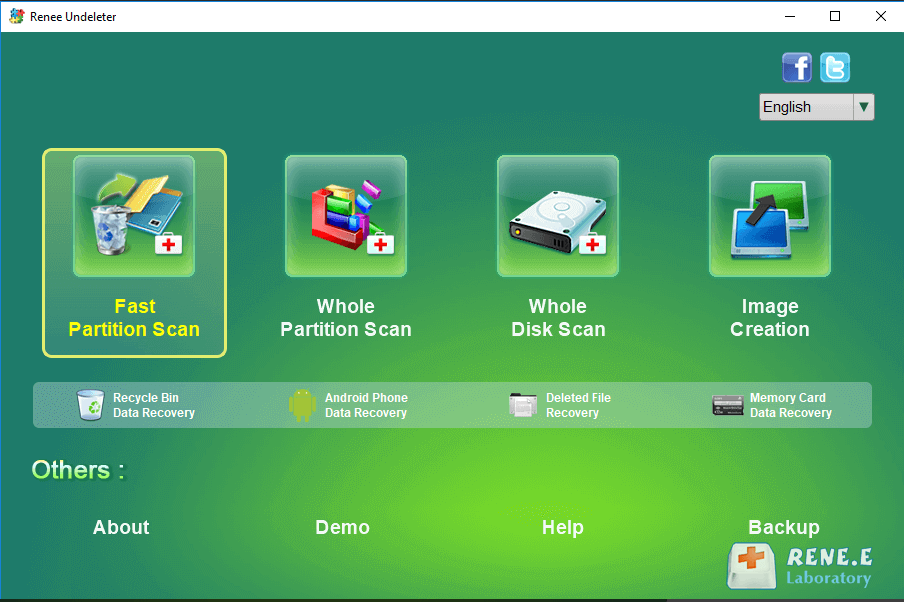
2. Pick [ Fast Partition Scan ] from the main screen.
Renee Undeleter, select Fast Partition Scan
Options include:
Fast Partition Scan: Great for quick deletes or Recycle Bin empties.
Whole Partition Scan: For formatted or inaccessible partitions.
Whole Disk Scan: Deep dive across the disk.
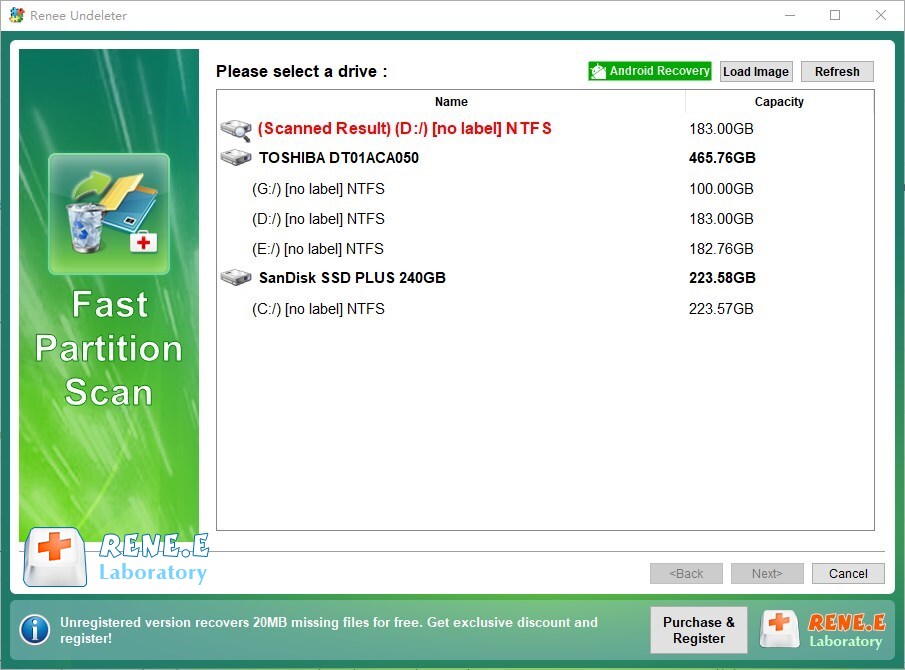
3. Choose the partition with your lost file and hit [ Next ] .
select partition to scan for fast partition scan
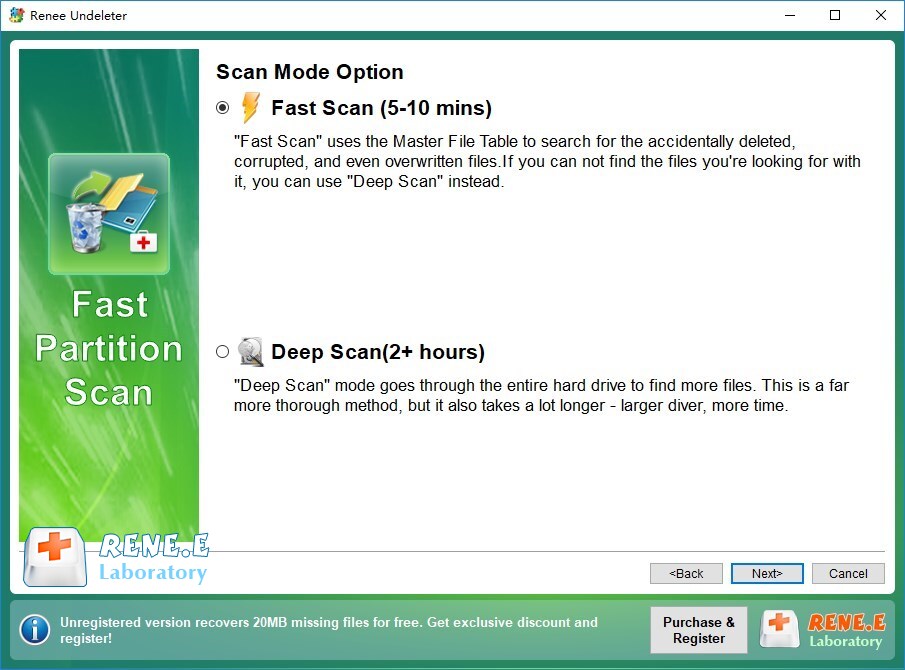
4. Select [ Fast Scan ] and click [ Next ] to start.
Select Fast scan in Fast Partition Scan
[Fast Scan] checks the first 30GB quickly. If nothing turns up, try [Deep Scan] - it takes longer but digs deeper.
5. Wait for the scan to finish.
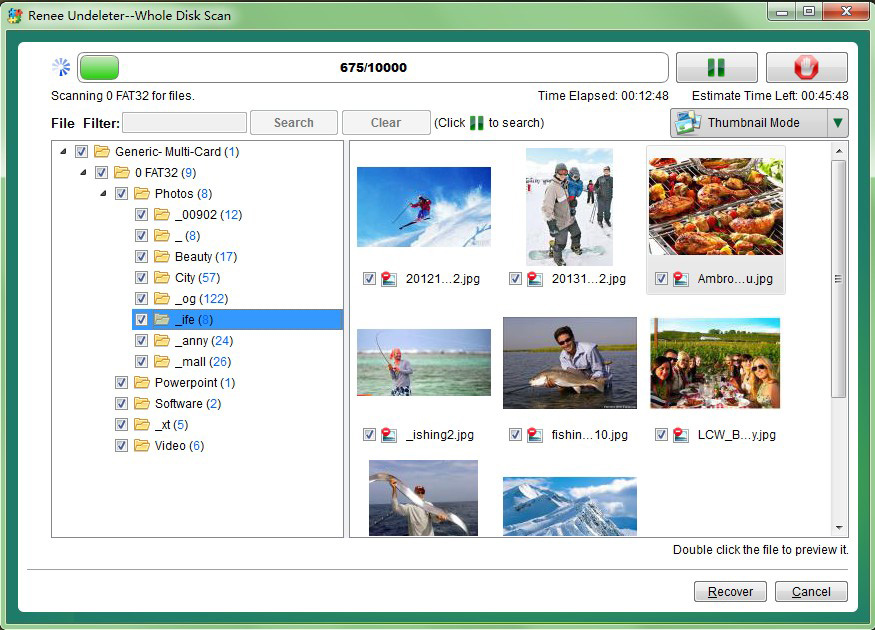
Preview files by double-clicking, pick what you want, and hit [ Recover ] to save them elsewhere.
preview before recovery
Renee Undeleter is your go-to for non-system drives—just act fast to keep new data from ruining your chances.
Renee Undeleter - Powerful Data Recovery SoftwareRenee Undeleter data Recovery software

Easy to use Only simple steps to recover data from storage devices.

Multiple scan modes Fast partition scan, whole partition scan and whole disk scan for different recovery needs.

File types Support to recover pictures, videos, audios, documents, mails, etc.

Supported storage devices Recover data from recycle bin, SD card, external disk, etc.

Supported systems Windows 11,10, 8.1, 8, 7, Vista, XP, 2000 and Mac OS X10.6, 10.7, 10.8+.

Easy to use Only simple steps to recover data from storage devices.

Multiple scan modes - 3 scan modes for different recovery needs.

Supported storage devices Recover data from recycle bin, SD card, external disk, etc.
Free TrialFree TrialFree Trial

3000 users have downloaded Renee Undeleter and found data back!

Option 4: Avast File Recovery Using Windows File History

Windows File History is a built-in backup tool that can assist with Avast file recovery, but only if you enabled it before the file was deleted. This method is reliable for files stored in standard folders like Desktop, Documents, Downloads, Music, Pictures, or Videos.
If the file was in a custom folder or system root, File History won’t help, and you’ll need Renee PassNow (for C drive) or Renee Undeleter (for other drives).
Here’s how to recover with File History:
1. Open Control Panel on your Windows PC.
search windows Control Panel
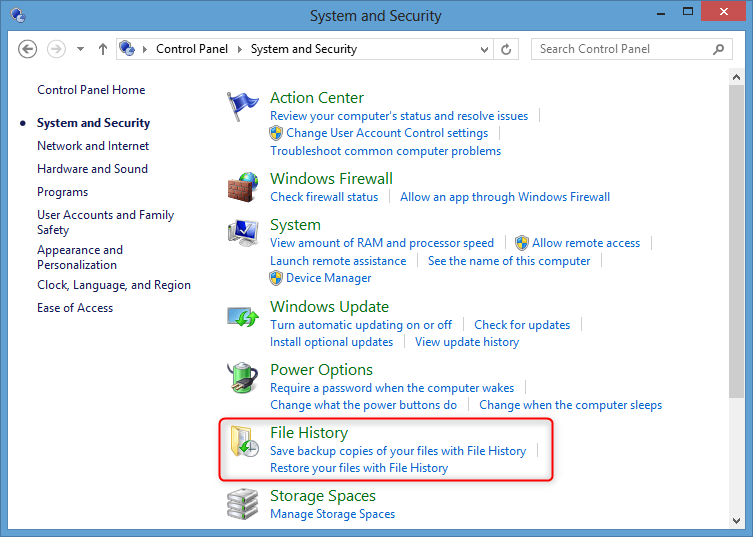
2. Click System and Security.
3. Select File History.
select file history
4. Click Restore personal files on the left.
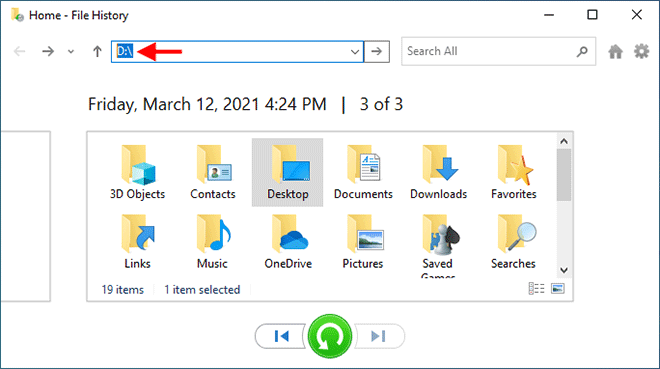
5. Browse folders, use the arrows to check backup versions, pick your file, and hit Restore.
Windows File History

Preventing File Deletion for Smoother Avast File Recovery

To avoid needing Avast file recovery in the future, tweak Avast’s settings to stop automatic deletions. By default, it quarantines suspicious files it can’t fix, but you can make it ask you first.
Here’s how:
1. Open Avast antivirus.
2. Click Menu, then Settings.
3. Go to Protection > Core Shields.
Avast Core Shields
4. Under Malware, set it to Ask.
Avast, Under Malware, set it to Ask
5. In Potentially unwanted tools and programs, choose Ask me what to do.
Now Avast will check with you before acting. Add key folders to the Exceptions tab to skip them during scans.

FAQ for Avast File Recovery

How do I find quarantined files for Avast file recovery?

To locate files in quarantine for Avast file recovery:
1. Open Avast Antivirus.
2. Click Protection in the sidebar.
3. Select Quarantine to view all isolated files.
You can review, restore, or delete these files as needed.

What if Avast file recovery from quarantine fails?

If the file isn’t in quarantine, use a recovery tool like Renee Undeleter for non-system drives or Renee PassNow for the system drive (C drive). If you had Windows File History enabled, it can restore files from backups in folders like Documents or Pictures.

How do I remove files from quarantine to avoid Avast file recovery?

To delete files from quarantine:
1. Go to Protection > Quarantine.
2. Select the files, click the three dots next to Delete all, and choose Delete to remove them permanently or Restore for Avast file recovery.

Is Avast file recovery from quarantine safe?

Restoring files from quarantine is safe only if you’re certain the file is harmless. Avast flags files for a reason, but it can misjudge safe ones like work documents or trusted apps. Before restoring:
- Verify the file’s source is legit.
- Scan it with another antivirus or upload it to VirusTotal for a multi-engine check.
If you’re confident it’s safe, choose Restore and add exception to stop future flagging. When in doubt, don’t restore to keep your PC secure.

Why did Avast delete my file instead of quarantining it?

Avast may delete a file outright if it deems it too risky to repair or quarantine. This can happen during aggressive scans or if automatic actions are enabled. To prevent this, go to Settings > Protection > Core Shields and set actions to Ask for malware and potentially unwanted programs. Check your settings to avoid surprises.

Can I recover files if I don’t have a backup?

Yes, if the files aren’t in quarantine, tools like Renee PassNow (for system drives) or Renee Undeleter (for non-system drives) can scan for deleted files. Act fast—new data can overwrite what you’re trying to recover. For system drives, Renee PassNow’s offline mode is key to avoid further data loss.

How can I tell if a file is safe to restore?

Before restoring from quarantine, make sure the file comes from a known and trusted source—like a document you created or a legitimate download from a verified website. If it’s an executable or installer, checking the developer’s official site or user reviews is a smart move.For added safety, use multi-engine scanning tools to assess the file for threats. The most popular choice is VirusTotal, but there are other solid options worth trying:
🔍 Recommended Free Online File Scanners
NameKey FeaturesLink

VirSCAN

Multi-engine virus scanning, supports Chinese UI

virscan.org

Tencent Habo

Behavior analysis and threat grading

habo.qq.com

Maldun

Sandbox-based file and URL behavior inspection

maldun.com

ThreatBook Sandbox

Behavior analysis with threat intelligence

s.threatbook.cn

Hybrid Analysis

Detailed sandbox analysis for pros

hybrid-analysis.com

Jotti's Malware Scan

Fast, minimalist scanner with multiple AV engines

virusscan.jotti.org

ANY.RUN

Interactive sandbox—you can monitor the malware live

any.run

NoDistribute

Does not share samples with antivirus vendors

nodistribute.com

QiAnXin Sandbox

Deep analysis from China-based provider

sandbox.ti.qianxin.com

ScanVir

Fast scans and basic threat reports

scanvir.com

📌 Pro Tip: Avoid restoring any file unless you’re confident it’s safe. When in doubt, ask a trusted tech-savvy friend—or skip the restore entirely to be safe. And always scan suspicious files through multiple platforms for a second (or third) opinion.

What if my system drive files are gone and Windows won’t boot?

If files on your C drive are deleted and your system won’t start, use Renee PassNow. Create a bootable USB on another PC, boot from it, and use the Undeleter feature to recover files without risking overwrites. Save recovered files to an external drive to keep them secure.
Renee Undeleter - Powerful Data Recovery SoftwareRenee Undeleter data Recovery software

Easy to use Only simple steps to recover data from storage devices.

Multiple scan modes Fast partition scan, whole partition scan and whole disk scan for different recovery needs.

File types Support to recover pictures, videos, audios, documents, mails, etc.

Supported storage devices Recover data from recycle bin, SD card, external disk, etc.

Supported systems Windows 11,10, 8.1, 8, 7, Vista, XP, 2000 and Mac OS X10.6, 10.7, 10.8+.

Easy to use Only simple steps to recover data from storage devices.

Multiple scan modes - 3 scan modes for different recovery needs.

Supported storage devices Recover data from recycle bin, SD card, external disk, etc.
Free TrialFree TrialFree Trial

3000 users have downloaded Renee Undeleter and found data back!

User Comments

Page 1

Leave a Comment


Your comment has been submitted and is awaiting moderation.