author avatar
    Senior Product Manager
Last update by James Smith at 2 December 2025

Summary
Learn how to recover media files on Windows 10 and 11—even after emptying the Recycle Bin or using Shift+Delete. This expert guide covers both free and paid solutions to get your photos and videos back quickly and safely.



Just accidentally deleted your irreplaceable vacation photos, 4K drone videos, wedding footage, or that precious voice memo of your kid’s first words?
Already emptied the Recycle Bin or used Shift+Delete and now panicking?
Relax – your media files are almost certainly still on the drive and can be recovered, even if they disappeared weeks ago. This completely updated guide shows you every working method (free and paid) to recover deleted media files on Windows 11 and 10 with the highest possible success rate.

Critical First Rule: Stop Using the Drive Immediately!

The moment you realize files are gone, stop saving anything new to that drive. Every new file, Windows update, or even browser cache can overwrite your deleted photos and videos forever.
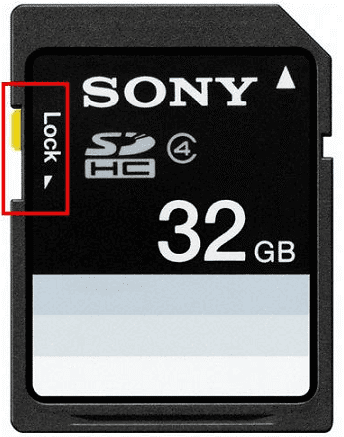
Mount external drives/SD cards as “read-only” if possible, and install any recovery software on a different drive (usually your C: drive is safe).
lock sd card

Quick Method Comparison Table (Jump Straight to What Works for You)

MethodSuccess Rate for Media FilesDifficultyCostBest ForJump to SectionPreview Available
Recycle Bin + OneDrive BackupLow–MediumVery EasyFreeVery recent deletions onlyMethod 1✅ Yes (Recycle Bin & OneDrive both allow preview)
Microsoft Windows File RecoveryMediumHardFreeRecent deletions, command-line fansMethod 2❌ No (command-line tool, no preview)
Renee Undeleter (Recommended)Very High (up to 98% reported)EasyPaid*Photos, 4K/RAW/GoPro videos, formatted drivesMethod 3✅ Yes (GUI tool supports preview before recovery)
Previous Versions / File HistoryLowEasyFreeOnly if you previously enabled backupMethod 4❌ No
Free scan & preview – you only pay if you actually see and want your files back.

Method 1: Check Recycle Bin and OneDrive Backup

Note for USB drives, SD cards, and external HDDs: These devices do not have a Recycle Bin, and OneDrive usually doesn’t sync them automatically. If your media was on an external device, skip straight to Method 2 or 3.
Most Windows 10/11 users have their Desktop, Documents, and Pictures folders automatically synced to OneDrive. Even if you emptied the Recycle Bin on your PC, the files might still be in:
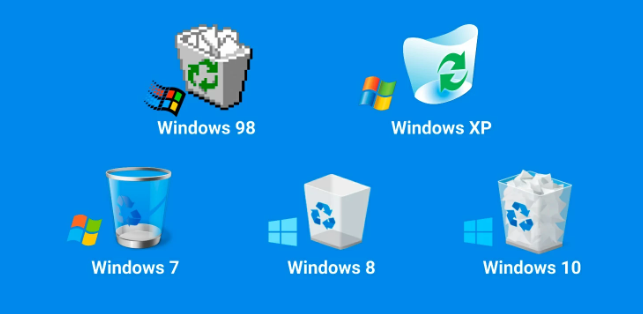
1. Recycle Bin – Double-click the desktop icon → type the file name → right-click → Restore.
Recycle Bins
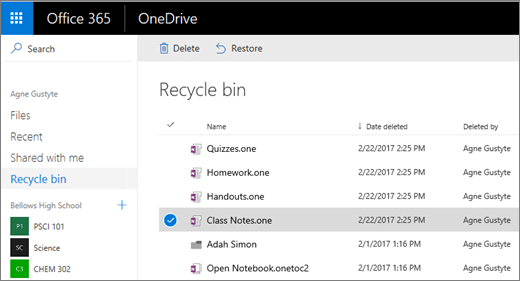
2. OneDrive Recycle Bin – Log into onedrive.com→ Recycle bin (left sidebar) → restore from there (keeps files for 30–93 days).
onedrive recycle bin

Method 2: Microsoft Windows File Recovery (Free Official Tool)

Microsoft’s own command-line tool is completely free and surprisingly powerful for recent deletions.
Windows File Recovery is a free Microsoft Store app that can recover photos, videos, and documents from local drives, SD cards, and USB sticks – even after the Recycle Bin is emptied.
It works in two modes (Regular and Extensive) and supports NTFS, FAT, exFAT, and ReFS file systems. In 2025, it’s still the best completely free option if you’re comfortable with a few commands.
Advantages:
  • 100% free and official Microsoft tool
  • Works on external drives and SD cards
  • No installation on the affected drive needed

Disadvantages:

  • Command-line only – intimidating for beginners
  • No preview before recovery
  • Lower success rate than professional GUI tools on formatted drives

Step-by-step:
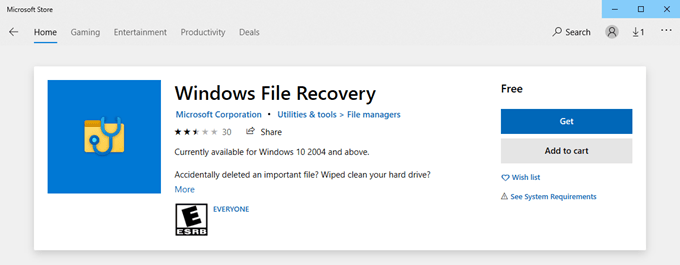
1. Open Microsoft Store → search “Windows File Recovery” → Install.
windows file recovery in Windows store
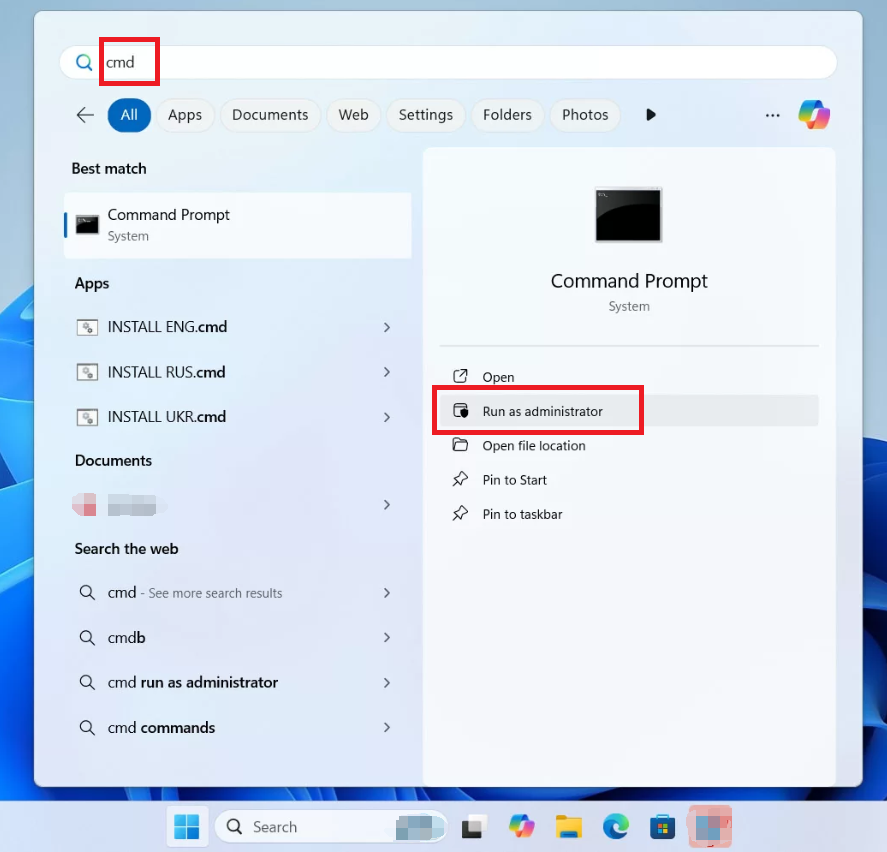
2. Run Command Prompt as Administrator.
Run Command Prompt as Administrator
3. Basic syntax (example for D: drive, saving to E:):

winfr D: E: /regular /n \Users\Pictures\*.*

(Use /extensive instead of /regular for deeper scan.)
Windows File Recovery command help
4.Type “Y” to confirm → wait → recovered files appear in a “Recovery_” folder on the destination drive.
Windows File Recovery result
If commands scare you, move to the next method – most users get far better results with a graphical tool.

Method 3: Renee Undeleter – The Most Reliable Solution in 2025

Renee Undeleter is a professional data recovery tool that can help you retrieve lost or deleted files from your computer. It is a user-friendly and comprehensive tool that offers a high success rate for file recovery – especially for media files like 4K videos, RAW photos, GoPro footage, and drone recordings.
With Renee Undeleter, you can find and recover around 400 file formats even after overwriting has begun, and the process is incredibly simple thanks to its modern user interface and numerous quality-of-life features. It runs completely locally (no cloud upload), so your private family videos never leave your PC.
In addition to signature scanning, Renee Undeleter also supports file system-based recovery with all major Windows file systems, making it perfect for both recently deleted files and long-lost media from formatted or corrupted drives.
Renee Undeleter - Powerful Data Recovery SoftwareRenee Undeleter data Recovery software

Easy to use Only simple steps to recover data from storage devices.

Multiple scan modes Fast partition scan, whole partition scan and whole disk scan for different recovery needs.

File types Support to recover pictures, videos, audios, documents, mails, etc.

Supported storage devices Recover data from recycle bin, SD card, external disk, etc.

Supported systems Windows 11,10, 8.1, 8, 7, Vista, XP, 2000 and Mac OS X10.6, 10.7, 10.8+.

Easy to use Only simple steps to recover data from storage devices.

Multiple scan modes - 3 scan modes for different recovery needs.

Supported storage devices Recover data from recycle bin, SD card, external disk, etc.
Free TrialFree TrialFree Trial

3000 users have downloaded Renee Undeleter and found data back!

Step-by-step:

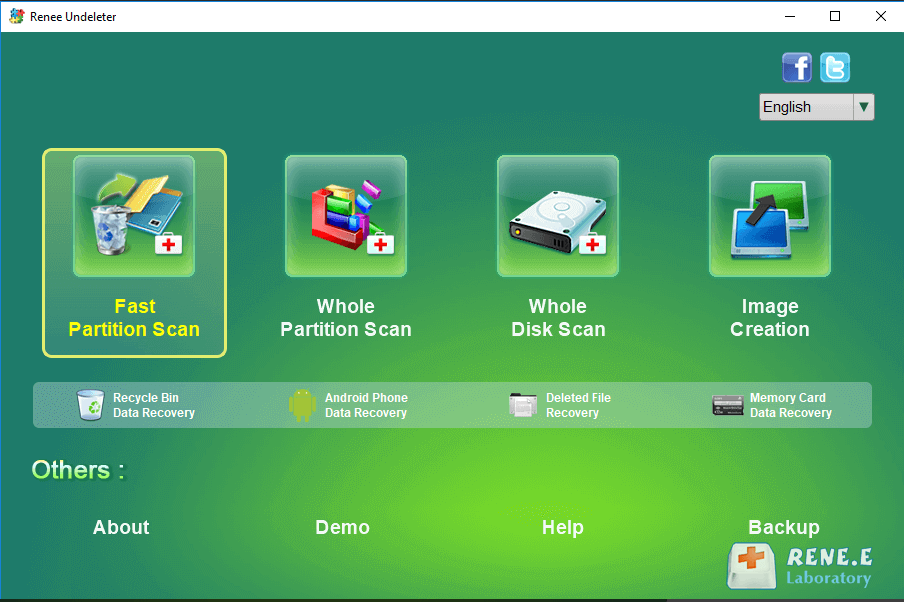
Step 1: Download, install and run Renee Undeleter on your Windows computer.
Important: Avoid installing the software on the disk containing the data to be recovered to prevent overwriting.
Renee Undeleter, select Fast Partition Scan
Data Recovery Features
Fast Partition Scan: Recovers files from accidental deletions or Recycle Bin clearance.
Whole Partition Scan: Restores files from inaccessible or formatted partitions.
Whole Disk Scan: Analyzes partition information for a comprehensive disk scan.
Image Creation: Generates a partition mirror image for backup purposes (extra safety).
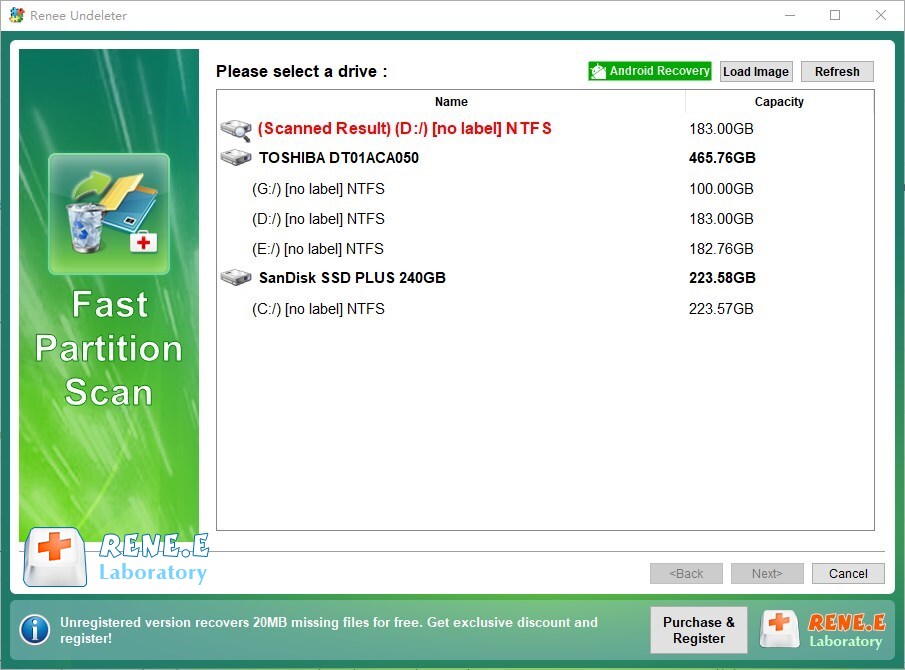
Step 2: Choose the drive → click [ Next ] .
select partition to scan for fast partition scan
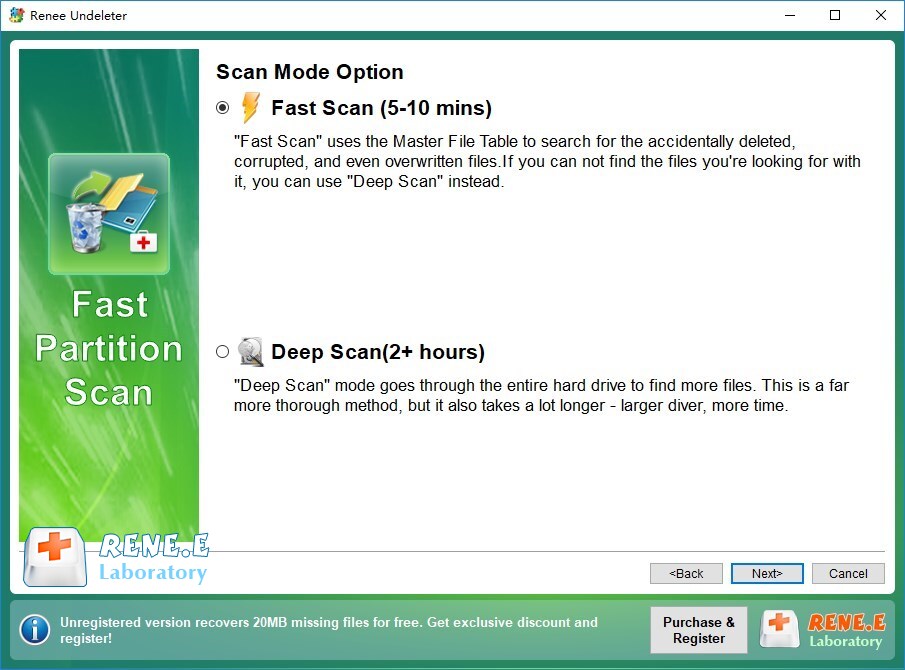
Step 3: Choose [ Fast Scan ] first (scans first 30GB – super quick).
If nothing shows up, switch to [ Deep Scan ] – it takes longer but finds files other tools miss.
Select Fast scan in Fast Partition Scan
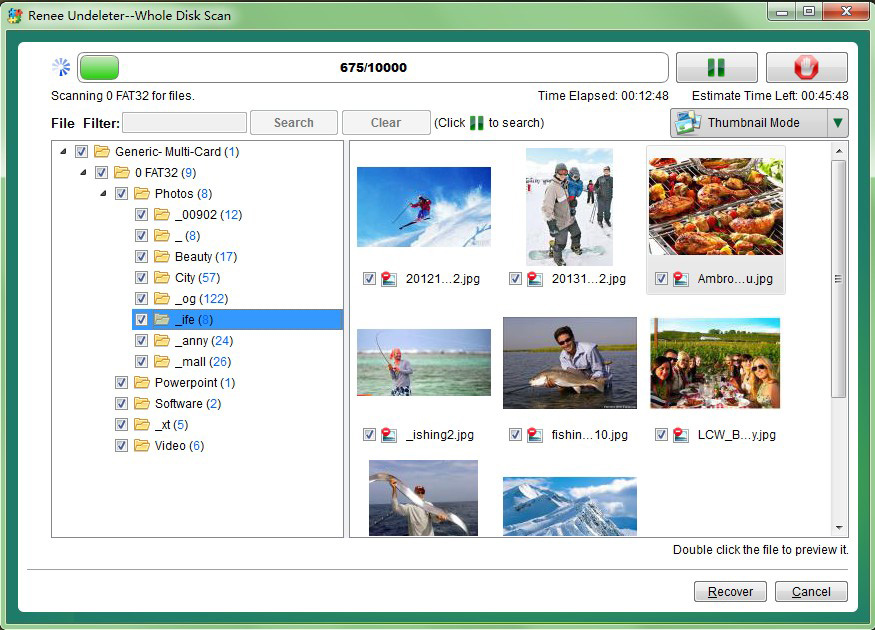
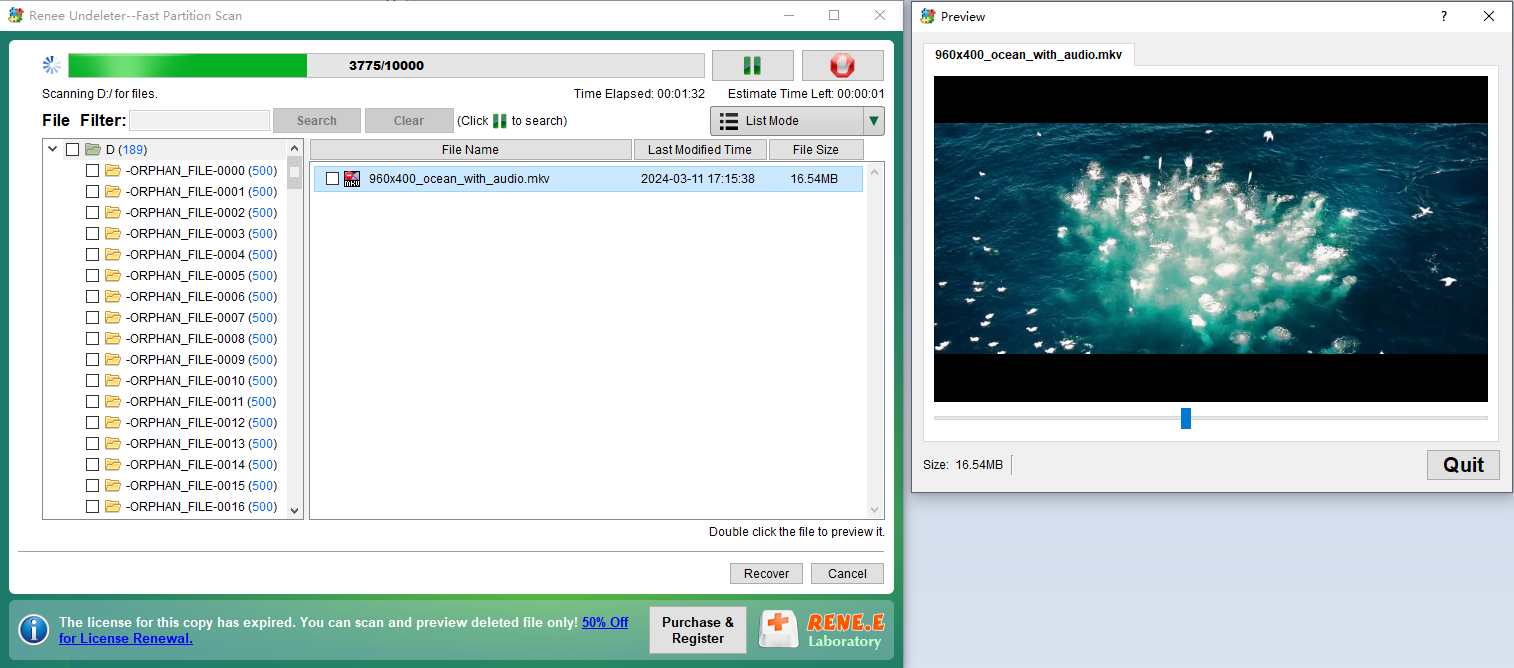
Step 4: Preview files (double-click photos/videos) → tick what you want → click [ Recover ] → save to a different drive.
preview before recovery
preview mkv file
Renee Undeleter - Powerful Data Recovery SoftwareRenee Undeleter data Recovery software

Easy to use Only simple steps to recover data from storage devices.

Multiple scan modes Fast partition scan, whole partition scan and whole disk scan for different recovery needs.

File types Support to recover pictures, videos, audios, documents, mails, etc.

Supported storage devices Recover data from recycle bin, SD card, external disk, etc.

Supported systems Windows 11,10, 8.1, 8, 7, Vista, XP, 2000 and Mac OS X10.6, 10.7, 10.8+.

Easy to use Only simple steps to recover data from storage devices.

Multiple scan modes - 3 scan modes for different recovery needs.

Supported storage devices Recover data from recycle bin, SD card, external disk, etc.

Free TrialFree TrialFree Trial

3000 users have downloaded Renee Undeleter and found data back!

Method 4: Windows Previous Versions / File History

This recovery option only works if File History or System Protection was enabled before the deletion occurred. Without prior setup, no restore points or backups will be available.
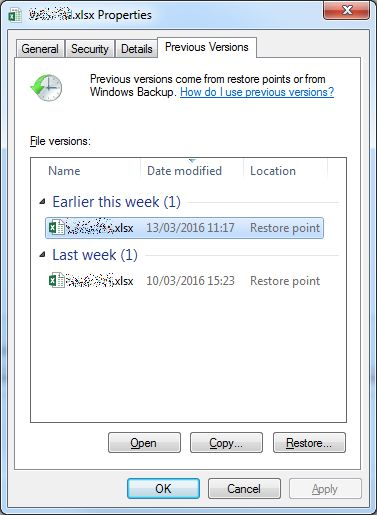
1. Right‑click the folder that originally contained your files → select Properties → open the Previous Versions tab.
previous version
2. Alternatively, open File History from Control Panel → choose Restore personal files → browse and restore the desired version.
Limitations:

  • Most home users never enable these features, so recovery success is uncommon.
  • Works only if backups or restore points were created in advance.
  • Despite the low success rate, it’s a quick check that takes less than 10 seconds and may save you time if enabled.

Final Thoughts

Getting back deleted photos and videos on Windows is easier and more successful than ever – as long as you act quickly and choose the right tool. While free methods can sometimes help with very recent deletions, Renee Undeleter consistently delivers the highest recovery rates for precious media files, especially from formatted drives, SD cards, and GoPro/drone cameras.
Don’t gamble with your memories – start the free scan now and see exactly what’s recoverable.

FAQ

Can I recover 4K videos or RAW photos that were permanently deleted months ago?

Yes. As long as the drive space hasn’t been heavily reused, Renee Undeleter’s Deep Scan and Whole Partition Scan can still retrieve large 4K/RAW files even months later. Success stories from 2025 show recoveries of files deleted 6–12 months prior.

Is it safe to recover files from an SD card used in my camera or drone?

Absolutely. Connect the card, run Renee Undeleter, and recover directly – the software is read-only. Just don’t take new photos until recovery is complete.

Will recovering files damage my drive or existing data?

No. Professional tools like Renee Undeleter only read data; they never write to the source drive during scanning. Always save recovered files to a different location.

Can I recover only specific media types (e.g., just MP4 videos or NEF RAW files)?
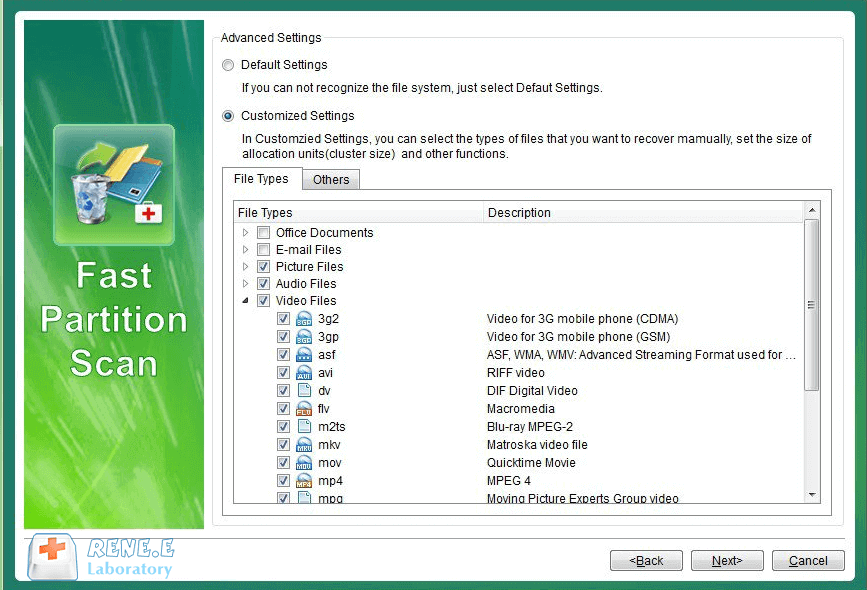
Yes. After scanning, you can filter by Images, Videos, Audio, or even specific extensions to speed things up and focus only on what you need.
undeleter file type
Renee Undeleter - Powerful Data Recovery SoftwareRenee Undeleter data Recovery software

Easy to use Only simple steps to recover data from storage devices.

Multiple scan modes Fast partition scan, whole partition scan and whole disk scan for different recovery needs.

File types Support to recover pictures, videos, audios, documents, mails, etc.

Supported storage devices Recover data from recycle bin, SD card, external disk, etc.

Supported systems Windows 11,10, 8.1, 8, 7, Vista, XP, 2000 and Mac OS X10.6, 10.7, 10.8+.

Easy to use Only simple steps to recover data from storage devices.

Multiple scan modes - 3 scan modes for different recovery needs.

Supported storage devices Recover data from recycle bin, SD card, external disk, etc.

Free TrialFree TrialFree Trial

3000 users have downloaded Renee Undeleter and found data back!

User Comments

Page 1

Leave a Comment


Your comment has been submitted and is awaiting moderation.