author avatar
    Senior Product Manager
Last update by Emma Johnson at 24 June 2026

Summary
This technical guide outlines multiple methods to recover unsaved notepad file data across Windows 10 and Windows 11 operating systems. It details the utilization of built-in temporary directories, session restore features, and professional data recovery software to restore lost text documents.




You’re typing away, maybe taking meeting notes or drafting an idea, and then—click. You close Notepad without saving. Or the power flickers. Or Windows crashes. Suddenly the work you just did is gone, and you’re left staring at a blank screen, trying to remember what you wrote.
recover unsaved notepad files
The problem is that classic Notepad doesn’t autosave in real time. Everything you type lives only in your computer’s memory (RAM) or in temporary data that Windows may or may not keep. Unless you manually saved your work as a .txt file, it exists in a fragile state that can vanish in an instant.
There’s a meaningful difference between the Notepad versions on Windows 10 and Windows 11, and understanding that difference matters for recovery:
ItemWindows 10 NotepadWindows 11 Notepad

Multi-tab Support

❌ None

✔️ Yes (Multi-tab editing supported since 2023)

Auto-save Feature

❌ No auto-save

⚠️ Partial auto-save: Automatically restores unsaved content upon closing (but not real-time saving)

Encoding & Line-endings

Basic UTF-8 / CRLF

Improved encoding detection & line-ending compatibility (LF, CRLF auto-identification)

Critical warning: Stop using the computer the moment you realize your Notepad content is lost. Every new file you save, every program you install, and even normal background activity can overwrite the temporary files or disk sectors that might still contain your text. The less you do, the better your chances.

Renee Undeleter - Powerful Data Recovery SoftwareRenee Undeleter data Recovery software

Easy to use Only simple steps to recover data from storage devices.

Multiple scan modes Fast partition scan, whole partition scan and whole disk scan for different recovery needs.

File types Support to recover pictures, videos, audios, documents, mails, etc.

Supported storage devices Recover data from recycle bin, SD card, external disk, etc.

Supported systems Windows 11,10, 8.1, 8, 7, Vista, XP, 2000 and Mac OS X10.6, 10.7, 10.8+.

Easy to use Only simple steps to recover data from storage devices.

Multiple scan modes - 3 scan modes for different recovery needs.

Supported storage devices Recover data from recycle bin, SD card, external disk, etc.
Free TrialFree TrialFree Trial

3000 users have downloaded Renee Undeleter and found data back!

Immediate First-Aid: Built-in Windows Recovery Methods

Before you try anything else, follow this rule: do not save new files, install software, or restart your PC. If you can, keep the system exactly as it is until you’ve exhausted these recovery options.

Check Recycle bin First

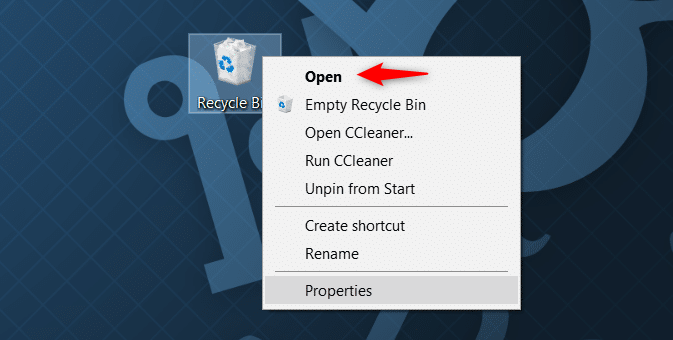
open recycle bin windows 10
After checking the Recycle Bin, the next place to look is Windows’ temporary storage. While Notepad doesn’t include an auto‑recovery feature, Windows may leave behind fragments of unsaved text in temp folders after a crash.

For Windows 10 Users (Temporary Folders)

Notepad does not have an auto-recovery feature like Word. However, when Windows crashes or shuts down unexpectedly, you may sometimes find leftover temporary files that contain unsaved text. This is not guaranteed, but it’s worth checking.
The main location to check is:

%Temp%

Steps:
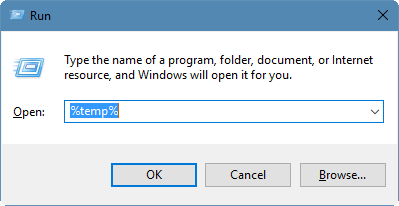
1. Press Win + R to open the Run dialog.
2. Type %temp% and press Enter.
type temp in run dialog
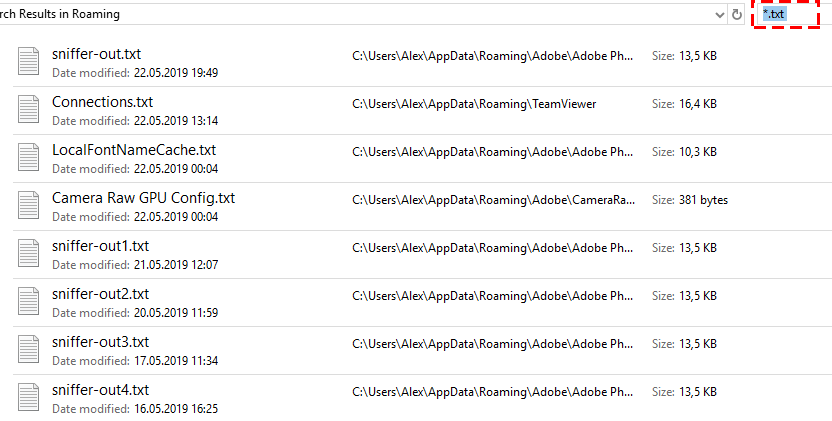
3. Input *.txt or *.tmp in File Explorer search bar.
find_txt_in_temp_folder
4. Sort files by Date modified and look for items created around the time you lost your work.
Notepad crash files usually appear as random .tmp files or files without an extension. They don’t follow a fixed naming pattern, so rely on the timestamp and file size. Try opening suspicious files with Notepad to see if your text is inside.

For Windows 11 Users (Session Restore)

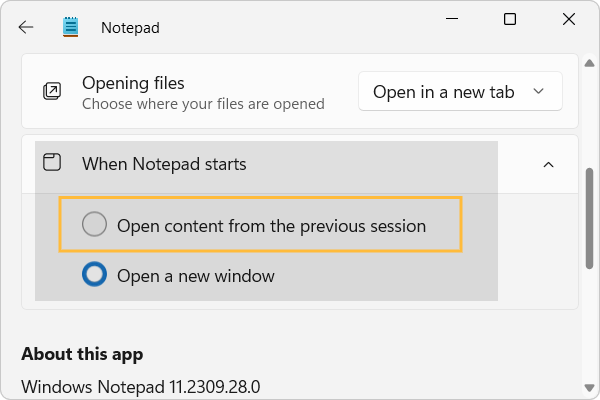
Windows 11 Notepad handles this a bit differently. If you have “Continue previous session when Notepad starts” enabled in Settings, the app may automatically reopen your unsaved tabs after a crash or unexpected close.
notepad settings Continue previous session when Notepad starts
Try simply launching Notepad again. If your tabs reappear, great—but don’t walk away yet. This is a temporary restore in the app’s UI, not a saved file on your disk. Immediately use File > Save As to save a real .txt file before you close anything.
Important limitation: These built-in methods have a low success rate. Windows creates temporary files inconsistently, and the session restore only works under specific conditions. If you don’t find your text here, don’t assume it’s gone forever—there are other options.

Checking Temporary Files

If the session restore doesn’t bring back your text, you can still look for leftover temporary files:
1. Press Win + R to open the Run dialog.
2. Type %temp% and press Enter.
3. In the Temp folder, sort files by Date modified.
4. Look for files created around the time you lost your work. These may be random .tmp files or files without an extension.
5. Open suspicious files in Notepad to see if your text is inside.

Checking AppData Cache

Windows 11 Notepad also stores session data in its AppData package folder:
1. Press Win + R.
2. Type %AppData%\Local\Packages and press Enter.
3. Find the folder named something like Microsoft.WindowsNotepad_*.
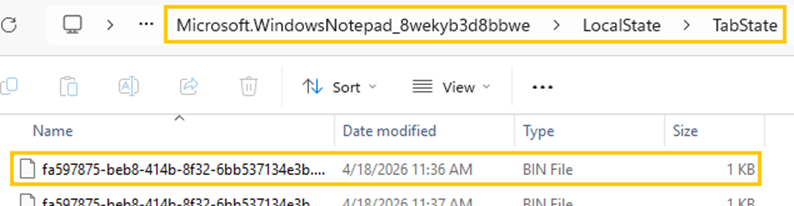
4. Find LocalState\TabState in this folders and look for recent files—these may be session data or temp files.
Windows 11 notepad LocalState bin file
5. Browse inside for cache or temporary files.
In Windows 11, the .bin files you see inside the LocalState folder are essentially session cache files created by Notepad. They aren’t regular text documents but binary data containers that store the state of your open tabs and unsaved content so the app can attempt to restore them after a crash or reboot.

No true auto‑save: Notepad doesn’t permanently save unsaved files. Session restore and temp files are only stopgaps.

Using Previous Versions

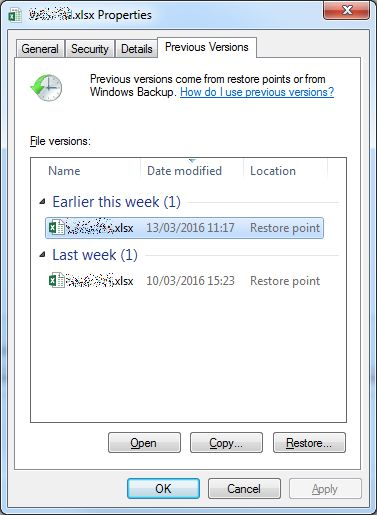
If you had saved the file at least once before losing your changes, right-click the .txt file (or the folder containing it) in File Explorer, choose Properties, then go to the Previous Versions tab. If File History or System Restore Points are enabled, you may find an older copy to restore.
Folder properties window with Previous Versions tab
This method is helpful for recovering earlier versions of a saved file, but it won’t help if your content was never saved to disk at all.

Recommended Professional Solution: Renee Undeleter

Built-in recovery options often come up empty. When that happens, it’s easy to assume your text is gone forever. But the data often still exists on the disk as recoverable fragments—it’s just not accessible through normal Windows tools.
That’s where specialized recovery software comes in. These tools scan raw disk sectors and recognize file signatures, essentially finding orphaned data that Windows has lost track of.
Renee Undeleter - Powerful Data Recovery SoftwareRenee Undeleter data Recovery software

Easy to use Only simple steps to recover data from storage devices.

Multiple scan modes Fast partition scan, whole partition scan and whole disk scan for different recovery needs.

File types Support to recover pictures, videos, audios, documents, mails, etc.

Supported storage devices Recover data from recycle bin, SD card, external disk, etc.

Supported systems Windows 11,10, 8.1, 8, 7, Vista, XP, 2000 and Mac OS X10.6, 10.7, 10.8+.

Easy to use Only simple steps to recover data from storage devices.

Multiple scan modes - 3 scan modes for different recovery needs.

Supported storage devices Recover data from recycle bin, SD card, external disk, etc.

Free TrialFree TrialFree Trial

3000 users have downloaded Renee Undeleter and found data back!

Renee Undeleter is well-suited for this job for a few reasons:
- Text preview before recovery: You can double-click any file in the scan results and view its contents in the built-in viewer. This lets you confirm you’re recovering the right text instead of blindly restoring files and hoping for the best.
- Broad file format support: It recognizes over 400 file formats, including plain text, UTF-8, UTF-16, and ASCII .txt files.
- Straightforward interface: The wizard-style design makes it accessible even if you’re not technically inclined. You don’t need to understand file systems or disk structures to use it effectively.

Critical installation rule: You must install Renee Undeleter on a different drive than the one you’re recovering from. If you install it on your C: drive (where your lost data sits), you risk overwriting the very fragments you’re trying to recover

Step-by-Step: Using Renee Undeleter to Recover .txt Files

Download Renee Undeleter first.
download now download now

a. Select the Appropriate Scan Mode

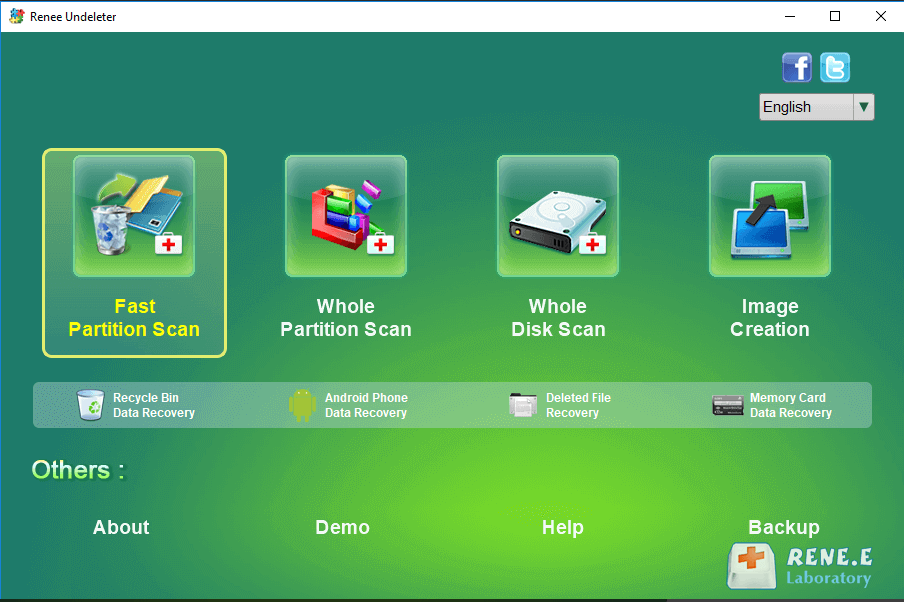
Launch Renee Undeleter from your safe installation location. You’ll see several scan options:
Renee Undeleter interface: select Fast Partition Scan mode
- Fast Partition Scan: Use this for recent losses, such as accidentally closing Notepad without saving. It’s quick and works well for recently deleted or lost files.
- Whole Partition Scan: Choose this if the drive is inaccessible, formatted, or if the Fast Scan doesn’t find what you need. It’s more thorough but takes longer.
- Whole Disk Scan: For comprehensive analysis across an entire physical drive.
- Image Creation: A backup option for advanced users.
For most unsaved Notepad scenarios, start with Fast Partition Scan. If that fails, move to Whole Partition Scan.

b. Choose the Partition and Scan Depth

Select the partition where your lost text was likely stored—usually C: for the system drive—and click Next.
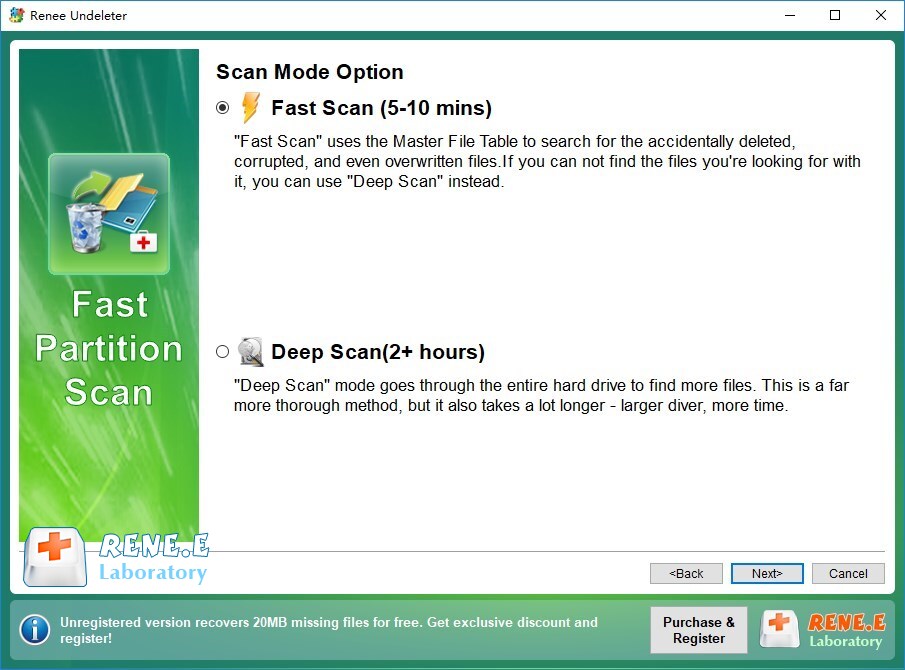
You’ll be asked to choose between Fast Scan and Deep Scan:
Select Fast Scan option during Fast Partition Scan recovery
- Fast Scan: Scans the initial 30 GB of the drive, which is where most temporary file fragments are located. Start here.
- Deep Scan: Performs a sector-by-sector search. It’s more thorough and can find data Fast Scan misses, but it takes considerably longer.
If Fast Scan doesn’t find your text, run Deep Scan on the same partition.

c. Preview, Select, and Recover

Once the scan finishes, you’ll see a list of recoverable files. Look for .txt files or .tmp files with the right date and size.
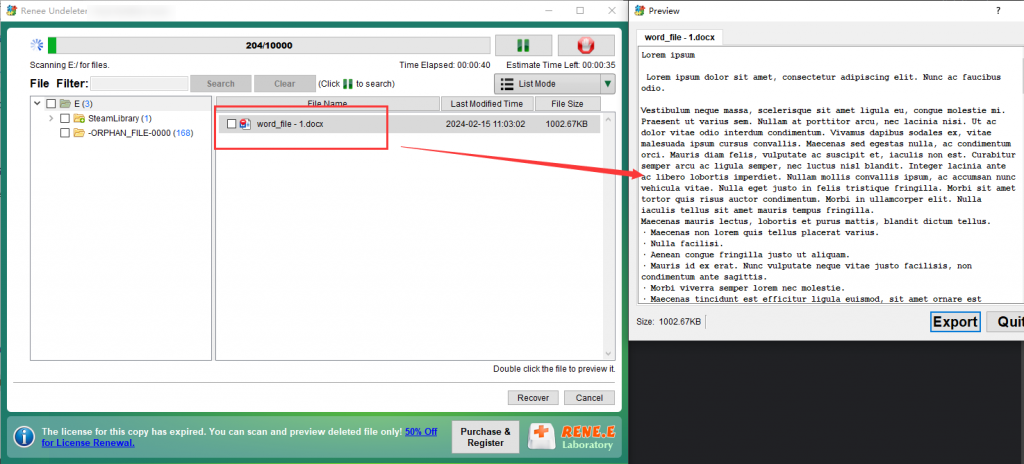
To verify content: Double-click any file to open it in the built-in preview viewer. This shows you exactly what’s inside, so you can confirm it’s the text you lost before committing to the recovery.
preview file in Renee Undeleter
Check the files you want to recover, then click the Recover button.
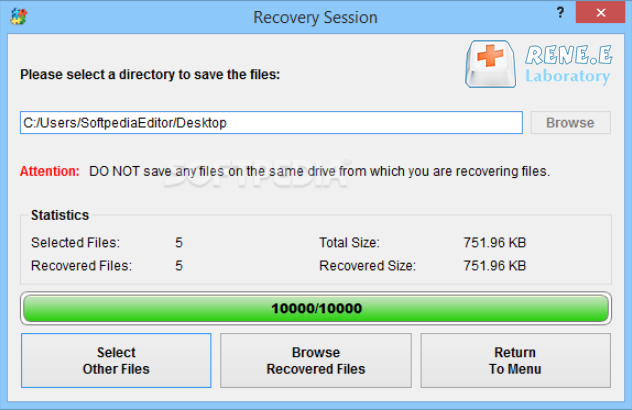
Critical step: Save the recovered files to a different drive—not the one you scanned. Use an external drive, a USB stick, or a different internal partition like D:. This prevents your recovered data from overwriting the very files you just restored.
Choose destination drive for recovered files in Renee Undeleter

Alternative Methods & Recovery Comparison

If the built-in Windows tools don’t work, you have a few other situational options to explore.

a. Alternative Free Methods (Situational)

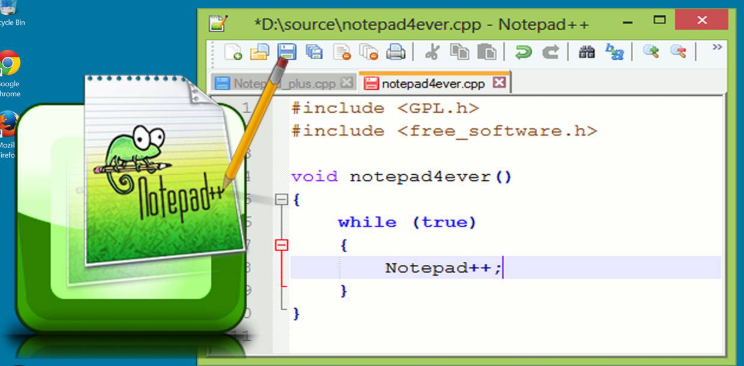
Notepad++ Backup: Many people confuse Notepad with Notepad++ (a more powerful third-party editor). If you actually use Notepad++, check %APPDATA%\Notepad++\backup for .bak backup files. The catch is that you must have enabled backup settings in Notepad++ beforehand—it doesn’t happen automatically.
notepad plus plus
Recycle Bin & File History: These only help if the file was saved at least once. If you accidentally deleted a .txt file, check the Recycle Bin first. You can also right-click the file or folder, choose Properties, and look for “Restore previous versions” if File History is enabled. But again, neither method works for content that was never saved in the first place.

b. Recovery Method Comparison Matrix

MethodTypical Success RateDifficultyBest-fit Scenario

Temp Folder Search

Very Low

Beginner

Windows 10 crash, minimal disk activity

Win 11 Session Restore

High

Beginner

Windows 11 app crash or unexpected close

Renee Undeleter

High

All Users

Deep recovery, deleted files, or when temp files are missing

Notepad++ Backup

High

Intermediate

Power users who enabled backup in Notepad++

File History

Situational

Beginner

Previously saved files with restore points enabled

Next step after failure: Try a free scan.

Renee Undeleter - Powerful Data Recovery SoftwareRenee Undeleter data Recovery software

Easy to use Only simple steps to recover data from storage devices.

Multiple scan modes Fast partition scan, whole partition scan and whole disk scan for different recovery needs.

File types Support to recover pictures, videos, audios, documents, mails, etc.

Supported storage devices Recover data from recycle bin, SD card, external disk, etc.

Supported systems Windows 11,10, 8.1, 8, 7, Vista, XP, 2000 and Mac OS X10.6, 10.7, 10.8+.

Easy to use Only simple steps to recover data from storage devices.

Multiple scan modes - 3 scan modes for different recovery needs.

Supported storage devices Recover data from recycle bin, SD card, external disk, etc.

Free TrialFree TrialFree Trial

3000 users have downloaded Renee Undeleter and found data back!

Best Practices to Prevent Future Data Loss

Recovering lost text is stressful. The best strategy is to avoid the situation entirely.
For Windows 11 users: Turn on session restore in Notepad Settings—it helps when the app crashes. But don’t rely on it as a substitute for saving. The moment your content reappears, use File > Save As to secure it.
Consider better tools: If you regularly take notes or write in Notepad, switch to an editor with real backup features. Notepad++ with backup enabled is a solid choice, as are lightweight cloud-synced apps like Notion, Obsidian, or even OneNote. They save automatically and sync across devices.
Build the habit: Press Ctrl + S frequently. It takes a split second and protects you from most losses. Also, enable “Show file extensions” in File Explorer Options so you can clearly see what you’re working with.
Keep Renee Undeleter handy: Having recovery software installed on a USB drive means you’re prepared if something goes wrong. It’s a safety net, not a crutch—don’t let it replace regular saving.

FAQ: Frequently Asked Questions

Does Windows 11 Notepad save my work automatically when the PC shuts down?

It offers session restore, which can reopen your unsaved tabs after the app is relaunched—but only if you have “Continue previous session” enabled. This is not real-time autosave. The content isn’t saved to a file until you manually click “Save As.”

Is Renee Undeleter free to try, and can it really preview unsaved .txt files?

You can download the software and run scans for free to see what’s recoverable. Yes, it includes a preview feature—just double-click any file in the scan results to view its contents before recovering.

What is the very first thing I should do after accidentally closing Notepad without saving?

Stop everything. Don’t save new files, don’t install software, and don’t restart the computer. Every action risks overwriting the temporary data that might still contain your text. Check temp folders immediately, and if they come up empty, run recovery software from a different drive.
Renee Undeleter - Powerful Data Recovery SoftwareRenee Undeleter data Recovery software

Easy to use Only simple steps to recover data from storage devices.

Multiple scan modes Fast partition scan, whole partition scan and whole disk scan for different recovery needs.

File types Support to recover pictures, videos, audios, documents, mails, etc.

Supported storage devices Recover data from recycle bin, SD card, external disk, etc.

Supported systems Windows 11,10, 8.1, 8, 7, Vista, XP, 2000 and Mac OS X10.6, 10.7, 10.8+.

Easy to use Only simple steps to recover data from storage devices.

Multiple scan modes - 3 scan modes for different recovery needs.

Supported storage devices Recover data from recycle bin, SD card, external disk, etc.
Free TrialFree TrialFree Trial

3000 users have downloaded Renee Undeleter and found data back!

User Comments

Page 1

Leave a Comment


Your comment has been submitted and is awaiting moderation.