author avatar
    Senior Program Developer
Last update by Emma Johnson at 30 July 2025

Summary
This guide details how to crack Windows 11 password when you’re locked out, offering step-by-step methods for users. Learn safe, legal, and effective ways to regain access to your computer using proven techniques.



It’s a feeling we all dread. You turn on your computer, ready to get to work or browse the web, but your mind goes blank. You can’t remember your Windows 11 password. We’ve all been there, and it’s incredibly frustrating, especially when you need access to your files right away. This guide is all about how to crack a Windows 11 password, getting you back into your own machine without the headache.
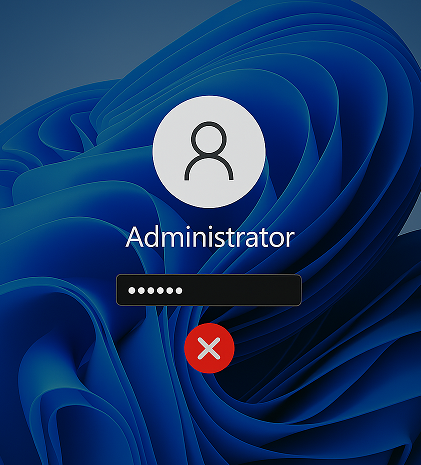
Windows 11 login failed
Security is a double-edged sword. While passwords protect our data from others, they can sometimes lock us out, too. If you’ve tried every combination you can think of and are still stuck at the login screen, don’t worry. There are several effective methods to get past this hurdle. Let’s walk through the best ways to solve this problem.

What to Know Before You Try to Crack a Windows 11 Password

First and foremost, you should only be attempting this on a computer that you personally own. Trying to gain access to someone else’s PC or laptop without permission is illegal and a serious invasion of privacy.

Preparation

Before you jump into the methods below, there are a few things you need to have ready. Getting these sorted out first will make the process much smoother.
A Second Computer: You’ll need access to another working computer to download recovery software and create a bootable USB drive.
A Blank USB Drive: A USB flash drive with at least 8GB of space is essential for creating a password reset disk. Make sure there’s nothing important on it, as the process will erase all its data.
Internet Connection: A stable internet connection is needed on the second computer to download the necessary tools.

Crack vs. Reset: Understanding the Difference

When trying to regain access to your Windows 11 PC, you might come across terms like “crack” and “reset” for password recovery. While both aim to help you log back in, they differ in approach, speed, and suitability. Additionally, certain software or files encrypted with your current account password may be affected, especially with older Windows encryption methods. Below, we break down the differences to help you choose the right method.
AspectCrack PasswordReset Password

Definition

Recover original password(eg. Ophcrack) [1]

Clear or replace SAM hash (eg. Renee PassNow) [2]

Speed

hours to days

5–10 minutes

Suitable for

When you need the old password; software dependencies

Fast access; Local Accounts; Microsoft Account

Encrypted data

Preserves EFS access

May break EFS access [3]

[1] Uses rainbow tables or brute-force tools like Ophcrack to retrieve the existing password.
[2] Directly edits the Windows SAM file’s password hash (e.g., Renee PassNow).
[3] Files encrypted with older EFS may become inaccessible; BitLocker remains unaffected.
Before choosing a method, consider how it impacts encrypted data, as explained below.

Important Considerations for Encrypted Data
EFS is only available on Windows Pro, Enterprise, and Server editions. It’s not supported on Home editions.
Before you mess with your Windows password—whether by cracking it with Ophcrack or resetting it through Renee PassNow—pause and think about how your files are protected. On older Windows editions (pre–Windows 7), the Encrypting File System (EFS) ties file access directly to your account password. If you reset that password, EFS can’t decrypt your files anymore, leaving them locked away. Cracking the password instead recovers the original credentials so your EFS-encrypted data stays accessible.
Modern disk-encryption solutions like BitLocker operate independently of your login credentials. They rely on separate recovery keys or a TPM module, so they remain intact whether you crack or reset your Windows password. No matter which route you choose, always back up your critical data beforehand. And if you suspect you’ve got EFS-protected files, consider cracking the password first—or consult a data-recovery specialist—to avoid an unexpected data loss.

Method 1: How to Crack Windows 11 Password with the Official Microsoft Reset Page

If you use a Microsoft account to log into your Windows 11 PC, this is by far the easiest and quickest solution. You can usually tell if you’re using a Microsoft account if your email address is displayed on the login screen. This method won’t work for local accounts, but for everyone else, it’s a lifesaver.
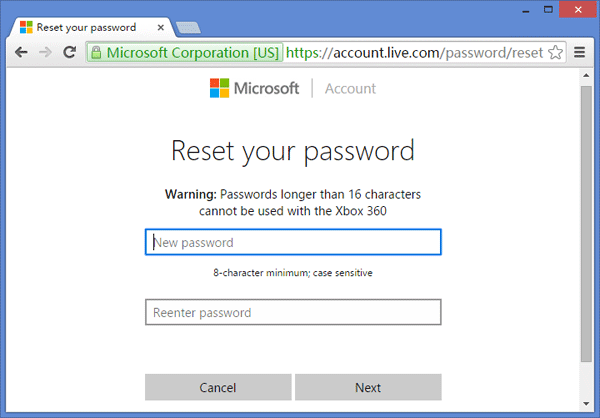
set the new password for Microsoft account

Key Features

  • Completely free and official method.
  • Very simple and fast.
  • Guaranteed success if you have access to your recovery email or phone number.
  • Works for any Windows version linked to a Microsoft account.

Here’s a step-by-step guide on how to get it done

1. On a different computer or phone, open a web browser and navigate to the Microsoft Password Reset page. Enter the email address, phone number, or Skype name associated with your Microsoft account and click Next.
2. Microsoft needs to verify that it’s really you. You’ll be asked to receive a security code on your recovery email or phone number. Choose your preferred method and click Get code.
3. Check your email or phone for the code. Enter it on the verification page and click Next.
4. Once your identity is confirmed, you’ll be taken to the password reset screen. Type in your new password twice, and click Next. That’s it! You can now use this new password to log into your locked Windows 11 computer.

Method 2: How to Crack Windows 11 Password Using a Recovery Tool (Renee PassNow)

Renee PassNow works for Local Account and Microsoft Account.
If you’re using a local account or don’t have access to your Microsoft account’s recovery information, you’ll need a different approach. This is where a dedicated Windows password recovery tool comes in handy. Renee PassNow is widely considered one of the best options available because it’s reliable, fast, and easy to use, even if you’re not a tech expert. It can reset or remove passwords for any user account on your system without losing any data.
Renee Passnow – Professional Windows Password Remover

Remove Windows Login Password 3 steps for whole password remove process.

Recover the files Recover the deleted files without Windows system.

Transfer the data Transfer the important files of the computer with system.

Multifuctional Data transfer, data recovery, bootable problem recovery can be run without system.

Highly compatible Windows 11/10/8.1/8/7/XP/Vista. UEFI boot.

Remove Login Password Support Windows 11/10/8.1/8/7/XP/Vista. UEFI boot.

Recover the files Recover the deleted files without Windows system.

Transfer the data Transfer the important files of the computer with system.

Free TrialFree TrialNow 2000 people have downloaded!
For users locked out of their Windows 11 PC, Renee PassNow offers a straightforward solution to regain access. Whether you’ve forgotten your local account password, need to bypass an administrator account, or even deal with a Microsoft account, this tool simplifies the process. It’s particularly useful for those who didn’t create a password reset disk in advance, a common scenario for many users. Renee PassNow creates a bootable USB or CD/DVD to reset your password, and it even includes features like data transfer to safeguard your files if your system fails to boot. Compatible with Windows 11, 10, 8.1, 8, 7, Vista, and XP, it supports multiple languages and provides additional tools like disk erasure, file extension changes, and secure file transfers.
Note: If you’re using a Microsoft account, Renee PassNow will convert it to a local account during the reset process. After logging in, you’ll need to reconnect your Microsoft account.

Here’s how to use Renee PassNow to crack your Windows 11 password

Step 1: Download and Install Renee PassNow
On a second computer that you can access, visit the official Renee PassNow website and download the software. Install it by following the on-screen instructions, selecting the version compatible with your operating system.
Step 2: Create a Bootable USB or CD/DVD
Launch Renee PassNow on the second computer and insert a blank USB flash drive (at least 8GB) or a CD/DVD. In the software, choose the option to create a bootable media and follow the prompts to prepare the USB or disc. This will erase all data on the USB, so ensure it’s empty.
Create New Windows 11 Password Reset Disk with Renee PassNow
Step 3: Boot the Locked PC from the Bootable Media
Insert the bootable USB or CD/DVD into your locked Windows 11 computer. Restart the PC and enter the BIOS/UEFI settings by by pressing the appropriate key (commonly F2, Delete, or Esc). Set the boot order to prioritize the USB or CD/DVD. Below is a quick reference for common systems:
Boot the target PC with the created password reset USB/CD/DVD.
Common Servers:
Server TypeEnter Boot Menu Method

DELL

Press F12 repeatedly before the Dell logo appears.

HP

Press F9 multiple times when the HP logo is displayed.

Common Computers:
BIOS NameEnter Boot Menu Method

ASRock

DEL or F2

ASUS

DEL or F2 for PCs/ DEL or F2 for Motherboards

Acer

DEL or F2

Dell

F12 or F2

ECS

DEL

Gigabyte / Aorus

DEL or F2

Lenovo (Consumer Laptops)

F2 or Fn + F2

Lenovo (Desktops)

F1

Lenovo (ThinkPads)

Enter then F1

MSI

DEL

Microsoft Surface Tablets

Press and hold Power and Volume Up buttons

Origin PC

F2

Samsung

F2

Toshiba

F2

Zotac

DEL

HP

Esc/ F9 for Boot Menu/ Esc/ F10/ Storage tab/ Boot Order/ Legacy Boot Sources

INTEL

F10

Step 4: Select Password Reset Function
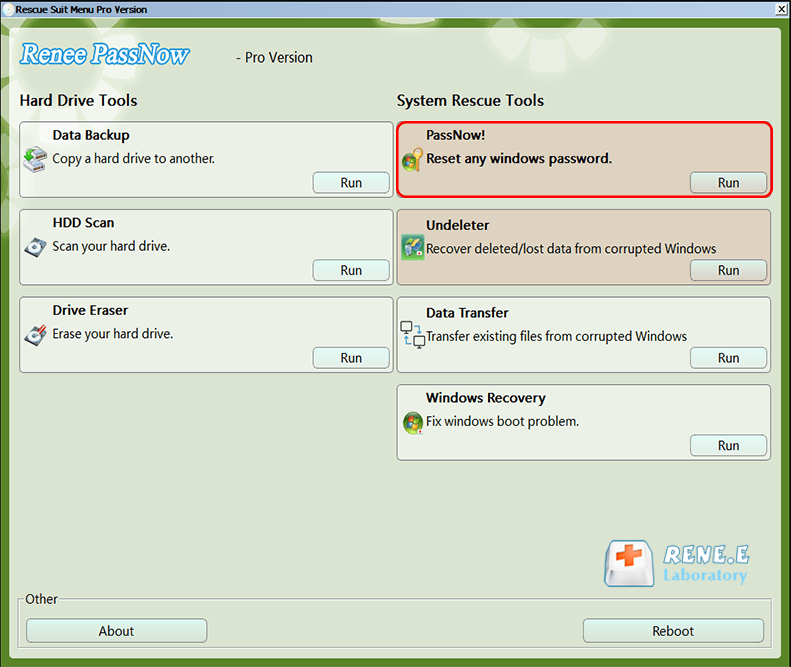
Once the PC boots from the media, Renee PassNow will load its interface. Select the “PassNow!” function to proceed with the password reset process.
click on passnow to reset login password
Step 5: Resetting the Password
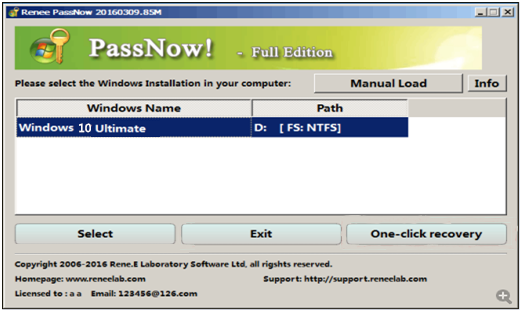
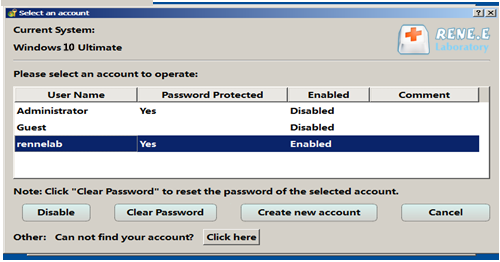
In the Renee PassNow interface, select your Windows 11 system from the list, then choose the user account you want to reset. Click the “Clear Password” button to remove or reset the password for the selected account.
Select target Windows system in the list
Select target user account in the list
Step 6: Reboot the PC
After the password is reset, remove the bootable media and restart your computer. You should now be able to log into your Windows 11 account without a password. If it was a Microsoft account, remember to reconnect it to your Microsoft account afterward.
Renee Passnow – Professional Windows Password Remover

Remove Windows Login Password 3 steps for whole password remove process.

Recover the files Recover the deleted files without Windows system.

Transfer the data Transfer the important files of the computer with system.

Multifuctional Data transfer, data recovery, bootable problem recovery can be run without system.

Highly compatible Windows 11/10/8.1/8/7/XP/Vista. UEFI boot.

Remove Login Password Support Windows 11/10/8.1/8/7/XP/Vista. UEFI boot.

Recover the files Recover the deleted files without Windows system.

Transfer the data Transfer the important files of the computer with system.

Free TrialFree TrialNow 2000 people have downloaded!
Renee PassNow is a lifesaver for those unexpected lockouts, especially when you’re dealing with a local account or a complex admin password. Its user-friendly interface and robust features make it a top choice for users, where quick and reliable solutions are valued.

Method 3: A Technical Guide on How to Crack Windows 11 Password with Ophcrack

For those who are more tech-savvy and prefer a free, open-source solution, Ophcrack is a classic choice. It works by using “rainbow tables” to find the password associated with your account’s hash. It can be more complicated than other methods, but it’s a powerful tool if you’re up for the challenge.
⚠️ Heads up: Ophcrack hasn’t been updated since version 3.8.0, released way back in March 2018. Since it’s no longer actively maintained, it may have security flaws or struggle to work reliably on newer systems. The rainbow tables are still online, but they’re built around older hash formats like LM and NTLM—which modern versions of Windows rarely use anymore.

Key Features

  • Completely free to download and use.
  • Runs on Windows, Linux, and macOS.
  • Specializes in cracking LM and NTLM hashes, which is how Windows stores passwords.
  • Real-time graphs to analyze passwords.

Here’s a general overview of how to crack a Windows 11 password with Ophcrack
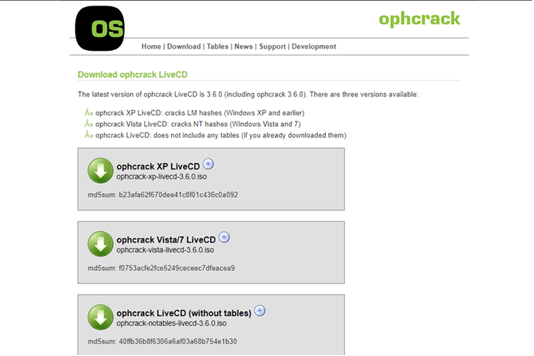
1. From a second PC, go to the Ophcrack website and download the correct LiveCD ISO image for your version of Windows.
Opcrack version selection
2. You’ll need to burn this ISO file to a CD or, more commonly, create a bootable USB drive using a tool like Rufus or the Universal USB Installer.
3. For Ophcrack to work effectively, it needs rainbow tables. You can download free tables from the Ophcrack website. Paid tables are more effective for complex passwords but can be very large.
4. If using a USB, extract the downloaded tables into the correct folder on the drive so Ophcrack can find them automatically.
5. Plug the CD or USB into the locked computer and boot from it. You may need to change the boot order in the BIOS/UEFI settings.
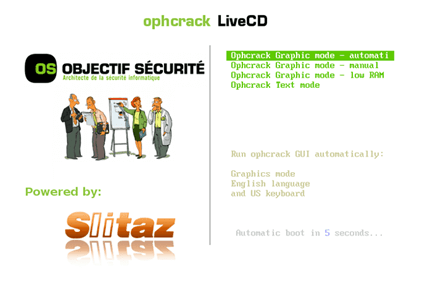
wait for seconds to enter the password cracking interface
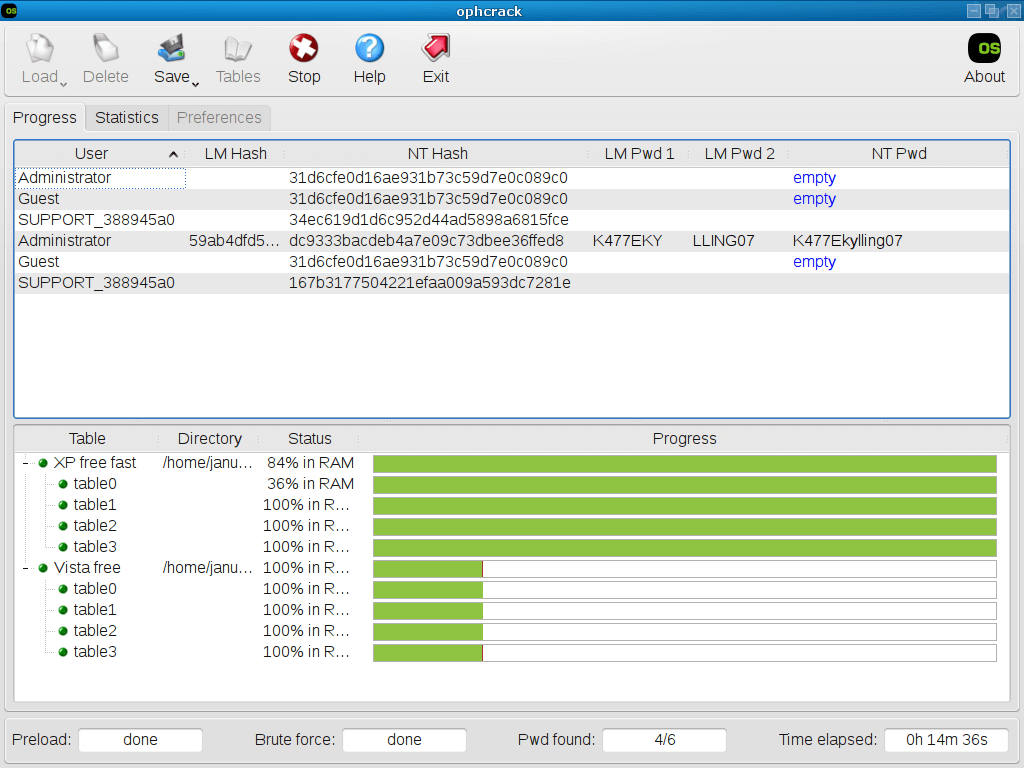
6. Once booted, Ophcrack should launch automatically and begin the process of cracking the passwords for all user accounts on the system.
cracking password ophcrack
This process can take anywhere from a few hours to several days, depending on the complexity of the password and the quality of your rainbow tables. If it’s successful, the password will be displayed in plaintext. Write it down, reboot the computer normally, and log in.

Final Thoughts

Being locked out of your own computer is a major hassle, but it’s not a hopeless situation. We’ve covered three distinct ways to get back in. For Microsoft account users, the official reset page is your best first step.

If that’s not an option, a reliable tool like Renee PassNow offers a nearly foolproof and data-safe solution that is perfect for all skill levels, especially for users who value efficiency and ease of use. For the more adventurous, Ophcrack provides a powerful free alternative. Choose the method that best fits your situation and technical comfort level, and you’ll be back on your desktop in no time.

Renee Passnow – Professional Windows Password Remover

Remove Windows Login Password 3 steps for whole password remove process.

Enable/Create Administrator One click for creating new administrator and enable the disabled account.

Widely Use New version supports UEFI boot model, which can be used on more computers, laptops and even surfaces.

Multifuctional Data transfer, data recovery, bootable problem recovery can be run without system.

Highly compatible Windows 11/10/8.1/8/7/XP/Vista.

Remove Login Password Support Windows 11/10/8.1/8/7/XP/Vista.

Enable/Create Administrator One click for creating new administrator and enable the disabled account.

Easy to use No need of any professional knowledge or password reset disk.

Free TrialFree TrialNow 2000 people have downloaded!