
Locked Out? Find Your Windows 10/11 Administrator Password Easily

Summary
Discover how to recover your Windows 10/11 administrator password with trusted, step-by-step solutions for local accounts. This guide covers easy recovery and reset methods, catering to both beginner and advanced users who need quick, reliable access.



Remove Windows Login Password 3 steps for whole password remove process.
Recover the files Recover the deleted files without Windows system.
Transfer the data Transfer the important files of the computer with system.
Multifuctional Data transfer, data recovery, bootable problem recovery can be run without system.
Highly compatible Windows 11/10/8.1/8/7/XP/Vista. UEFI boot.
Remove Login Password Support Windows 11/10/8.1/8/7/XP/Vista. UEFI boot.
Recover the files Recover the deleted files without Windows system.
Transfer the data Transfer the important files of the computer with system.

| Server Type | Enter Boot Menu Method |
|---|---|
DELL |
Press F12 repeatedly before the Dell logo appears. |
HP |
Press F9 multiple times when the HP logo is displayed. |
BIOS Name |
Enter Boot Menu Method |
ASRock |
DEL or F2 |
ASUS |
DEL or F2 for PCs/ DEL or F2 for Motherboards |
Acer |
DEL or F2 |
Dell |
F12 or F2 |
ECS |
DEL |
Gigabyte / Aorus |
DEL or F2 |
Lenovo (Consumer Laptops) |
F2 or Fn + F2 |
Lenovo (Desktops) |
F1 |
Lenovo (ThinkPads) |
Enter then F1 |
MSI |
DEL |
Microsoft Surface Tablets |
Press and hold Power and Volume Up buttons |
Origin PC |
F2 |
Samsung |
F2 |
Toshiba |
F2 |
Zotac |
DEL |
HP |
Esc/ F9 for Boot Menu/ Esc/ F10/ Storage tab/ Boot Order/ Legacy Boot Sources |
INTEL |
F10 |
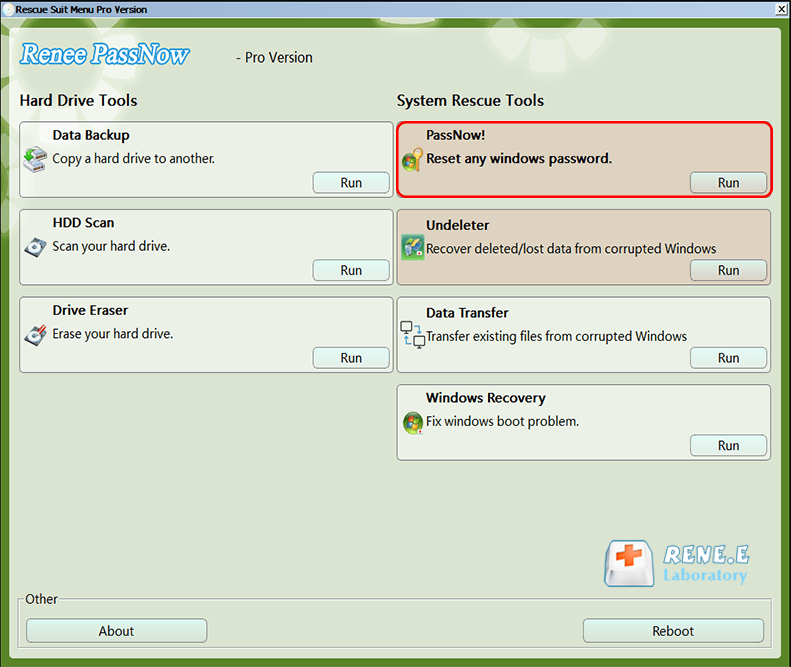
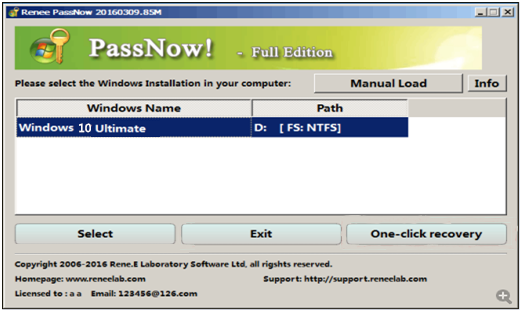
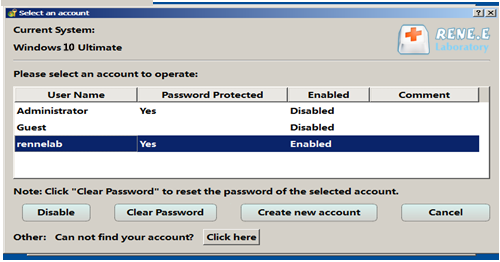

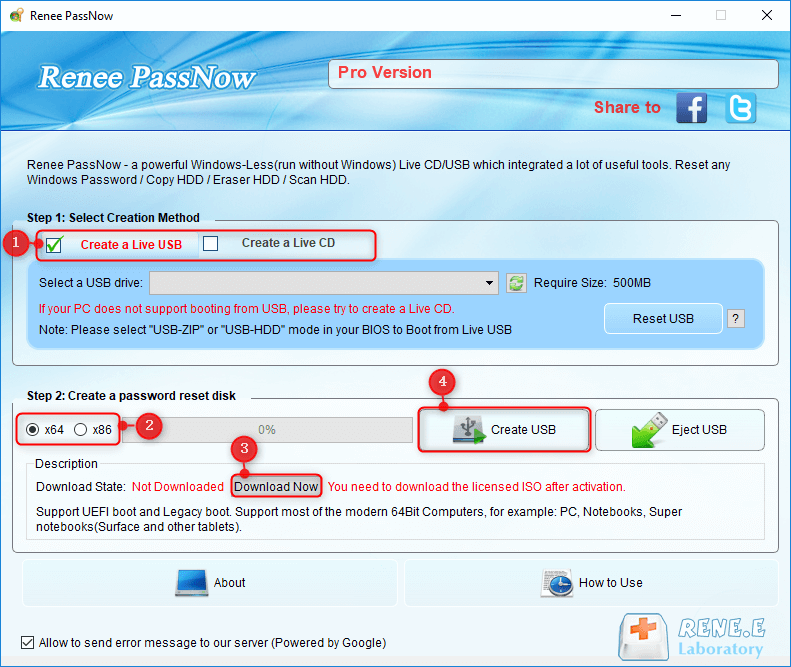
Remove Windows Login Password 3 steps for whole password remove process.
Enable/Create Administrator One click for creating new administrator and enable the disabled account.
Widely Use New version supports UEFI boot model, which can be used on more computers, laptops and even surfaces.
Multifuctional Data transfer, data recovery, bootable problem recovery can be run without system.
Highly compatible Windows 11/10/8.1/8/7/XP/Vista.
Remove Login Password Support Windows 11/10/8.1/8/7/XP/Vista.
Enable/Create Administrator One click for creating new administrator and enable the disabled account.
Easy to use No need of any professional knowledge or password reset disk.
Relate Links :
HP Reset Password Disk: Complete Guide to Unlocking Your HP Laptop Without Losing Data

02-06-2026
John Weaver : This guide outlines the operational mechanics and available alternatives for an hp reset password disk when addressing Windows...
Recover Files from Windows 11 Not Starting: Safe Data Rescue Guide
09-03-2026
John Weaver : This guide explains how to recover files from Windows 11 not starting by outlining software-based, built-in recovery, and...
How to Factory Reset Panasonic Laptop & PC Without Password

27-11-2025
Jennifer Thatcher : Discover how to factory reset Panasonic laptop & PC without password using proven methods. This guide covers secure...



User Comments
Leave a Comment