how if the laptop wont be turned on
author avatar
    Senior Product Manager
Last update by William Davis at 6 August 2025

Summary
Locked out of your laptop? Don’t worry-this guide walks you through proven ways to regain access to your Windows 11 device. From fast online reset options to trusted recovery tools and manual workarounds, we’ll help you unlock your laptop and keep your files safe.



Forgot your Windows 11 password and can’t get into your laptop? Don’t stress—you’re not locked out for good! Whether you’re desperate to access critical work documents, precious family photos, or urgent study materials, this guide is your lifeline. We’ve compiled proven, step-by-step solutions to help you unlock your laptop quickly and safely, without losing your files. From easy online resets to powerful tools like Renee PassNow, we’ve got you covered for every scenario—no tech skills needed. Let’s get you back in control!
how if the laptop wont be turned on

Why You Might Be Locked Out: Common Scenarios

🔐 Forgot Password

Before diving into solutions, let’s identify why you’re stuck. Below are the most common reasons people can’t access their Windows 11 laptops. Find your situation and see how this guide can help.
This often happens when someone hasn’t used their laptop in a while or forgets their password after juggling multiple logins. Totally normal—especially if you’re managing accounts across work, school, and personal devices.
Recommended Fix:

If your account’s linked to Microsoft, you can reset the password online. (View this method)

[No prerequisites] You may also use 3-party password reset tool(eg. Renee PassNow) to reset Windows 11 password. (View this method)

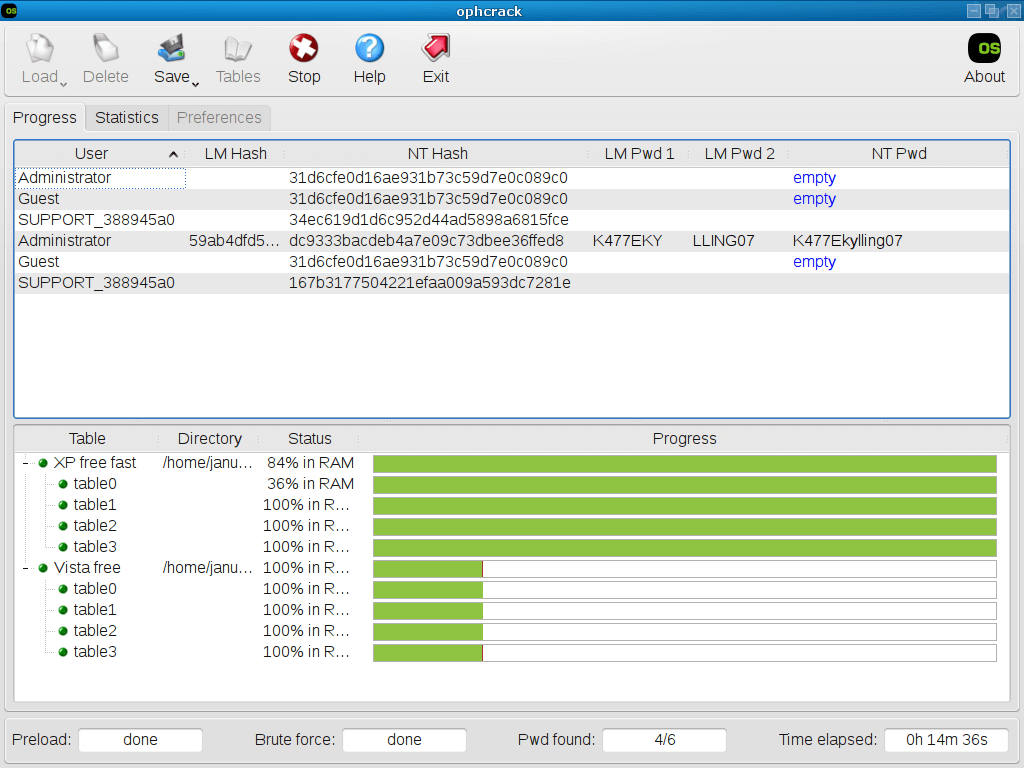
[No prerequisites] Use password crack tool (eg. Ophcrack) to get back original Windows 11 password. (View this method)

Advanced users can also use the Windows Installation Disk with Command Prompt to bypass and reset the login for free. (View this method)

If the laptop only supports PIN or biometric login (like fingerprint or facial recognition) and won’t switch to password entry, try using a password recovery tool-Renee PassNow to create a new administrator account.

💻 New User or Second-Hand Laptop

This is common when buying a second-hand laptop or inheriting a device from a colleague. Without the previous owner’s password, you’re locked out and need access without compromising the data inside.
Solution (doesn’t require original password): Try resetting via a linked Microsoft account. If that’s not an option, tools like Renee PassNow can help bypass the login quickly. If possible, reach out to the seller for the original credentials.
Solution (requires original password):

If you must recover the original password, try Ophcrack. (View this method)

Alternatively, Renee PassNow can be used to create a new admin account if the original can’t be retrieved. (View this method)

⚙️ Technical Issue
Sometimes, it’s not you—it’s the system. A glitch, keyboard error, or bug might prevent your password from registering correctly.
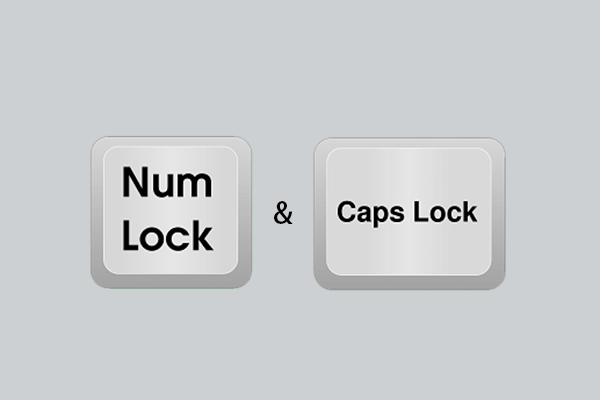
Recommended Fix: First, check if Caps Lock or your keyboard layout is causing the issue. If that doesn’t help, boot into Safe Mode and troubleshoot. You can also use Command Prompt in Safe Mode to reset the password if necessary. Finally, password reset tool can also help.
Check Caps Lock and Num Lock

🚨 Urgent Access Needed

Being locked out when you urgently need work files or school assignments is stressful—but there are fast fixes.
Recommended Fix:

[No prerequisites] For a quick recovery, try a password reset tool like Renee PassNow. (View this method)

You can also reset online if the account is linked to Microsoft if you are able to access the email address.

Just need to grab your files without altering the system? Try Renee PassNow’s Data Transfer feature to back up your files from the locked system, then proceed with a clean reinstall. (View this method)

Tip: All solutions here prioritize keeping your data safe. Choose the one that matches your situation and follow along.

Part 1: Reset Your Windows 11 Password to Unlock Your Laptop

Ready to get back in? This section offers reliable methods to regain access to your Windows 11 laptop, all designed to protect your data. Pick the approach that fits your needs and follow the steps carefully.

Method 1: Reset Your Password Using a Recovery Tool

Need a quick and reliable fix? A trusted tool like Renee PassNow is one of the best ways to unlock your laptop if you’ve forgotten your Windows 11 password. It works for local accounts, admin accounts, and even Microsoft accounts—no prior info required.
Renee Passnow – Professional Windows Password Remover

Remove Windows Login Password 3 steps for whole password remove process.

Recover the files Recover the deleted files without Windows system.

Transfer the data Transfer the important files of the computer with system.

Multifuctional Data transfer, data recovery, bootable problem recovery can be run without system.

Highly compatible Windows 11/10/8.1/8/7/XP/Vista. UEFI boot.

Remove Login Password Support Windows 11/10/8.1/8/7/XP/Vista. UEFI boot.

Recover the files Recover the deleted files without Windows system.

Transfer the data Transfer the important files of the computer with system.

Free TrialFree TrialNow 2000 people have downloaded!
Renee PassNow lets you create a bootable USB to reset your password in minutes. It’s user-friendly, supports Windows 11 (plus 10, 8.1, 8, 7, Vista, and XP), and includes extras like secure file transfers and disk erasure. Even if your laptop won’t boot, its Data Transfer feature ensures your files stay safe.
Note: If you use a Microsoft account, Renee PassNow converts it to a local account. Converting to a local account may temporarily affect Microsoft services like OneDrive; reconnect your Microsoft account after resetting.
Steps to Reset Your Password:
1. Download and Install: Get Renee PassNow from the official website and install it on another computer you can access. Choose the version for your operating system.
2. Create a Bootable USB or CD/DVD: Launch Renee PassNow, insert a USB drive or blank CD/DVD, and select the option to create bootable media. Follow the prompts to finish.
Create New Windows 10 Password Reset Disk with Renee PassNow
3. Boot Your Locked Laptop: Plug the USB or CD/DVD into your locked laptop, restart, and enter the BIOS settings (usually F2 or Delete). Set the boot order to prioritize your media.
Boot the target PC with the created password reset USB/CD/DVD.
Common Boot Menu Keys:
Servers:
4DELLPress F12 repeatedly before the Dell logo appears.

HP

Press F9 multiple times when the HP logo shows.

Computers:
ASRockDEL or F2

ASUS

DEL or F2 (PCs/Motherboards)

Acer

DEL or F2

Dell

F12 or F2

ECS

DEL

Gigabyte / Aorus

DEL or F2

Lenovo (Consumer Laptops)

F2 or Fn + F2

Lenovo (Desktops)

F1

Lenovo (ThinkPads)

Enter then F1

MSI

DEL

Microsoft Surface Tablets

Press and hold Power + Volume Up

Origin PC

F2

Samsung

F2

Toshiba

F2

Zotac

DEL

HP

Esc, then F9 for Boot Menu or F10 for Boot Order

INTEL

F10

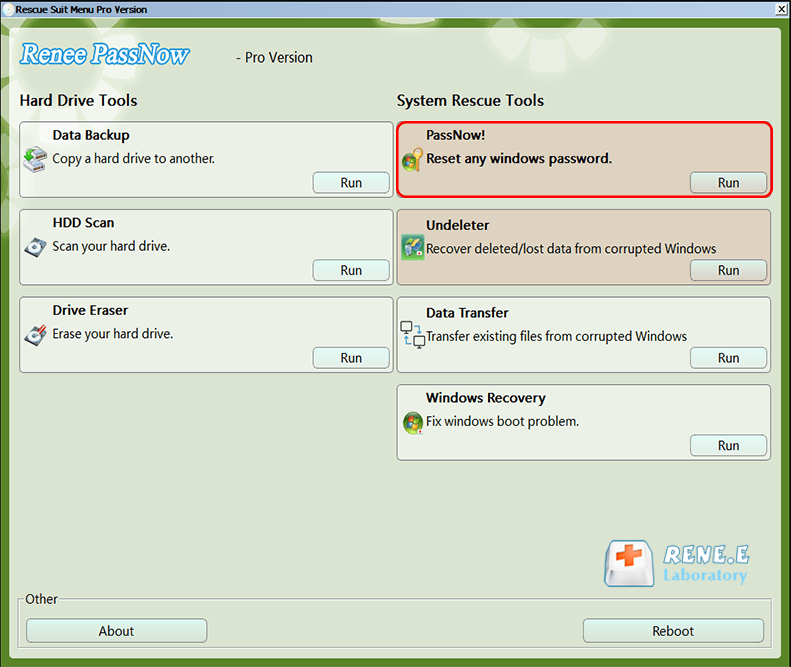
4. Select Password Reset: Once Renee PassNow loads, choose the “PassNow!” function.
After loading into main interface, please select the “PassNow!” function.
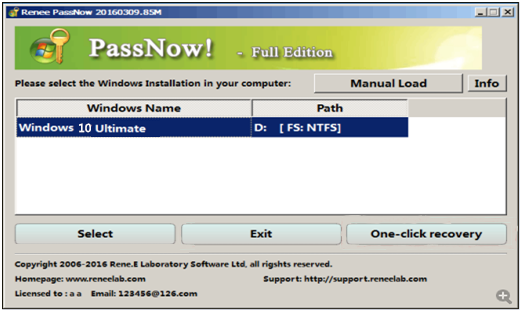
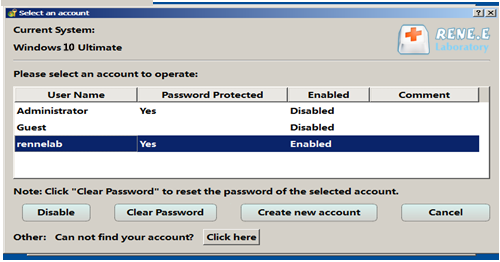
5. Reset the Password: Select your user account and click “Clear Password” to remove or reset it.
Select target Windows system in the list
Select target user account in the list
6. Reboot: Remove the USB or CD/DVD and restart your laptop. You can now log in without a password.
Using Renee PassNow is fast and safe. For future-proofing, create a password reset disk ahead of time, but if you don’t have one, this tool is a lifesaver.
Tip: After resetting a Microsoft account password, reconnect it to your account online.

Method 2: Create a New Admin Account with a Recovery Tool

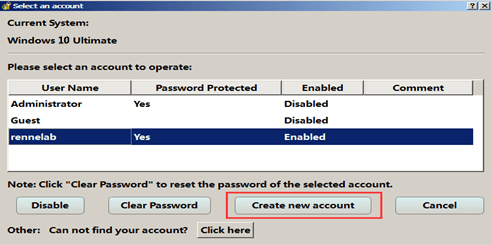
Locked out with no way to enter the password(Only PIN or Windows Hello)? Renee PassNow’s “Create New Account” feature lets you set up a new admin account to get back into Windows and try other recovery options.

Steps:

1. Boot your laptop using the Renee PassNow USB (follow Method 1’s steps to create it).
Renee Passnow – Professional Windows Password Remover

Remove Windows Login Password 3 steps for whole password remove process.

Recover the files Recover the deleted files without Windows system.

Transfer the data Transfer the important files of the computer with system.
Multifuctional Data transfer, data recovery, bootable problem recovery can be run without system.

Highly compatible Windows 11/10/8.1/8/7/XP/Vista. UEFI boot.

Remove Login Password Support Windows 11/10/8.1/8/7/XP/Vista. UEFI boot.

Recover the files Recover the deleted files without Windows system.

Transfer the data Transfer the important files of the computer with system.
Free TrialFree TrialNow 2000 people have downloaded!
2. When Renee PassNow loads, select “Create New User” from the main interface.
Create New User
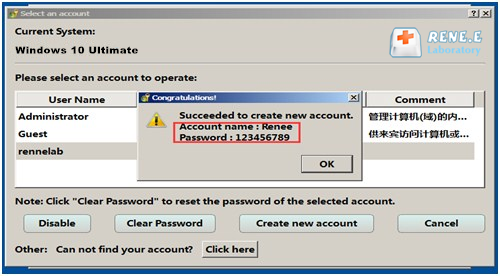
3. The tool sets a default account: username “Renee” and password “123456789”.
Create New User
4. Restart your laptop and log in with the new account.
This gives you admin access to explore further fixes.

Method 3: Reset Password Using a Windows Installation Disk

Have a Windows installation disk or USB? This method uses Command Prompt to reset your password without touching your files—a great option if you prefer built-in tools.

Steps:

1. Insert your Windows 11 installation media and boot from it (press F2, F12, or Delete for the boot menu).
If you do not have Windows 11 installation media, please download the latest creator from https://www.microsoft.com/en-us/software-download/windows11.
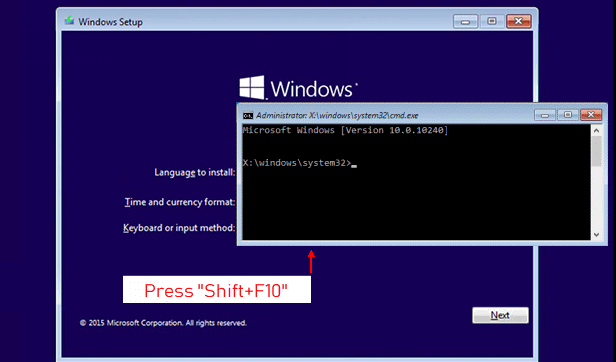
2. At the Windows Setup screen, press Shift + F10 to open Command Prompt.
Shift + F10
3. Replace the Accessibility tool (Sticky Keys) with Command Prompt:

D:
cd Windows\System32
ren sethc.exe sethc.exe.bak
copy cmd.exe sethc.exe

Tips: If there is no Windows\System32 folder in D:, please try to use C: instead.
4. Close Command Prompt, cancel the setup, and restart your PC (remove the media).
5. At the login screen, press Shift five times to open Command Prompt with admin privileges.
press Shift key five times
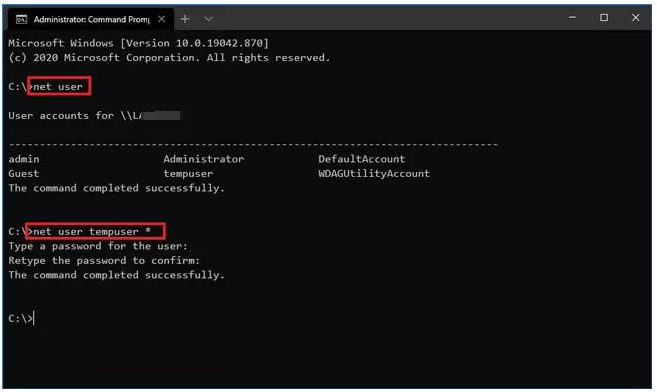
6. Enter the command in the command prompt to reset the password:

net user [username] [new_password]

Replace [username] with your account name (use quotes if it contains spaces, e.g., “John Smith”) and [new_password] with your new password—or leave it blank for no password.
net user command
7. Close Command Prompt and log in.
Warning: You need admin privileges for this. If you have encrypted files, back them up first to avoid losing access.

Part 2: Cracking Methods to Unlock Your Laptop

If the standard methods didn’t work or you’re up for a more technical approach, these options can help. They include cracking tools and online resets for specific cases.

Method 4: Recover Your Password with Ophcrack

Want to retrieve your original password? Ophcrack is a free tool that attempts to crack Windows passwords using rainbow tables. However, it’s outdated (last updated in March 2018) and may struggle with Windows 11’s modern security.
Caution: Ophcrack may take hours or days and isn’t always reliable for complex passwords. Ensure you have legal authorization to recover passwords on this device.

Key Features:

- Free to download and use.
- Works on Windows, Linux, and macOS.
- Cracks LM and NTLM hashes used by Windows.
- Shows real-time password analysis graphs.

Steps:

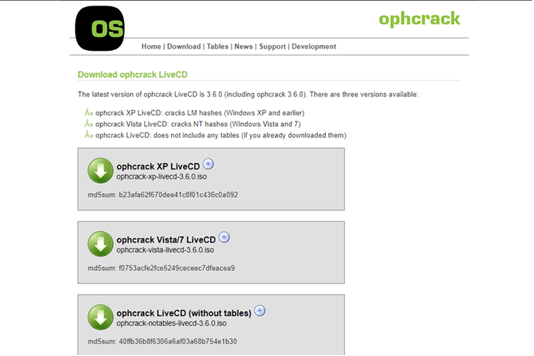
1. On another computer, download the Ophcrack LiveCD ISO from its website.
Ophcrack version selection
2. Burn the ISO to a CD or create a bootable USB with Rufus or Universal USB Installer.
3. Download rainbow tables from the Ophcrack site (free or paid for better results).
4. For USB, extract the tables to the correct folder on the drive.
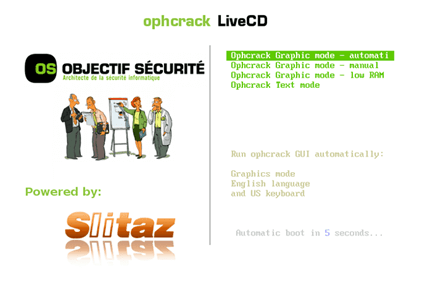
5. Boot your locked laptop from the CD/USB (adjust BIOS/UEFI settings if needed).
wait for seconds to enter the password cracking interface
6. Ophcrack will auto-run and attempt to crack passwords for all accounts.
cracking password ophcrack
If successful, your password will appear in plaintext. Write it down, reboot normally, and log in.

Method 5: Reset Password via Microsoft Account Online

Ensure you have access to the recovery email or phone number linked to your Microsoft account.
Using a Microsoft account? Resetting your password online is the simplest way to unlock your laptop—no extra tools needed.Steps:
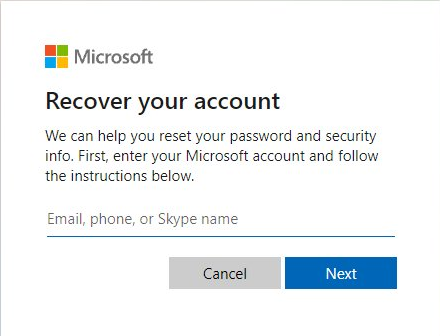
1. On another device, go to account.live.com and enter your Microsoft account email.
recover account
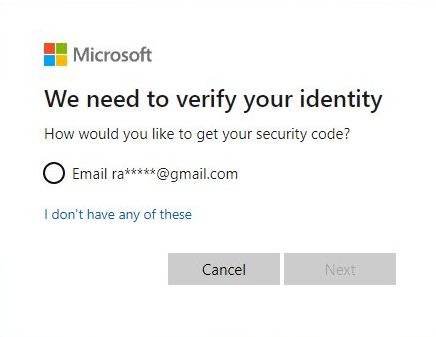
2. Verify your identity via recovery email or phone number.
verify identity
3. Set a new password and use it to log in to your laptop.
Your laptop is now accessible with the new password.Got access? Great! Now let’s make sure this doesn’t happen again with some smart password habits.

Part 3: Prevent Future Lockouts with Password Best Practices

Avoid the hassle of a forgotten password by following these tips to manage and secure your Windows 11 account.

Why Regular Password Updates Matter

Reduce Hacking Risks: Old passwords are easier to crack. Refreshing them keeps your data safe.
Don’t Reuse Passwords: Using the same password across accounts is risky—one breach could expose everything.
Secure Shared Devices: If others use your laptop, regular updates prevent unauthorized access to saved credentials.

How to Update Your Windows 11 Password

Here are three easy ways to change your password or username:

Option 1: Using CTRL + ALT + DELETE

  1. Press CTRL + ALT + DELETE on your laptop.
  2. Select “Change a password.”
  3. Enter your current password, then set and confirm a new one.
  4. Restart to apply the changes.

Option 2: Via Settings

  1. Press Windows + I to open Settings.
  2. Go to Accounts > Sign-in options.
  3. Under “Password,” click “Change” and follow the prompts.

Option 3: Via Control Panel

  1. Press the Windows key, type “Control Panel,” and open it.
  2. Navigate to User Accounts.
  3. Select “Change your password,” enter the details, and save.

Frequently Asked Questions (FAQ)

Still have questions? Here are answers to common concerns about unlocking your Windows 11 laptop:
Q: What if I only use a PIN or biometric login?
A: If your laptop only has a PIN or biometric (fingerprint/face) login and you can’t switch to a password, use Renee PassNow to create a new admin account with a password. This lets you bypass the issue and regain access.
Q: Can I unlock a laptop I inherited from a colleague or family member?
A: Yes, for inherited or second-hand laptops, use Renee PassNow to reset the password or create a new admin account. If it’s linked to a Microsoft account you don’t control, contact the original owner for credentials or reset it as a local account.
Q: What if I don’t have admin privileges to create rescue CD/USB?
A: Most methods (like Renee PassNow or the installation disk) require admin rights. If you lack them, try the Microsoft account reset if applicable, or consult your IT department for work laptops.
Q: Will resetting my password delete my files?
A: No, the methods here (Renee PassNow, Microsoft reset, Safe Mode) are designed to preserve your data. However, always back up important files before making system changes, especially if you have encrypted folders.
Q: How can I make my password easier to remember?
A: Use a passphrase (e.g., “Coffee!2025Sunset”) that’s meaningful but hard to guess. A password manager can store it securely, or switch to biometric login for convenience.
Q: What if my laptop is offline?
A: No internet? Use Renee PassNow or a Windows installation disk—both work offline. Create the bootable media on another computer and follow the steps.
Q: Is it safe to use third-party tools like Renee PassNow?
A: Yes, when downloaded from the official Renee PassNow site, it’s secure and widely trusted for password recovery without harming your system.
Q: What if my password issue is due to a system update?
A: Sometimes, Windows updates can cause login glitches. Boot in Safe Mode to check if the password works, or use the Command Prompt method to reset it. If the issue persists, run a system repair from the installation media.

Final Thoughts

Forgetting your Windows 11 password can feel like a disaster, especially when important files are on the line. This guide offers reliable, data-safe solutions—from the user-friendly Renee PassNow to quick Microsoft account resets. Whether you’re dealing with a second-hand laptop, a system glitch, or an urgent need, these steps will get you back in. Try them out, stay calm, and you’ll be using your laptop again in no time!
Renee Passnow – Professional Windows Password Remover

Remove Windows Login Password 3 steps for whole password remove process.

Enable/Create Administrator One click for creating new administrator and enable the disabled account.

Widely Use New version supports UEFI boot model, which can be used on more computers, laptops and even surfaces.

Multifuctional Data transfer, data recovery, bootable problem recovery can be run without system.

Highly compatible Windows 11/10/8.1/8/7/XP/Vista.

Remove Login Password Support Windows 11/10/8.1/8/7/XP/Vista.

Enable/Create Administrator One click for creating new administrator and enable the disabled account.

Easy to use No need of any professional knowledge or password reset disk.

Free TrialFree TrialNow 2000 people have downloaded!

User Comments

Page 1

Leave a Comment


Your comment has been submitted and is awaiting moderation.