author avatar
    Senior Program Developer
Last update by William Davis at 4 November 2026

Summary
This guide details the systematic approach to fix disk structure is corrupted and unreadable errors by prioritizing data extraction prior to executing system repairs. It covers specialized recovery software utilization, CHKDSK command execution, and safe formatting protocols to restore drive functionality without data loss.


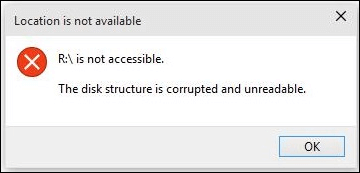
disk structure is corrupted and unreadable
When you double-click a drive and see “The disk structure is corrupted and unreadable”, your first instinct might be to click Repair or format the disk. That can be risky because your files are often still present, even if the file-system map is damaged. If you need the drive for work, school, or family backups, losing access can feel urgent. The safest approach is to stop writing to the drive, check its status, and prioritize data recovery before any repair that rewrites the disk. The steps below are ordered to protect your files before attempting fixes.

What to do first when Windows says 'The disk structure is corrupted and unreadable'

When Windows shows this error, don’t rush to format or repair. Follow these quick checks first:
- Stop writing immediately: Do not save new files, format, or use aggressive repair tools if your files matter. Any write can overwrite recoverable data.
- Reassure yourself: This error usually means file-system metadata corruption—not a physically dead disk. Many files are likely still intact and recoverable.
- Try different hardware: Connect the drive with another USB cable, port, or card reader. Test it on a different PC to rule out connection or driver issues.
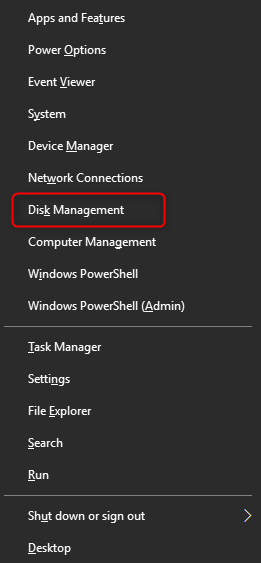
To check the drive’s condition, open Disk Management by right clicking the start menu and click “Disk Management’ in the menu.
open windows disk management
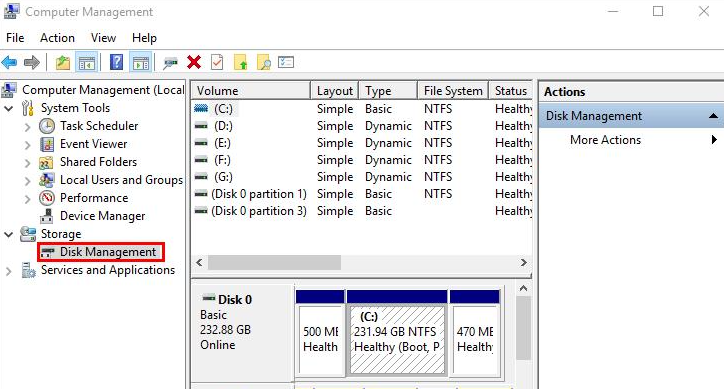
Then review the drive status:
disk management
Display Text Explanation Recommended Action

RAW

The file system cannot be accessed or read. The data may still exist, but the operating system cannot interpret it. 📁

Recover the files first before making any changes to the drive.

Unallocated

The partition entry is missing, corrupted, or no longer recognized. The actual data may still be present on the disk. 🔍

Perform a full disk scan to detect and restore lost partitions.

No Media

The storage device is not responding correctly, making it appear as if no storage media is present. ⚠️

Check the cables, power supply, USB connection, or card-reader contacts, then reconnect the device.

⚠️ Important* Do not initialize or format the drive yet. Doing so may overwrite critical metadata and significantly reduce the chances of a successful recovery.

Choosing a Recovery Tool for Corrupted or Unreadable Drives

After determining the drive’s status in Disk Management, the next step is selecting a recovery tool capable of working with damaged file systems, lost partitions, or inaccessible drives. Not all recovery software handles these scenarios equally well, so the following features are particularly valuable when dealing with “The disk structure is corrupted and unreadable” errors:
- Whole Partition Scan: Recovers files from inaccessible, RAW, or corrupted partitions.
- Whole Disk Scan: Searches the entire drive for lost partitions and analyzes partition structures when partition information is missing.
- Signature Scanning: Identifies more than 400 file formats based on file signatures, even when the file system or MFT has been severely damaged.
- Image Creation: Creates a sector-by-sector backup image of the drive before recovery or repair operations.
- UnCHK Recovery: If CHKDSK has already run and generated hidden FOUND.000 folders, the UnCHK feature can help restore .chk files to their original formats.
Renee Undeleter includes the core recovery features needed when Windows reports “The disk structure is corrupted and unreadable”. In addition, Renee Undeleter supports NTFS, FAT, FAT32, and exFAT file systems. It combines traditional file-system analysis with advanced file signature scanning techniques, enabling recovery even when Windows can no longer mount or read the drive normally.
Because the software provides both partition-level and file-signature-based recovery methods, it is well suited for common corruption scenarios involving RAW partitions, damaged file systems, missing partitions, and accidental CHKDSK modifications.
Recover Your Data After Disk Corruption — Download Renee UndeleterRenee Undeleter data Recovery software

Easy to use Only simple steps to recover data from storage devices.

Multiple scan modes Fast partition scan, whole partition scan and whole disk scan for different recovery needs.

File types Support to recover pictures, videos, audios, documents, mails, etc.

Supported storage devices Recover data from recycle bin, SD card, external disk, etc.

Supported systems Windows 11,10, 8.1, 8, 7, Vista, XP, 2000 and Mac OS X10.6, 10.7, 10.8+.

Easy to use Only simple steps to recover data from storage devices.

Multiple scan modes - 3 scan modes for different recovery needs.

Supported storage devices Recover data from recycle bin, SD card, external disk, etc.

Free TrialFree TrialFree Trial

3000 users have downloaded Renee Undeleter and found data back!

How to safely recover your data and fix the corrupted disk structure step-by-step

Fixing a corrupted disk structure requires a careful, two-phase approach to ensure your data stays safe. First, rescue your important files before attempting any repairs. Once your data is securely backed up, you can repair the corrupted drive using Windows tools or by formatting it.

Phase 1: Rescue your files safely

1. Install and launch safely with Renee Undeleter

Install Renee Undeleter on a healthy internal disk. Never install it on the corrupted drive, as the installer itself can overwrite lost files.
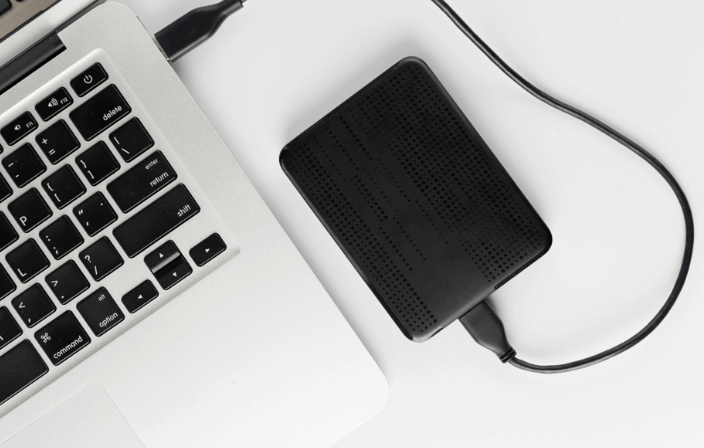
Connect the affected external HDD, USB stick, or SD card directly to a primary USB port. Avoid unpowered hubs and unreliable card readers.
connect external hard drive to mac

2. Select scan mode

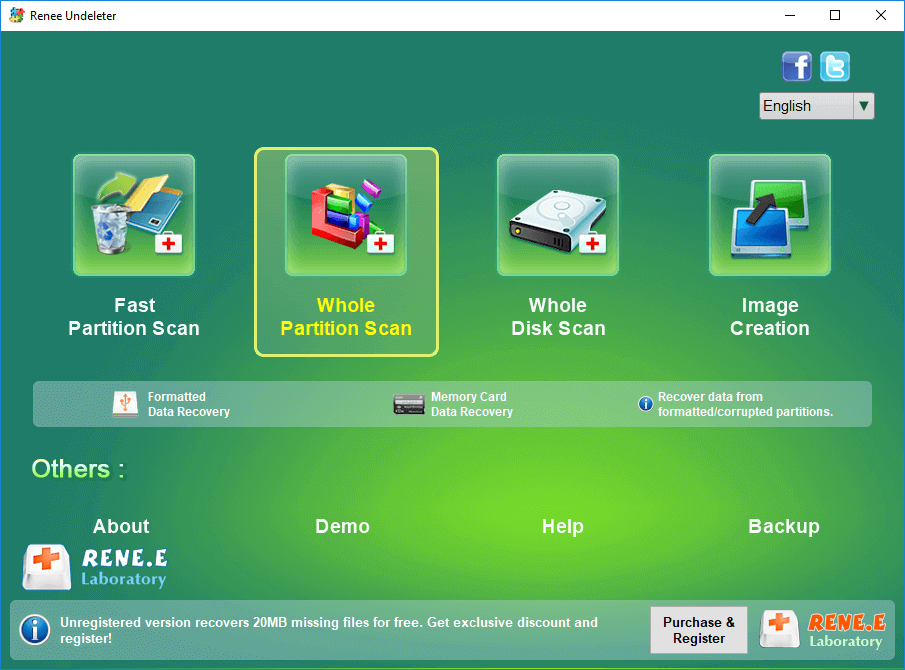
Open Renee Undeleter and choose Whole Partition Scan for visible RAW or corrupted partitions.

If the partition doesn’t appear in the list, use Whole Disk Scan.

select whole partition scan in renee undeleter to recover deleted video from sd card
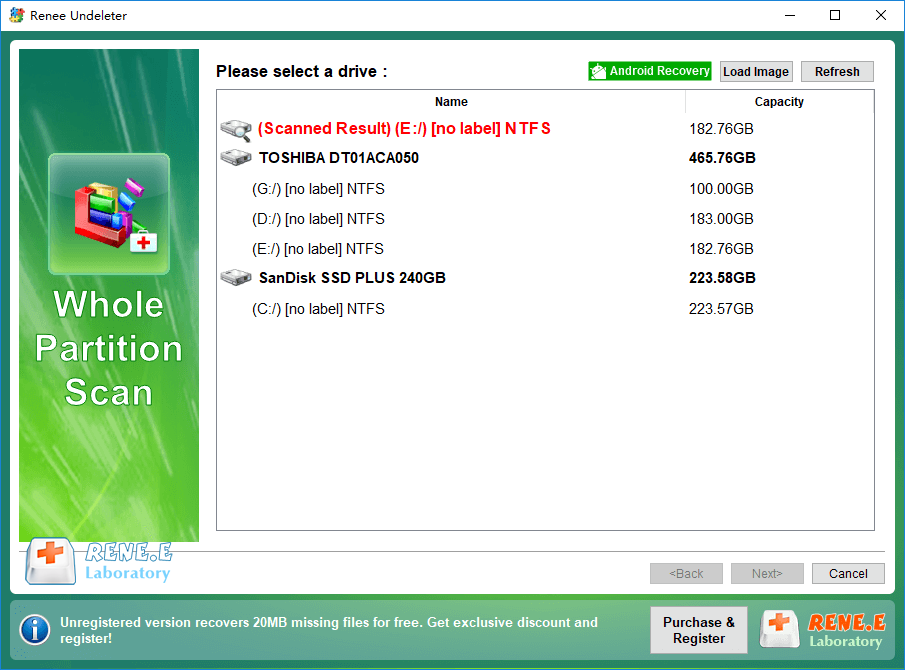
Next, select the corrupted partition and click Next.
Renee Undeleter Whole Partition Scan

3. Preview and recover files to a safe location
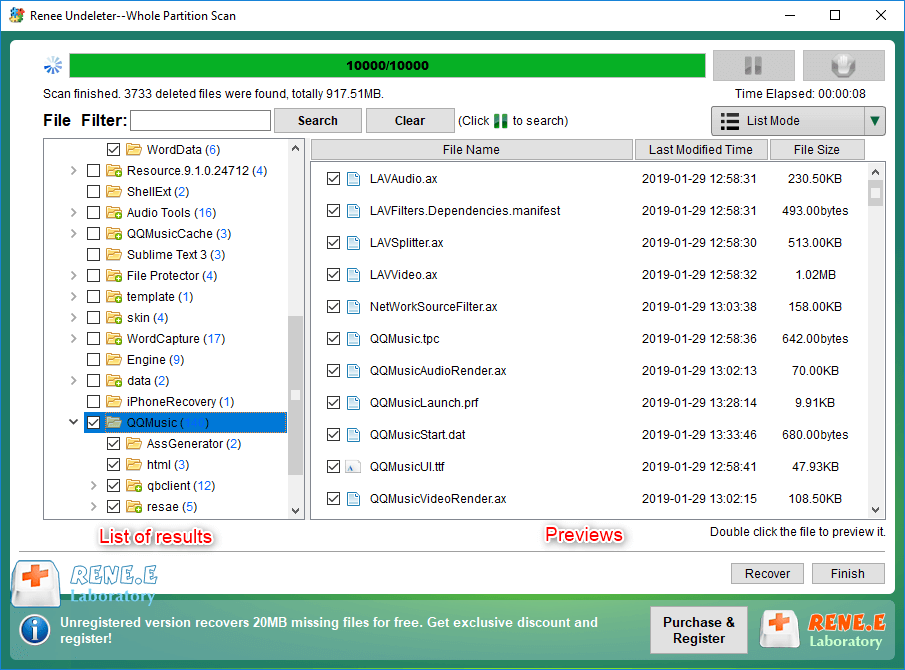
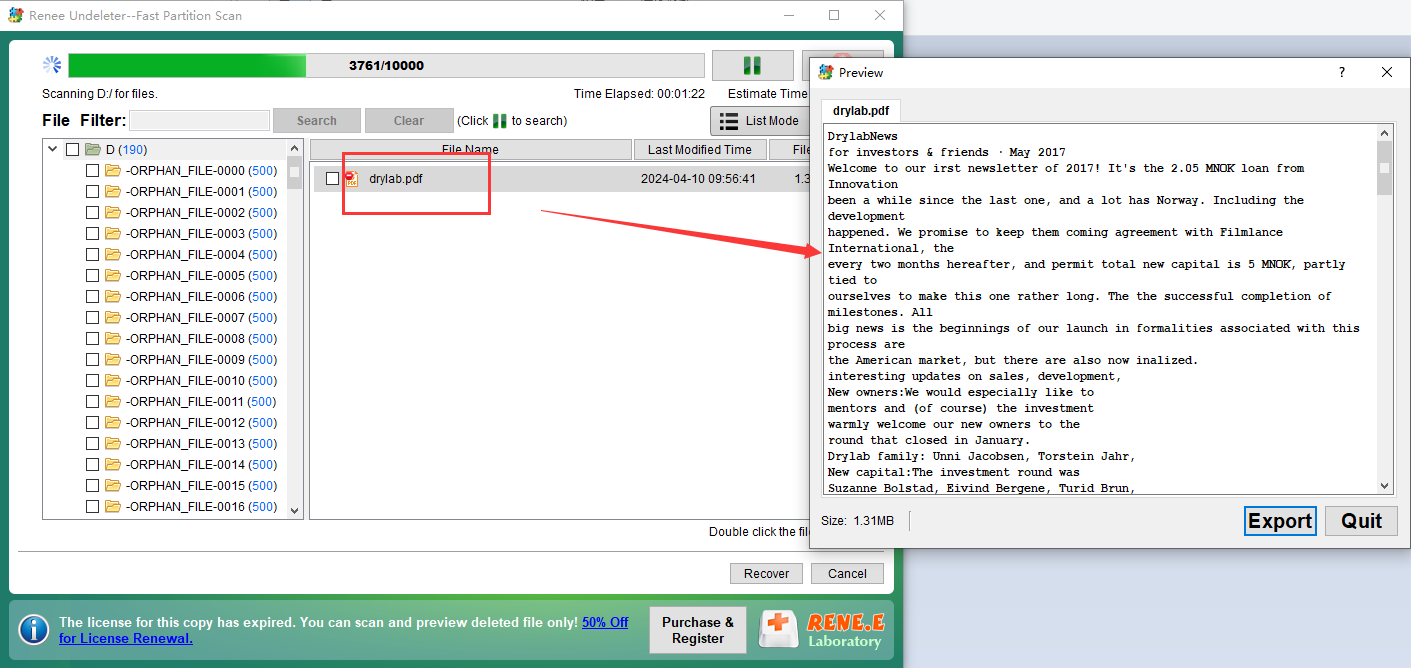
Wait for the scan to complete. Double-click files in the result window to preview them and confirm they’re intact.
Select the files you want to recover, click Recover, then choose a destination on a different physical disk or drive letter. Never save recovered files back to the corrupted drive.
preview and select the files to recover in renee undeleter
preview pdf files
Recover Your Data After Disk Corruption — Download Renee UndeleterRenee Undeleter data Recovery software

Easy to use Only simple steps to recover data from storage devices.

Multiple scan modes Fast partition scan, whole partition scan and whole disk scan for different recovery needs.

File types Support to recover pictures, videos, audios, documents, mails, etc.

Supported storage devices Recover data from recycle bin, SD card, external disk, etc.

Supported systems Windows 11,10, 8.1, 8, 7, Vista, XP, 2000 and Mac OS X10.6, 10.7, 10.8+.

Easy to use Only simple steps to recover data from storage devices.

Multiple scan modes - 3 scan modes for different recovery needs.

Supported storage devices Recover data from recycle bin, SD card, external disk, etc.

Free TrialFree TrialFree Trial

3000 users have downloaded Renee Undeleter and found data back!

Phase 2: Repair the corrupted drive

4. Run CHKDSK command to fix the filesystem

After your files are safely copied to another disk, you can attempt to repair the original file system. CHKDSK is a built-in Windows utility that checks the disk for file-system errors, repairs broken directory entries, and marks bad sectors. It’s often the first repair tool users try, but it’s not perfect. On an unreadable or RAW disk, CHKDSK can take a long time and may convert damaged file fragments into hidden FOUND.000 folders with .chk files. That’s why recovery should always come first.
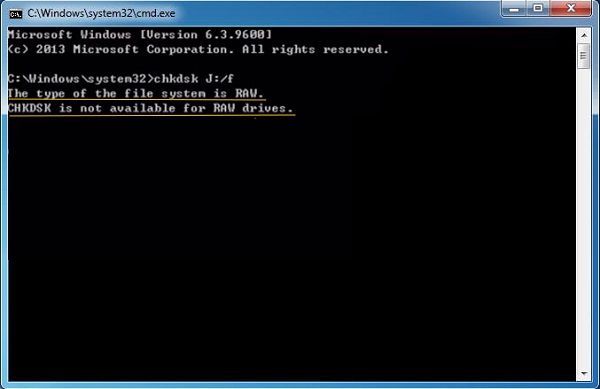
Windows error: CHKDSK not available for RAW drive
Use CHKDSK only when the drive is stable enough to complete the scan, and always specify the correct drive letter. On large external drives, CHKDSK can run for several hours. It usually cannot repair physical bad sectors—those are handled by the drive’s firmware. Still, for logical corruption from unsafe removal, power loss, or stale metadata, CHKDSK often restores normal access.
Advantages:
  • Built into Windows
  • Repairs common file-system metadata errors
  • Can mark bad sectors to avoid reuse

Disadvantages:

  • Can take hours on large disks
  • May create FOUND.000 and CHK files
  • Cannot repair physical damage

To open an elevated Command Prompt: 1. Click Start, type:
cmd2. Right-clickCommand Promptand selectRun as administrator.
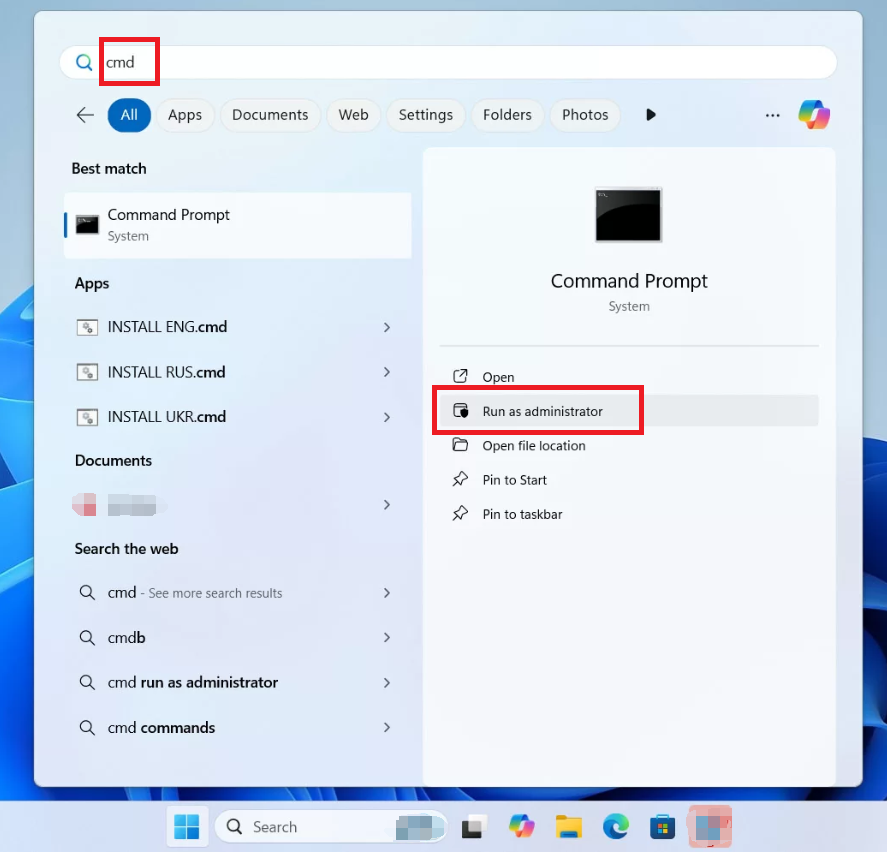
Windows 11, run cmd as administrator
3. ClickYesif User Account Control prompts. Then run:chkdsk X: /f /r /xReplaceXwith the actual corrupted drive letter. -/ffixes file-system errors. -/rlocates bad sectors and recovers readable information. -/xdismounts the volume if necessary. CHKDSK may create hiddenFOUND.000folders and rename damaged fragments asFILE0000.CHK. Do not delete these unless you’re sure you have recovered the original files.
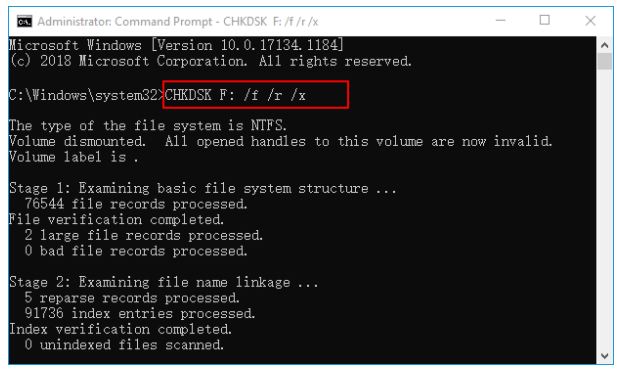
Screenshot of Command Prompt running chkdsk F: /f /r /x to check and repair the F: drive.
Recover files from FOUND.000 folders with UnCHKIf CHKDSK has already producedFOUND.000folders, use Renee Undeleter’sUnCHKfeature to restore the.chkfiles to their original formats. 1. Open Renee Undeleter and clickUnCHKin theOtherssection.
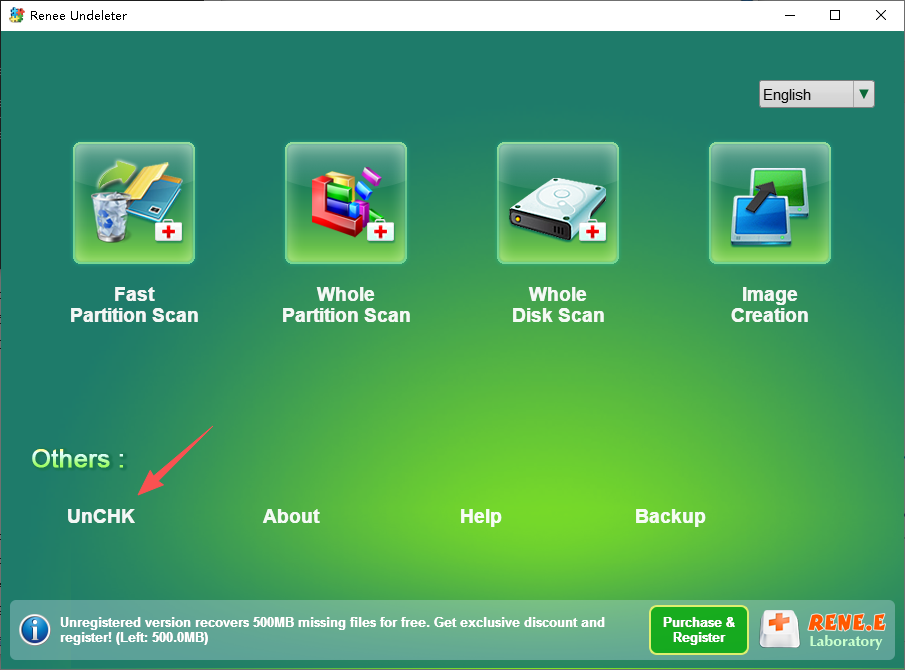
Renee Undeleter Unchk to recover chk files
2. UnderCHK folder, clickBrowse…and select theFOUND.000folder. 3. UnderSave to, click the secondBrowse…and choose a destination on a different drive. 4. SelectInclude sub-foldersand optionally enableAlso carve the files inside each CHKfor deeper recovery.
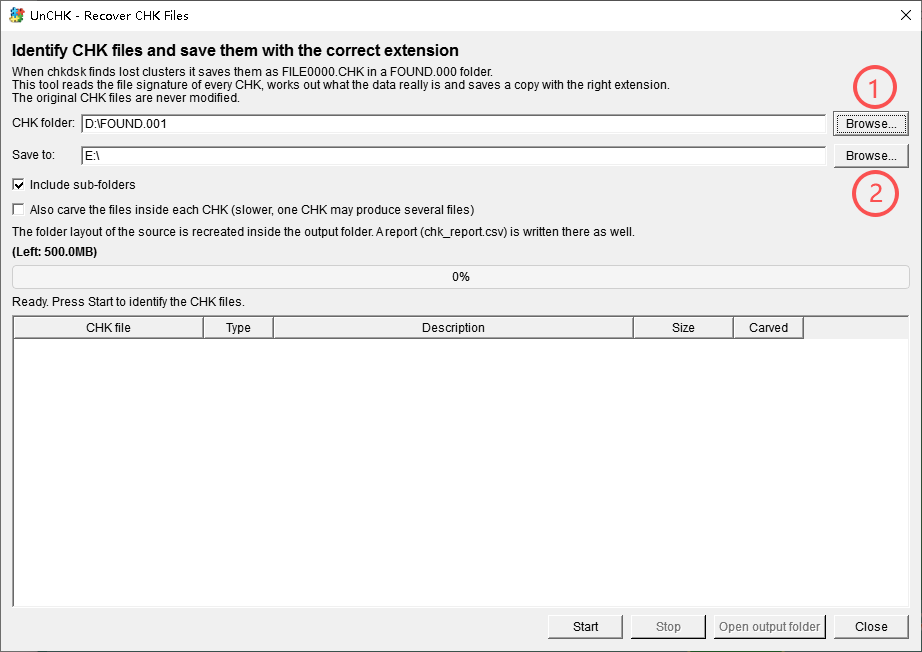
unchk set chk folder name and the folder to store recovered fils
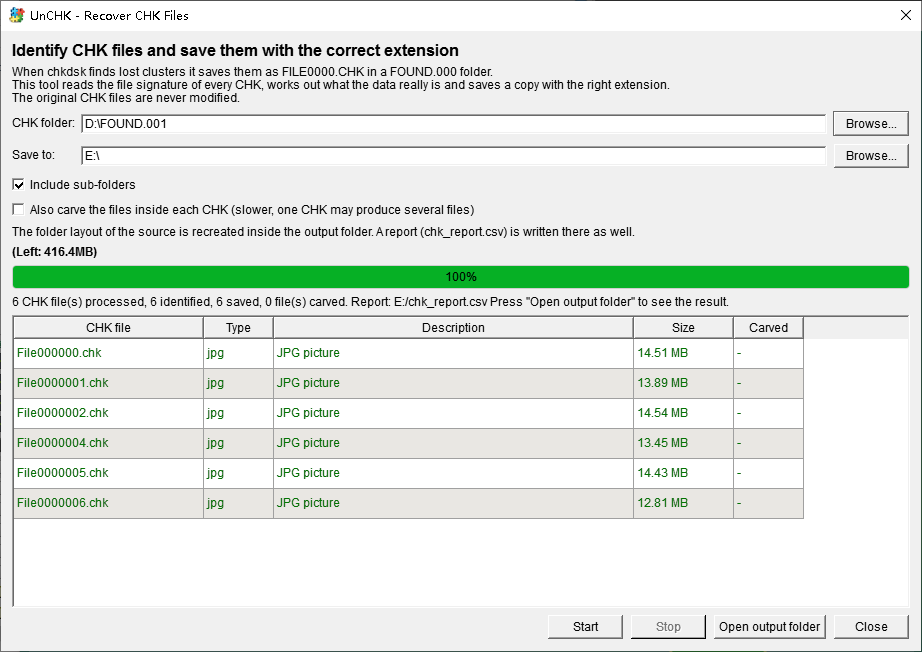
5. ClickStart, wait for the analysis to finish, then clickOpen output folderto view the restored files.
unchk result
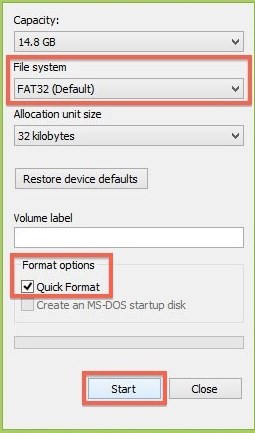
#### 5. Format the drive as a last resort (Only after data is rescued) Formatting rebuilds a fresh file system and can make a corrupted drive usable again, but it erases the old file-system map. Only use this method after recovering your files to another disk. A Quick Format creates new NTFS or exFAT structures without wiping all sectors, so it’s faster and usually enough for logical corruption. A Full Format also scans for bad sectors but takes much longer. If the drive still shows RAW after CHKDSK, formatting may be the only way to reuse it. Be certain you select the correct disk—formatting the wrong drive will erase healthy data. After formatting, the drive will appear empty. Don’t write new data if you think recovery may still be needed.
Screenshot of the Format SD Card dialog box in Windows, showing options for file system, allocation unit size, volume label, and format options.
## FAQ #### Does this error mean my data is already gone? No. The error usually means the file-system metadata is damaged, not that the files themselves are erased. Stop writing to the disk and use recovery software such as Renee Undeleter to scan the RAW or unreadable partition before running repair tools. #### Can I fix the disk structure without formatting the drive? In many cases, yes. Run CHKDSK after recovering files. If the damage is logical, CHKDSK can rebuild enough metadata to make the drive readable again. If CHKDSK fails or takes too long, formatting may be required. #### Is CHKDSK safe to run first on an unreadable disk? It’s safer to recover files first. CHKDSK can rewrite metadata and may convert recoverable fragments into.chkfiles. If you already ran it, use Renee Undeleter’sUnCHKfeature to restore files fromFOUND.000folders. #### When should I stop trying and contact a professional recovery service? Stop if the drive makes clicking or grinding noises, repeatedly disconnects, freezes during scans, or fails to appear in BIOS or Disk Management. These are signs of physical failure. Continuing DIY attempts can make professional recovery harder.
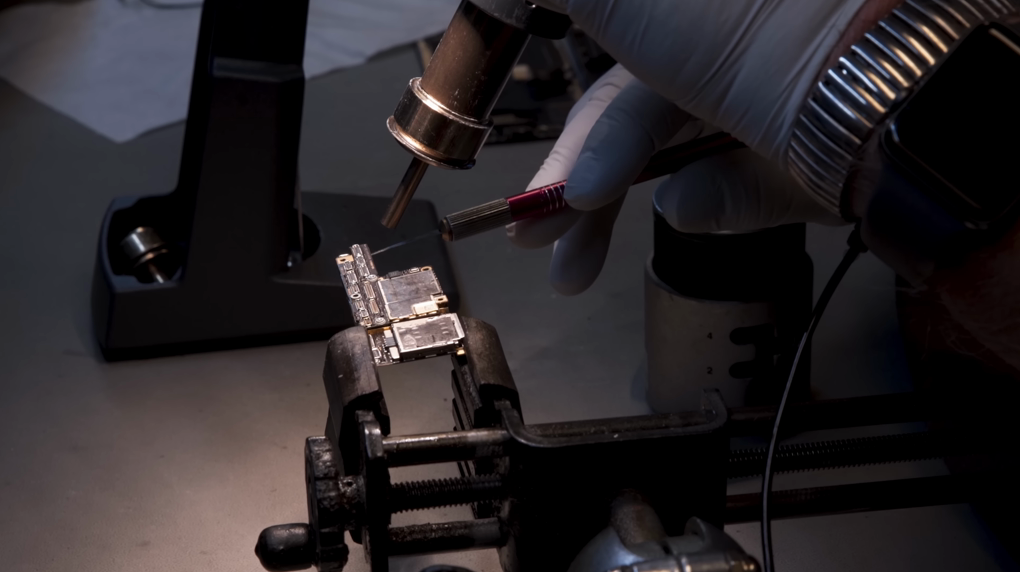
Damaged memory cards being repaired in a professional clean room
Renee Undeleter - Powerful Data Recovery SoftwareRenee Undeleter data Recovery software

Easy to use Only simple steps to recover data from storage devices.

Multiple scan modes Fast partition scan, whole partition scan and whole disk scan for different recovery needs.

File types Support to recover pictures, videos, audios, documents, mails, etc.

Supported storage devices Recover data from recycle bin, SD card, external disk, etc.

Supported systems Windows 11,10, 8.1, 8, 7, Vista, XP, 2000 and Mac OS X10.6, 10.7, 10.8+.

Easy to use Only simple steps to recover data from storage devices.

Multiple scan modes - 3 scan modes for different recovery needs.

Supported storage devices Recover data from recycle bin, SD card, external disk, etc.

Free TrialFree TrialFree Trial

3000 users have downloaded Renee Undeleter and found data back!

User Comments

Page 1

Leave a Comment


Your comment has been submitted and is awaiting moderation.