author avatar
    Specialist of Customer Service Dept.
Last update by William Davis at 11 July 2025

Summary
Learn how to recover a defragmented hard drive with proven methods. This authoritative guide covers why files disappear after defrag and recommends top solutions for users seeking quick, reliable recovery.



Lost files after defragmenting your hard drive? Worried that defragmentation erased your data? You’re not alone—many users search for solutions when files vanish after a defrag. In this 2025 updated guide, we clarify why this happens, debunk common myths, and provide practical steps to recover a defragmented hard drive using professionnal data recovery software and build-in Windows functions. Act fast to get your data back safely!
defragment

Why Do Files Disappear After Defragmentation?

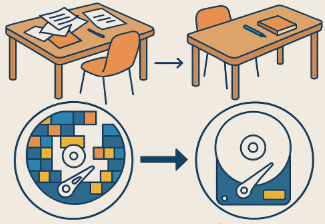
Defragmentation reorganizes scattered data on your hard drive to boost performance, much like tidying a cluttered desk. Fragmented files are split across the disk, slowing access times. Defragmenting gathers these pieces for faster retrieval.
Good news: Defragmentation itself doesn’t delete files—it only repositions them.
So, why do files seem to vanish? Common reasons include:
- Interrupted defrag: Defragmentation is a time-consuming process, and if there’s a power outage or system crash while it’s running, it could result in corrupted or lost files.
- Pre-existing deletions: Files deleted before defragmentation may become harder to recover if the process overwrites their data.
- Drive issues: Underlying hardware problems or bad sectors can cause data loss, noticed only after defragmentation.
Don’t panic—whether it’s an interrupted defrag or a misunderstanding, you can recover a defragmented hard drive with the right tools and steps.
Tips: Only traditional hard disk drives (HDDs) require defragmentation. If you’re using a solid-state drive (SSD), there’s no need to defragment it—doing so can actually shorten the lifespan of your SSD.

How to Recover a Defragmented Hard Drive

Unsure if defragmentation caused your data loss or another issue is at play? Stop using the drive immediately to avoid overwriting lost files. Below are three proven methods to recover a defragmented hard drive, starting with our top recommendation, Renee Undeleter. Act quickly for the best results!

Method #1: Recover Files with Renee Undeleter

Lost files aren’t gone forever—they’re often still on your drive until overwritten. Renee Undeleter is a powerful, user-friendly tool, excelling at recovering files from defragmented hard drives. It supports over 400 file formats (documents, photos, videos) and offers high recovery rates (up to 90% for recent losses), making it ideal for defragmentation-related issues, accidental deletions, or system crashes.
Renee Undeleter - Powerful Data Recovery SoftwareRenee Undeleter data Recovery software

Easy to use Only simple steps to recover data from storage devices.

Multiple scan modes Fast partition scan, whole partition scan and whole disk scan for different recovery needs.

File types Support to recover pictures, videos, audios, documents, mails, etc.

Supported storage devices Recover data from recycle bin, SD card, external disk, etc.

Supported systems Windows 11,10, 8.1, 8, 7, Vista, XP, 2000 and Mac OS X10.6, 10.7, 10.8+.

Easy to use Only simple steps to recover data from storage devices.

Multiple scan modes - 3 scan modes for different recovery needs.

Supported storage devices Recover data from recycle bin, SD card, external disk, etc.
Free TrialFree TrialFree Trial

3000 users have downloaded Renee Undeleter and found data back!

Here’s how to use Renee Undeleter to recover a defragmented hard drive:
Step 1: Download and Install Renee Undeleter
Visit Renee Undeleter’s official site to download the software. Install it on a different drive from the one you’re recovering to prevent overwriting data.
Step 2: Select Fast Partition Scan
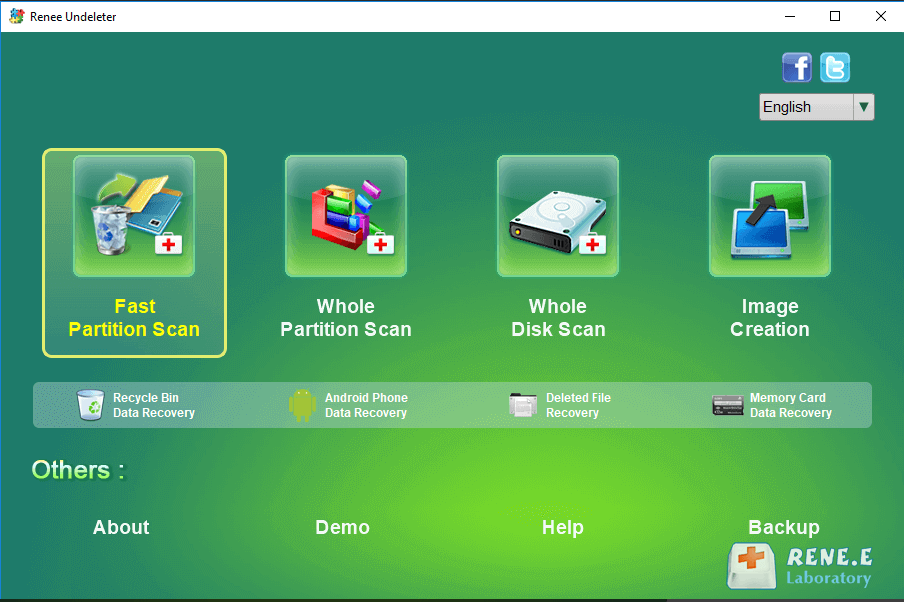
Open Renee Undeleter and choose [ Fast Partition Scan ] from the main interface for quick recovery of recently lost files.
Select Fast Partition Scan, alt: Screenshot of Renee Undeleter’s main interface with Fast Partition Scan option highlighted 
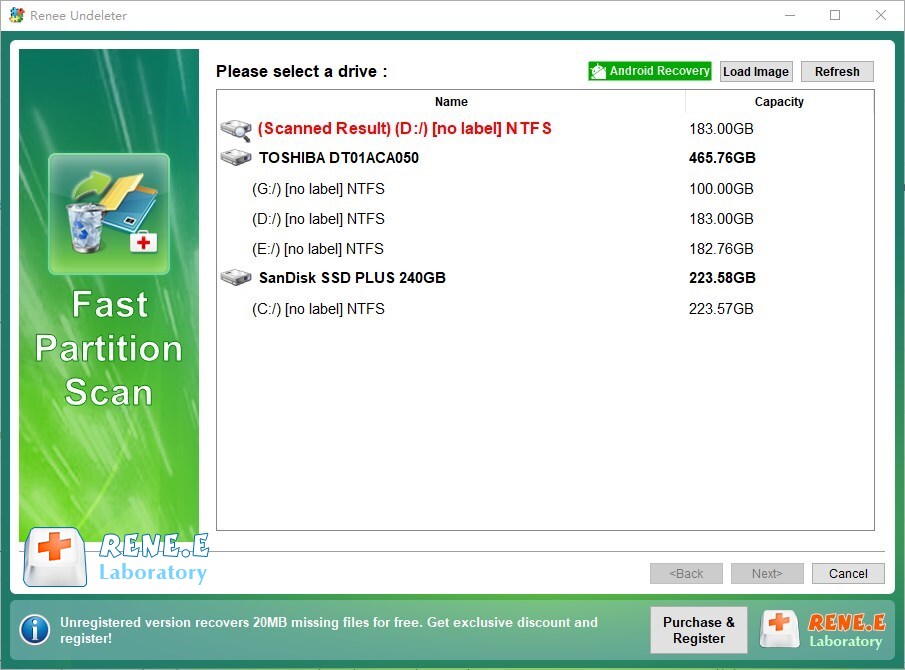
Step 3: Choose the Affected Partition
Select the partition where your lost files were stored and click [ Next ] .
Select partition, alt: Screenshot of Renee Undeleter showing partition selection screen for data recovery 
Step 4: Run the Scan
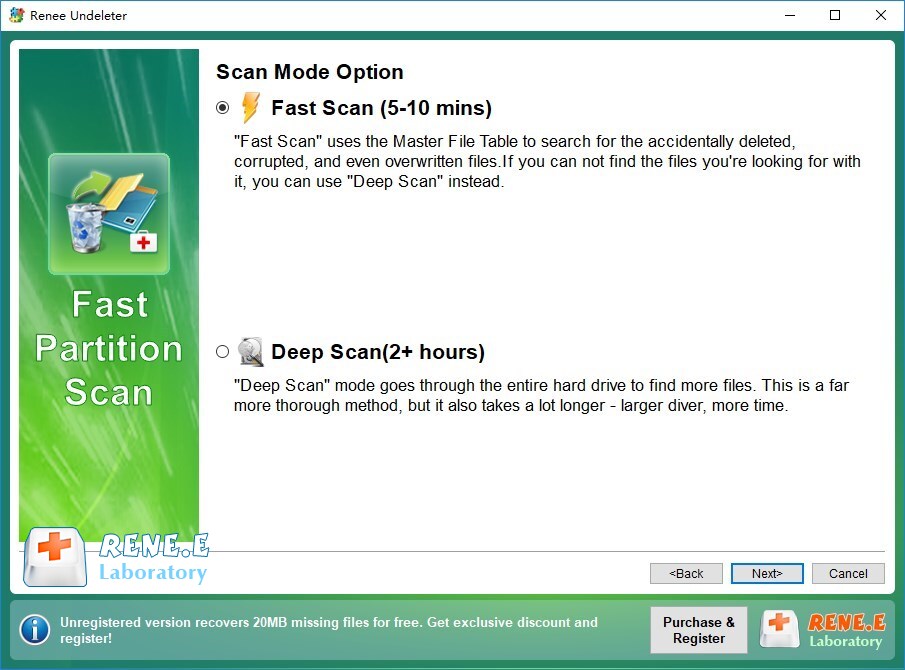
Choose [ Fast Scan ] to scan the first 30GB of the partition. Click [ Next ] to start. If files aren’t found, switch to [ Deep Scan ] for a thorough search (note: this takes longer).
Run Fast Scan, alt: Screenshot of Renee Undeleter’s Fast Scan option during partition scanning 
Step 5: Preview and Recover
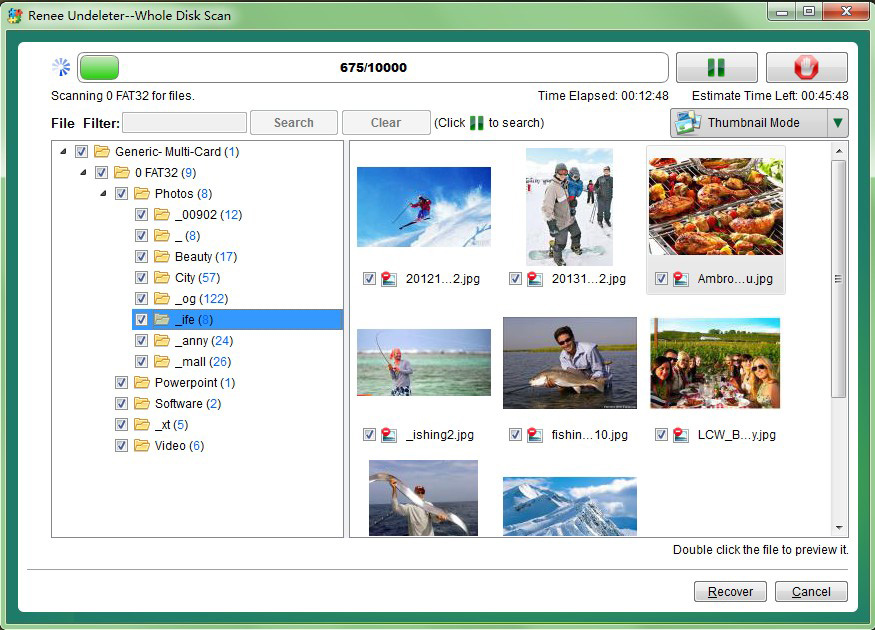
After scanning, double-click files to preview them. Select the files you want to recover and click [ Recover ] to save them to a different drive.
Preview and recover files, alt: Screenshot of Renee Undeleter showing file preview and recovery options 
Tips:

- Save recovered files to a separate drive to avoid overwriting.

- Use Deep Scan if Fast Scan doesn’t find your files.

- Act quickly, as continued drive use lowers recovery chances.

Method #2: Restore Files Using Windows File History

If you had Windows File History enabled before defragmentation, you can recover files from automatic backups of folders like Documents, Pictures, or Desktop. This method is simple and doesn’t affect current data.
Here’s how to recover files using File History:
1. Connect the external or network drive with your File History backups.
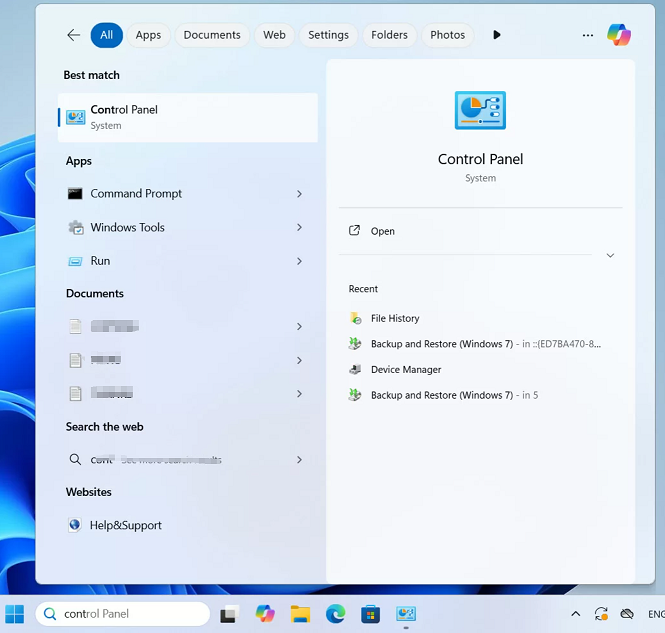
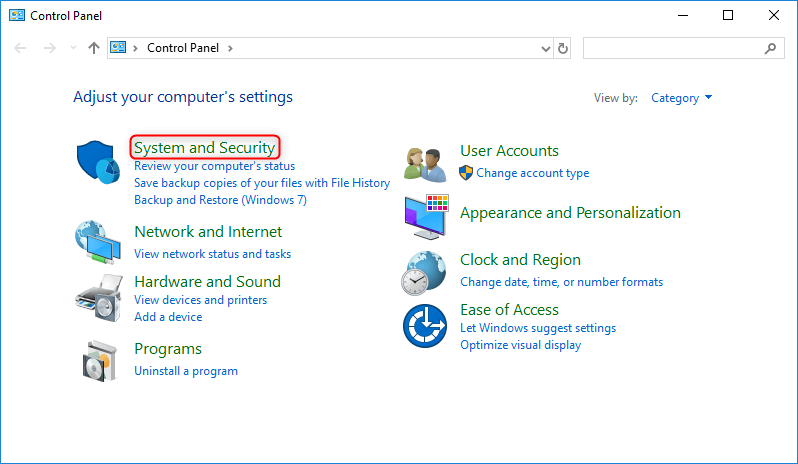
2. Press Windows Key, type “Control Panel” and press Enter to open the Control Panel.
find control pannel in Windows 11
3. Click System and Security.
select system and security in windows control panel
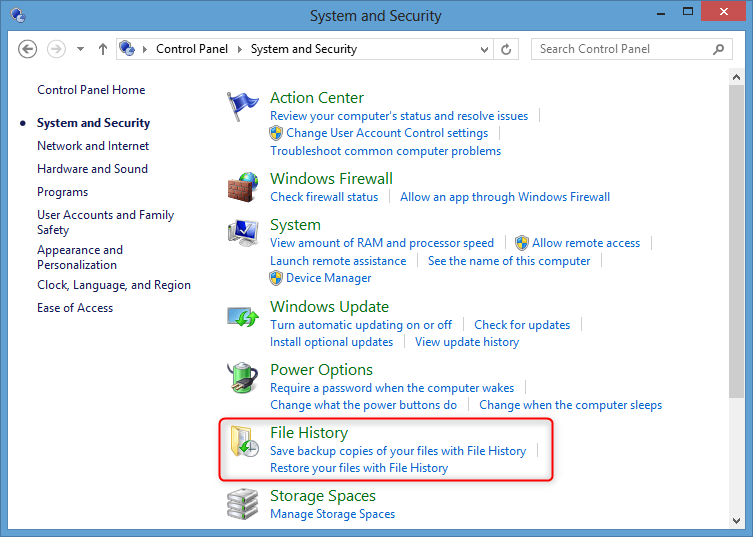
4. Select Restore personal files / Restore your files with File History from the File History section in the left menu.
select file history
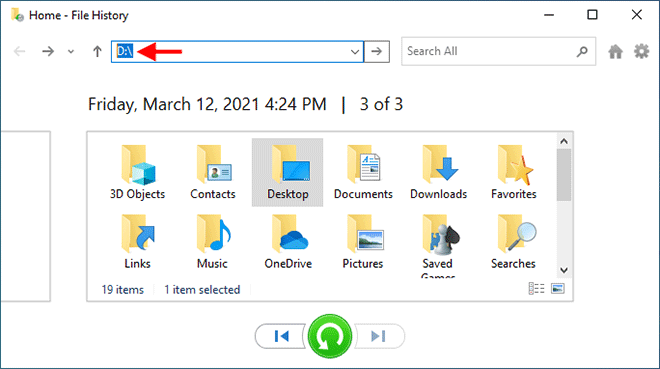
5. Browse backup dates using the arrows at the bottom of the File History window.
6. Navigate to the folder with your lost files, select them, and click the green Restore button.
Windows File History
7. If prompted, choose to replace existing files, skip them, or keep both.

Method #3: Contact Professional Data Recovery Services

If Renee Undeleter or File History doesn’t work, professional data recovery services can help. Experts use advanced tools to recover data from defragmented drives, even in cases of physical damage or severe corruption. Research reputable services like Secure Data Recovery for free consultations. Stop using the drive immediately, as overwritten data is unrecoverable.

Tips to Prevent Data Loss During Defragmentation

To avoid issues and simplify recovery from a defragmented hard drive:
- Back up regularly: Save files to an external drive or cloud before defragmenting.
- Ensure stable power: Use a UPS (uninterruptible power supply) to prevent crashes.
- Check drive health: Run CHKDSK (e.g., chkdsk /f) to detect bad sectors before defragmenting.
- Avoid defragging SSDs: Solid-state drives don’t need defragmentation and may wear out faster if defragged (Microsoft Support).

Common Questions About Defragmentation and Data Recovery

Q: Does defragmentation delete my files?
A: No, defragmentation only reorganizes data. Data loss typically occurs due to interruptions or pre-existing issues.
Q: Can I recover files if I defragmented after deleting them?
A: Recovery is harder but possible with tools like Renee Undeleter, especially if you act quickly before data is overwritten.
Q: Should I defrag my SSD?
A: No, SSDs use TRIM for optimization, and defragmentation can reduce their lifespan.

Conclusion

Defragmentation boosts your hard drive’s performance by reorganizing data, but interruptions like power outages or pre-existing deletions can lead to data loss. To recover a defragmented hard drive, stop using the drive immediately and try Renee Undeleter for its high recovery rates and ease of use. Windows File History or professional services are solid alternatives.
Renee Undeleter - Powerful Data Recovery SoftwareRenee Undeleter data Recovery software

Easy to use Only simple steps to recover data from storage devices.

Multiple scan modes Fast partition scan, whole partition scan and whole disk scan for different recovery needs.

File types Support to recover pictures, videos, audios, documents, mails, etc.

Supported storage devices Recover data from recycle bin, SD card, external disk, etc.

Supported systems Windows 11,10, 8.1, 8, 7, Vista, XP, 2000 and Mac OS X10.6, 10.7, 10.8+.

Easy to use Only simple steps to recover data from storage devices.

Multiple scan modes - 3 scan modes for different recovery needs.

Supported storage devices Recover data from recycle bin, SD card, external disk, etc.
Free TrialFree TrialFree Trial

3000 users have downloaded Renee Undeleter and found data back!