clone os in SSD to new SSD
author avatar
    Specialist of Customer Service Dept.
Last update by Emma Johnson at 22 August 2025

Summary
Easily clone your entire system—Windows OS, files, and applications—to a new SSD without reinstalling or losing data. This step-by-step guide ensures a smooth boot, zero downtime, and a frustration-free upgrade for first-time users.


Is your SSD running out of space or slowing everything down? Upgrading to a larger or faster drive is a smart move—but reinstalling Windows, reactivating your license, and setting everything up from scratch? That’s a time sink nobody wants. Thankfully, there’s a better way: cloning your SSD lets you transfer your entire system—OS, files, settings, and apps—exactly as they are, so you can boot up on the new drive without missing a beat.
clone os in SSD to new SSD
This guide walks you through the full process, step by step, using both free and paid tools to make the transition smooth and frustration-free.
“How do I properly clone my old SSD to a new M.2 drive? Most YouTube tutorials are outdated or use software that’s no longer free… I want to migrate everything and make the new drive bootable.”
It’s a common concern—and this walkthrough is built to solve it. Let’s get your system moved over cleanly, quickly, and without the guesswork.

Before You Start: Essential Checklist for Cloning SSD to New SSD

Putting in some upfront effort really helps make the cloning go without a hitch. Prior to diving in, be sure you’ve handled these key preparations.
➡️ Back Up Your Old SSD
This step is absolutely essential. Although cloning is usually reliable, unexpected problems can arise. To safeguard against losing any data, copy your critical files to an external hard drive, a USB thumb drive, or an online storage service. For added security, you might even generate a complete system backup image with Windows’ own “Backup and Restore” tool.
➡️ Pick a Compatible New SSD
SSDs vary in forms and connections, primarily SATA and NVMe M.2. Look up your computer’s motherboard or laptop specs to confirm compatibility. Also, verify that the new SSD offers sufficient space for all the content from your current drive. Opting for a larger one than your existing SSD is wise, providing extra capacity for future needs.
➡️ Hook Up the New SSD to Your Computer
To clone, both drives must be linked to your machine simultaneously.
* For desktops: Typically, you can pop open the case and slot the new SSD into an available M.2 or SATA port on the motherboard.
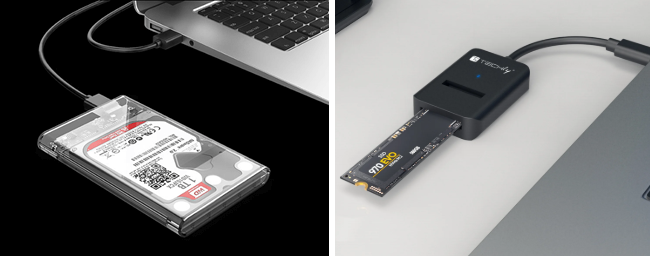
* For laptops: Most laptops have just one SSD spot. You’ll require a USB-to-SATA adapter or an M.2 NVMe SSD enclosure to attach the new drive through a USB port externally. After connecting, confirm that Windows sees it in File Explorer.
usb ssd / disk enclosure
➡️ Inspect the Health of the New SSD
It’s uncommon, but fresh drives might have flaws like faulty sectors that could derail the cloning. Many SSD makers supply free diagnostic tools for their products. Doing a fast check can prevent headaches down the line.
If you want to quickly check whether an SSD is legit or a knockoff, grab CrystalDiskInfo to verify the brand, model, and health status, and run H2testw to test the actual storage capacity. These tools are fast, free, and super reliable for spotting fake drives.

Using Pro Software: Cloning Your SSD to a New SSD on Windows

With preparations out of the way, it’s time to tackle the core task. Here’s a detailed walkthrough on copying all your data from the old drive to the new one with Renee Becca, a dependable and easy-to-use program built for effortless SSD cloning, perfect for when you’re moving to a bigger drive or swapping out an aging one.

Step 1: Install the New SSD

Insert the new SSD into your computer. For M.2 drives, insert the drive at a 30-degree angle, then press down and secure it with the provided screw.
How to Install an M.2 SSD
If you’re cloning to an external drive temporarily, use a USB-to-M.2 adapter or external enclosure to connect your new SSD via USB.
usb ssd / disk enclosure

Step 2: Download and Install Renee Becca

For a seamless SSD upgrade, Renee Becca is your go-to solution. Renee Becca is a tool specifically designed for system and hard disk data backup and restoration. It can efficiently back up and restore essential data on your computer, including programs, system configurations, emails, photos, videos, documents, and bookmarks. Additionally, it allows for disk and system data cloning with 3 different cloning methods: hard disk cloningpartition cloning, and system migration. Choose the most suitable method based on your individual needs.
Renee Becca – Safe and Quick System Migration to SSD

Automatic 4K alignment Improves SSD performance during system migration.

Support GPT and MBR Automatically adapt to the suitable partition format.

Support NTFS and FAT32 Redeploy various files in different file systems.

Back up quickly Back up files at up to 3,000MB/min.

Overall backup schedule Support system redeployment/system backup/partition backup/disk backup/disk clone.

Automatic 4K alignment Improve SSD performance

Support GPT and MBR Intelligently adapt to a partition format

Support NTFS and FAT32 Redeploy files in different file systems

Free TrialFree TrialNow 56337 people have downloaded!
This professional-grade software simplifies the process of cloning your entire SSD or just the Windows system to a new drive, ensuring it’s fully bootable and functional.
Download and install Renee Becca on your PC or laptop to get started.

Step 3: Cloning SSD

Renee Becca offers two powerful options to suit your cloning needs. Depending on whether you want to clone your entire SSD or just the system partition, you can select the best feature for your upgrade:
Function NameFeatureSuitable For

Hard Disk Clone/Clone System Disk

Creates an exact copy of the selected disk, supports adjusting partition size by moving the partition boundary with the mouse, and enables starting the cloned hard disk.

Complete SSD Replacement

System Redeploy

Support to only migrate the Windows system partition to another hard disk.

Dual-Drive Configuration, HDD-to-SSD Migration

Option 1: Clone the Entire Drive Using 'Hard Disk Clone'
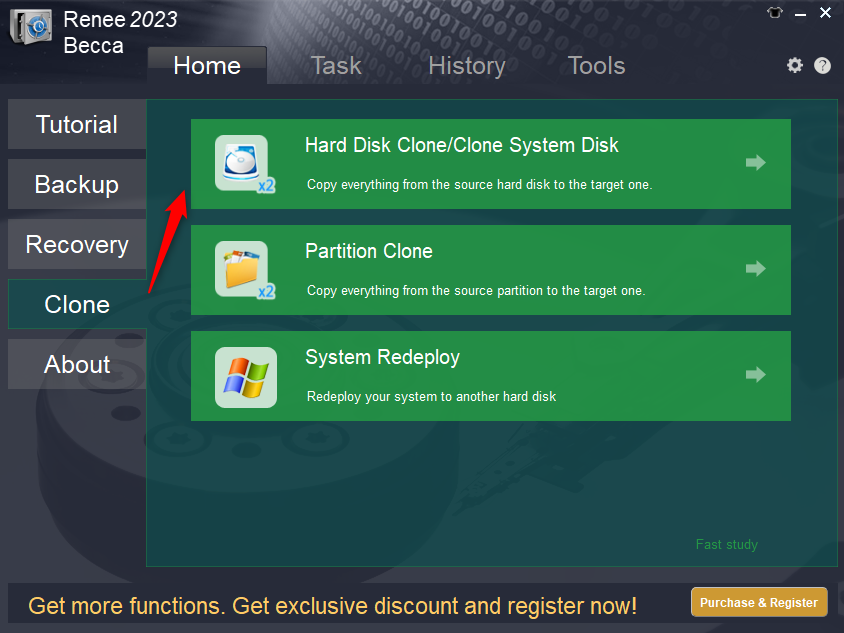
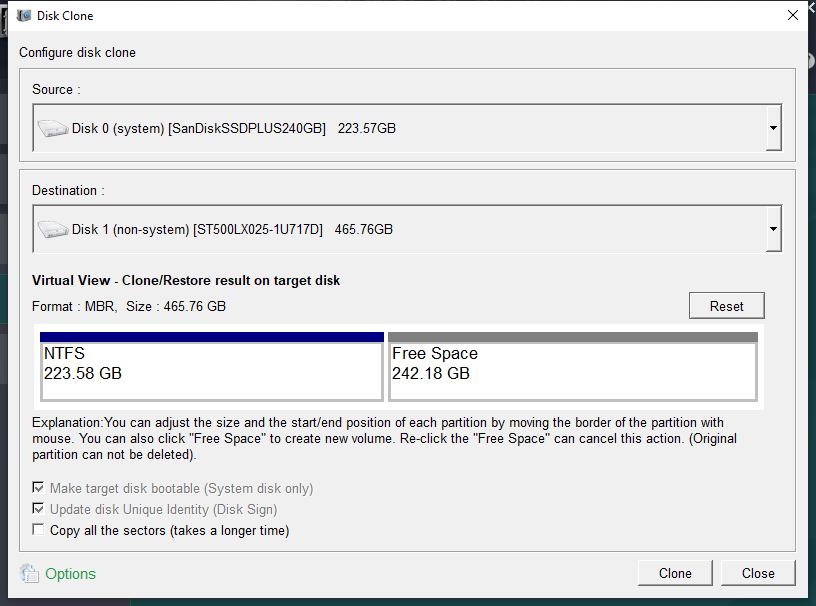
If your original SSD contains both system and data partitions, use the “Hard Disk Clone/Clone System Disk” feature under the “Clone” section of Renee Becca’s main interface. This option copies all partitions, including system and user data, to your new SSD.
renee becca disk clone
1. Configure Source and Destination Drives
In the “Hard Disk Clone” window, select your original SSD as the source and your new SSD as the destination. Double-check that you’ve chosen the correct drives to avoid overwriting important data.
clone the hard disk
2. Customize Advanced Settings
Renee Becca offers advanced options to tailor the cloning process:
* Copy all sectors: This feature clones every sector, including reserved areas and unused space, which is critical if software licenses are stored in those sectors.
* Universal compatibility: Works with various HDDs, SSDs, and USB drives, ensuring a smooth cloning process regardless of your setup.
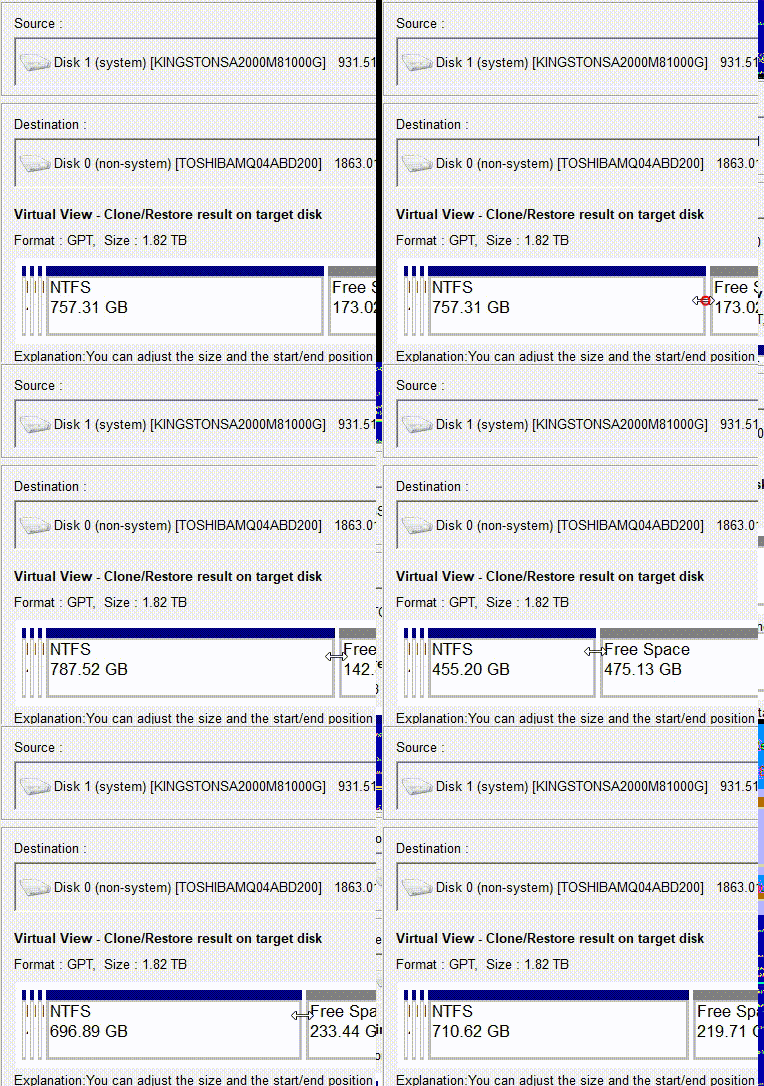
* Adjustable partitions: Resize partitions by dragging their boundaries to optimize space on your new SSD.
adjust partitions
Once configured, click the “Clone” button to start the process.

Option 2: Clone Only the System with 'System Redeploy'
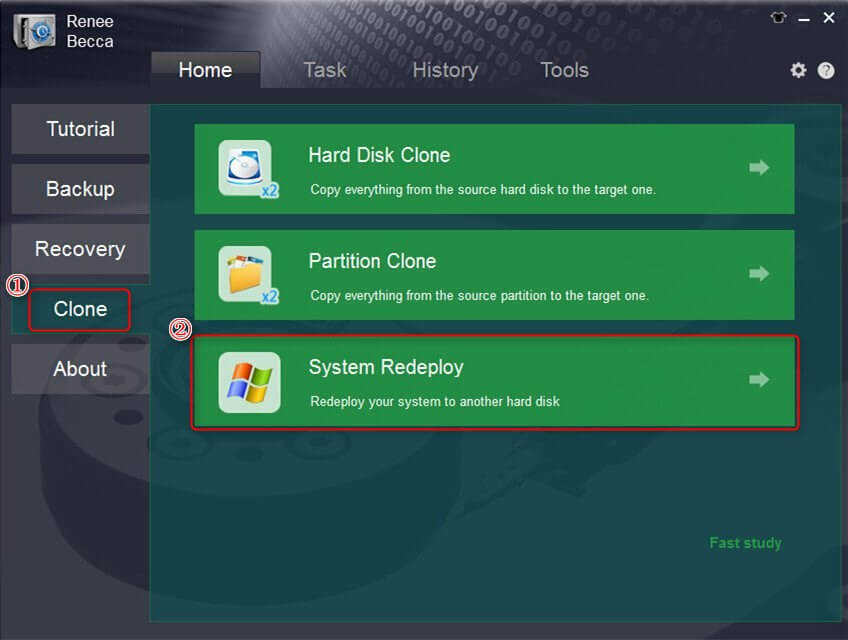
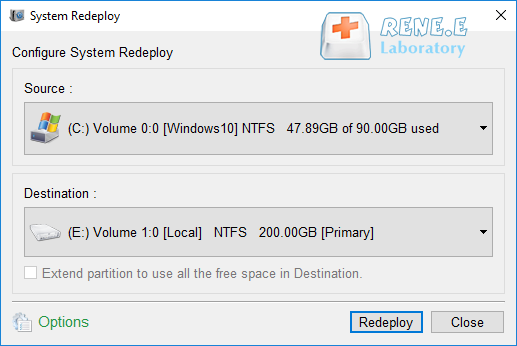
For a faster migration that only transfers the Windows system, select “System Redeploy” under the “Clone” section. This is ideal if you’re setting up a dual-drive system or moving only the OS to your new SSD.
select system redeploy function in clone
Choose Source and Destination
Select your current system partition as the source and your new SSD as the destination. Verify your selections to ensure a successful transfer.
select a destination to redeploy system with renee becca
Click the “Redeploy” button to begin transferring your Windows system, including the OS, apps, settings, and files.
Renee Becca – Safe and Quick System Migration to SSD

Automatic 4K alignment Improves SSD performance during system migration.

Support GPT and MBR Automatically adapt to the suitable partition format.

Support NTFS and FAT32 Redeploy various files in different file systems.

Back up quickly Back up files at up to 3,000MB/min.

Overall backup schedule Support system redeployment/system backup/partition backup/disk backup/disk clone.

Automatic 4K alignment Improve SSD performance

Support GPT and MBR Intelligently adapt to a partition format

Support NTFS and FAT32 Redeploy files in different file systems
Free TrialFree TrialNow 56337 people have downloaded!

Step 4: Monitor the Cloning Process

Wait for the progress bar to reach 100%, indicating a successful clone. The time required depends on your SSD’s data size, typically ranging from 30 minutes to a few hours. Once complete, your new SSD will be a bootable copy of your original drive.
Important Note: Ensure the new SSD’s capacity is larger than the data being cloned. The cloning process will erase all data on the target drive, so back up any important files on the new SSD before starting.

Step 5: Verify the New SSD’s Status

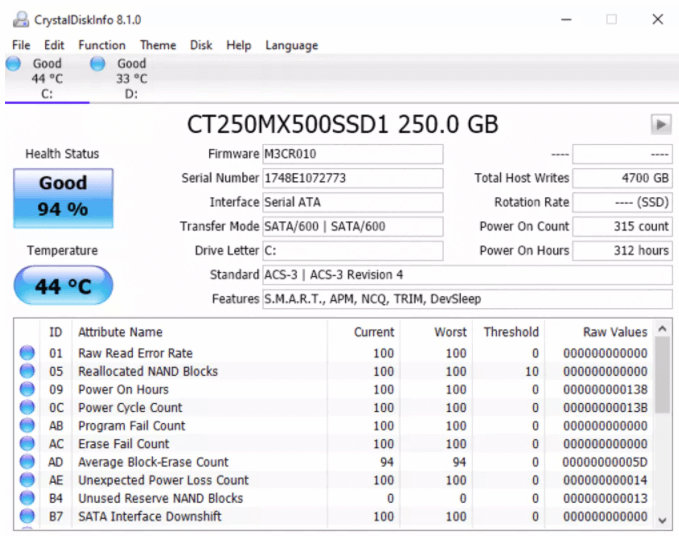
Use tools like CrystalDiskInfo to check the health of your new SSD, ensuring it’s free of errors or bad sectors. This tool uses S.M.A.R.T. data to confirm drive reliability and detect potential issues, such as fake or second-hand SSDs.
how to check ssd health with crystaldiskinfo
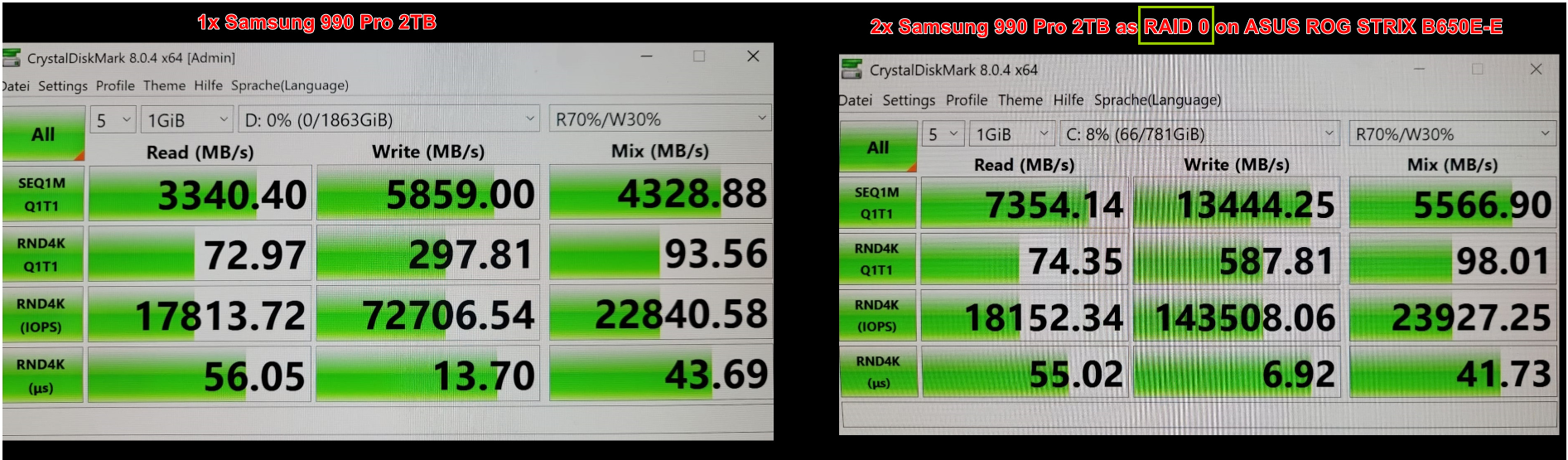
Additionally, run CrystalDiskMark to measure your new SSD’s read/write speeds and confirm its performance matches expectations.
raid 0 speed
This approach guarantees that your data and system move over precisely, sparing you the trouble of setting up Windows and your software from square one.
If you’re on a budget or prefer open-source tools, another solid choice is Clonezilla. It’s completely free and powerful for creating exact copies of your drive, though it involves a bit more hands-on work since it runs from a bootable USB. Let’s cover how to use it for cloning your SSD.
Renee Becca – Safe and Quick System Migration to SSD

Automatic 4K alignment Improves SSD performance during system migration.

Support GPT and MBR Automatically adapt to the suitable partition format.

Support NTFS and FAT32 Redeploy various files in different file systems.

Back up quickly Back up files at up to 3,000MB/min.

Overall backup schedule Support system redeployment/system backup/partition backup/disk backup/disk clone.

Automatic 4K alignment Improve SSD performance

Support GPT and MBR Intelligently adapt to a partition format

Support NTFS and FAT32 Redeploy files in different file systems
Free TrialFree TrialNow 56337 people have downloaded!

Using Clonezilla: A Free, No-Frills SSD Cloning Option

If you want to upgrade your SSD without shelling out for paid software, Clonezilla is a solid choice. It’s free, open-source, and clones everything—including your boot sector—so your new SSD boots up exactly like the old one. Just a heads-up: it’s not plug-and-play. You’ll need to boot from a USB and follow a few technical steps, but if you’re comfortable with basic setup tasks, it’s totally doable.
Here’s how to get it done:
🔹 Step 1: Create a Bootable Clonezilla USB- Download the latest Clonezilla Live ISO from clonezilla.org.
- Use Rufus (Windows) or Balena Etcher (cross-platform) to flash the ISO onto a USB drive (at least 1GB).
Tip: If you’re using older hardware, make sure your USB is formatted as FAT32 before flashing.
🔹 Step 2: Plug in Both SSDs and Boot from USB- Power down your PC or laptop.
- Connect your new SSD. If it’s an M.2 or NVMe drive and your system doesn’t have a second slot, use a USB-to-SATA adapter or external enclosure.
- Insert the Clonezilla USB and boot into BIOS (usually F2, Del, or Esc).
- Set the USB as the first boot device, save changes, and reboot.
🔹 Step 3: Launch Clonezilla and Choose Cloning Mode- Once Clonezilla loads, pick your language and keyboard layout.
- Select “Start Clonezilla” → “device-device” for direct disk-to-disk cloning.
Clonezilla - Opt for device-device mode for direct disk-to-disk cloning
Tip: This skips creating an image file and saves time.
🔹 Step 4: Pick Your Source and Target Drives
- Carefully choose your old SSD as the source and the new one as the destination.
- Double-check drive names and sizes—Clonezilla doesn’t ask twice before overwriting.
Clonezilla - Pick Your Source and Target Drives
Tip: If you’re unsure, The lsblk command helps you list all block devices and their details, making it easier to spot the source disk.

lsblk -o NAME,SIZE,FSTYPE,MOUNTPOINT,LABEL,UUID

command lsblk result
🔹 Step 5: Use Beginner Mode and Default Settings
- Choose “Beginner” mode unless you’re familiar with advanced options.

- Enable bootloader cloning and partition resizing if your new SSD is larger.

- Confirm your choices. Clonezilla will show a final warning before starting.

🔹 Step 6: Start the Clone and Monitor Progress
- Hit “Yes” to begin. The cloning process can take anywhere from 20 minutes to 2 hours depending on drive size and speed.

- You’ll see a live progress bar—no need to touch anything.

Pro Tips: If Clonezilla throws errors, check their official forums or search for your issue on Reddit or Stack Overflow. For laptops with only one SSD slot, consider cloning to an external drive first, then swapping and cloning back internally.
While Renee Becca provides a user-friendly Windows-based experience and Clonezilla offers a robust free alternative, you might want to explore other tools depending on your specific setup or brand of SSD. To help you decide, here’s a comparison of popular SSD cloning and backup options, highlighting their strengths and who they’re best for.

Comparing SSD Cloning and Backup Tools

Choosing the right tool can make your SSD upgrade even smoother. Whether you prioritize ease of use, cost, or advanced features, the following table breaks down several reliable options. This will give you a clear overview to match your needs, from simple migrations to more complex setups.
MethodFeaturesProsConsTarget Users

Renee Becca (Free \& Paid Options)

All-in-one backup and cloning utility; supports system migration in 3 steps; offers incremental/differential backups, AES-256 encryption, and scheduled tasks; backs up to local, external, or cloud storage.

Intuitive interface; flexible backup modes; fast system migration; full disk image restore; works during active use via VSS.

Free version has limited advanced features; paid upgrade needed for full functionality.

Home users, professionals, and small businesses needing reliable backup and easy system migration.

Samsung Magician (Brand-specific, Free)

Tailored for Samsung SSDs; supports data migration and firmware updates; requires encryption to be disabled before cloning; auto-detects drives.

Easy to use; no extra cost; includes SSD management tools; performance optimization after cloning.

Only works with Samsung SSDs; encrypted drives need extra steps; not compatible with other brands.

Samsung SSD owners; beginners looking for a brand-integrated solution.

Clonezilla / Rescuezilla (Free, Open Source)

Boots from USB; performs 1:1 cloning including partitions; supports various SSD types (e.g., SATA to NVMe).

Completely free; no installation required; supports multiple operating systems.

Outdated interface; steep learning curve; requires USB boot; may need manual partition expansion.

Tech-savvy users or budget-conscious individuals; Linux/Windows hybrid setups.

Acronis True Image (OEM Free or Paid)

Auto-resizes partitions; supports HDD/SSD/NVMe; OEM version limited to specific brands (e.g., WD, Crucial); cloning without reboot.

User-friendly interface; preserves system settings; free with brand OEM.

Paid version required for non-OEM; brand-limited free edition.

Brand SSD users; beginners preferring paid reliability.

NTI Echo (Paid)

Simple interface; USB-based cloning; supports HDD to SSD migration.

Fast (≈20 min); no second PC needed.

Requires USB adapter; doesn’t handle partition expansion.

Speed-focused beginners; users with USB hardware.

With a tool selected and the cloning complete, the next phase is configuring your system to recognize and boot from the new SSD properly.
Renee Becca – Safe and Quick System Migration to SSD

Automatic 4K alignment Improves SSD performance during system migration.

Support GPT and MBR Automatically adapt to the suitable partition format.

Support NTFS and FAT32 Redeploy various files in different file systems.

Back up quickly Back up files at up to 3,000MB/min.

Overall backup schedule Support system redeployment/system backup/partition backup/disk backup/disk clone.

Automatic 4K alignment Improve SSD performance

Support GPT and MBR Intelligently adapt to a partition format

Support NTFS and FAT32 Redeploy files in different file systems

Free TrialFree TrialNow 56337 people have downloaded!

After Cloning: Configuring Your New Drive as the Boot Drive

Once the cloning process is complete, you’re almost done. Just a few quick steps will make sure your system boots from the new SSD and runs smoothly.

Step 1: Adjust the Boot Order for Your Cloned SSD

It’s time to instruct your computer to launch from the new drive.
1. Restart your computer and access the BIOS/UEFI settings. This is often done by hitting a key like DEL, or ESC during startup. The key usually flashes briefly on the screen.
Common Server:
Brand Name

DELL

Press the F12 key repeatedly before the Dell logo appears on the screen.

HP

Press the F9 key multiple times when the HP logo is displayed.

Common Computers:
Brand Name

ASRock

DEL or F2

ASUS

DEL or F2 for PCs/ DEL or F2 for Motherboards

Acer

DEL or F2

Dell

F12 or F2

ECS

DEL

Gigabyte / Aorus

DEL or F2

Lenovo (Consumer Laptops)

F2 or Fn + F2

Lenovo (Desktops)

F1

Lenovo (ThinkPads)

Enter then F1

MSI

DEL

Microsoft Surface Tablets

Press and hold Power and Volume Up buttons

Origin PC

F2

Samsung

F2

Toshiba

F2

Zotac

DEL

HP

Esc/ F9 for Boot Menu/ Esc/ F10/ Storage tab/ Boot Order/ Legacy Boot Sources

INTEL

F10

2. Head to the “Boot” or “Boot Order” area.
3. Modify the boot sequence to position your new SSD at the top of the list.
4. Apply the changes and leave the BIOS/UEFI. Your system will reboot and start from the new, cloned SSD!
Tip: On some laptops, BIOS keys may vary—check your manufacturer’s support page if you’re unsure.

Step 2: Confirm the Cloned Drive Works

Your machine should now start quicker and run more smoothly. To verify the SSD cloning went perfectly, perform these checks:
* Review Your Files: Launch File Explorer and look through directories (Documents, Pictures, Desktop) to make sure your personal files are present.
* Launch Your Apps: Try opening your browser, office tools, or any games you use regularly. If they open without reinstalling, you’re good.
* Assess Performance: Access Task Manager (Ctrl + Shift + Esc) and switch to the “Performance” tab. Your new SSD should appear as the C: drive, with normal usage stats.
After everything checks out, you can wipe your old SSD and repurpose it for additional storage or backups.
Tip: If your new SSD is larger than the old one, open Disk Management (Win + X → Disk Management) and extend the main partition to use the extra space.
Renee Becca – Safe and Quick System Migration to SSD

Automatic 4K alignment Improves SSD performance during system migration.

Support GPT and MBR Automatically adapt to the suitable partition format.

Support NTFS and FAT32 Redeploy various files in different file systems.

Back up quickly Back up files at up to 3,000MB/min.

Overall backup schedule Support system redeployment/system backup/partition backup/disk backup/disk clone.

Automatic 4K alignment Improve SSD performance

Support GPT and MBR Intelligently adapt to a partition format

Support NTFS and FAT32 Redeploy files in different file systems

Free TrialFree TrialNow 56337 people have downloaded!

Final Thoughts on Your SSD Cloning Upgrade

There you have it! Cloning an SSD may seem intimidating at first, but with proper setup and the appropriate tool like Renee Becca or Clonezilla, it’s a manageable job. You’ve upgraded your storage successfully, bypassing the annoyance of rebuilding your system from the ground up. Savor your quicker, more expansive setup! 🚀

Common Questions About Cloning SSD to New SSD

How do I clone my M.2 SSD to a new M.2 SSD?

The steps for cloning an SSD to a new SSD remain consistent no matter the physical type. You’ll connect the new M.2 drive (probably via an external case), employ cloning software such as Renee Becca to duplicate the data from the old M.2 to the new, exchange the drives in the motherboard if needed, and adjust the boot priority in BIOS to the new one.

Can I swap an M.2 SSD without reinstalling Windows?

Definitely! Cloning’s main advantage is that it produces an identical, ready-to-boot duplicate. After the clone, swapping drives lets you continue exactly where you were, skipping any reinstallation.

How do I clone my SSD to another SSD for free?

Free tools like Clonezilla or Rescuezilla are available for disk cloning. They’re effective but might feel more complex for newcomers. Also, see if your SSD brand (such as Samsung, Crucial, or Western Digital) supplies a complimentary cloning program made for their hardware.

What if the cloning process fails midway?

If cloning stops or errors out, don’t panic—start by checking hardware connections, ensuring both drives are properly attached and powered. Run a health check on both SSDs using manufacturer tools or CrystalDiskInfo to spot issues like bad sectors. Try a different USB port or adapter if using external connections, and consider switching to another tool like Clonezilla if the first one glitches. Always have a backup, as retrying might require starting over.

Can I clone my SSD to a smaller SSD?

It’s possible but not always advisable. The new SSD must have enough space for all the used data on the old one, not just the total capacity. Some tools like Renee Becca allow resizing partitions downward, but if the used space exceeds the new drive’s size, it won’t work and could lead to data loss or boot issues. Clean up unnecessary files first or use selective cloning for just the system partition.

How long does SSD cloning usually take?

The duration varies based on factors like the amount of data, drive speeds, and your computer’s hardware. For a typical 500GB SSD with average usage, expect anywhere from 30 minutes to two hours. Larger drives or slower connections might push it to several hours, so plan accordingly and avoid interrupting the process to prevent corruption.

Is cloning safe, or could it damage my data?

Cloning is generally safe when done correctly, as it reads from the source without altering it and writes to the target. However, risks exist if there’s a power failure or hardware glitch during the process. That’s why backing up first is crucial. Using reputable tools minimizes chances of errors, and post-clone verification ensures everything transferred intact.

What's the difference between cloning and creating a disk image?

Cloning makes a direct, bootable copy from one drive to another, ideal for immediate upgrades. Disk imaging, on the other hand, creates a compressed file of your drive that you can store and restore later, which is better for backups but requires extra steps to apply to a new SSD. Tools like Clonezilla support both, depending on your goal.
Renee Becca – Safe and Quick System Migration to SSD

Automatic 4K alignment Improves SSD performance during system migration.

Support GPT and MBR Automatically adapt to the suitable partition format.

Support NTFS and FAT32 Redeploy various files in different file systems.

Back up quickly Back up files at up to 3,000MB/min.

Overall backup schedule Support system redeployment/system backup/partition backup/disk backup/disk clone.

Automatic 4K alignment Improve SSD performance

Support GPT and MBR Intelligently adapt to a partition format

Support NTFS and FAT32 Redeploy files in different file systems

Free TrialFree TrialNow 56337 people have downloaded!

User Comments

Page 1

Leave a Comment


Your comment has been submitted and is awaiting moderation.