author avatar
    Senior Product Manager
Last update by Olivia Brown at 29 July 2025

Summary
This expert guide shows how to perform a dell xps ssd clone upgrade, helping you transfer data safely and efficiently to a new SSD while maintaining smooth laptop performance.



Is your Dell XPS laptop slowing down or running out of space?
Upgrading to a larger SSD can breathe new life into your system—boosting speed, improving responsiveness, and giving you the room you need. In this guide, we’ll walk you through how to clone your existing Dell XPS drive to a new SSD without losing a single file. Whether you’re a designer, developer, gamer, or just tired of system lag, this step-by-step tutorial makes upgrading fast, safe, and painless.
“Hey everyone, I’ve got a Dell XPS 8900 with a packed 1TB hard drive. Just bought a Samsung 860 QVO 2TB SSD and want to clone my old drive over. What’s the easiest way to do that? Also—will it fit right in, or should I grab an adapter?”
With sleek designs, stunning displays, and serious horsepower under the hood, the Dell XPS lineup—from the 13 all the way up to the 17—has long been a favorite among power users. Whether you’re rocking an ultralight or a desktop-class workstation, cloning your SSD is the easiest way to upgrade without starting from scratch. This guide covers two proven methods: using trusted third-party software and Dell’s own built-in recovery tools.

Know Your Dell XPS Configuration Before Upgrading Your SSD

Before you start the cloning process for your Dell XPS SSD upgrade, it’s essential to understand your laptop’s configuration. This knowledge helps you decide the best upgrade path—whether you’ll replace your current SSD or add a new one. Getting familiar with your model’s capabilities sets you up for a hassle-free upgrade.
To assist you, here’s a breakdown of common Dell XPS models and their upgrade options:
Dell XPS Laptop Upgrade Summary
Model(s)SizeSSD InterfaceSSD SlotsSSD UpgradeableRAM UpgradeableRAM Slots

XPS 13 (9350, 9360, 9370)

13.3"

M.2 SATA/NVMe

1

✅ Yes

❌ No (soldered)

0

XPS 13 (9380, 7390, 9300–9315)

13.4"

M.2 NVMe

1

✅ Yes

❌ No (soldered)

0

XPS 13 Plus (9320, 9340)

13.4"

M.2 NVMe Gen 4

1

✅ Yes

❌ No (soldered)

0

XPS 15 (9550, 9560, 9570)

15.6"

M.2 NVMe

1

✅ Yes

✅ Yes

2

XPS 15 (9500, 9510, 9520, 9530)

15.6"

M.2 NVMe Gen 3

1

✅ Yes

✅ Yes

2

XPS 16 (9640)

16.3"

M.2 NVMe Gen 4

1

✅ Yes

❌ No (soldered)

0

XPS 17 (9700, 9710, 9720, 9730)

17.0"

M.2 NVMe Gen 3

2

✅ Yes (dual)

✅ Yes

2

Notes & Tips

SSD Interface: All models use M.2 slots, but newer ones support faster NVMe Gen 4.
RAM: Only XPS 15 and 17 models have upgradeable RAM. XPS 13 and 13 Plus use soldered memory.
Slot Count: XPS 17 models are the only ones with dual SSD slots—perfect for RAID or extra storage.
Warranty Caveat: Opening the chassis might void your warranty in some regions. Check Dell’s policy first.

Choosing Your SSD Upgrade Approach

Your upgrade strategy depends on your model’s SSD slot count:
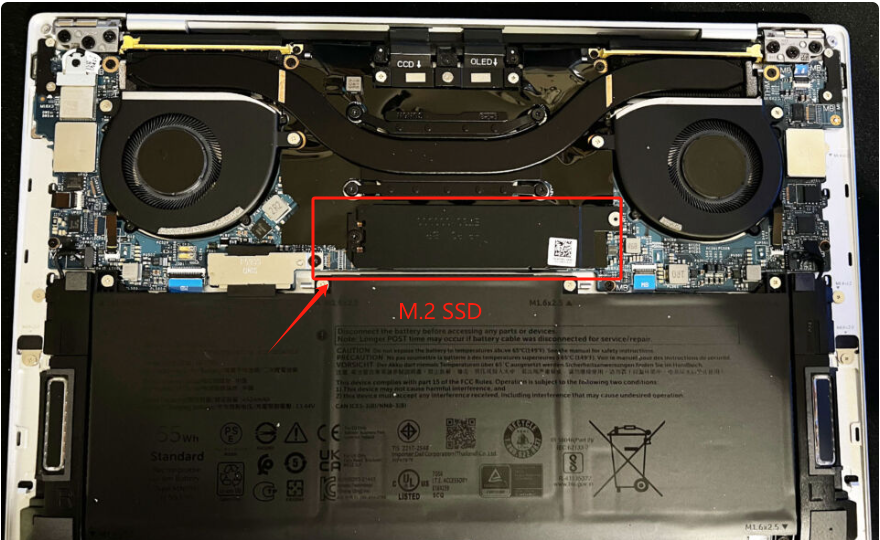
- Single-slot models (e.g., XPS 13, 15 and 16): You’ll replace the existing M.2 SSD with a new one. This requires cloning your data to the new SSD before swapping them out.
XPS 13, 15 and 16 internal image
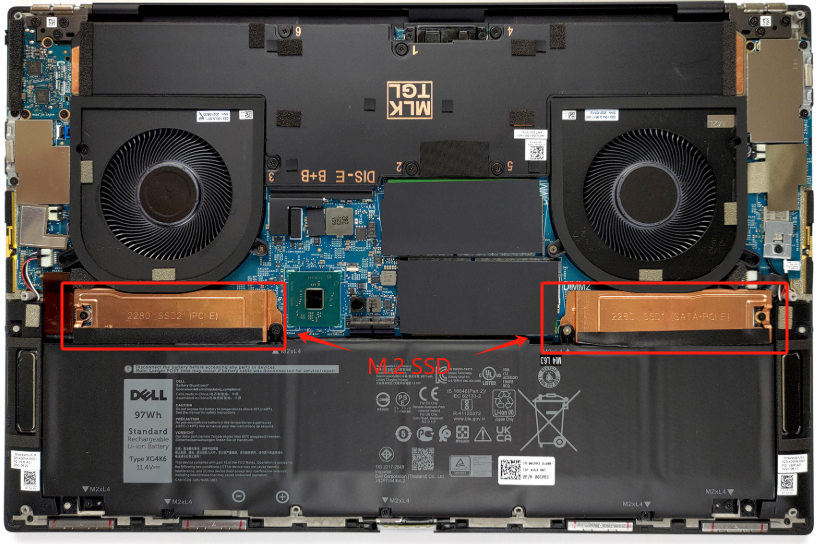
- Dual-slot models (e.g., XPS 17): You can add a second M.2 SSD without removing the original. Keep the first for your OS and use the new one for more storage—or replace the existing one if you’d rather.
XPS 17 internal image
Make sure your new SSD matches your model’s specs (e.g., M.2 2280 size and NVMe compatibility) and has enough capacity for your needs.

Preparation Before Cloning Dell XPS SSD

Before diving into your Dell XPS SSD clone upgrade, take some time to prepare. These steps will ensure everything goes smoothly:

1. Choose a Compatible SSD for Your Dell XPS Laptop

Start by picking an SSD that works with your Dell XPS model. This laptop supports M.2 2230 and M.2 2280 SSDs, with common types including 2.5-inch, M.2 SATA, NVMe, and NVMe PCIe. Not sure what fits? Check your current SSD or your laptop’s manual. Popular picks include Samsung 990/980/970 Pro (1TB to 4TB), Samsung 870 EVO (250GB to 4TB), WD Black SN850X (500GB to 1TB), and Crucial P3/P5. Make sure the new SSD has more capacity than your old one to hold all your data.

2. Back Up Your Old SSD to Prevent Data Loss

Cloning is usually safe, but it’s smart to back up your data just in case. Use a tool like Renee Becca to save your files, folders, or even a full system image to an external drive, NAS, or cloud storage.

3. Gather Tools to Access Your Laptop

After cloning, you’ll need to swap out the old SSD for the new one. Grab a Phillips screwdriver and a pry pick to open your Dell XPS’s back cover and access the SSD slot.

4. Install the New SSD

If you’re installing it internally right away, insert the SSD at a 30-degree angle into the M.2 slot, press it down, and secure it with the screw provided.
How to Install an M.2 SSD
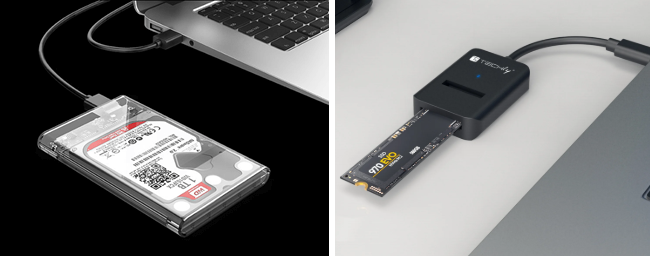
If you’re cloning to an external SSD first, connect it using a USB-to-M.2 adapter or an enclosure.
When using a USB-to-M.2 adapter or enclosure for cloning, ensure it supports USB 3.0 or higher for faster transfer speeds.
USB SSD / Disk Enclosure

5. Format the New SSD (Optional)

If your new SSD isn’t formatted, you might want to do it for peak performance. Some cloning tools, like Renee Becca, format the SSD automatically during cloning, so check your software’s features.

Clone Dell XPS SSD Easily with Professional SSD Cloning Software

For a smooth and reliable Dell XPS SSD clone upgrade, professional software is the way to go. We recommend Renee Becca, a powerful tool designed to make cloning your SSD a breeze. Whether you’re replacing your SSD or migrating only the Windows system, Renee Becca has you covered with its intuitive design and robust features.
Renee Becca – Safe and Quick System Migration to SSD

Automatic 4K alignment Improves SSD performance during system migration.

Support GPT and MBR Automatically adapt to the suitable partition format.

Support NTFS and FAT32 Redeploy various files in different file systems.

Back up quickly Back up files at up to 3,000MB/min.

Overall backup schedule Support system redeployment/system backup/partition backup/disk backup/disk clone.

Automatic 4K alignment Improve SSD performance

Support GPT and MBR Intelligently adapt to a partition format

Support NTFS and FAT32 Redeploy files in different file systems

Free TrialFree TrialNow 56337 people have downloaded!

Why Choose Renee Becca for Your Dell XPS SSD Clone Upgrade?

  • Full System Migration: Clone your entire SSD—OS, apps, and files—to the new drive effortlessly.
  • Flexible Options: Clone the whole disk or just the system partition, depending on your needs.
  • Customizable Layouts: Resize partitions with a drag-and-drop interface to match your new SSD’s capacity.
  • Broad Compatibility: Works with SSDs and HDDs from brands like Samsung, WD, Crucial, and more.
  • Thorough Cloning: Copies every sector, including hidden areas that might hold important data.

Steps to Clone Your Dell XPS SSD with Renee Becca

Here’s how to use Renee Becca for your Dell XPS SSD clone upgrade:
Before cloning with Renee Becca, ensure BitLocker is disabled on your source SSD. Refer to Dell’s guide or Windows settings to disable it.

Step 1: Download and Install Renee Becca

Grab Renee Becca from its official website and install it on your Dell XPS laptop.

Step 2: Choose the Right Cloning Function

Open Renee Becca and pick the cloning option that fits your goal:
Function NameFeatureSuitable For

Hard Disk Clone/Clone System Disk

Copies the entire SSD, including all partitions, with adjustable sizes.

Full SSD replacement

System Redeploy

Moves only the Windows system partition to the new SSD.

Dual-drive setups or system-only upgrades

Option 1: Clone the Entire SSD
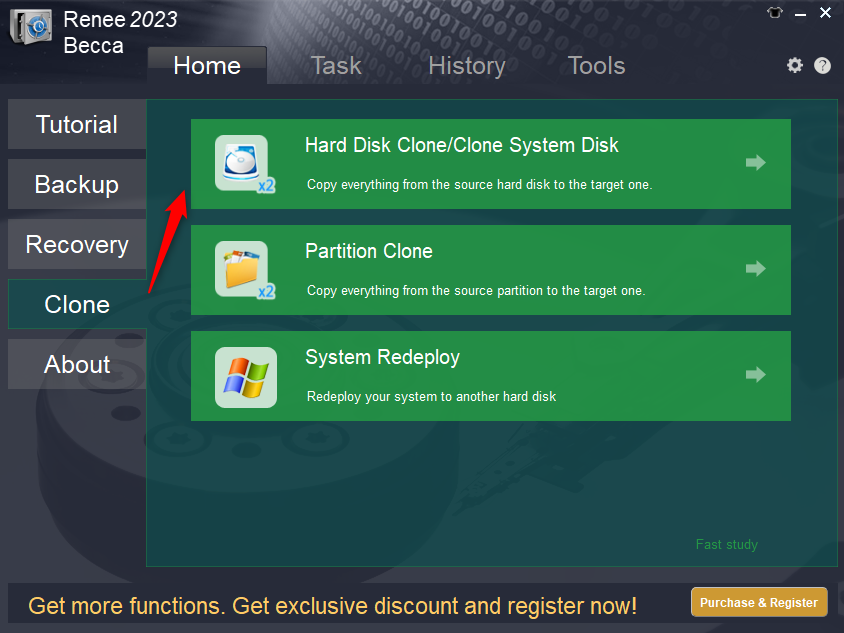
For a complete Dell XPS SSD clone upgrade, select Hard Disk Clone/Clone System Disk under the “Clone” menu.
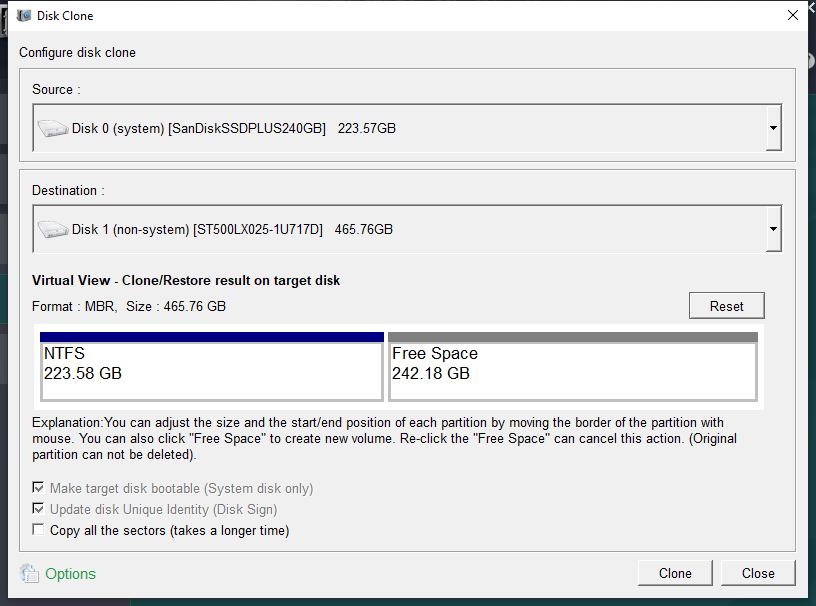
Renee Becca Disk Clone
1. Pick Your Drives: Set your current Dell XPS SSD as the source and the new SSD as the destination. Double-check to avoid overwriting the wrong drive!
Clone the Hard Disk
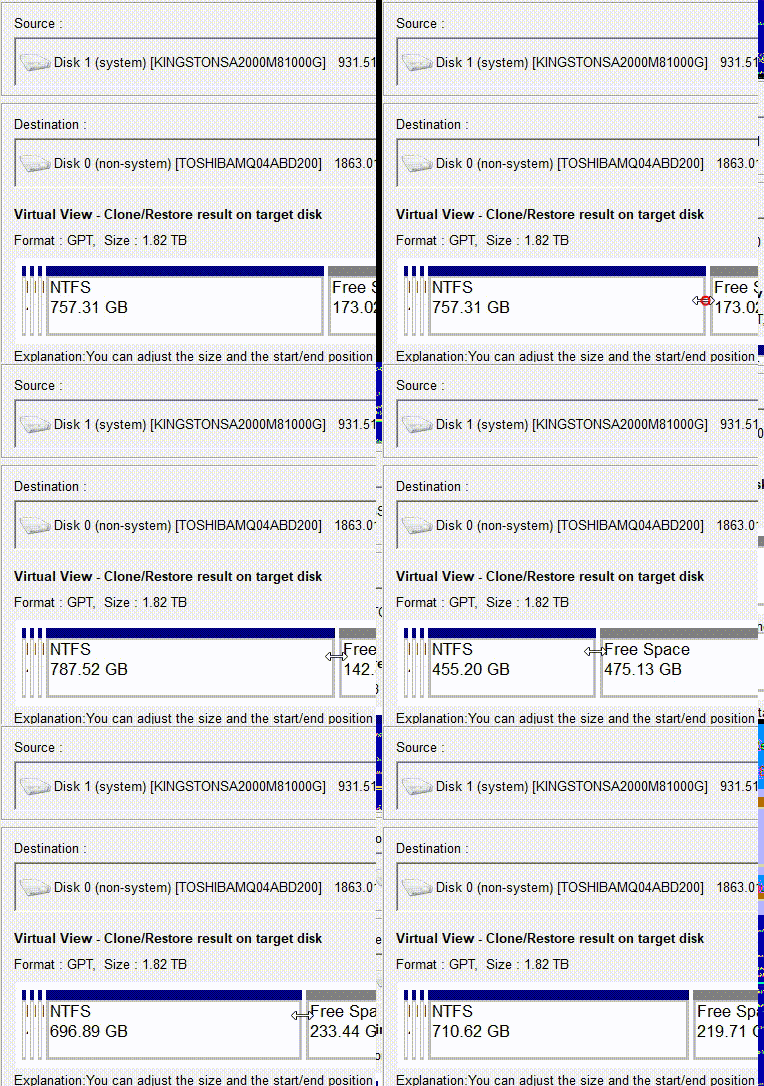
2. Tweak Settings: Use advanced options like sector-by-sector cloning for a perfect copy or resize partitions by dragging their boundaries.
Adjust Partitions
3. Start Cloning: Hit Clone to kick off the process.
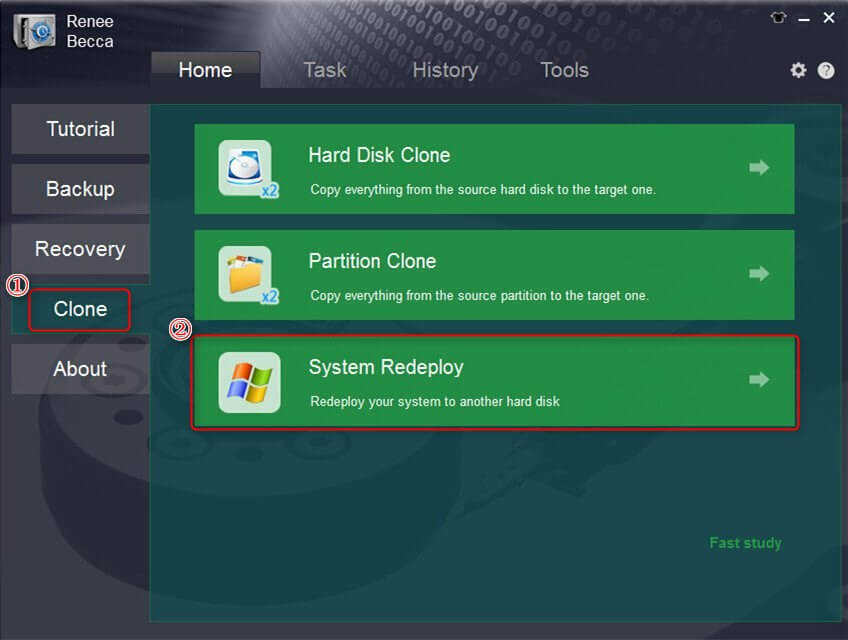
Option 2: Move Just the Windows System
If you only need the OS on your new SSD, choose System Redeploy from the “Clone” section.
Select System Redeploy
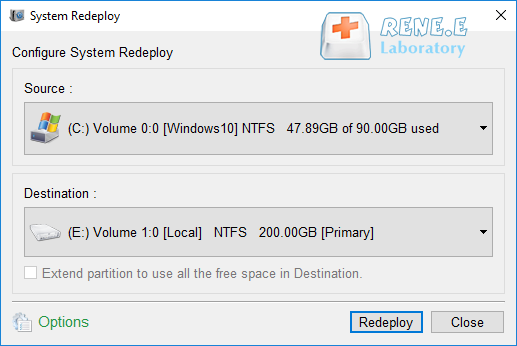
1. Select Drives: Choose your current system partition as the source and the new SSD as the destination.
System Redeploy
2. Begin Migration: Click Redeploy to transfer your system.

Step 3: Monitor the Cloning Process

Sit back as the progress bar fills up. Depending on your SSD’s data size, this could take 30 minutes to a few hours.
Important Note: Ensure your new SSD has enough space for the data you’re cloning. All existing data on the target SSD will be wiped, so back up anything important there first!

Step 4: Verify the New SSD

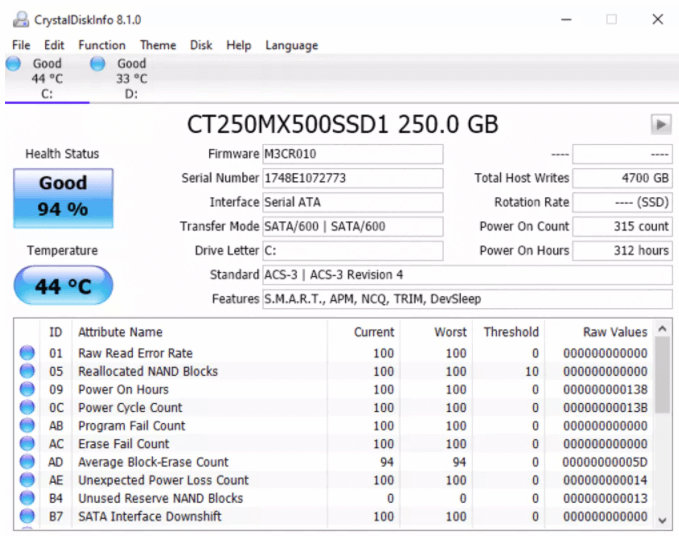
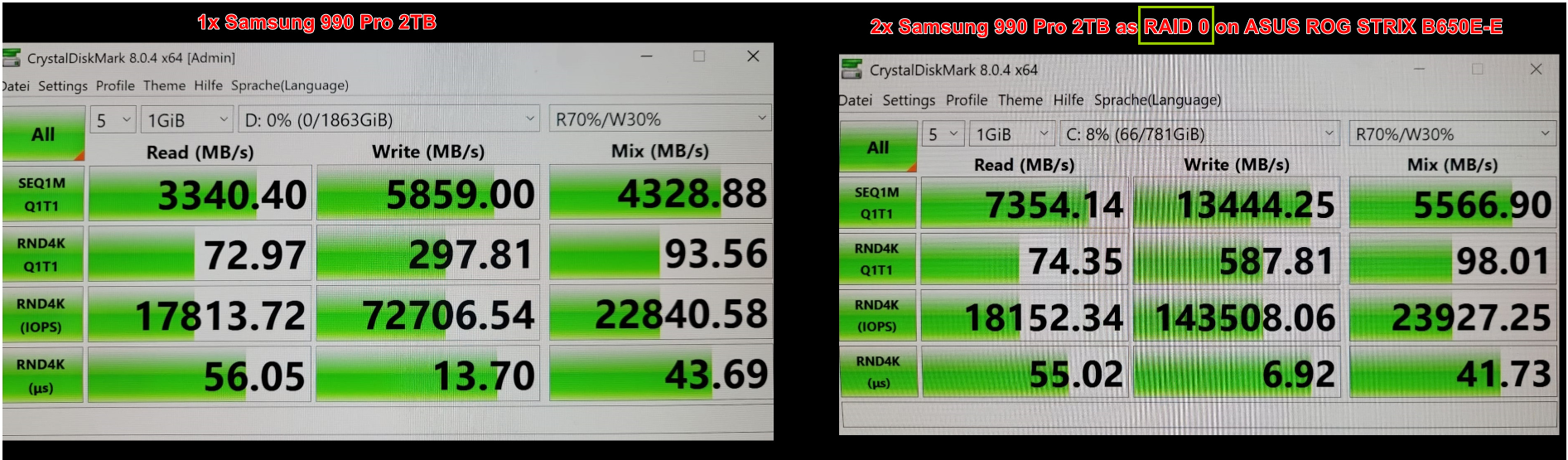
Once done, check your new SSD’s health with CrystalDiskInfo and test its speed with CrystalDiskMark.
Check SSD Health
SSD Speed Test
With Renee Becca, your Dell XPS SSD clone upgrade is fast, safe, and straightforward—perfect for boosting your laptop’s performance without the hassle.
Renee Becca – Safe and Quick System Migration to SSD

Automatic 4K alignment Improves SSD performance during system migration.

Support GPT and MBR Automatically adapt to the suitable partition format.

Support NTFS and FAT32 Redeploy various files in different file systems.

Back up quickly Back up files at up to 3,000MB/min.

Overall backup schedule Support system redeployment/system backup/partition backup/disk backup/disk clone.

Automatic 4K alignment Improve SSD performance

Support GPT and MBR Intelligently adapt to a partition format

Support NTFS and FAT32 Redeploy files in different file systems

Free TrialFree TrialNow 56337 people have downloaded!

Clone Dell XPS SSD with SupportAssist OS Recovery

If you’d rather skip third-party tools, Dell’s built-in SupportAssist OS Recovery offers a free way to perform a Dell XPS SSD clone upgrade. Just make sure you meet these requirements:
  • The primary drive must boot into Windows.
  • The new SSD needs more capacity than the old one.
  • Disable BitLocker (check Dell’s guide for steps).
  • Keep your laptop plugged into power throughout.
  • If it shuts down mid-process, restart from scratch.

Steps to Clone Dell XPS SSD with SupportAssist

1. Access SupportAssist OS Recovery
At the boot screen, press F12 to enter One-Time Boot Settings, then select SupportAssist OS Recovery.
Dell XPS Clone SSD
2. Go to Disk Cloning
Under the Recover section, choose Back Up Files / Disk Cloning.
Dell XPS Clone SSD
3. Select Disk Cloning
Click Disk Cloning, then hit Next.
Dell XPS Clone SSD
4. Choose Your New SSD
Pick the target SSD based on how it’s connected (internal, USB housing, or USB device), then click Next.
Dell XPS Clone SSD
5. Start Cloning
Confirm the new SSD by its name and click Next to begin.
6. Finish Up
When cloning’s done, click Continue to shut down. You’re ready to swap in the new SSD!
Renee Becca – Safe and Quick System Migration to SSD

Automatic 4K alignment Improves SSD performance during system migration.

Support GPT and MBR Automatically adapt to the suitable partition format.

Support NTFS and FAT32 Redeploy various files in different file systems.

Back up quickly Back up files at up to 3,000MB/min.

Overall backup schedule Support system redeployment/system backup/partition backup/disk backup/disk clone.

Automatic 4K alignment Improve SSD performance

Support GPT and MBR Intelligently adapt to a partition format

Support NTFS and FAT32 Redeploy files in different file systems

Free TrialFree TrialNow 56337 people have downloaded!

The Final Words

When it comes to a Dell XPS SSD clone upgrade, you’ve got two solid paths: Renee Becca and SupportAssist OS Recovery. While both can handle the job, Renee Becca shines with its user-friendly interface, customizable options, and wide SSD compatibility. It’s the go-to choice for a quick, reliable upgrade, whether you’re tackling storage limits or chasing better performance. With Renee Becca, your Dell XPS SSD clone upgrade is a breeze—keeping your data safe and your laptop running like new.

FAQs About Dell XPS Clone SSD

How do I know if my new SSD is compatible with my Dell XPS for a clone upgrade?

Check your laptop’s manual or the Dell website for your model’s SSD specifications. Most XPS models use M.2 NVMe SSDs (2230 or 2280 sizes). Popular options like Samsung 970 Pro or WD Black SN850X are usually compatible, but confirm the slot size and interface (SATA or NVMe) to ensure a smooth Dell XPS SSD clone upgrade.

Will cloning my Dell XPS SSD improve my laptop’s performance?

Yes, upgrading to a faster SSD (e.g., NVMe Gen 4) can significantly boost boot times, app loading, and file transfers. Cloning ensures your system and data transfer seamlessly, so you’ll enjoy the performance benefits of the new SSD without reinstalling anything during your Dell XPS SSD clone upgrade.

What happens if my Dell XPS SSD clone upgrade fails midway?

If cloning fails (e.g., due to a power interruption or incorrect settings), don’t panic. Verify that your source and target drives are properly connected, ensure the target SSD has enough capacity, and restart the process using Renee Becca or SupportAssist OS Recovery. Always back up your data before starting to avoid any loss during your Dell XPS SSD clone upgrade.

Do I need a mounting adapter for my new SSD in a Dell XPS?

Most Dell XPS models, like the XPS 13, 15, and 17, use M.2 SSDs (2230 or 2280), which don’t require adapters as they fit directly into the M.2 slot. For models like the XPS 8900 desktop, a 2.5-inch SSD like the Samsung 860 QVO may need a mounting bracket if replacing a 3.5-inch HDD. Check your model’s specs to confirm for your Dell XPS SSD clone upgrade.

Can I clone my Dell XPS SSD to a smaller drive?

Cloning to a smaller SSD is possible only if the used space on your current drive is less than the target SSD’s capacity. Tools like Renee Becca allow you to adjust partitions during the Dell XPS SSD clone upgrade, but ensure all your data fits. Back up your data first to avoid any issues.

How long does a Dell XPS SSD clone upgrade take?

The cloning time depends on the amount of data and the speed of your drives. For a 1TB drive, it typically takes 30 minutes to a few hours with tools like Renee Becca. Faster NVMe SSDs and USB 3.0 connections can speed things up for your Dell XPS SSD clone upgrade.

Will cloning my Dell XPS SSD void my warranty?

Upgrading your SSD generally doesn’t void the warranty, but opening your laptop might in some regions. Check Dell’s warranty policy for your model before starting your Dell XPS SSD clone upgrade. Using an external enclosure for cloning can help avoid opening the device until necessary.
Renee Becca – Safe and Quick System Migration to SSD

Automatic 4K alignment Improves SSD performance during system migration.

Support GPT and MBR Automatically adapt to the suitable partition format.

Support NTFS and FAT32 Redeploy various files in different file systems.

Back up quickly Back up files at up to 3,000MB/min.

Overall backup schedule Support system redeployment/system backup/partition backup/disk backup/disk clone.

Automatic 4K alignment Improve SSD performance

Support GPT and MBR Intelligently adapt to a partition format

Support NTFS and FAT32 Redeploy files in different file systems

Free TrialFree TrialNow 56337 people have downloaded!

User Comments

Page 1

Leave a Comment


Your comment has been submitted and is awaiting moderation.