author avatar
    Senior Program Developer
Last update by Emma Johnson at 14 May 2026

Summary
This guide addresses the critical_process_died windows 11 stop code by outlining systematic troubleshooting methods, including built-in Windows repair tools, driver management, and hardware diagnostics. Solution categories covered range from data backup procedures using bootable utilities to advanced recovery paths like System Restore and Windows reset options.


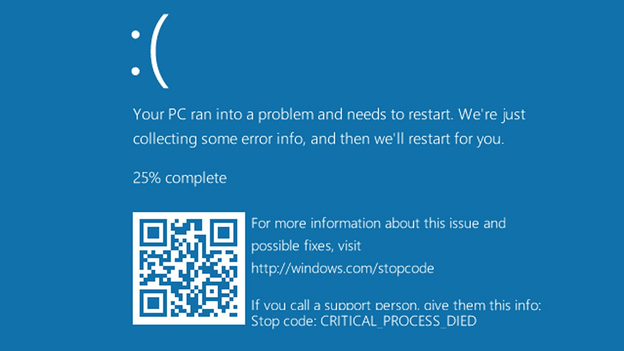
The CRITICAL_PROCESS_DIED error(stop code 0xEF) shows up when a core Windows process—like csrss.exe, services.exe, or wininit.exe—dies without warning. When that happens, Windows crashes immediately to protect your system, which often leaves you stuck in a boot loop or staring at repeated blue screens.
Windows 10 blue screen stop code 0x000000EF CRITICAL_PROCESS_DIED
Windows 11 users have noticed this error spiking after certain events:
  • Windows Update failures — Major rollouts like the Windows 11 24H2 preview wave in mid‑2025 and cumulative updates such as KB5074109 in January 2026 triggered widespread boot problems when installation didn’t complete cleanly or left system files in an inconsistent state.
  • Driver conflicts — GPU and chipset drivers pushed through Windows Update (for example, the NVIDIA Game Ready driver released on October 12, 2025) have occasionally caused immediate reboot loops or black‑screen failures after installation.
  • Corrupted system files — Sudden power loss during storms, forced shutdowns, or malware incidents (notably the late‑2024 ransomware surge) often leave Windows unable to load essential boot components.
  • Recent software installations — Kernel‑level anti‑cheat engines introduced by several major games in summer 2025, as well as aggressive antivirus suites, have been linked to BSODs and startup failures right after installation.
  • Hardware changes — Users frequently report this error after adding RAM, swapping SSDs, or adjusting CPU undervolting/overclocking settings — especially following the 12th‑gen Intel microcode update in early 2025, which made unstable overclocks more sensitive.
  • File system corruption — NTFS errors or bad sectors on aging SSDs/HDDs often surface after heavy write operations, such as large game installs or Windows feature updates.

First priority warning: Do NOT run automatic repair tools repeatedly before securing your data.

If you wish to analyze exactly what issue caused this Blue Screen error, please refer to: Bug Check 0x000000EF: CRITICAL_PROCESS_DIED – Causes, Data Rescue & Proven Fixes
If your system is boot-looping, focus on backing up your data first. Jump to Section 2 before trying any command-line fixes.

Before Any Repairs: Secure Your Data with a Bootable Emergency Tool

Here’s the reality: all repair operations—SFC, DISM, CHKDSK, System Restore—come with some data risk. Backing up your important files isn’t optional, especially when Windows won’t boot normally.
Standard backup methods fall apart in these situations:
  • Windows won’t reach the desktop or Safe Mode
  • External drives don’t show up in the Recovery Environment
  • The crash loop blocks you from logging in
Renee PassNow gives you a bootable environment for safe data transfer and data recovery. Walk through the steps below to create a bootable USB, boot from it, and secure your files before touching any system repairs.
Renee Passnow – Professional Windows Password Remover

Remove Windows Login Password 3 steps for whole password remove process.

Recover the files Recover the deleted files without Windows system.

Transfer the data Transfer the important files of the computer with system.

Multifuctional Data transfer, data recovery, bootable problem recovery can be run without system.

Highly compatible Windows 11/10/8.1/8/7/XP/Vista. UEFI boot.

Remove Login Password Support Windows 11/10/8.1/8/7/XP/Vista. UEFI boot.

Recover the files Recover the deleted files without Windows system.

Transfer the data Transfer the important files of the computer with system.

Free TrialFree TrialNow 2000 people have downloaded!

Creating a Bootable Live USB on a Working Computer

1. Grab a working computer and download Renee PassNow. Insert a USB drive (at least 8GB)—everything on it will be erased, so back up anything you need from it first.
download now
2. Launch Renee PassNow and choose Create a Live USB.
3. Pick the right architecture (x64 for most modern systems, x86 for older ones), click Download Now to grab the ISO, then hit Create Live USB, and finally Eject USB.
use renee passnow to create usb to reset passnword

Booting from the USB Drive

Plug the USB into the affected computer and turn it on. Immediately start tapping the BIOS or boot menu key—the prompt usually flashes for just 1-2 seconds.
Insert the boot device
Common boot keys by brand:
  • Dell: F12
  • HP: F9 or Esc
  • Lenovo: F2 or Fn+F2
  • ASUS/Acer: DEL or F2
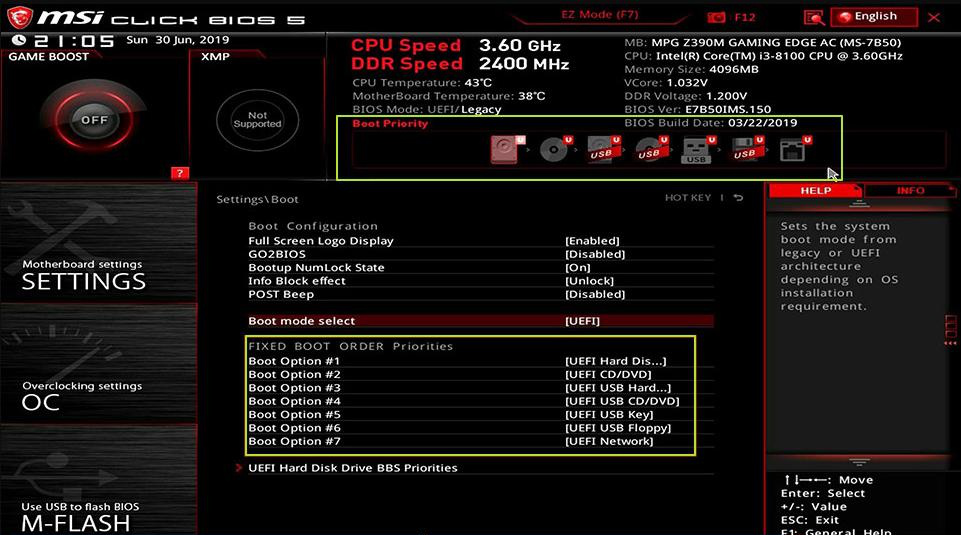
Once you’re in BIOS, set the USB as the first boot device in the Boot Priority menu, save your changes, and reboot.
select boot order

Transferring Files Using Data Transfer

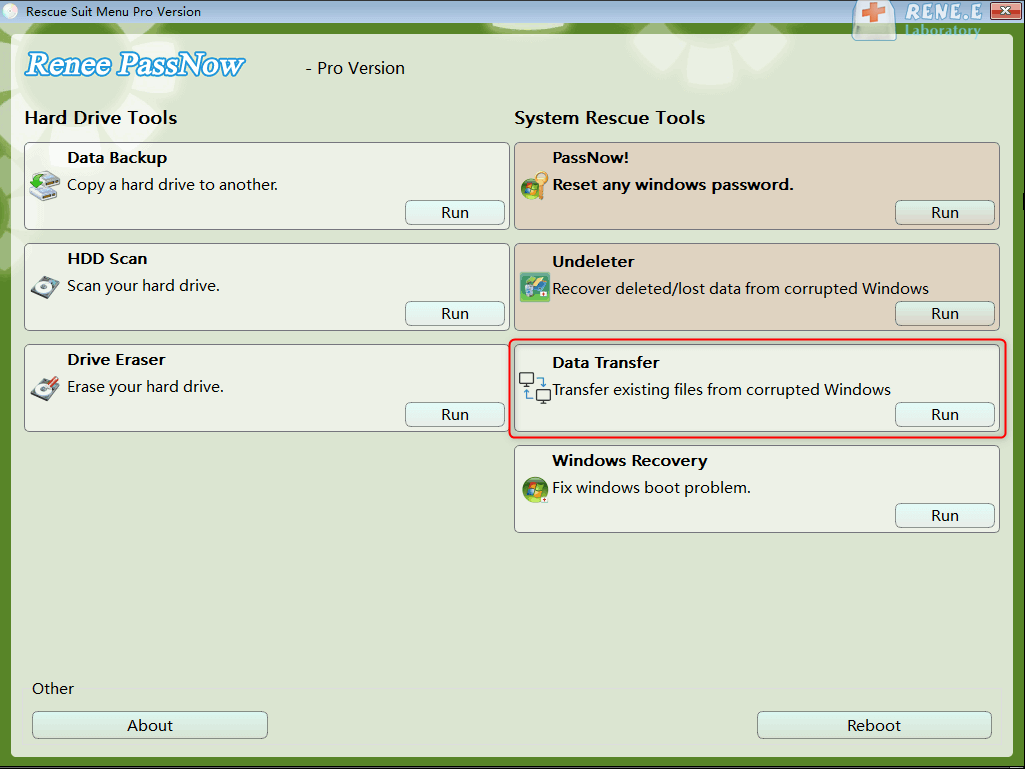
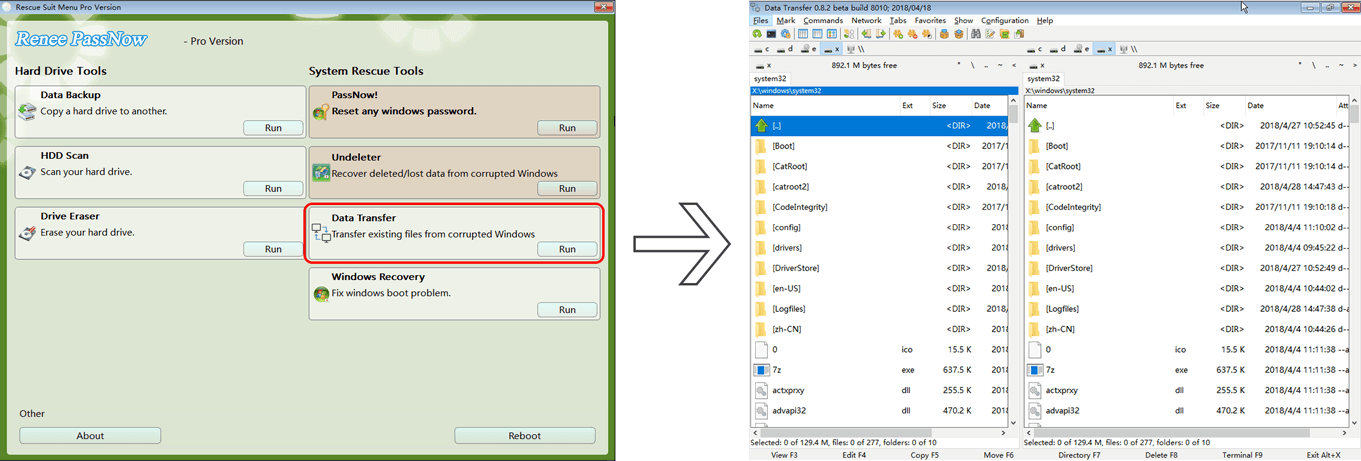
Once Renee PassNow loads, pick Data Transfer from the main screen.
data transfer
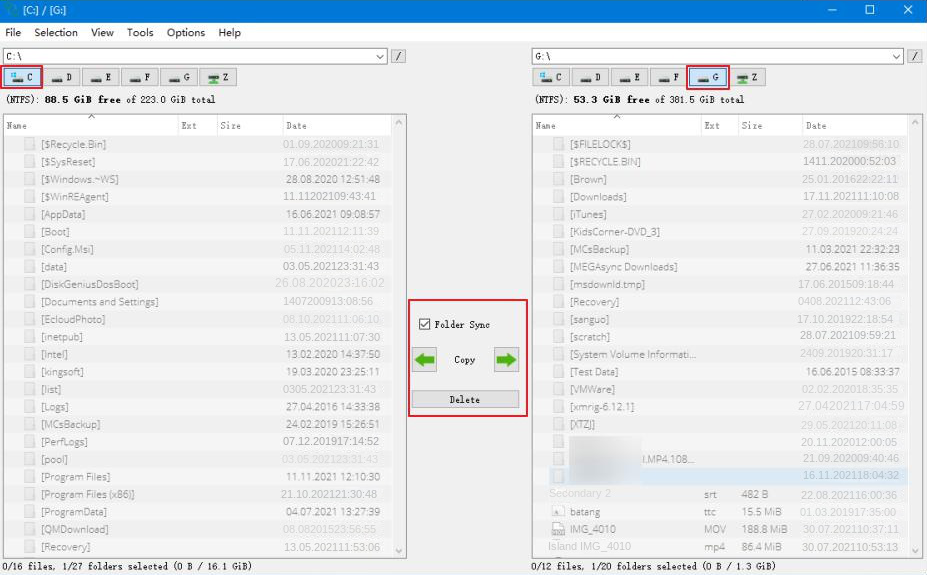
Select your system drive (usually C:) on the left panel, and an external drive on the right. Browse through your folders and copy what you need.
Renee PassNow data transfer wizard copying files to external drive
transfer data interface
Focus on these key locations under C:\Users\YourUserName:
  • Desktop
  • Documents
  • Pictures
  • Downloads
  • Videos
  • Music

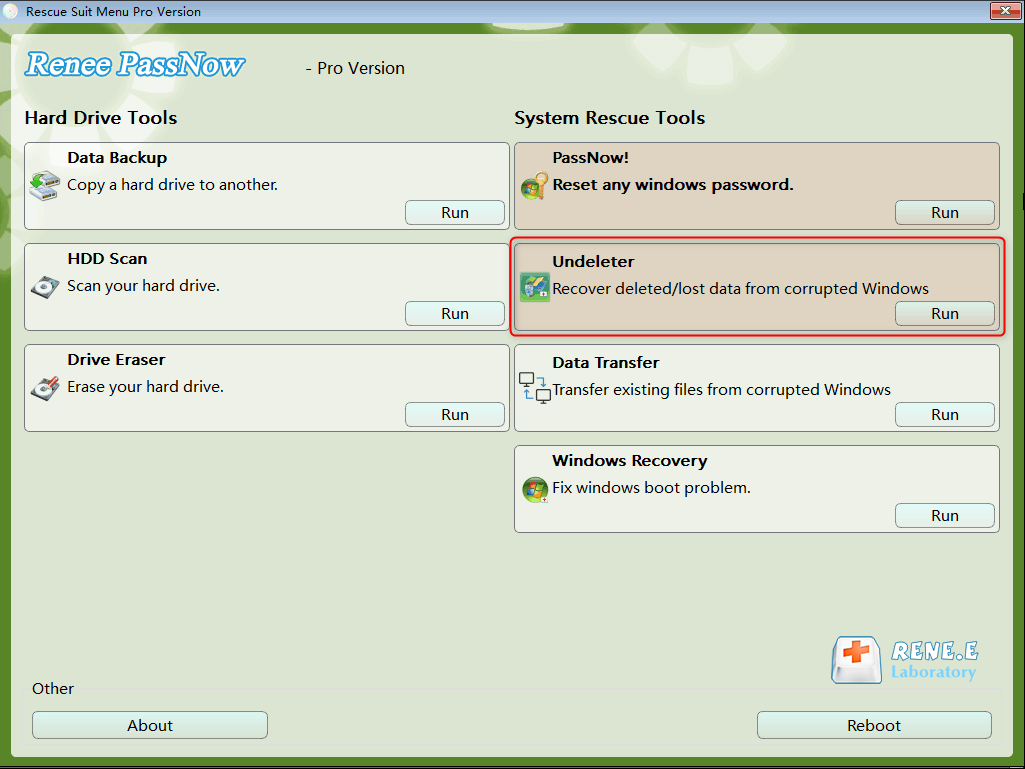
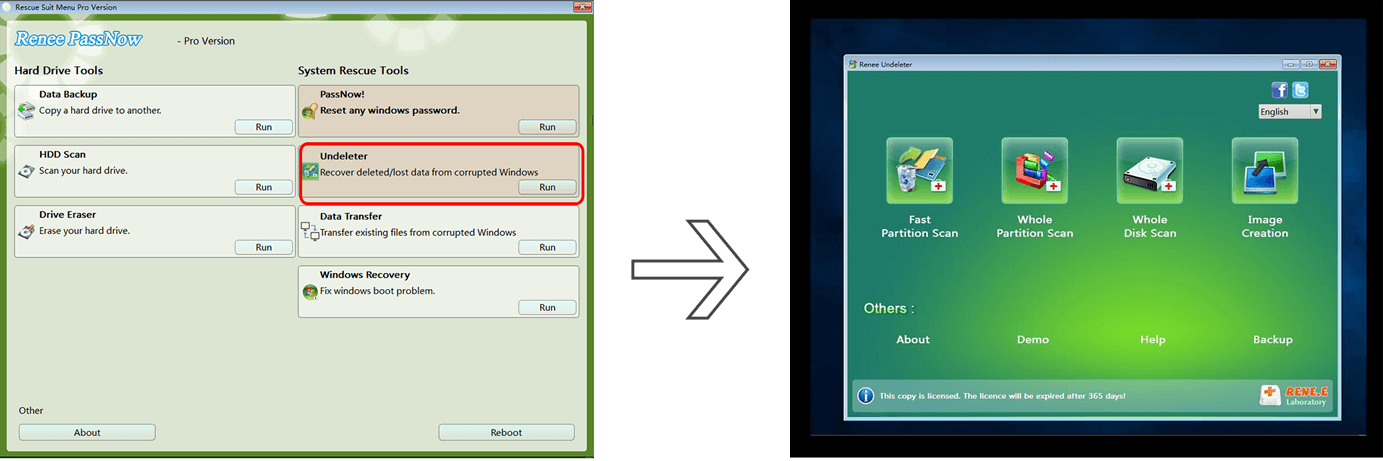
Recovering Already Lost Files Using Undeleter

If files went missing before the crash, switch to the Undeleter option instead.
data recovery function in Renee PassNow
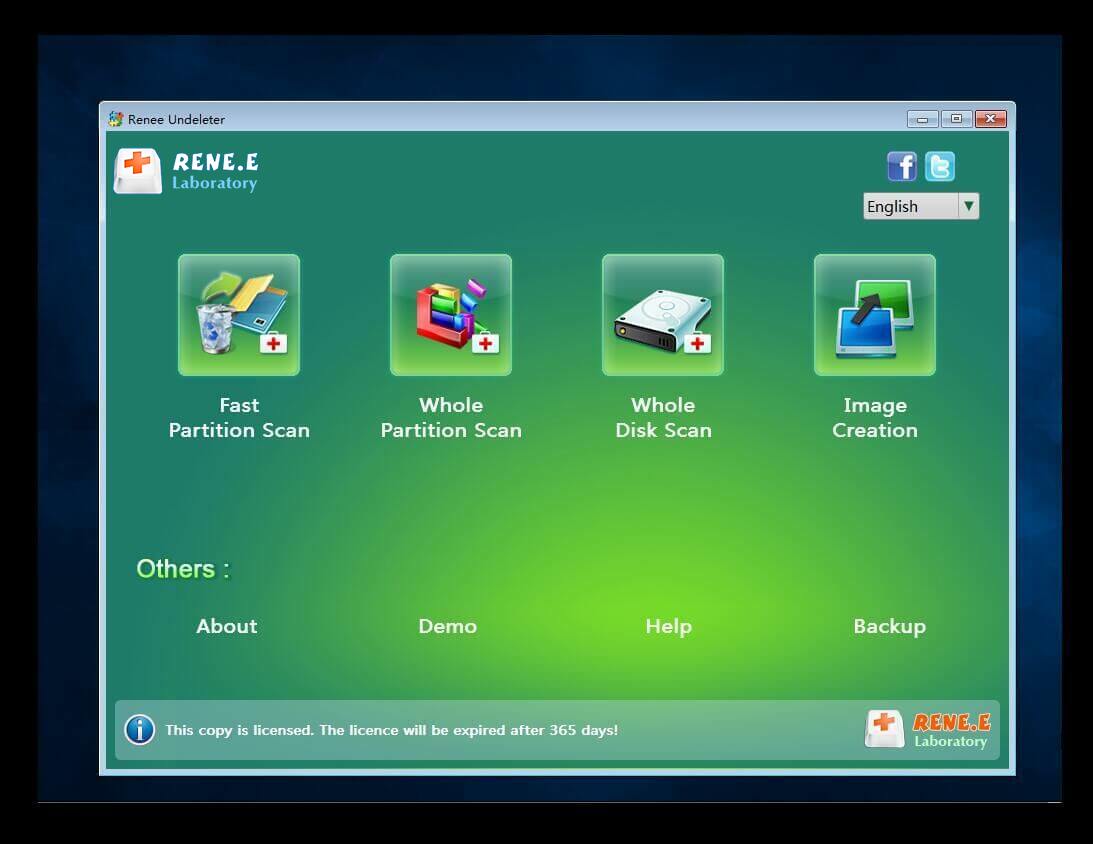
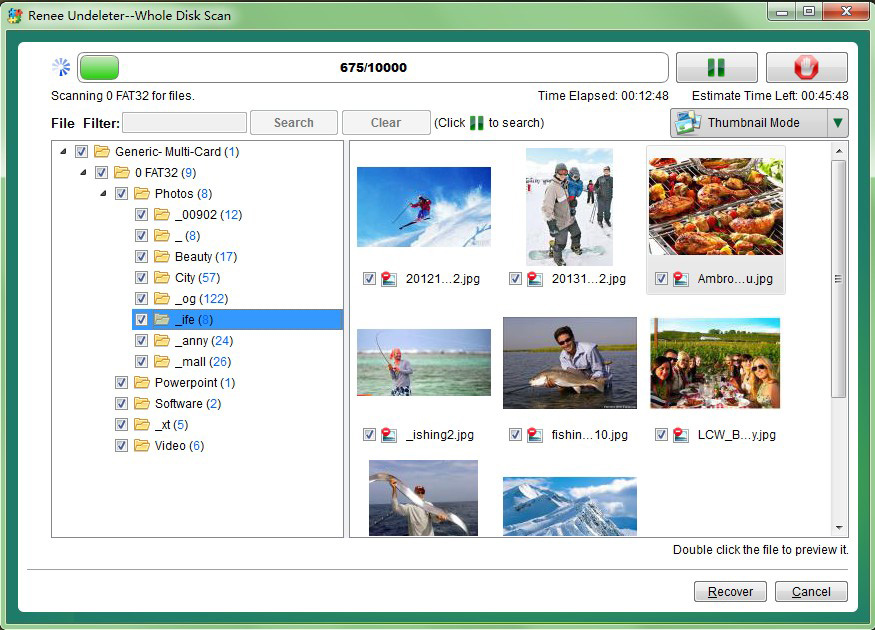
Pick a scan mode (scanning the whole partition works best), preview the files it finds, select what you need, and click Recover.
Renee PassNow Undeleter recovering deleted files
Always save recovered files to a different external drive—never back onto the same disk.
scan the whole partition with renee passnow recovery function to reinstall windows 7
preview before recovery

After you finish backing up or recovering files, safely eject the USB before moving on to system repairs.

Method 1: Software Repair Methods: Built-in Windows Tools

Once your data is safe and you can reach the Windows Recovery Environment (WinRE) or Safe Mode, it’s time to try the built-in repair tools.

Entering Windows Recovery Environment (WinRE) and Safe Mode

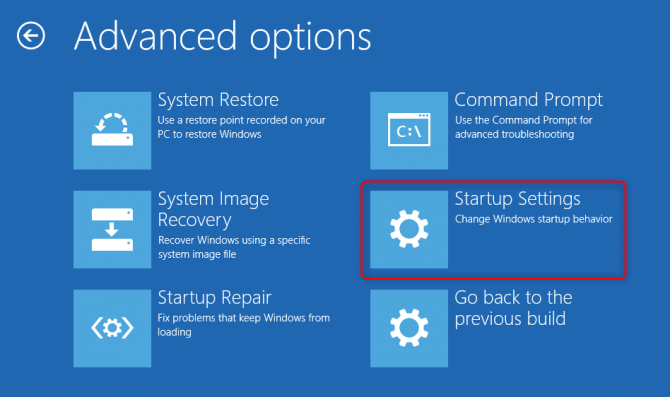
Force your way into WinRE by powering off the PC during startup three times in a row. From the blue WinRE screen, go to Troubleshoot → Advanced Options → Startup Settings → Restart.
select startup settings in advanced options
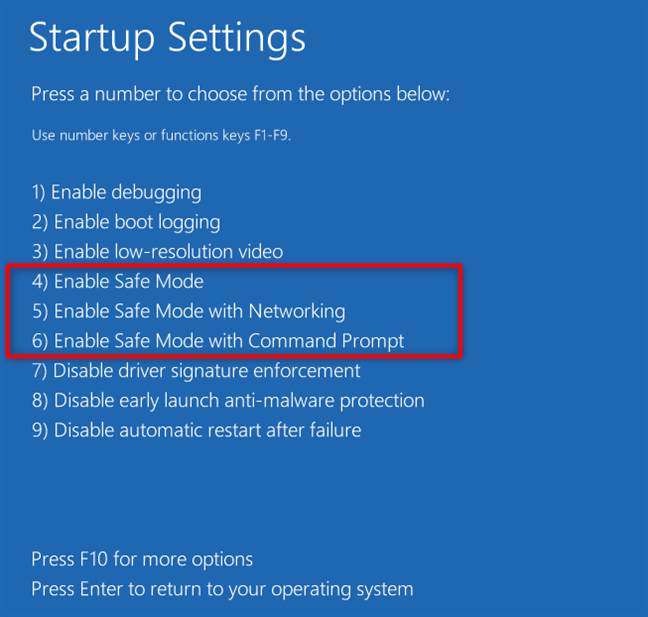
When your PC restarts, press 4 or F4 for Safe Mode.
startup settings windows 11 safe mode
If Safe Mode crashes with the same CRITICAL_PROCESS_DIED error, skip to Section 5.

Running System File Checks in Safe Mode (Order Matters)

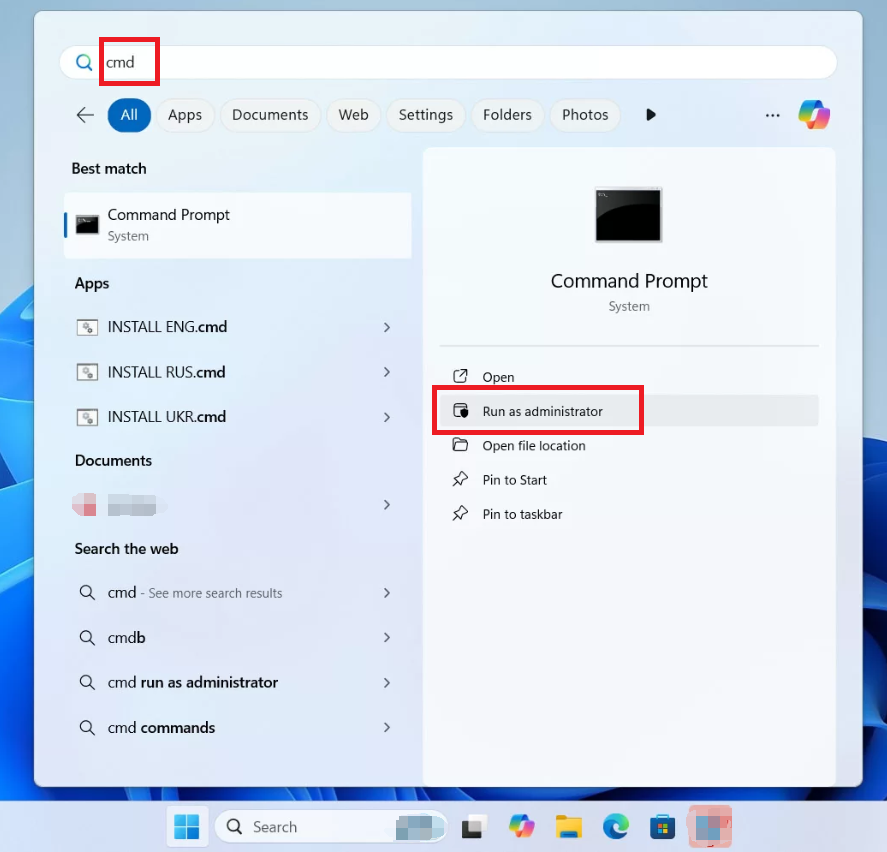
Open an elevated Command Prompt (run as administrator) and run these commands one at a time,
Windows 11, run cmd as administrator
in this exact order:

sfc /scannow

DISM /Online /Cleanup-Image /RestoreHealth

chkdsk C: /f /r
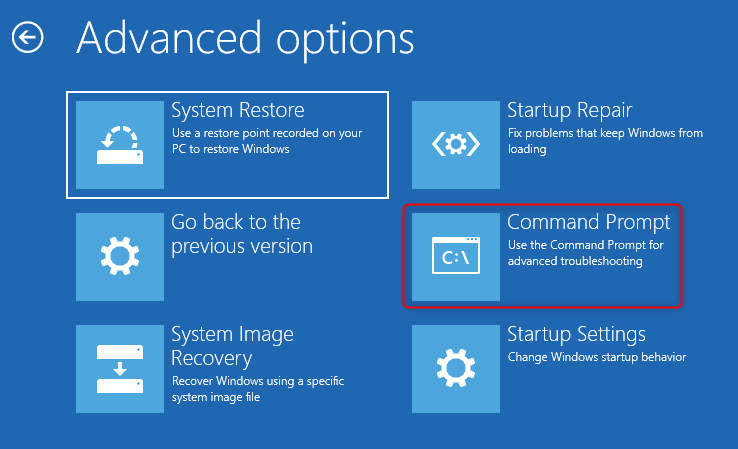
Restart your PC after each command and check if the problem is gone. Running them in order—SFC first, then DISM, then CHKDSK—gives you the best shot at fixing things.

When Built-in Tools Fail to Run

Sometimes you’ll see an error like “Windows Resource Protection could not perform the requested operation.” When that happens, try running the same commands from the Command Prompt inside WinRE (offline mode) instead of Safe Mode.
Command Prompt in WinRE for system file checker
If that still doesn’t work, you’re probably looking at driver or hardware issues—move on to Method 2 or 3.

Method 2: Rolling Back Drivers and Uninstalling Recent Updates

If your crashes started right after a Windows update or a driver installation, this section is for you.

Common Conflicting Driver Types

Driver TypeTypical ManufacturersWhy It Triggers CRITICAL_PROCESS_DIED

Graphics

NVIDIA, AMD, Intel

Direct memory access conflicts

Network/Wi-Fi

Realtek, Intel, Killer

Kernel-level driver crashes

Storage/disk controller

Intel RST, AMD

Corrupted filter drivers

Audio

Realtek, NVIDIA HDMI

Interrupt conflicts

Rolling Back Drivers in Safe Mode

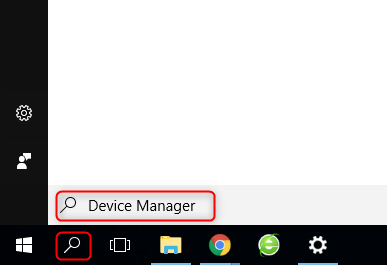
Get into Safe Mode, then open Device Manager.
Screenshot of Windows search bar with 'Device Manager' typed in
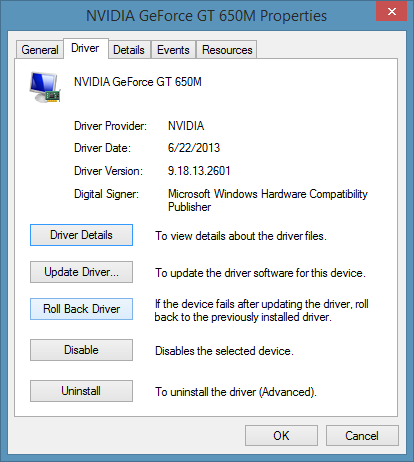
Right-click the device you suspect (graphics card, network adapter, etc.), go to Properties → Driver tab → Roll Back Driver.
Driver Properties window showing Roll Back Driver option
If that button is grayed out, choose Uninstall Device instead. Windows will automatically reinstall a generic driver when you restart.

Uninstalling Recent Windows Updates

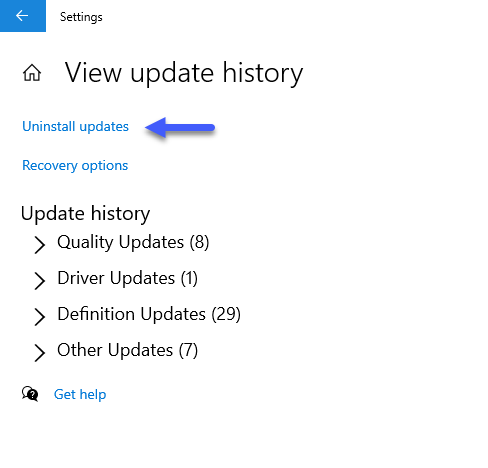
Still in Safe Mode, go to Control Panel → Programs and Features → View installed updates. Sort by the “Installed On” date so the newest ones show up first. Pick the most recent updates (look for KB numbers) and click Uninstall.
Windows Update: Uninstall updates screen
After removing them, pause automatic updates temporarily so Windows doesn’t immediately put them back before you’ve had a chance to test.

Method 3: Hardware Diagnostics: Testing RAM and Storage

Software fixes didn’t work? Crashes feel random instead of predictable? You might be dealing with failing hardware.

Testing RAM with Windows Memory Diagnostic
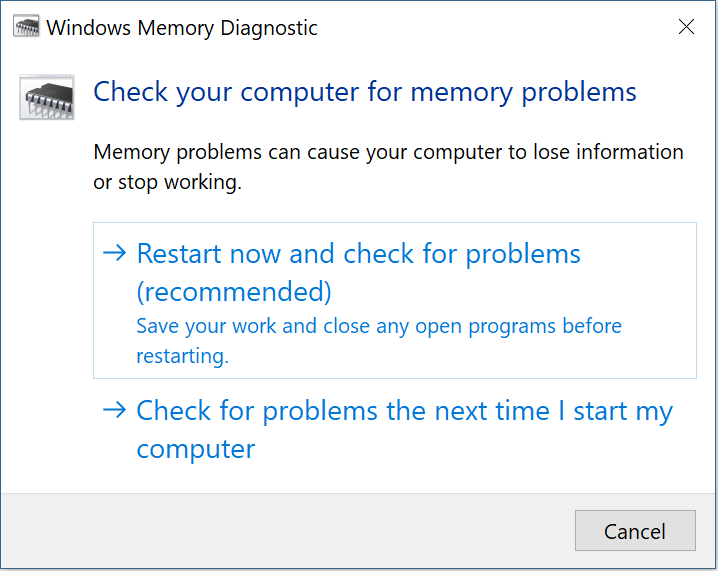
From WinRE or a working Windows system, search for and run Windows Memory Diagnostic. Choose “Restart now and check for problems.”
Windows Memory Diagnostic tool: check for memory problems
For accurate results, run the Extended test and let it complete at least 2–3 full passes.
  • No errors found → RAM is probably fine, but still try reseating the modules or testing one stick at a time
  • Errors detected → You’ve got a faulty RAM module. Replace it.

Checking SSD/HDD Health

From a WinRE command prompt, run chkdsk C: /f /r again (covered in Method 1). For a deeper look, grab a S.M.A.R.T. monitoring tool like CrystalDiskInfo (just mentioning it as an option). Pay attention to two key attributes: Reallocated Sectors Count (05) and Current Pending Sectors (C5). If either shows yellow or red, your drive is failing.

Product note: If hardware diagnostics confirm your drive is dying, use Renee PassNow Undeleter to try pulling off whatever data you can before replacing the drive.

Method 4: Advanced Recovery Paths: System Restore, Startup Repair, and Reset

When nothing else has worked and your hardware checks out, it’s time for the advanced options.

Using System Restore from WinRE

If you don’t already have a Windows installation disc or bootable USB to run WinRE, you’ll need to create one using Microsoft’s Media Creation Tool on another working computer. This tool allows you to download the official Windows installation files and create a bootable USB drive that can be used for system repair or recovery.
create windows 11 installation media USB
You may download this tool from: https://www.microsoft.com/software-download/windows11
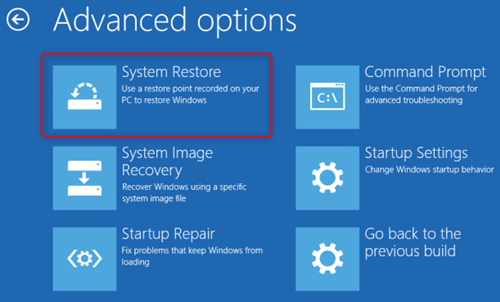
From WinRE, go to Troubleshoot → Advanced Options → System Restore. Pick a restore point dated before the CRITICAL_PROCESS_DIED error started.
Windows System Restore window with restore point selected
This rolls back recent system changes—drivers, registry edits, installed apps—but keeps your personal files. The catch: System Restore has to have been enabled beforehand, and you need an existing restore point.

Startup Repair (Limited Effectiveness)
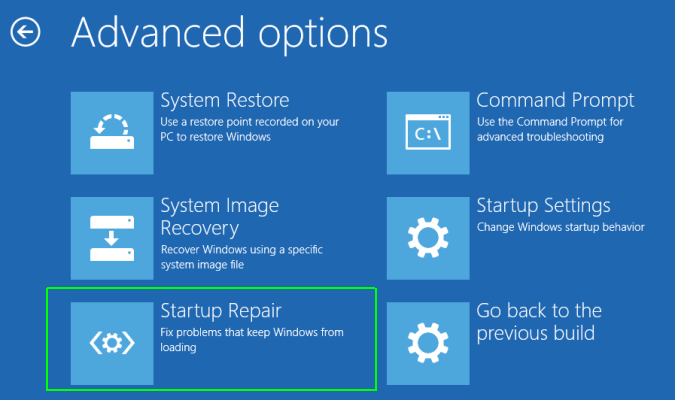
From WinRE: Troubleshoot → Advanced Options → Startup Repair. This tool fixes boot configuration data (BCD) corruption and missing boot files.
startup repair in Windows
But honestly? It rarely fixes CRITICAL_PROCESS_DIED on its own, since that error usually comes from a runtime process crash, not a boot failure. Only bother with this after other options have failed.

Reset This PC (Keep My Files Option)

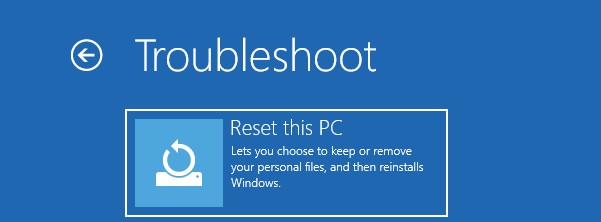
From WinRE: Troubleshoot → Reset this PC → Keep my files. This reinstalls Windows while trying to preserve your personal data in C:\Users.
select troubleshot and then reset this pc
Everything else goes—all your installed apps, drivers, and custom settings will be wiped. Critical warning: Even with “Keep my files” selected, do a full backup using Renee PassNow Data Transfer (Section 2) first. Don’t skip this.

When to Consider Clean Installation

If every software fix has failed, your hardware passes all diagnostics, and your data is safely backed up, a clean Windows 11 install is your last resort.

Frequently Asked Questions

Is CRITICAL_PROCESS_DIED the same as other BSOD codes like PAGE_FAULT_IN_NONPAGED_AREA or SYSTEM_SERVICE_EXCEPTION?

Not exactly, but they’re related. CRITICAL_PROCESS_DIED specifically means a critical system process terminated. The other codes point to memory management issues or service problems. That said, the same troubleshooting steps—checking drivers, running SFC/DISM, testing RAM—often fix all of them because the underlying causes overlap.

Why does this error appear specifically after Windows 11 updates, and how can I prevent it from recurring?

Feature updates and cumulative updates can break things when they conflict with existing drivers or corrupt files during installation. To prevent it from happening again: create restore points before major updates, keep your drivers updated by downloading directly from manufacturer sites (not just through Windows Update), and stay away from beta or insider builds unless you really need them.

Can outdated BIOS/UEFI firmware trigger CRITICAL_PROCESS_DIED on specific laptop brands (HP, Dell, Lenovo)?

Yes, especially on newer hardware or after Windows 11 updates that change how the OS talks to the firmware. Check your laptop manufacturer’s support page for the latest BIOS version, and update it carefully following their instructions.

How do I recover data if Renee PassNow fails to create a bootable USB on my working computer (e.g., ISO download error or USB not recognized)?

First, try a different USB drive and make sure it’s formatted correctly. Run the program as administrator, and temporarily disable your antivirus during the creation process. If the ISO download keeps failing, check your internet connection or download the ISO on another computer, then point Renee PassNow to the local file.
Renee Passnow – Professional Windows Password Remover

Remove Windows Login Password 3 steps for whole password remove process.

Enable/Create Administrator One click for creating new administrator and enable the disabled account.

Widely Use New version supports UEFI boot model, which can be used on more computers, laptops and even surfaces.

Multifuctional Data transfer, data recovery, bootable problem recovery can be run without system.

Highly compatible Windows 11/10/8.1/8/7/XP/Vista.

Remove Login Password Support Windows 11/10/8.1/8/7/XP/Vista.

Enable/Create Administrator One click for creating new administrator and enable the disabled account.

Easy to use No need of any professional knowledge or password reset disk.

Free TrialFree TrialNow 2000 people have downloaded!

User Comments

Page 1

Leave a Comment


Your comment has been submitted and is awaiting moderation.