author avatar
    Specialist of Customer Service Dept.
Last update by Olivia Brown at 28 August 2025

Summary
Learn how to clone Windows 10/11 to a smaller SSD step-by-step, keeping all your files and apps. This guide helps you upgrade without reinstalling, ensuring your system runs fast and smoothly on your new SSD.


Tired of waiting forever for your computer to boot up or load programs? If you’re dealing with a slow hard drive and want to switch to a faster SSD—but the new one is smaller than your current drive—this guide is exactly what you need. We’ll show you step-by-step how to clone your Windows 10 or 11 system without reinstalling anything, keeping all your files, apps, and settings intact. Whether you’re upgrading for better performance, fixing a failing drive, or just saving money on a smaller SSD, you’ll get your PC running smoother in no time. Let’s jump right in and make that upgrade happen!
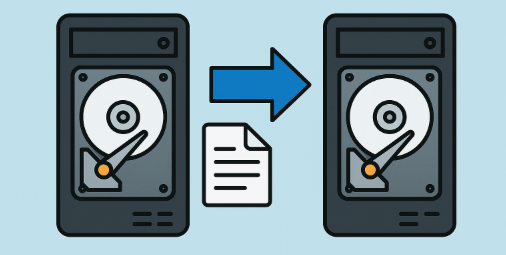
transfer data between internal drives

Getting Ready to Clone Windows 10/11 to a Smaller SSD

Before jumping into the cloning process for Windows 10 or 11 onto a smaller SSD, taking a few key steps upfront will help everything go smoothly and avoid common headaches like space shortages or compatibility issues.

🔍 Picking the Best SSD for Your Needs

Before you begin cloning your drive, it’s essential to confirm that your SSD can actually hold all the data from your current hard drive. If the used space on your HDD exceeds the SSD’s total capacity, you’ll have to delete some files first—things like outdated videos, forgotten downloads, or files you rarely touch.
💡 How to check your used space:
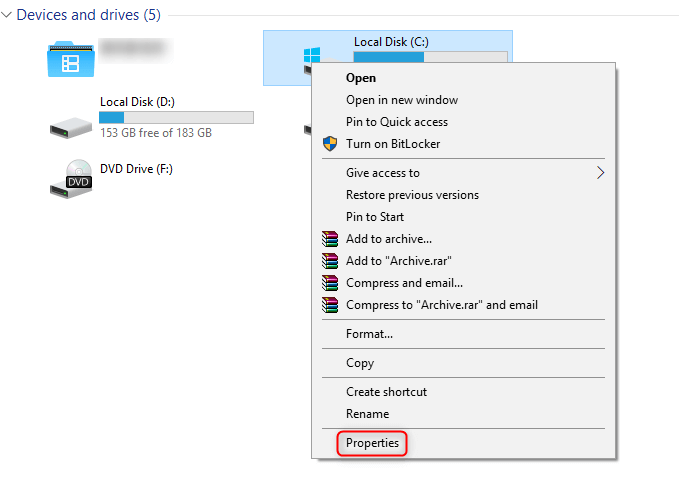
Open File Explorer, right-click your system drive (usually This PC > C:), select Properties, and look at the Used space value. That number reflects how much room your Windows install, apps, and personal files are taking up.
click C drive and select properties
C drive Used space
📐 Quick sizing rule:
Your SSD should be at least as large as the used space on your current drive—plus a little extra for breathing room. Here’s a simple formula to help:
SSD size ≥ (Used HDD space + [RAM × 2]) + 20GB
🧮 Example:
If your HDD shows 300GB used and your system has 16GB of RAM:
300GB + (16GB × 2) + 20GB = 352GB
So you’d want an SSD with at least 352GB, but going with 500GB or more is a smart move—it gives you headroom for future updates, temp files, and system growth.

Making Sure Your SSD Isn't a Fake

With all the online deals out there, it’s not uncommon to accidentally buy a fake SSD that underperforms or even lies about its storage capacity. To check if yours is the real deal, start by comparing the packaging and serial number on the manufacturer’s website—companies like Samsung, WD, or Crucial often provide online verification tools.
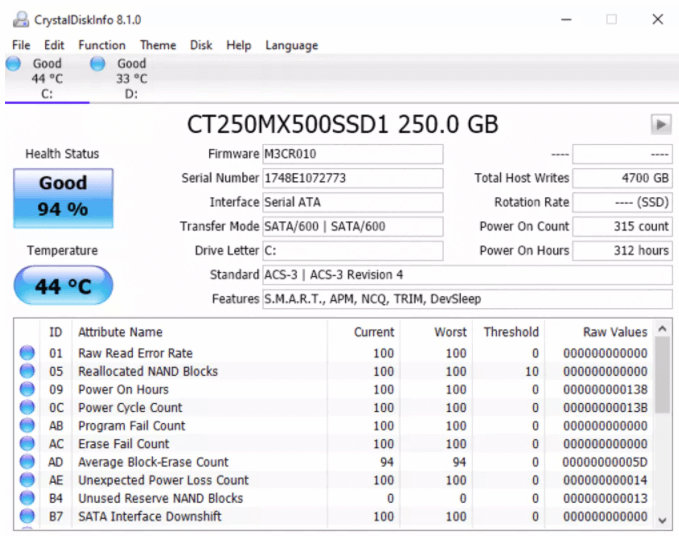
You can also grab free programs such as CrystalDiskInfo or HWMonitor to examine the drive’s specs, including its firmware and SMART health data; counterfeit drives frequently display odd inconsistencies or outright failures.
CrystalDiskInfo
Another good test is using H2testw, a no-cost utility, to fill the drive with test data and verify it—if it’s genuine, it’ll match the advertised size perfectly, but fakes might throw errors or reveal hidden shortfalls in capacity.
H2testw defective

Gathering the Right Cables and Connections

For laptops, you’ll need a USB-to-SATA cable to hook up the SSD externally. For desktops, you can mount the SSD inside using the built-in connectors while keeping your old drive in place.
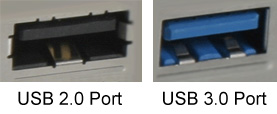
It’s important to stick with a USB 3.0 or faster cable (such as USB 3.1 or USB-C) to maintain quick transfer rates and prevent interruptions or errors during cloning—USB 2.0 is just too sluggish and might lead to failures. To spot a USB 3.0 port or cable, check for the blue interior in the port (as opposed to black for USB 2.0) or look for the “SS” (SuperSpeed) symbol. On your PC, fire up Device Manager by searching for it in the Start menu, expand the “Universal Serial Bus controllers” section, and confirm if it mentions “USB 3.0″ or “xHCI” controllers.
usb 3.0
To bridge smoothly from preparations to actually freeing up space, remember that once your hardware is set, the next big hurdle is often making sure your original drive’s data fits on the smaller SSD. That’s where trimming down unnecessary files comes in handy.
Renee Becca – Safe and Quick System Migration to SSD

Automatic 4K alignment Improves SSD performance during system migration.

Support GPT and MBR Automatically adapt to the suitable partition format.

Support NTFS and FAT32 Redeploy various files in different file systems.

Back up quickly Back up files at up to 3,000MB/min.

Overall backup schedule Support system redeployment/system backup/partition backup/disk backup/disk clone.

Automatic 4K alignment Improve SSD performance

Support GPT and MBR Intelligently adapt to a partition format

Support NTFS and FAT32 Redeploy files in different file systems
Free TrialFree TrialNow 56337 people have downloaded!

Effective Ways to Free Up Space on Your Original Hard Drive

A frequent roadblock when trying to clone Windows 10 or 11 to a smaller SSD is hitting those pesky space errors midway through. That’s why learning how to reduce your current system’s storage usage is key before you even start the cloning.
Here are several practical approaches to cut down on your original hard drive’s occupied space while preserving what matters most:

Uninstall Programs You No Longer Use

Head over to Settings > Apps > Apps & features, sort the list by size, and uninstall hefty applications like unused games or outdated software. This can reclaim several gigabytes in just minutes.

Clear Out Temporary Files and Cache

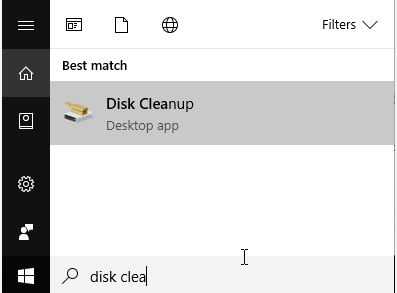
Launch Disk Cleanup by searching for it in the Start menu, pick your drive, and tick the boxes for temporary files, thumbnails, and the recycle bin contents.
disk cleanup function
For a more thorough sweep, consider using the free version of CCleaner to erase browser caches and other system clutter.

Hunt Down and Delete Large Files and Folders

In File Explorer, browse folders like Downloads or Documents and sort by size to spot big files easily. Utilities like TreeSize Free can map out your entire drive visually, highlighting space hogs such as videos, old backups, or duplicate files for targeted removal.

Transfer Files to External or Cloud Storage

Move your photos, videos, or documents to a USB drive or services like Google Drive or OneDrive prior to cloning. It’s easy to bring them back onto the SSD afterward.

Turn Off Hibernation and Trim the Page File

Run Command Prompt as an administrator and enter “powercfg -h off” to disable hibernation, which can free up an amount equal to your RAM. Then, navigate to System Properties > Advanced > Performance Settings > Advanced > Virtual memory to dial down the page file size when space is tight.

Apply Compression to Files

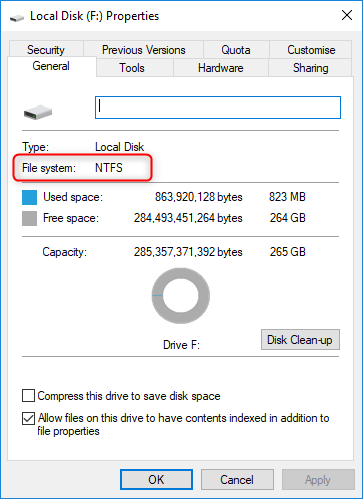
In File Explorer, right-click on the folders you want to compress, select Properties > Advanced, and turn on “Compress contents to save disk space” for less critical directories.
For large folders you rarely access, this method is an effective way to cut down on the space they take up.
Compress contents to save disk space
By following these methods, you can noticeably reduce your drive’s used space, ensuring it aligns with the smaller SSD’s limits. And don’t forget—always create backups of vital files beforehand to stay safe!

Top Disk Cloning Software for Moving Windows 10/11 to a Smaller SSD

Since Windows lacks native cloning features, turning to third-party software is necessary for transferring Windows 10 or 11 to a smaller SSD. A standout choice is Renee Becca, which is built with ease in mind to handle the cloning task effortlessly.
Renee Becca makes the whole process user-friendly through its clear interface, enabling you to clone Windows 10 or 11 to a smaller SSD with minimal effort. It efficiently safeguards and recovers key computer data, covering programs, system settings, emails, photos, videos, documents, and bookmarks. It also supports disk and system cloning via three methods: hard disk cloning, partition cloning, and system migration. Pick the one that fits your situation, such as system migration when focusing on cloning Windows 10 or 11 to a smaller SSD.
Here’s what sets it apart:
  • Works with drives from various brands without issues.
  • Handles exact bit-for-bit copies, including those with damaged sectors.
  • Moves data smoothly to a new PC or SSD.
  • Fine-tunes disk layouts during cloning for better efficiency.
  • Shifts Windows 10 or 11 to a smaller SSD while keeping all data safe.
  • Lets you create a bootable WinPE disk for any recovery needs.
Renee Becca – Safe and Quick System Migration to SSD

Automatic 4K alignment Improves SSD performance during system migration.

Support GPT and MBR Automatically adapt to the suitable partition format.

Support NTFS and FAT32 Redeploy various files in different file systems.

Back up quickly Back up files at up to 3,000MB/min.

Overall backup schedule Support system redeployment/system backup/partition backup/disk backup/disk clone.

Automatic 4K alignment Improve SSD performance

Support GPT and MBR Intelligently adapt to a partition format

Support NTFS and FAT32 Redeploy files in different file systems
Free TrialFree TrialNow 56337 people have downloaded!
When you’re ready to clone Windows 10 or 11 to a smaller SSD, selecting the appropriate software can turn a potentially tricky task into a straightforward one. Renee Becca excels here, particularly for those who want a seamless system migration without extra hassles. Let’s go through its usage in detail for this specific scenario.

Using Renee Becca to Clone Windows 10/11 to a Smaller SSD

Here’s how to do it step by step:
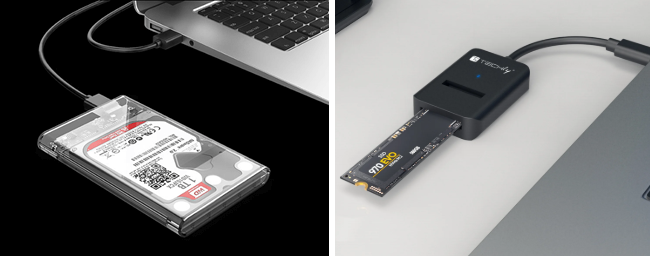
Step 1: Attach the smaller SSD to your original computer using an external hard disk enclosure or USB-to-SATA cable.
usb ssd / disk enclosure
Download and install Renee Becca on the original computer.
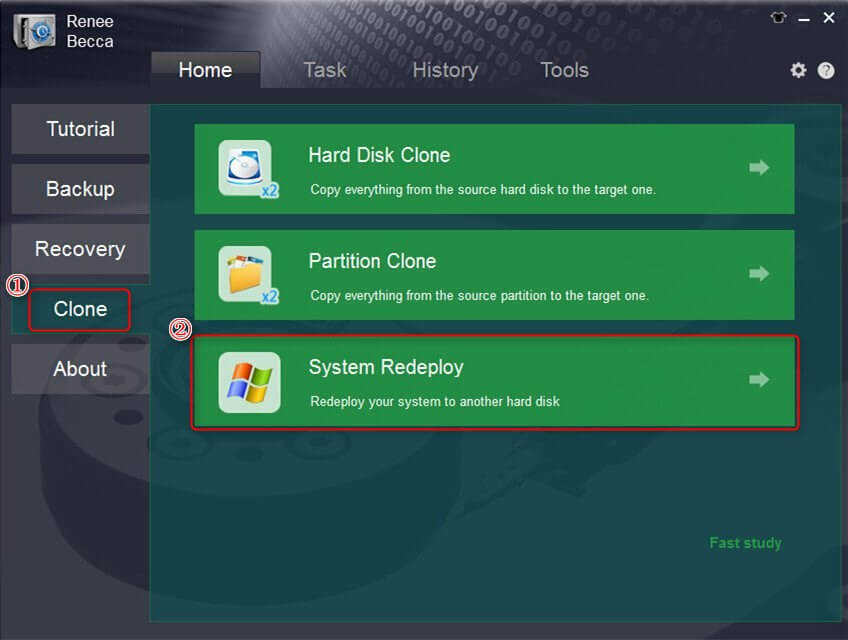
Choose the “System Redeploy” option under the “Clone” section in the main interface.
select system redeploy function in clone
Step 2: In the “System Redeploy” window, select the smaller SSD as the target and the system partition as the source. Hit the “Redeploy” button to begin.

Wait until the progress bar hits 100% for completion. Then, install the SSD into your computer and prioritize it as the first boot device in the BIOS. If necessary, review and tweak the BIOS settings.
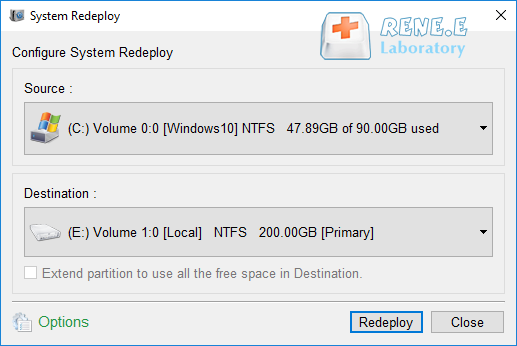
select a destination to redeploy system with renee becca
Kind tips: The total capacity of the smaller SSD needs to be greater than the used space of the system to be cloned; in addition, since all data in the target SSD will be erased during the cloning, please check whether the target SSD has important data before starting, and make file backups in advance.
If you want to clone all the data from the original hard drive (not just the system partition) to the smaller SSD, you can also choose the hard disk clone function, but ensure the used space fits first.
After finishing the clone, you’ll end up with a fully bootable SSD containing your Windows 10 or 11 setup, ready to deliver that performance upgrade your PC deserves.
Further reading:
To ensure a complete transition, the next part covers how to configure your system to start from the new SSD, which is crucial for desktops and laptops alike.
Renee Becca – Safe and Quick System Migration to SSD

Automatic 4K alignment Improves SSD performance during system migration.

Support GPT and MBR Automatically adapt to the suitable partition format.

Support NTFS and FAT32 Redeploy various files in different file systems.

Back up quickly Back up files at up to 3,000MB/min.

Overall backup schedule Support system redeployment/system backup/partition backup/disk backup/disk clone.

Automatic 4K alignment Improve SSD performance

Support GPT and MBR Intelligently adapt to a partition format

Support NTFS and FAT32 Redeploy files in different file systems

Free TrialFree TrialNow 56337 people have downloaded!

Setting Up Your PC to Boot from the Smaller SSD After Cloning Windows 10/11

Once you’ve cloned Windows 10 or 11 to the smaller SSD, the final step is configuring your PC to start from it:
For desktops: If you’re retaining the old hard drive, access the BIOS (by pressing F2, F12, Delete, or Esc at startup) and designate the SSD as the main boot device. Afterward, you can reformat the old hard drive for additional storage.
For laptops: Swap out the old hard drive with the SSD using a screwdriver. Laptops usually have just one drive slot, so BIOS adjustments aren’t typically required. If booting fails, refer to the troubleshooting tips below.
Common Server:
Server TypeEnter boot menu method

DELL

Press the F12 key repeatedly before the Dell logo appears on the screen.

HP

Press the F9 key multiple times when the HP logo is displayed.

Common Computers:
BIOS NameEnter boot menu method

ASRock

DEL or F2

ASUS

DEL or F2 for PCs/ DEL or F2 for Motherboards

Acer

DEL or F2

Dell

F12 or F2

ECS

DEL

Gigabyte / Aorus

DEL or F2

Lenovo (Consumer Laptops)

F2 or Fn + F2

Lenovo (Desktops)

F1

Lenovo (ThinkPads)

Enter then F1

MSI

DEL

Microsoft Surface Tablets

Press and hold Power and Volume Up buttons

Origin PC

F2

Samsung

F2

Toshiba

F2

Zotac

DEL

HP

Esc/ F9 for Boot Menu/ Esc/ F10/ Storage tab/ Boot Order/ Legacy Boot Sources

INTEL

F10

Renee Becca – Safe and Quick System Migration to SSD

Automatic 4K alignment Improves SSD performance during system migration.

Support GPT and MBR Automatically adapt to the suitable partition format.

Support NTFS and FAT32 Redeploy various files in different file systems.

Back up quickly Back up files at up to 3,000MB/min.

Overall backup schedule Support system redeployment/system backup/partition backup/disk backup/disk clone.

Automatic 4K alignment Improve SSD performance

Support GPT and MBR Intelligently adapt to a partition format

Support NTFS and FAT32 Redeploy files in different file systems

Free TrialFree TrialNow 56337 people have downloaded!

Fixing Common Problems When Cloning Windows 10/11 to a Smaller SSD

Should you encounter any snags along the way, these fixes address typical challenges:

Cloned SSD Won’t Boot

Double-check that the SSD is listed as the primary boot device in the BIOS.
If it still doesn’t work, consider restarting the cloning from the beginning to eliminate any transfer glitches. As another option, opt for the full disk cloning mode in your software rather than system migration alone, since it could manage boot sectors more effectively.

Not Enough Space on the SSD

Remove unneeded files from the hard drive or adjust partition sizes to match the SSD’s capacity prior to cloning.

FAQs on Cloning Windows 10/11 to a Smaller SSD

1. How can I clone Windows 10/11 to a smaller SSD without losing data?

Use a trusted cloning tool like Renee Becca, Clonezilla, or Acronis True Image. These programs ensure your data and Windows 10/11 system transfer without loss, provided the SSD has enough capacity.

2. Can I clone a larger hard drive to a smaller SSD?

Yes, as long as the used space on the hard drive is less than the SSD’s capacity. Use cloning software to adjust partitions or clone only the necessary data.

3. Why can’t I shrink my partition for cloning Windows 10/11 to a smaller SSD?

If you get a “cannot shrink volume” error, try disabling system restore, hibernation, or the paging file to free up space. Then, use a cloning tool to resize partitions during the process.

4. Is there a free tool to clone Windows 10/11 to a smaller SSD?

Clonezilla is a free, open-source tool that can clone Windows 10/11 to a smaller SSD or transfer specific partitions, making it a great budget-friendly option.

5. What should I do if the cloning process gets stuck or fails midway?

If the cloning stalls—perhaps due to a connection issue or power fluctuation—first verify your cables are secure and you’re using a stable power source. Restart the software and try again, but if it keeps happening, run a disk check on both drives using the built-in Windows tool (right-click the drive in File Explorer, select Properties > Tools > Check). For persistent errors, switch to a different cloning method within the software, like partition cloning instead of full system migration, to isolate the problem.

6. How can I ensure my SSD performs at its best after cloning Windows 10/11?

After the clone, enable TRIM support in Windows (it’s usually on by default, but confirm by typing fsutil behavior query DisableDeleteNotify in Command Prompt—if it says 0, it’s enabled). Also, update your SSD’s firmware via the manufacturer’s tool for optimal speed and reliability. If you’re noticing slower-than-expected performance, align the partitions properly during cloning or use the software’s optimization features to boost read/write speeds.

7. What if I need to clone to an even smaller SSD but my used space is still too high after cleaning?

In cases where you’ve cleaned as much as possible but the used space remains a tight fit, consider cloning only the system partition and essential apps first, then manually transferring other files later. Tools like Renee Becca allow selective migration, so you can prioritize the OS and rebuild non-critical data on the new drive. This approach minimizes risks while giving you room for growth on the smaller SSD.

8. How long does cloning Windows 10/11 to a smaller SSD typically take, and what affects the time?

The duration can range from 30 minutes to a few hours, depending on factors like the amount of data being cloned (e.g., 200GB might take an hour), your connection speed (USB 3.0 is faster than 2.0), and the software’s efficiency. Slower hard drives or systems with bad sectors can extend the time, so running a defrag on the source drive beforehand often helps speed things up.

9. Is it safe to clone Windows 10/11 to a smaller SSD if my original drive has errors or bad sectors?

Yes, but proceed with caution—reputable tools like Renee Becca can handle bad sectors by skipping them during a bit-for-bit clone. Before starting, scan your original drive with chkdsk (in Command Prompt: chkdsk C: /f /r) to repair issues. If errors are severe, back up critical data separately and consider professional help to avoid data corruption on the new SSD.

Wrapping It Up

Cloning Windows 10/11 to a smaller SSD is a straightforward way to boost your PC’s performance without reinstalling your system. By ensuring your SSD has enough capacity for the used space on your hard drive and using a reliable tool like Renee Becca, you can complete the process smoothly. Whether you’re upgrading a laptop or desktop, this guide has you covered for cloning Windows 10/11 to a smaller SSD. Download a cloning tool today and enjoy a faster PC!
Renee Becca – Safe and Quick System Migration to SSD

Automatic 4K alignment Improves SSD performance during system migration.

Support GPT and MBR Automatically adapt to the suitable partition format.

Support NTFS and FAT32 Redeploy various files in different file systems.

Back up quickly Back up files at up to 3,000MB/min.

Overall backup schedule Support system redeployment/system backup/partition backup/disk backup/disk clone.

Automatic 4K alignment Improve SSD performance

Support GPT and MBR Intelligently adapt to a partition format

Support NTFS and FAT32 Redeploy files in different file systems

Free TrialFree TrialNow 56337 people have downloaded!

User Comments

Page 1

Leave a Comment


Your comment has been submitted and is awaiting moderation.