author avatar
    Specialist of Customer Service Dept.
Last update by Olivia Brown at 16 October 2025

Summary
Learn how to factory reset NEC laptop without password using simple, step-by-step solutions for 2025. This guide covers Windows built-in reset, and professional tools for all NEC models, making it easy and secure for users.



Locked out of your NEC laptop in 2025? This comprehensive guide will help you factory reset your NEC laptop without a password in under an hour using Windows’ built-in tools or professional software. Whether it’s a forgotten password, a second-hand device, or sluggish performance, these methods are compatible with NEC models like VersaPro, LaVie, Mate, and more. For advanced users or those seeking robust features, tools like Renee PassNow offer offline password bypass and data transfer to minimize loss.

Tips for 2025: Handling BitLocker and Cloud Reset

Many NEC laptops running Windows 11 in 2025 may use BitLocker encryption. If prompted for a recovery key during the reset, log into your Microsoft account at account.microsoft.com/devices to retrieve it. For faster resets on slower hardware, select Cloud download in the reset options.
BitLocker Recovery Keys 
For users preferring a local solution without internet dependency, Renee PassNow is highly effective. It runs directly on your machine, supports secure data transfer to external drives, and is compatible with all NEC models for password bypass or full erasure, even with BitLocker enabled.

Why You Might Need to Factory Reset Your NEC Laptop

A factory reset restores your NEC laptop to its original settings, wiping all data, apps, and settings. Common reasons for needing a reset include:
Forgotten Passwords: You can’t log in due to a lost administrator or user password.
Second-Hand Devices: A used NEC laptop has an unknown password, locking you out.
System Issues: Malware, crashes, or slow performance require a full reset to restore functionality.
Repurposing Old Devices: You want to clear a work or family-shared laptop for personal use.
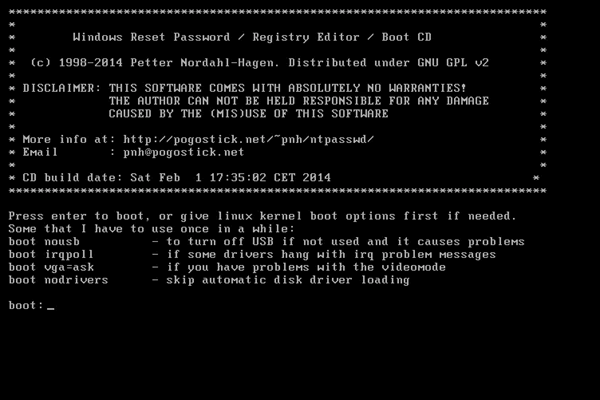
Important Note: If you’re resetting due to a forgotten password, many reset methods (e.g., recovery partition or built-in reset) may still prompt for the login password during the process. To avoid this, you’ll need to bypass or remove the password first using specialized tools like Renee PassNow or free alternatives such as Ophcrack or Offline NT Password & Registry Editor.
windows 7 reset require password 
In older recovery environments like Windows 7, you’ll need to enter your account and password to continue the recovery process.
windows 10 reset this pc require password 
In modern recovery environments like Windows 10 or 11, you’ll need to sign in with your account credentials to continue the reset.
If you already know the account password—or if no password is set—you can skip the password bypass section and proceed directly to the reset instructions.

Bypassing Passwords with Tools Before Factory Reset

If your NEC laptop is locked by a password, tools can help you bypass or remove it, allowing you to proceed with a factory reset. Below, we cover Renee PassNow and free tools, detailing their use and compatibility.

Option 1: Use Renee PassNow

Applicable Systems and Years: Works on all NEC models (VersaPro, LaVie, Mate, Lavie L/Note, ProMobile) running Windows XP, Vista, 7, 8, 8.1, 10, or 11 (2006–2025).
Renee PassNow is a professional tool that creates a bootable USB or CD/DVD to bypass Windows login credentials. It’s user-friendly, secure, and includes a Data Transfer feature to minimize data loss, making it ideal for users locked out due to forgotten passwords.
Renee Passnow – Professional Windows Password Remover

Remove Windows Login Password 3 steps for whole password remove process.

Enable/Create Administrator One click for creating new administrator and enable the disabled account.

Widely Use New version supports UEFI boot model, which can be used on more computers, laptops and even surfaces.

Multifuctional Data transfer, data recovery, bootable problem recovery can be run without system.

Highly compatible Windows 11/10/8.1/8/7/XP/Vista.

Remove Login Password Support Windows 11/10/8.1/8/7/XP/Vista.

Enable/Create Administrator One click for creating new administrator and enable the disabled account.

Easy to use No need of any professional knowledge or password reset disk.

Free TrialFree TrialNow 2000 people have downloaded!
Step 1: Download and Install Renee PassNow
On another computer, visit the official Renee PassNow website and download the software. Install it, selecting the version compatible with your system.
Step 2: Create a Bootable USB or CD/DVD
Launch Renee PassNow, insert a USB drive (at least 8GB) or a blank CD/DVD, and select “Create Bootable Media.” Follow the prompts to prepare the bootable device.
Create New Windows 10 Password Reset Disk with Renee PassNow 
Step 3: Boot Your NEC Laptop from the Media
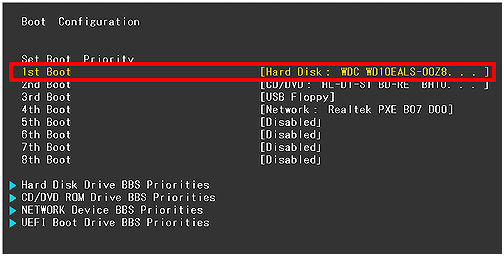
Insert the bootable USB/CD into your locked NEC laptop. Restart and press the appropriate BIOS key repeatedly (e.g., F2 for LaVie) to enter the BIOS menu. Set the boot order to prioritize the USB/CD.
Boot the target PC with the created password reset USB/CD/DVD 
Change the boot order in hard disk in boot configuration in BIOS 
NEC Model SeriesEnter BIOS Method
VersaProPress F2 repeatedly at startup
LaVie SeriesPress F2 or DEL when NEC logo appears
Mate SeriesPress F2 or Fn + F2 at boot
Lavie L/NotePress F2 during startup
ProMobilePress DEL or F2 before Windows loads
Step 4: Remove the Password
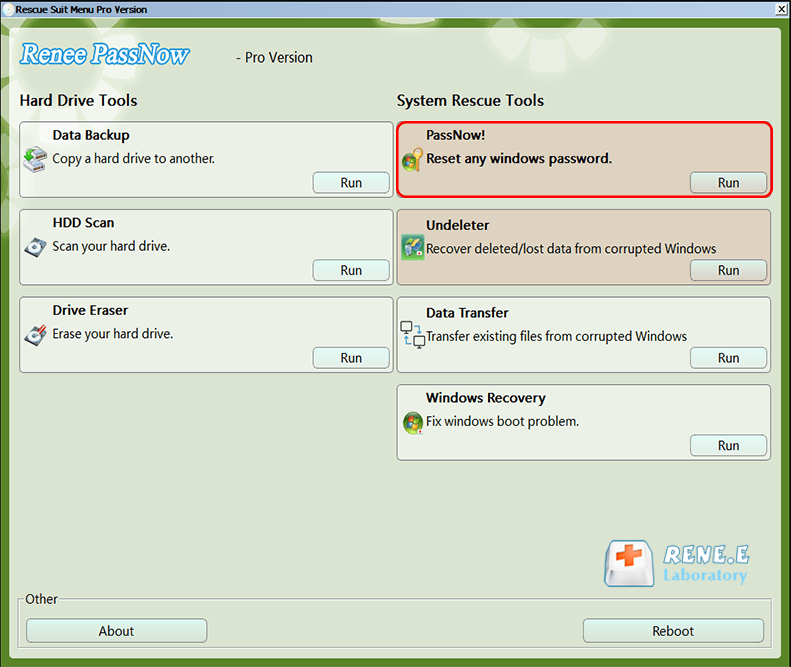
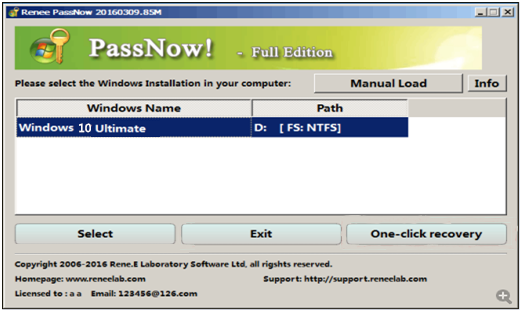
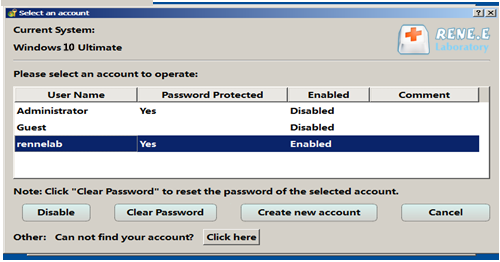
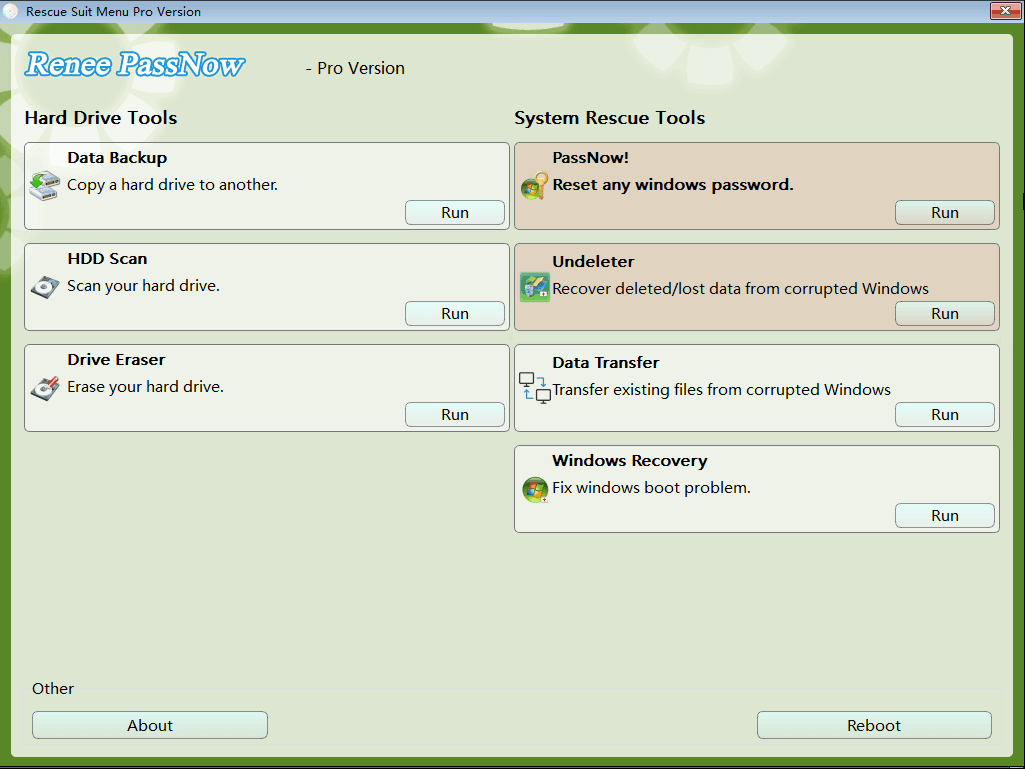
Once Renee PassNow loads, select the “PassNow!” function. Choose your Windows system and the locked user account, then click “Clear Password” to remove it instantly.
After loading into main interface, please select the "PassNow!" function 
Select target Windows system in the list 
Select target user account in the list 
Step 5: Proceed to Factory Reset
Reboot your laptop (remove the USB/CD). Log in without a password, then follow the Windows Built-in Factory Reset instructions in Method 1 below for your specific Windows version.
Step 6: Reconnect Microsoft Account (if applicable)
If your account was a Microsoft Account, Renee PassNow converts it to a local account. After the reset, reconnect it via Settings > Accounts > Your Info.
Tips: Renee PassNow is fast, supports multiple languages, and includes disk erasure and file transfer tools. For example, a student with a locked LaVie laptop in 2025 used it to reset their device in under 30 minutes, regaining access for schoolwork.

Option 2: Use Free Tools

Applicable Systems and Years: Works on all NEC models running Windows XP, Vista, 7, 8, 8.1, 10, or 11 (2006–2025).
For cost-free solutions, two reliable tools can bypass the password, enabling a factory reset. Here’s a comparison:
ToolAdvantagesDisadvantages
OphcrackOpen-source, free, effective for simple passwords, user-friendly interfaceStruggles with complex passwords, requires large rainbow tables, slower on modern systems
Offline NT Password & Registry EditorFree, lightweight, works on all Windows versions, removes passwords directlyText-based interface, requires technical know-how, no data transfer feature
Ophcrack: This open-source tool uses rainbow tables to crack Windows passwords. Download it from its official site, create a bootable USB, and follow its interface to recover or remove the password.
Ophcrack 
Offline NT Password & Registry Editor: A lightweight utility that edits the Windows registry to remove passwords. It requires technical know-how to create a bootable disk and navigate its text-based interface.
Offline NT Password & Registry Editor 
After bypassing the password, proceed to the Windows Built-in Factory Reset section (Method 1) for your Windows version.

How to Factory Reset NEC Laptop?

Once the password is bypassed or if no password prompt appears, you can reset your NEC laptop using one of the following methods. Each method is tailored to specific Windows versions and NEC models, ensuring flexibility based on your setup.

NEC Laptop Models and Factory Reset Compatibility

Before proceeding, ensure the reset method suits your NEC laptop model and Windows version. The table below lists common NEC models, their typical Windows versions, and recommended reset methods.
NEC Model SeriesTypical Windows VersionRecommended Reset MethodApplicable Years
VersaProWindows 10/11 (2025 Update)Renee PassNow or Direct Login Screen Reset (Shift + Restart)2015–2025
VersaProWindows 7/8Recovery Partition (F11 key) or Bootable USB2009–2015
LaVie SeriesWindows 10/11Recovery Partition (F11 key) or Built-in Reset2015–2025
LaVie SeriesWindows Vista/7NEC Recovery Disc or Bootable USB2006–2012
Mate SeriesWindows 10/11Bootable USB or Direct Reset2015–2025
Mate SeriesWindows 7/8Recovery Partition or Windows Installation Media2009–2015
Lavie L/NoteWindows 10/11Windows Installation Media2015–2025
Lavie L/NoteWindows Vista/7NEC Recovery Disc or Bootable USB2006–2012
ProMobileWindows 10/11Renee PassNow + Direct Reset2015–2025
ProMobileWindows 7/8Recovery Partition or Bootable USB2009–2015

Method 1: Windows Built-in Factory Reset (After Password Bypass)

Applicable Systems and Years: Works on NEC models running Windows 7, 8, 8.1, 10, or 11 (2009–2025). Not applicable for Windows Vista or XP.
After bypassing the password using Renee PassNow or a free tool, use Windows’ built-in reset feature. Steps vary by Windows version:

For Windows 7:

Step 1: Click Start > Control Panel > System and Security > Backup and Restore.
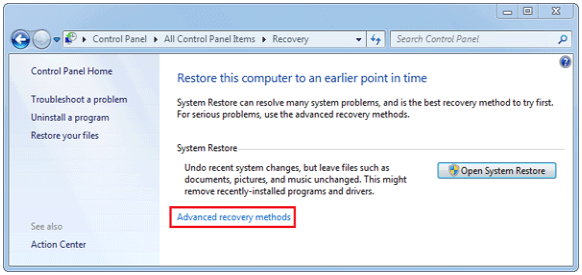
Step 2: Select Recover system settings or your computer > Advanced recovery methods.
Step 3: Choose Return your computer to factory condition (may vary by model).
Step 4: Confirm and let Windows reinstall.
Advanced recovery methods for factory reset windows 7 

For Windows 8/8.1:

Step 1: Swipe from the right edge or press Windows + C to open Charms.
Step 2: Go to Settings > Change PC settings > Update and recovery > Recovery.
Step 3: Under Remove everything and reinstall Windows, click Get started.
Step 4: Follow prompts to reset.
Windows 8 remove everything and reinstall Windows 

For Windows 10:

Step 1: Click Start > Settings (gear icon).
Step 2: Go to Update & Security > Recovery.
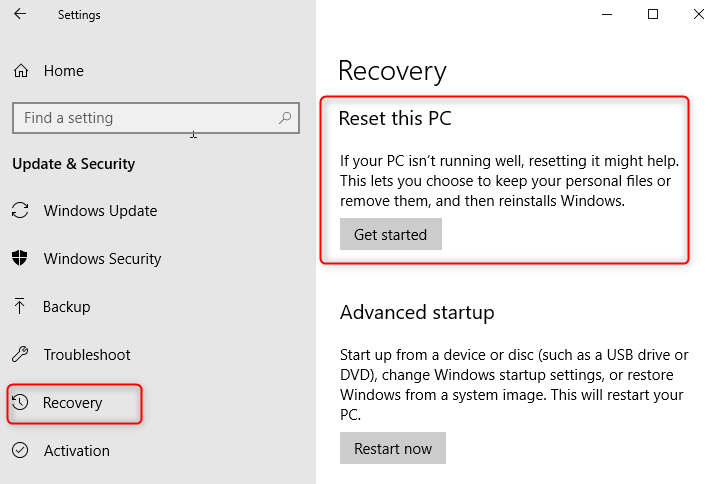
Step 3: Under Reset this PC, click Get Started.
Step 4: Choose Remove everything for a full factory reset.
Step 5: Select Fully clean the drive (recommended for security).
Step 6: Confirm and let Windows reinstall.
Reset this PC in Windows 10 settings 

For Windows 11:

Step 1: Click Start > Settings (Windows + I shortcut).
Step 2: Go to System > Recovery.
Step 3: Under Reset this PC, click Reset PC.
Step 4: Choose Remove everything.
Step 5: Select Change settings > Fully clean the drive if needed.
Step 6: Confirm and proceed with the reset.
Reset this PC in Windows 11 settings 
Tips: Always back up important files before resetting, as this process erases data.
Normally, you need to enter your Windows password to access the system before starting a factory reset. The methods below show how to reset your NEC laptop without logging in.

Method 2: Direct Factory Reset from Login Screen

Applicable Systems and Years: Works on NEC models running Windows 8, 8.1, 10, or 11 (2012–2025). Not applicable for Windows Vista or 7.
This method allows a factory reset without logging in, ideal for newer NEC models like VersaPro and LaVie when you’re locked out.
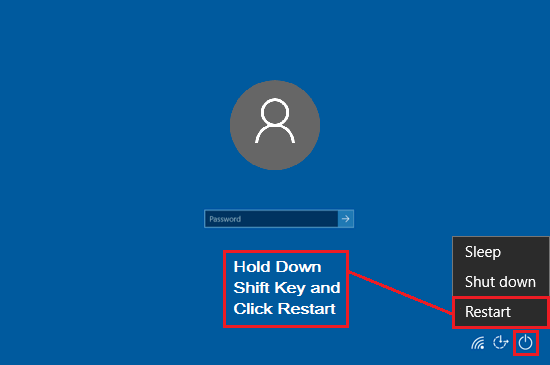
Step 1: On the login screen, click the Power icon in the bottom right.
Step 2: Hold the Shift key and click Restart. Your laptop will boot into the Advanced Startup menu.
Press Shift key and Restart 
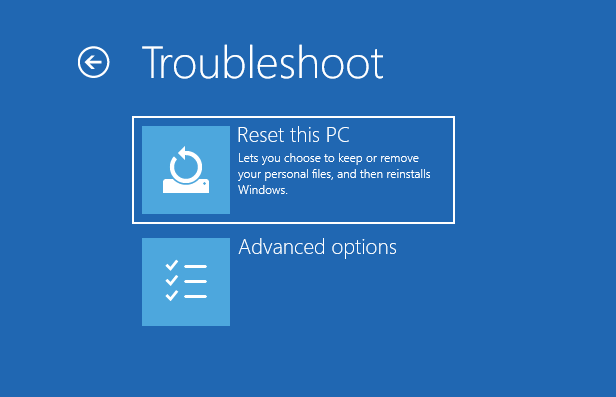
Step 3: Select Troubleshoot > Reset this PC.
Troubleshoot and Reset this PC 
Step 4: Choose Remove everything for a full factory reset.
Step 5: Select Local reinstall (or Cloud download for faster setup in Windows 11).
Step 6: Confirm and proceed—the process takes 30-60 minutes.
Tips: This method erases all data, so back up if possible. If BitLocker is enabled, you may need a recovery key from your Microsoft account. If this method isn’t viable or you’re using an older model, consider using the recovery partition.

Method 3: Use the Recovery Partition

Applicable Systems and Years: Works on NEC models (LaVie, VersaPro, Mate, Lavie L/Note, ProMobile) running Windows Vista, 7, 8, 8.1, 10, or 11 (2006–2025).
This method uses the built-in recovery partition, suitable for NEC laptops without a recovery disc.
Step 1: Shut down and restart your laptop. Immediately press F11, F8, or F12 repeatedly (check your model’s key).
Step 2: In the recovery menu, select Troubleshoot > Reset this PC or Restore Factory Settings.
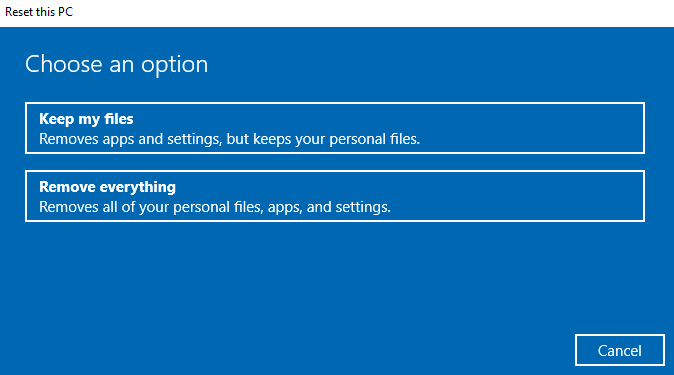
Step 3: Choose Remove everything for a full reset.
Step 4: Follow prompts to start the reset (20–60 minutes).
Step 5: After completion, the laptop restarts for initial setup.
Keep my files or Remove everything 
Tips: If a password is required, use Renee PassNow to bypass it. If the recovery partition is missing, try using a recovery disc as described below.

Method 4: Use the NEC Recovery Disc

Applicable Systems and Years: Works on NEC models running Windows XP, Vista, or 7 (2006–2012).
For older NEC models with a recovery CD/DVD, this method restores factory settings.
Step 1: Insert the NEC Recovery Disc and restart. Press F12 or Esc to access the boot menu and select the CD/DVD drive.
FunctionCommon KeysDescription
Enter BIOS SetupF2 / DEL (varies by model)Modify boot order, security settings, and system configuration
Access Boot MenuF12 / EscTemporarily select boot device (e.g., CD/DVD, USB drive)
Step 2: Launch the NEC Recovery Utility and choose Restore to factory settings.
Step 3: Follow prompts to start recovery (30–90 minutes).
Step 4: After completion, restart and set up Windows.
Tips: If a password is required, use Renee PassNow. If your laptop lacks a CD/DVD drive, use an external USB optical drive. For a more flexible approach, consider using Windows installation media.

Method 5: Use Windows Installation Media

Applicable Systems and Years: Works on NEC models running Windows Vista, 7, 8, 8.1, 10, or 11 (2006–2025).
This advanced method reinstalls Windows using a bootable USB.
Step 1: On another computer, download the Windows ISO from Microsoft’s website.
Windows VersionDownload SourceNotes
Windows VistaNot officially availableMicrosoft no longer provides ISO downloads. You may need to use third-party archives or original installation discs.
Windows 7HeiDoc.net ISO DownloaderMicrosoft removed direct downloads. HeiDoc provides links to official ISOs when available.
Windows 8Not officially availableMicrosoft has discontinued ISO access. Consider using Windows 8.1 instead.
Windows 8.1Microsoft Official SiteRequires a valid product key to access the ISO.
Windows 10Microsoft Software DownloadUse the Media Creation Tool or download ISO directly.
Windows 11Microsoft Software DownloadSupports ISO download and USB creation via Media Creation Tool.
Step 2: Create a bootable USB using Rufus (use GPT for UEFI, MBR for Legacy BIOS).
Step 3: Insert the USB into your NEC laptop, boot from it (adjust BIOS settings if needed).
NEC Model SeriesEnter BIOS Method
VersaProPress F2 repeatedly at startup
LaVie SeriesPress F2 or DEL when NEC logo appears
Mate SeriesPress F2 or Fn + F2 at boot
Lavie L/NotePress F2 during startup
ProMobilePress DEL or F2 before Windows loads
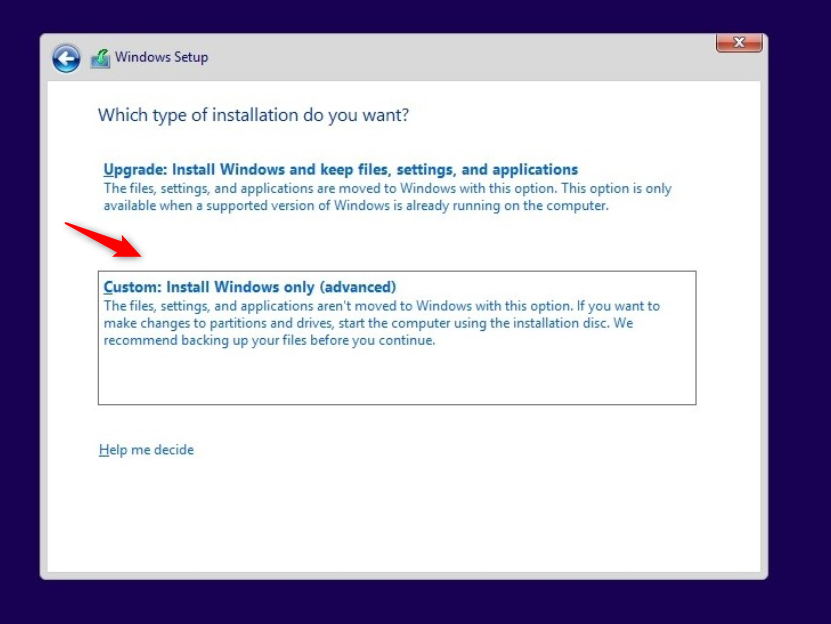
Step 4: At the Windows setup screen, click Install now > Custom, delete all partitions, and create new ones.
Step 5: Follow instructions to reinstall Windows.
Custom: Install Windows only in Windows Setup 
Notes: This erases all data. A BitLocker recovery key may be needed for Windows 10/11. Download drivers from the NEC support website post-installation.

Conclusion

Resetting your NEC laptop without a password is achievable with these methods. Start by bypassing the password using Renee PassNow or free tools like Ophcrack if needed, then choose a reset method based on your model and Windows version. The Windows Built-in Factory Reset (Method 1) is straightforward after password bypass, while the Direct Factory Reset from Login Screen (Method 2) is ideal for quick resets on Windows 8, 8.1, 10, or 11. Recovery partitions, discs, or installation media offer additional flexibility. Select the method that matches your technical comfort and urgency.

Frequently Asked Questions (FAQs)

Can I factory reset my NEC laptop without losing data?

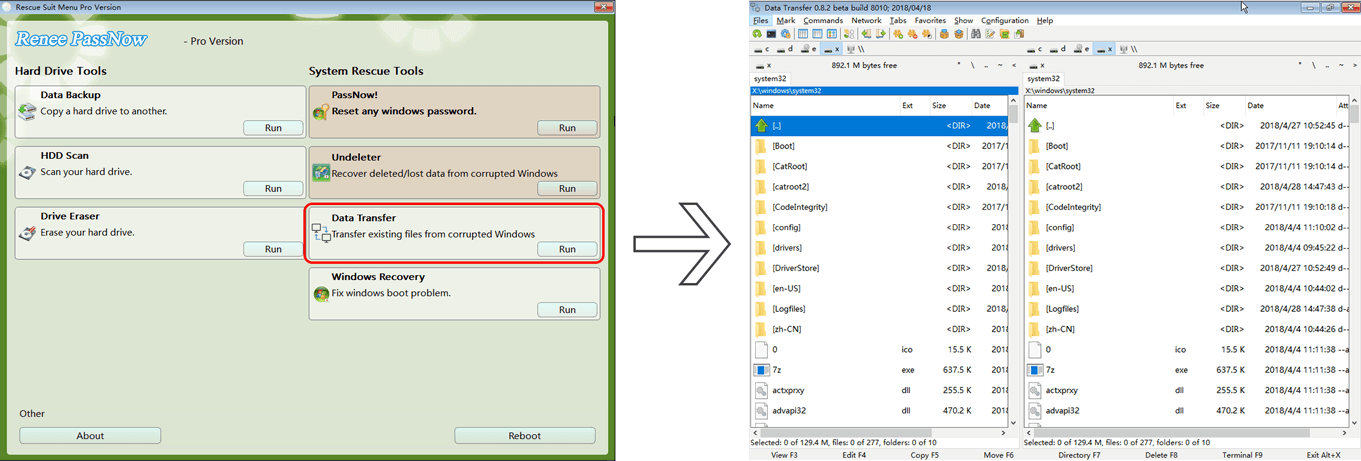
A factory reset typically wipes all data, but Renee PassNow’s Data Transfer feature can back up files to an external drive. Windows’ “Keep my files” option (available after password bypass) may preserve personal files on Windows 7, 8, 8.1, 10, or 11, but apps and settings are removed.
Data Transfer in Renee PassNow

Is Renee PassNow safe to use on my NEC laptop?

Yes, Renee PassNow is trusted, secure, and compatible with all NEC models and Windows versions. It’s been used successfully by thousands, like a 2025 VersaPro user who reset their Windows 11 laptop without issues.

What if my NEC laptop doesn’t boot from the USB?

Ensure the correct boot order in BIOS (e.g., F2 for LaVie). Verify the USB is formatted correctly (FAT32/NTFS) using Rufus or Renee PassNow. Disabling Secure Boot in BIOS may help.

Will a factory reset fix malware on my NEC laptop?

A reset removes most malware, but persistent threats may linger in BIOS or recovery partitions. Use Renee PassNow’s Drive Eraser for a thorough wipe.
Drive Eraser in Renee PassNow 

How long does it take to factory reset an NEC laptop?

Password bypass with Renee PassNow takes 10-15 minutes, with resets taking 30-60 minutes (Windows 7/8/8.1: ~40 min; Windows 10: ~45 min; Windows 11: ~50 min). USB resets may take 1-2 hours.

What’s the difference between Windows 7, 8, 10, and 11 reset steps?

Windows 7: Control Panel > System and Security > Backup and Restore.
Windows 8/8.1: Change PC settings > Update and recovery > Recovery.
Windows 10: Update & Security > Recovery > Get Started.
Windows 11: System > Recovery > Reset PC (offers cloud download options).
Renee Passnow – Professional Windows Password Remover

Remove Windows Login Password 3 steps for whole password remove process.

Enable/Create Administrator One click for creating new administrator and enable the disabled account.

Widely Use New version supports UEFI boot model, which can be used on more computers, laptops and even surfaces.

Multifuctional Data transfer, data recovery, bootable problem recovery can be run without system.

Highly compatible Windows 11/10/8.1/8/7/XP/Vista.

Remove Login Password Support Windows 11/10/8.1/8/7/XP/Vista.

Enable/Create Administrator One click for creating new administrator and enable the disabled account.

Easy to use No need of any professional knowledge or password reset disk.

Free TrialFree TrialNow 2000 people have downloaded!

User Comments

Page 1

Leave a Comment


Your comment has been submitted and is awaiting moderation.