author avatar
    Senior Product Manager
Last update by William Davis at 9 July 2026

Summary
The domain of file signature carving data recovery encompasses advanced forensic techniques utilized to extract digital content from storage media lacking valid file system metadata. These specialized methodologies rely on identifying unique hexadecimal structures to reconstruct various document and multimedia categories across RAW or formatted storage environments.


File signature carving data recovery is a powerful technique for retrieving lost photos, videos, and documents—even when a memory card or hard drive reports a RAW file system or has been completely formatted. In this article, you’ll learn how signature carving works by searching for recognizable file headers and footers, when this method becomes necessary, and what its limitations are. We’ll also guide you through using Renee Undeleter, a dedicated tool for signature-based recovery on SD cards, USB drives, and internal disks. Read on to understand the full process and maximize your chances of recovering irreplaceable files.
Illustration of file recovery after permanent deletion from Recycle Bin

What Is File Signature Carving and When Do You Need It

Traditional data recovery relies on the file system—structures like FAT32, exFAT, or NTFS that keep track of where each file starts, its name, and how its pieces are linked together. When this metadata is damaged or missing, the drive appears empty or RAW, leaving standard recovery tools unable to find your files.
File signature carving takes a different approach. It ignores the file system altogether and instead scans the raw storage sector by sector, searching for magic bytes—unique hexadecimal sequences that mark the beginning (header) and sometimes the end (footer) of specific file types.
For example:
- JPEG images always start with FF D8 FF
- PDF files begin with 25 50 44 46
- ZIP archives open with 50 4B 03 04
When a header is found, the software reads forward until it locates a matching footer or reaches a reasonable file-size limit, reassembling the data into a recoverable file—no directory entries or file records required.
Signature carving is essential in situations like:
- A camera SD card or Android microSD card that has been formatted (even a “quick” format erases file-system metadata)
- An external hard drive that suddenly becomes RAW after unsafe ejection
- A partition table that becomes corrupted and Windows prompts you to initialize the disk
- Forensic data recovery from unallocated or damaged space
If you’ve already tried basic undelete or recycle-bin tools without success, signature carving is your next step—because only raw carving can locate files when metadata is gone.

Why Standard Recovery Fails on Formatted or RAW Drives

Understanding the difference between recovery methods can save you time and frustration.
Recovery MethodWorks WhenLimitation

Standard undelete

Files were recently deleted and file system records (MFT/FAT entries) still exist

Finds nothing if metadata is overwritten or the drive was formatted

File-system rebuild

Partition boot sector or MBR/GPT is damaged but directory structures are partially intact

Needs a recognizable file system skeleton; cannot work if metadata blocks are wiped or zeroed

Signature carving

Drive is RAW, formatted, or partition table is missing; physical data blocks still contain headers

Loses filenames and folder structure; may not recover fragmented files; false positives are possible

Common real-world scenarios for signature carving include:
- A camera SD card accidentally quick-formatted in the device or in Windows
- An Android phone’s external storage prompting for formatting after a crash
- A USB stick with a corrupted partition table caused by unsafe removal

If standard undelete tools show zero files or you can’t even see the drive letter, the file system metadata is likely gone. At this point, signature carving is your most reliable recovery option.

Recommended Professional Solution: Renee Undeleter for Signature Carving

Renee Undeleter is purpose-built for situations where file-system-based recovery fails. It brings signature carving for over 400 file formats into an easy-to-use interface, eliminating the need for complex forensic tools while still delivering deep, sector-by-sector scans.
Why Renee Undeleter stands out for signature carving recovery:
- Unified engine: Starts with file-system recovery and automatically switches to signature scanning if the volume is RAW or metadata is missing—no need for multiple tools.
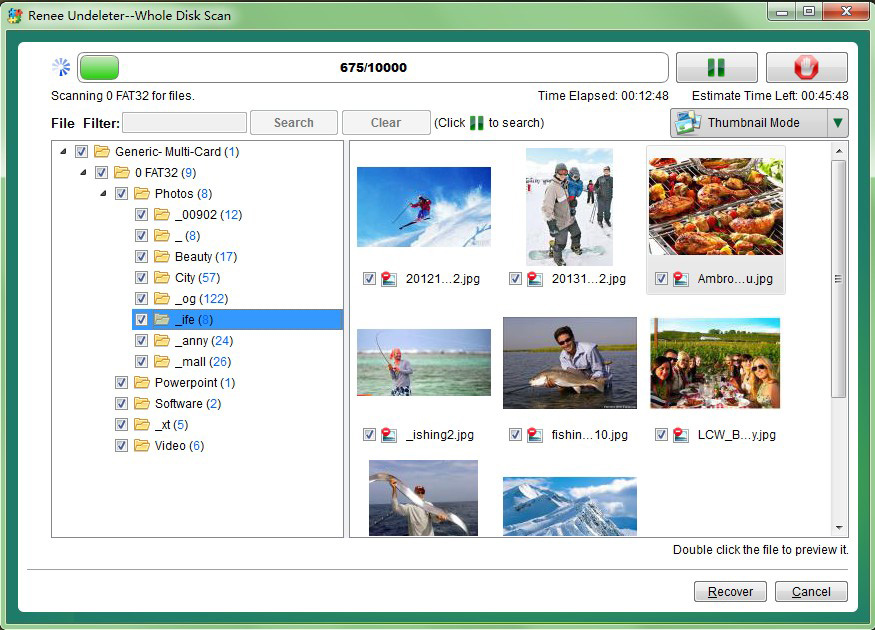
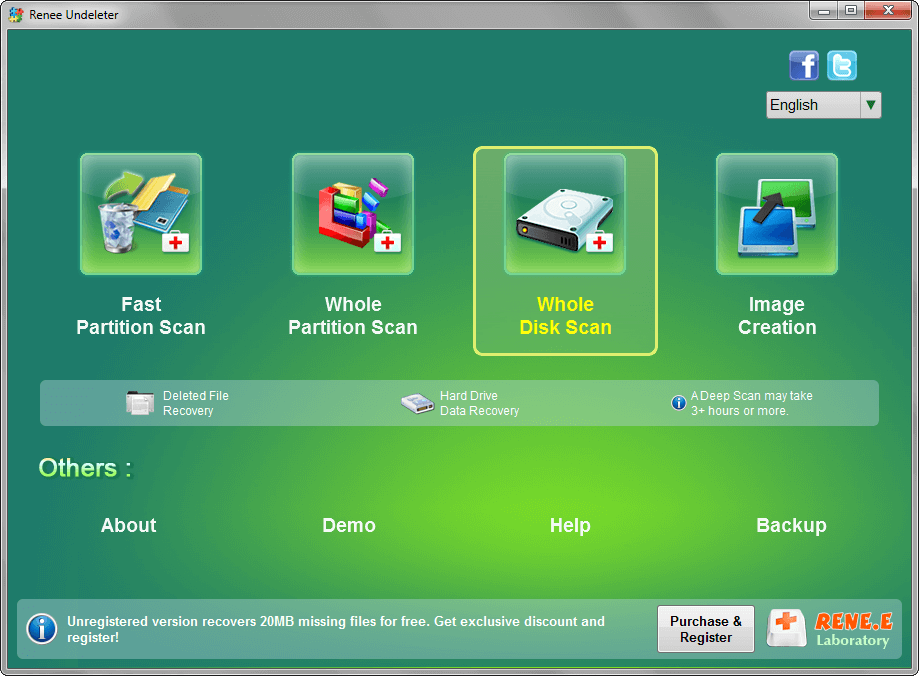
- Three scan modes: Fast Partition Scan (quick check using metadata), Whole Partition Scan (full carving for formatted/RAW partitions), and Whole Disk Scan (rebuilds lost partitions and carves across the entire disk).
- Built-in file preview: Lets you verify photos, documents, and videos before recovering, reducing guesswork.
- Image Creation: A byte-to-byte backup feature that allows you to clone a failing drive and recover from the image, protecting your original hardware from further risk.
Renee Undeleter - Powerful Data Recovery SoftwareRenee Undeleter data Recovery software

Easy to use Only simple steps to recover data from storage devices.

Multiple scan modes Fast partition scan, whole partition scan and whole disk scan for different recovery needs.

File types Support to recover pictures, videos, audios, documents, mails, etc.

Supported storage devices Recover data from recycle bin, SD card, external disk, etc.

Supported systems Windows 11,10, 8.1, 8, 7, Vista, XP, 2000 and Mac OS X10.6, 10.7, 10.8+.

Easy to use Only simple steps to recover data from storage devices.

Multiple scan modes - 3 scan modes for different recovery needs.

Supported storage devices Recover data from recycle bin, SD card, external disk, etc.
Free TrialFree TrialFree Trial

3000 users have downloaded Renee Undeleter and found data back!

Renee Undeleter is more than a one-trick utility; it’s designed for real-world data disasters, with Whole Partition Scan as your primary tool when signature carving is required.

Step-by-Step Guide: Recover Files with Renee Undeleter

The following walkthrough uses the Whole Partition Scan mode, which automatically applies signature scanning when no valid file system is found—ideal for corrupted SD cards, RAW USB drives, and formatted partitions.

Step 1: Download, Install, and Launch Renee Undeleter

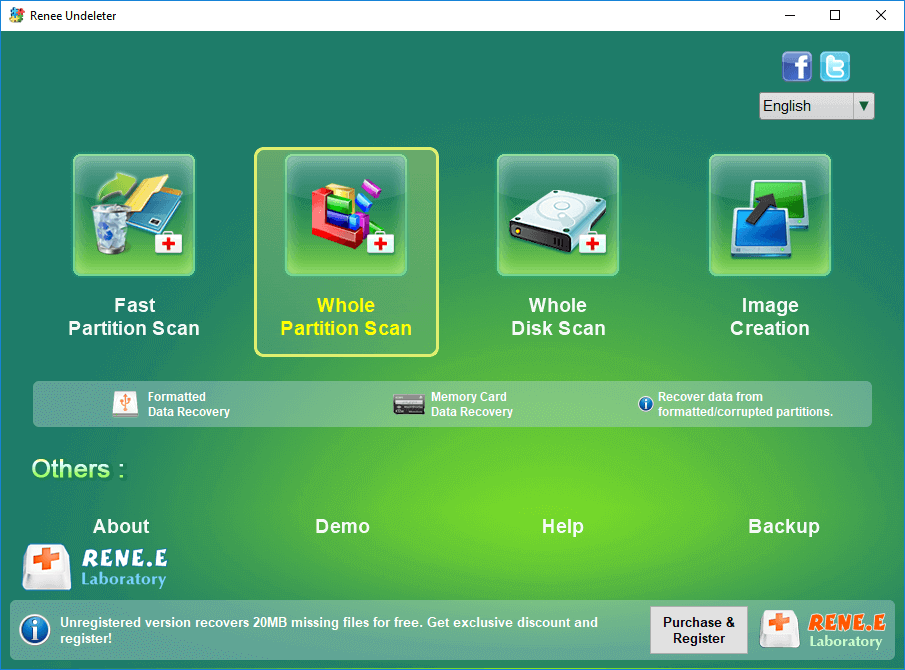
Download Renee Undeleter from the official website, install it, and open the application. On the main screen, select Whole Partition Scan—this mode is specifically labeled for “Formatted data recovery” and “Memory card data recovery.”

Important: Never install Renee Undeleter on the drive where your data was lost, as this could overwrite recoverable files.

select whole partition scan in renee undeleter to recover deleted video from sd card

Step 2: Select the Formatted Partition and Start Scanning

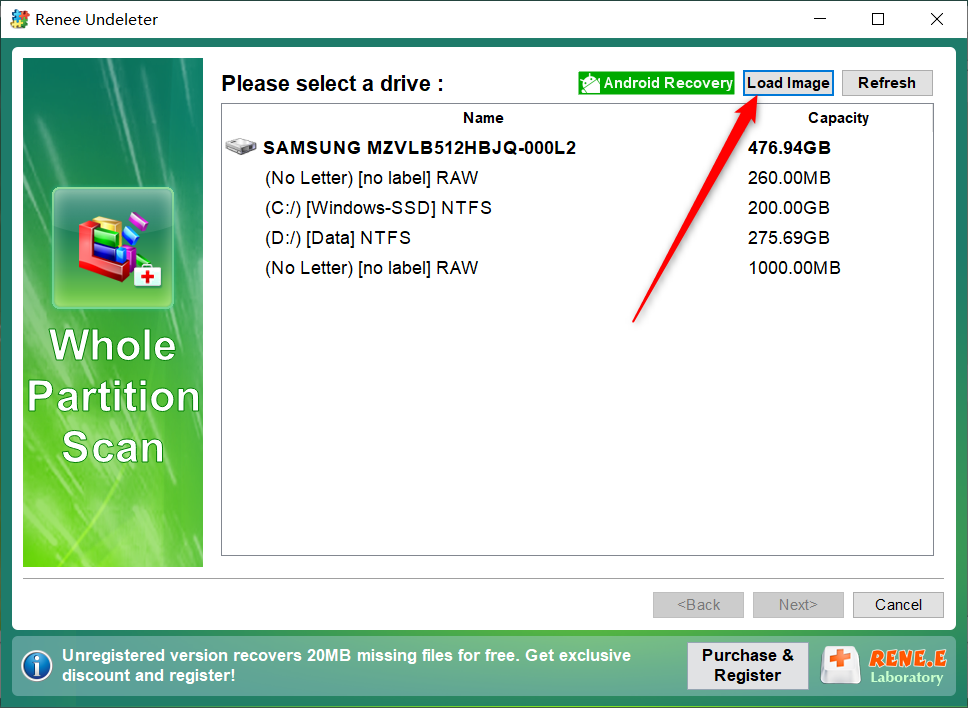
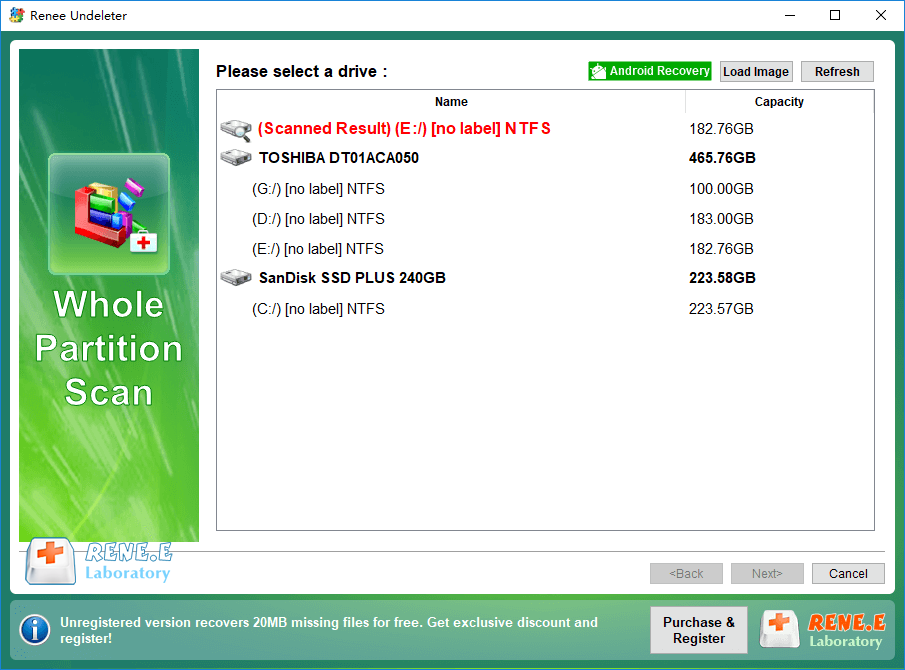
From the list, choose the drive that appears as RAW or was formatted. If your SD card or USB drive doesn’t show any partitions, you’ll need to use Whole Disk Scan (explained in the next section). Click Next to begin scanning.
Renee Undeleter Whole Partition Scan

Step 3: Preview and Recover Your Files

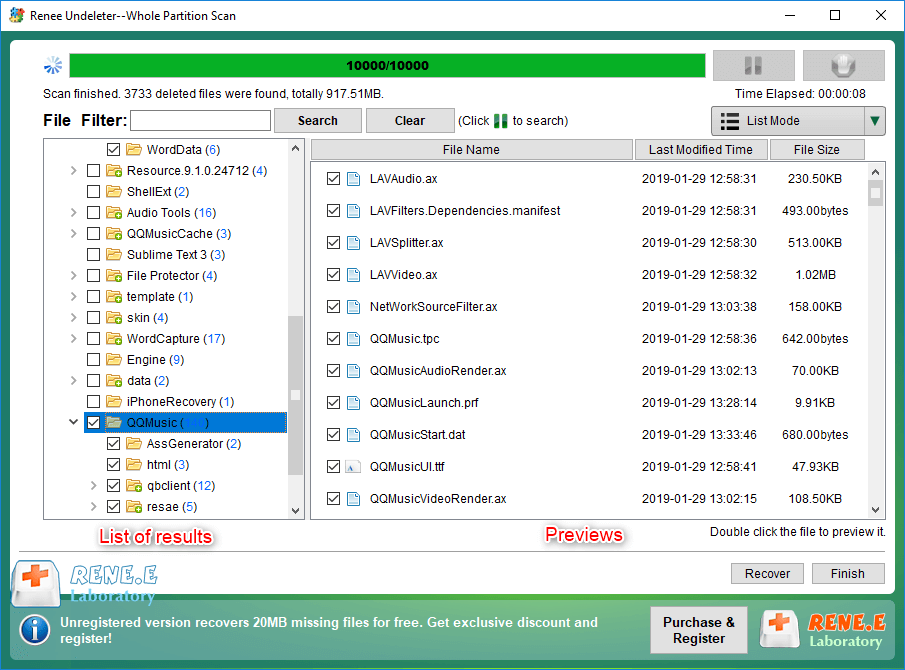
After the scan, Renee Undeleter will list all discovered files. Double-click any photo, document, or video to preview and confirm its quality before recovery.
File preview window in Renee Undeleter before restoring deleted files
Check the files you want to restore, then click the Recover button in the bottom-right corner.
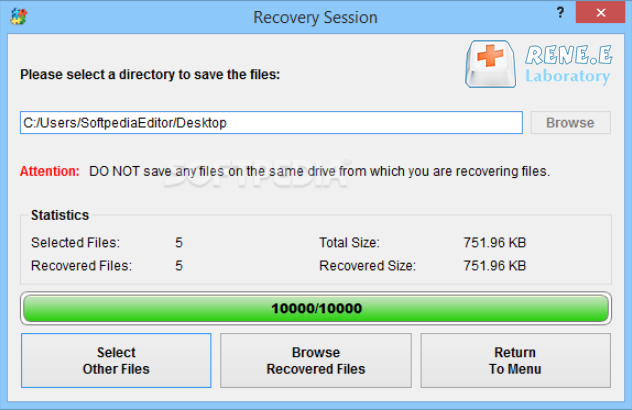
Reminder: Always save recovered files to a different physical disk. Saving them back to the same drive risks overwriting unrecovered data.
Saving recovered Maxtor files to another disk
preview and select the files to recover in renee undeleter

Advanced Options and When to Use Whole Disk Scan

While Whole Partition Scan is enough for most formatted or RAW drives, some situations require the deeper Whole Disk Scan mode:
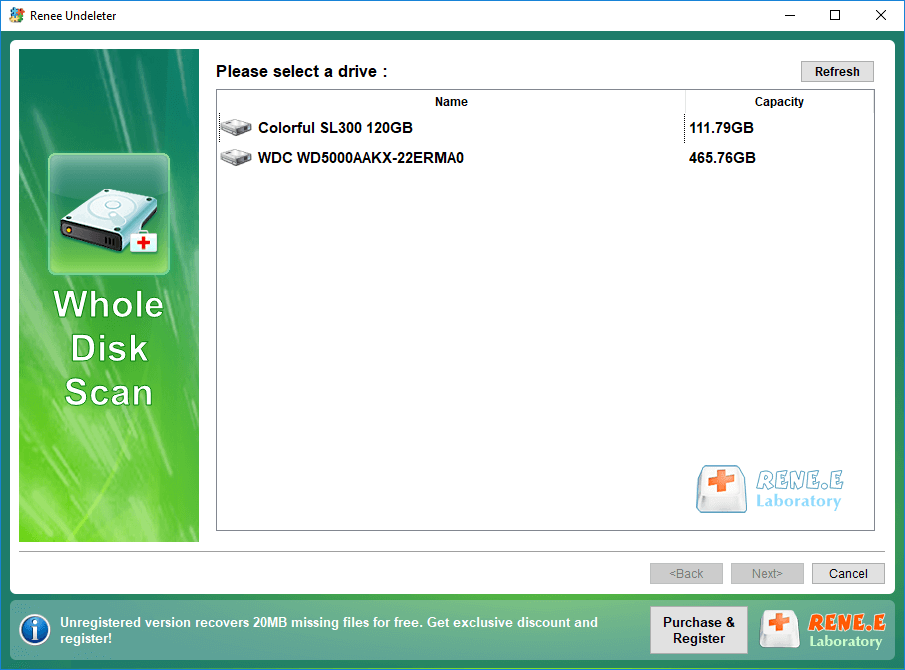
Renee Undeleter Whole Disk Scan option for NAS drive recovery
- Partitions are completely lost—the drive shows as “Unallocated” in Disk Management, with no volume letters.
- Partition tables are wiped—after failed repartitioning or a virus has erased the MBR/GPT.
- Media has been accidentally wiped—using a disk-cleaning tool that overwrote the first sectors.

How Whole Disk Scan works:

It first scans raw sectors to identify original partition boundaries, then builds a virtual partition map. Next, it performs signature carving across every reconstructed partition. Because it reads the entire disk, this method is the most thorough—but also the slowest.
Select a physical disk for whole disk scan in Renee Undeleter
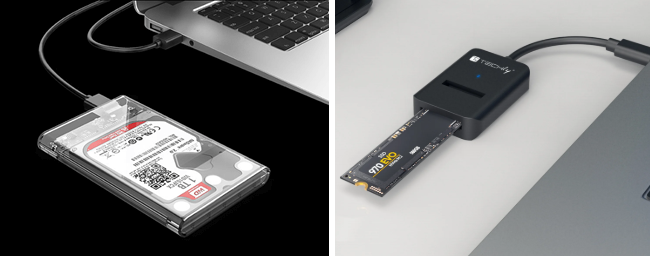
Scan speed depends greatly on connection type. USB 2.0 card readers or enclosures can be much slower due to higher latency and lower throughput. For best results, connect SATA drives directly to your motherboard and use a fast USB 3.0 reader for SD cards.
USB 3.0 SATA hard drive enclosure for NAS data recovery
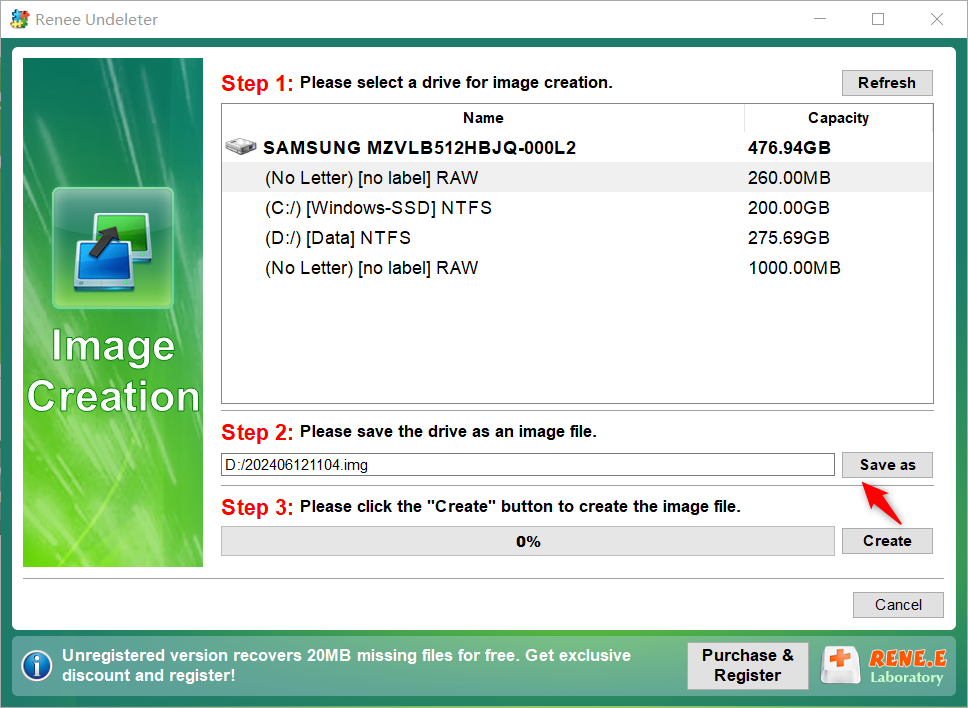
If your drive is failing (clicking, disconnecting, or reading very slowly), don’t scan the physical device directly. Instead, use Renee Undeleter’s Image Creation feature:
Selecting source Maxtor drive and destination for image creation
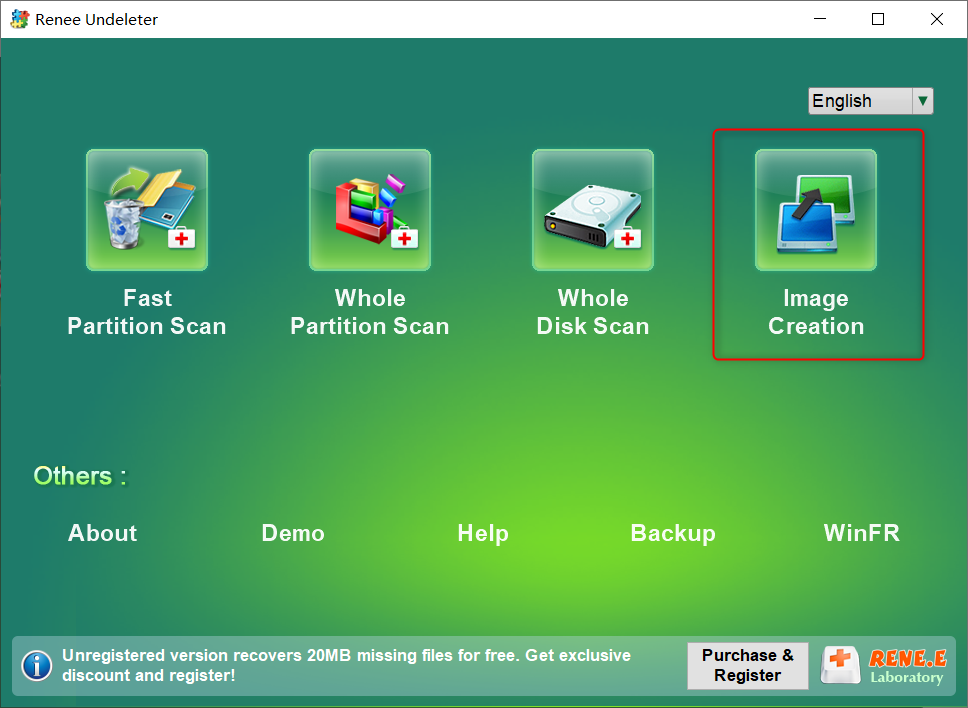
1. On the main screen, select Image Creation.
2. Choose the entire disk, set a save location on a healthy drive, and click Create to make a byte-to-byte backup.
3. Return to the main interface, select Whole Disk Scan, and click Load Image to import the backup.
4. Run the scan on this image—this preserves your original hardware while allowing full signature carving.
Create image in Renee Undeleter
Load image in Renee Undeleter

Limitations of File Signature Carving and What to Do Next

Even the best carving engines have limits. Knowing these helps set realistic expectations and guides your next steps.
- Original filenames and folder hierarchy are lost. Carving works from raw data only, so it can’t recover directory structure or original file names. Recovered files are grouped by type and given generic names like recovered_jpeg_0001.jpg.
- Fragmented files may be incomplete. Large videos or databases stored in non-contiguous clusters may only be partially recovered. Carving assumes files are in consecutive blocks, so scattered pieces can’t be fully rebuilt.
- False positives can occur. Sometimes, random bytes mimic a known header, producing a “file” that is actually junk. Always preview results in Renee Undeleter to filter out unusable files.
- SSD TRIM can erase data permanently. Modern SSDs quickly zero out deleted blocks. Once TRIM runs after a format, the data signature carving relies on is typically gone within minutes.
What you can do with Renee Undeleter:
- If Whole Partition Scan produces incomplete results due to severe partition damage, escalate to Whole Disk Scan for a more exhaustive, sector-by-sector search.
- Use the built-in preview to manually verify each file and discard obvious false positives before saving.
If, after a full Whole Disk Scan and image-based recovery, you still can’t retrieve your files, your drive may have a physical problem. If it clicks, won’t spin up, or isn’t detected by BIOS, further DIY attempts may worsen the damage. At that point, consult a professional data recovery lab.

Frequently Asked Questions (FAQ)

What is the difference between Fast Partition Scan and Whole Partition Scan?

Fast Partition Scan uses existing file system metadata (MFT on NTFS, directory entries on FAT) and is best for recently deleted files with intact records. Whole Partition Scan ignores the file system and uses signature carving, which works for formatted, RAW, or corrupted drives—but original names and folder structure are lost.

Can file signature carving recover original filenames and folder structure?

No. Since carving operates outside the file system, it only recovers raw file content. Without directory entries or file records, recovered files have generic names and are sorted by type.

Does Renee Undeleter work on SD cards and USB flash drives?

Yes. Renee Undeleter fully supports memory card s and USB drives. Whole Partition Scan is especially recommended for formatted cards or drives that appear as RAW. Connect your device via a card reader or USB port, select the partition, and start scanning.

Why do some recovered files open as corrupted?

This can happen for several reasons: the file may be a false positive (where header-like bytes were found but the data is random), partially overwritten after deletion, or severely fragmented so only the first segment was recovered. Use Renee Undeleter’s preview feature to check which files are actually usable.

Is file signature carving effective on SSDs after TRIM has run?

Generally not. TRIM tells the SSD controller which blocks are no longer needed, and the drive quickly erases them. Once TRIM has been executed after deletion or formatting, the data is typically gone—often within minutes. On SSDs, immediate action is crucial, but TRIM can make carving impossible.
Renee Undeleter - Powerful Data Recovery SoftwareRenee Undeleter data Recovery software

Easy to use Only simple steps to recover data from storage devices.

Multiple scan modes Fast partition scan, whole partition scan and whole disk scan for different recovery needs.

File types Support to recover pictures, videos, audios, documents, mails, etc.

Supported storage devices Recover data from recycle bin, SD card, external disk, etc.

Supported systems Windows 11,10, 8.1, 8, 7, Vista, XP, 2000 and Mac OS X10.6, 10.7, 10.8+.

Easy to use Only simple steps to recover data from storage devices.

Multiple scan modes - 3 scan modes for different recovery needs.

Supported storage devices Recover data from recycle bin, SD card, external disk, etc.
Free TrialFree TrialFree Trial

3000 users have downloaded Renee Undeleter and found data back!

User Comments

Page 1

Leave a Comment


Your comment has been submitted and is awaiting moderation.